$RMSG Precision Range (PRange) showing a nice Distribution Box that transisitions from a Ghost Box (dashed gray lines) → Transfer Box (solid gray lines) → Distribution Box confirmed (solid red lines & fill). #TradingView#Schwab#DayTrading@MohaveTrader
$STI What a move! I got a piece, but the volatility made it a little tough for me to trade. Took an early $45 loss after stopping out. Got back in and turned the loss into a positive. Would have been nice if the company held the news until 7 EST. #TradingView#Schwab#Scalping #DayTrading @MohaveTrader
$ABVX Profitable trade yesterday → added a few shares AH yesterday when first Accumulation Box appeared in my new PRange indicator. Available to all #TradingView users → open source protected.
This morning → Accumulation Box → Continuation ↑. Now another potential Distribution Box is forming. Will exit trade now and take the profit. #Schwab #Daytrading @MohaveTrader
1/ 🧵 You can wire Claude straight into a FREE Alpaca paper account — and have it check balances, pull market data, and run premarket screens in plain English. No coding. Full setup below 👇
2/ Free Alpaca account → pick Trading API (not Broker API). Stay on the Paper account: $100K simulated, $0 real risk. Turn on MFA, then generate paper API keys (Key ID starts with PK). Never share the secret.
3/ Install two free tools: Python 3.10+ (check "Add to PATH") and uv. That's the whole prereq list — no repo cloning, no Docker.
4/ Claude Desktop → Settings → Developer → Edit Config. Add the official alpaca-mcp-server block with your keys. Windows tip: if it won't launch, use the full path to uvx.exe.
5/ Fully restart Claude, confirm the server shows "running," then ask: "What's my Alpaca balance?" That's it.
6/ Works on Claude's FREE tier — but in the Desktop app, not the browser. Same protocol (MCP) also works with ChatGPT Desktop, Cursor & more.
7/ Full step-by-step + troubleshooting:
https://t.co/C44IGpGmu7
Paper trading only. Not financial advice. #trading #AI #MCP #Alpaca #TradingView #Schwab
The transfer box starts out as a Ghost box (dashed lines), along with the SC or BC marker placement. Then it enters the transfer stage where a verdict is still pending. Because the SC sign was created it points to a possible Accumulation box.
$ABVX Using Precision Range I picked up $350 on a scalp trade on the entire green move within the box.
The exit tell, was giving signs — upper wicks forming, smaller candle bodies and then the yellow triangle showing weakening momentum. #TradingView#Schwab#Scalping
CHEATSHEET: How to turn $5000 into $50,000+ in 1 trade...
Strategy only works if you choose these 12 companies:
1. $AMD — AI accelerators gaining share. Massive datacenter opportunity ahead.
2. $ORCL — AI cloud demand exploding. Revenue growth accelerating rapidly.
3. $NOW — AI workflows transforming enterprises. Sticky platform with pricing power.
4. $NVDA — Foundation of AI infrastructure. Demand still exceeds supply.
5. $MSFT — AI monetization across cloud, software, and enterprise.
6. $ARM — Every AI device needs efficient chip architecture.
7. $AVGO — Critical AI networking and custom silicon leader.
8. $IBM — Enterprise AI adoption with trusted customer relationships.
9. $DELL — AI server demand driving infrastructure growth cycle.
10. $DDOG — Monitoring and observability become essential in AI era.
11. $AAPL — AI upgrades unlock ecosystem expansion and device refreshes.
12. $QCOM — AI at the edge powering phones, PCs, and automotive.
Remember this, buy 6–24 month call options on dominant AI companies and give them time to execute. The goal isn't predicting next week. The goal is owning future winners through volatility.
♻️ RESHARE this post and write 1 comment, I'll DM you my next LEAP play for you right now.
Price targets for each of Jensen Huang's favorite stocks (1 year from now)
$NOW → $300
$CRWD → $950-$1000
$PLTR → $220
$MSFT → $600
$TSM → $550+
$HPE → $100
$IREN → $80
$CRWV → $240
$ARM → $500
$DELL → $600
The best strategy is to get 6-12 months of expiry on call options.
$ZETA Published Precision Range today.
Range frames intraday and swing structure through a Wyckoff lens: it treats a trading range as a transfer of ownership and tracks the single structure currently in play from the moment it forms to the moment it resolves. Rather than labelling every Wyckoff sub-event, PRange answers one question per structure — did this range transfer ownership, and which way? It marks the outcome as Accumulation, Distribution, or trend Continuation, and leaves a range that never commits as Coiling or unresolved. #TradingView #Schwab @MohaveTrader
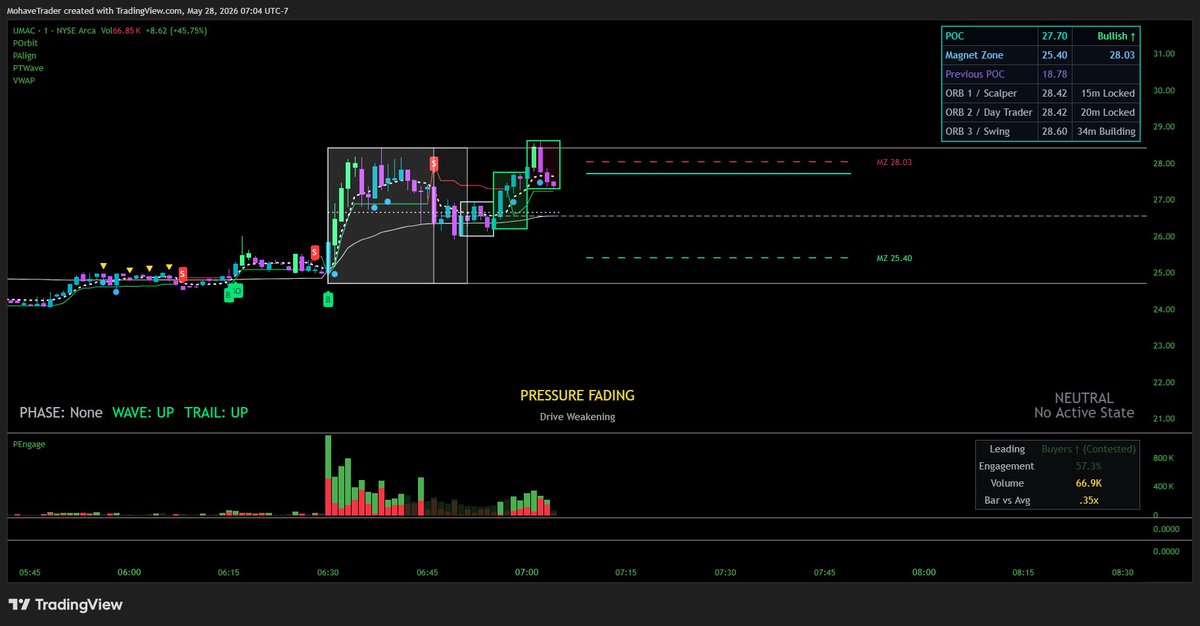
Looks like $UMAC might be running out of powder. Candles compressing, volume fading with less conviction. Upper Magnet Zone leve is current resistance.
$SPRC I mimicked @Rosscameronwar Momo Scanner settings on #ZENBOT scanner. Numerous stocks on that list.
How many of you got a piece of this and is there more to come? Current volume was lacking conviction (muted volume bars) up until these last few bars. Price is trying to BO from the Magnet Zone.
#TradingView, #thinkorswim #scalping #DayTrading
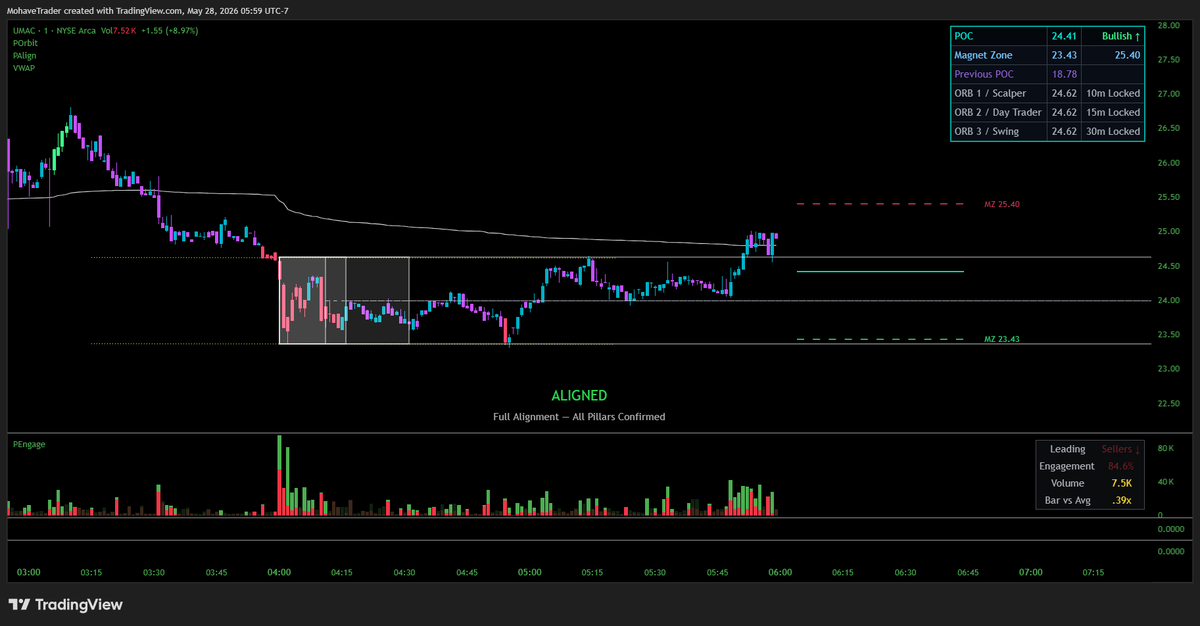
$UMAC 1 min chart looking better. POC ↑. Price above VWAP. May remain pinned there until market open. Overhead resistance is Volume Profile's Magnet Zone high (25.40).
$UMAC is on ZENBOT scanner's Most Popular list. So many user friendly features on this scanner.
All three trading styles on my POrbit indicator locked their ORBs at the same price level (24.62). Price rejected at that level, with VWAP slightly overhead on the 1 minute chart. #TradingView #thinkorswim #Schwab #DayTrading