📊 Spreadsheet View & XLSX Export - Built for Real Business Workflows
Not every workflow fits into a Kanban board. With PrivOS Spreadsheet View, teams can manage structured data in a familiar table-based interface, perfect for operations, CRM, inventory, reporting, HR, and more.
Need to share or work externally?
PrivOS also supports XLSX export/import, making it easy to move data between PrivOS and traditional spreadsheet tools without losing structure.
👉 The flexibility of spreadsheets, combined with the power of an integrated workspace.
📄 From a Simple Prompt to a Finished File. That's AI at Work.
Why spend time creating documents from scratch when AI can help you get the first draft done in seconds?
With PrivOS, you can simply describe what you need and let AI generate documents, reports, plans, and spreadsheets directly from your prompt. Once created, your files are saved straight into your Room, ready for you to review, edit, and share with your team.
The goal isn't just to generate content faster. It's to reduce the manual steps between having an idea and turning it into something your team can actually use.
Less time formatting. More time moving work forward.
🎥 Watch PrivOS Tutorial #11:
https://t.co/FlMkV4m8OR
#PrivOS #AIAgent #AIProductivity #DocumentAutomation #Spreadsheets #Tutorial
📁 Every Room Has Its Own File Space. Keep Everything Organized and Under Control.
As teams collaborate, files shouldn't get lost in scattered folders or disconnected conversations. They need a clear structure, controlled access, and a reliable way to track changes.
In PrivOS Tutorial #10, discover how Room Files help your team manage documents more effectively.
You'll learn how to:
- Organize documents into folders within each Room.
- Share files with other Rooms when collaboration is needed.
- Use Time Machine to explore file version history and restore previous versions.
Every Room has its own file environment, helping teams keep information organized within the right workspace while making cross-room collaboration easier.
And with Time Machine, you can look back at previous versions instead of worrying about losing track of changes.
Organized files. Controlled sharing. A history you can revisit.
🎥 Watch PrivOS Tutorial #10:
https://t.co/9RMViZMG6A
#PrivOS #RoomFiles #FileManagement #TeamCollaboration #Workspace #Tutorial
🔎 Find What You Need. Stay Focused on What Matters.
As teams grow and conversations multiply, finding the right information shouldn't become another challenge.
With PrivOS, one search box helps you find rooms, people, and even hidden rooms across your workspace. Smart notification settings give you control over what deserves your attention, so you can stay informed without being overwhelmed.
🎥 Watch PrivOS Tutorial #8:
https://t.co/NV2sTjBwXy
#PrivOS #TeamCollaboration #Productivity #Workspace #Tutorial
🤖 Put Your AI Agents on Autopilot with PrivOS.
What if your AI agents could do more than respond to instructions? What if they could run recurring tasks, coordinate with other agents, and keep work moving automatically?
With Routines and Agent Teams, PrivOS brings automation to the next level.
⚡ Routines: Schedule agents to handle recurring tasks daily, weekly, or on a custom schedule.
🤝 Agent Teams: Let multiple agents work together toward shared goals and automatically assign tasks to the right teammates.
From weekly reports and daily reminders to follow-ups and task coordination, your AI workforce can keep working even when you're away.
Less repetitive work. Better coordination. More time for what matters.
#PrivOS #Automation #AIAgents #Productivity #AIWorkspace #Tutorial
🚀 Build Your Own AI Agent. No Coding Required.
What if creating an AI agent was as simple as describing what you need?
With Build with AI in PrivOS, you can turn ideas into working AI agents using plain language. Simply describe your agent's name, purpose, and responsibilities. PrivOS AI will build it for you in seconds.
Here's what you can do:
✨ Create AI agents without writing code
⚙️ Let AI assemble your agent based on your instructions
🔧 Review and customize the result
🤖 Deploy your agent in a room and put it to work
From simple assistants to specialized agents for business workflows, you decide what you need. PrivOS helps bring it to life.
Less setup. More building. AI that works for your team.
#PrivOS #AIAgent #NoCodeAI #AIWorkspace #BuildWithAI
🤖 Your AI assistant is already part of your workspace. Are you making the most of it?
In PrivOS Tutorial #5, discover how PrivOS AI helps your team get answers, handle everyday requests, and work more efficiently without switching between apps.
Learn how to open AI Chat from any room, ask questions in context, and work with your team's built-in AI Agent. Each team has its own agent, joining as a Leader-level member and ready to support your daily workflows.
Less switching between tools. Less repetitive work. More time to focus on what matters.
🎥 Watch the tutorial and see how AI fits naturally into your team's workflow!
https://t.co/pvwwt8ooJh
#PrivOS #AIChat #AIAgent #AIAssistant #Tutorial
Same work, two ways to see it.
Tutorial #4 walks through task lists in PrivOS: switch between Kanban and table views, keep owners and deadlines clear, and manage work the way you think.
Watch: https://t.co/CdbO9JxX4P
Board or table, which one is yours? #PrivOS#TaskManagement
How you structure a workspace decides how well communication scales. In PrivOS, a team is the shared space for a department or a project, and channels inside it keep each topic separate so conversations stay organized. Every new team also gets its own AI agent as a leader, which answers in the channel in front of the whole team. Our new tutorial explains the full model in 1:55: https://t.co/HTaB3r2y1C
How does your team keep conversations organized as it grows?
#EnterpriseAI #PrivOS
🏢 A well-organized workspace makes collaboration easier.
In PrivOS Tutorial #3, discover how Teams and Channels work together to keep your workspace structured as your organization grows.
Learn when to create a Team or a Channel, how Owner, Leader, and Member roles work, and how to use Private, Read-only, and Broadcast settings to manage communication effectively.
Build a workspace where the right people have the right access, conversations stay organized, and teams can work without unnecessary clutter.
🎥 Watch the tutorial and learn how to structure your workspace with PrivOS!
🔗 https://t.co/HTaB3r35Ra
▶️ Coming next: Tutorial #4 – Task Lists: Manage Work in Kanban & Table Views
#PrivOS #Teamwork #Workspace #TeamCollaboration #Tutorial
💬 Better team communication starts with the basics.
In PrivOS Tutorial #2, we walk you through the essential messaging features that help your team communicate and collaborate more effectively.
Learn how to send DMs, mention teammates, share files and voice messages, use threads to organize discussions, and edit or pin important messages.
Everything you need to keep conversations clear and work moving, all in one place.
🎥 Watch the tutorial and get more out of PrivOS at https://t.co/uPLKc3F28N
#PrivOS #TeamChat #Messaging #TeamCollaboration #Tutorial
New to PrivOS?
Tutorial #1 is out: a quick tour of the interface. See how Rooms, files, conversations, and AI come together in one workspace, in a few minutes.
Watch: https://t.co/yaWG2kBbox
What should we cover next? #PrivOS#EnterpriseAI
💬 What if AI could work right inside your team chat?
With PrivOS, you don't need to switch between apps to get things done. Simply tag an AI bot in your conversation to summarize meeting notes, turn discussions into actionable tasks, and organize work with clear owners and deadlines.
Your team discusses. AI takes action. Everything stays in the same conversation, where everyone can follow the progress and collaborate.
Less switching. Less manual work. More getting things done.
That's how people and AI work together in PrivOS. 🚀
#PrivOS #TeamCollaboration #EnterpriseAI
🔒 One Room. One AI Space. Your Data Stays in Context.
In PrivOS, data isolation goes beyond separating files. Every Room has its own AI workspace, with its own files, conversations, permissions, and business context.
When you chat with AI inside a Room, it works with the information available in that specific environment. Marketing AI stays focused on Marketing data. HR AI works within HR's context. Project AI uses the files and knowledge available to that project.
This means AI doesn't simply draw from one shared pool of company data. Each Room provides a dedicated context, helping prevent information from crossing boundaries and keeping access aligned with permissions.
One company. Multiple AI spaces. Clear data boundaries.
That's how PrivOS brings AI into everyday collaboration while keeping your data under control.
#PrivOS #DataSecurity #EnterpriseAI
🔒 Your data belongs to your room, not everyone else's.
Worried that sensitive files shared with AI could be exposed to other users? PrivOS is designed to keep your workspaces separate.
Every Room and chat space has its own file environment. AI understands the context of the Room you're working in and processes information based on the data and permissions available there. Files and conversations stay within the intended access boundaries, so users outside the Room cannot access them without permission.
Your team's data stays in context. Your AI stays focused. Your workspace stays under control.
PrivOS. AI collaboration without compromising data boundaries.
#PrivOS #DataSecurity #EnterpriseAI
💬 AI right inside your chat room.
With PrivOS, you don’t need to switch between apps to use AI. Simply tag an AI Agent in your conversation, tell it what you need, and let it get to work.
🎨 Need an image? Tag the Media Gen Agent and describe your idea. It can generate visuals right in the chat, keeping your team’s requests and results in one place.
Less switching. More collaboration. Work gets done where the conversation happens.
PrivOS: Where people and AI work together.
#PrivOS #EnterpriseAI #AIAgents
📁 Every file has a history. Keep it within reach.
With PrivOS, you can look up file revision history directly in your workspace, making it easier to track changes, review previous versions, and keep your team on the same page.
No more guessing what changed or losing track of document updates. Find the right version and keep your work organized, all in one place.
PrivOS. Your files, your history, your control. 🔍
#PrivOS #FileVersioning #DigitalWorkspace
👥 Simplify HR with PrivOS HRM!
From employee records and attendance tracking to payroll management, bring your essential HR operations into one connected workspace.
🤖 With PrivOS AI Agent, automate routine HR tasks and make everyday employee support easier.
Less admin, smoother workflows, more time for people. 🚀
#PrivOS #HRM #Automation #FutureOfWork
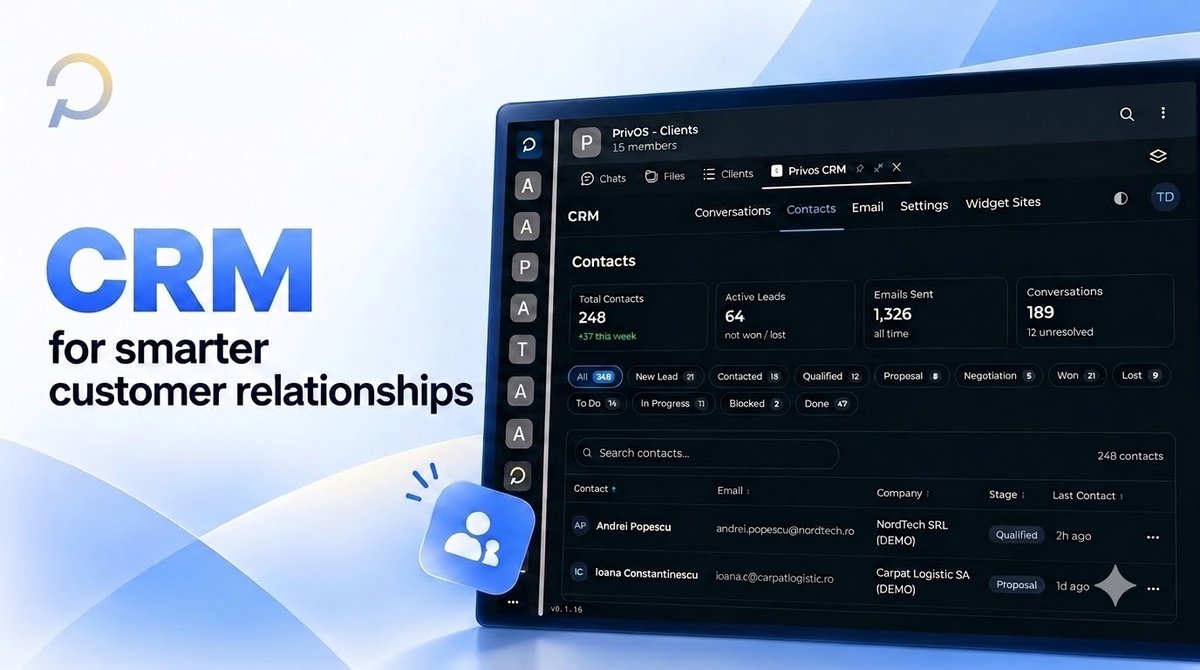
Managing customer relationships shouldn't mean switching between endless tools and spreadsheets. 🔄
With PrivOS CRM, your team can manage contacts, track leads through every stage of the sales pipeline, monitor conversations, and keep customer information organized in one workspace. 📊
From new leads to closed deals, get a clearer view of your sales process, stay on top of follow-ups, and help your team focus on building stronger customer relationships. 🤝
Less time managing data. More time growing relationships. 🚀
Discover CRM with PrivOS.
#PrivOS #CRM #CustomerRelationships