AWS Confusables : Kinesis Data Streams vs MSK
This one is not just “AWS stream vs Kafka.”
The real question is:
Do you want AWS-native streaming, or do you need the Kafka ecosystem?
Both Kinesis Data Streams and Amazon MSK are used for event streaming.
Both can handle producers, consumers, replay, and high-throughput event pipelines.
But they feel very different in production.
Amazon Kinesis Data Streams
Kinesis Data Streams is AWS-native event streaming.
You write records into a stream.
Records are distributed across shards.
A partition key decides which shard receives the record.
Ordering is guaranteed within a shard, not globally across the whole stream.
Kinesis works well when your system is already deep in AWS.
Common use cases:
- Clickstream events
- IoT events
- Application logs
- Real-time analytics
- Lambda-based event processing
- Event ingestion into Firehose, S3, Redshift, OpenSearch, etc.
Kinesis gives you two capacity modes:
- Provisioned
- On-demand
In provisioned mode, you manage shard count.
A shard has throughput limits, so scaling means adding more shards and choosing good partition keys.
In on-demand mode, AWS handles scaling more automatically, which reduces planning work.
The nice thing about Kinesis:
You don’t operate Kafka brokers.
No broker patching.
No Kafka cluster tuning.
No partition rebalancing rabbit hole before dinner.
It integrates cleanly with AWS services like Lambda, KCL, Firehose, CloudWatch, and analytics services.
Amazon MSK
Amazon MSK is managed Apache Kafka on AWS.
AWS manages the Kafka infrastructure, but you are still working with Kafka concepts.
You have:
- Topics
- Partitions
- Consumer groups
- Brokers
- Retention
- Offsets
- Replication
- Kafka clients
- Kafka ecosystem tools
MSK is a strong choice when your team already uses Kafka or needs Kafka compatibility.
Common use cases:
- Existing Kafka migration to AWS
- Multi-language producer/consumer systems
- Event-driven microservices
- Stream processing with Kafka Streams or Flink
- Teams already using Kafka tooling and patterns
- Cross-platform or hybrid architecture
With MSK provisioned, you choose broker types, storage, partition strategy, and capacity.
That gives control, but also responsibility.
MSK Serverless reduces some operational work, but the Kafka model still matters.
You still need to understand topics, partitions, consumer lag, retention, and ordering behavior.
The practical difference
Kinesis asks:
“Do you want a managed AWS-native stream that integrates easily with AWS services?”
MSK asks:
“Do you need Kafka compatibility, Kafka clients, and Kafka ecosystem tooling?”
That is the main decision.
Not which one sounds more advanced.
Common mistake
Teams choose MSK because Kafka is popular.
Then they realize they now need to understand:
- Partition strategy
- Consumer lag
- Broker capacity
- Retention settings
- Rebalancing
- Client behavior
- Schema evolution
- Monitoring Kafka health
Kafka is powerful.
But it comes with operational vocabulary you cannot ignore.
On the other side, teams choose Kinesis and later realize they needed Kafka compatibility for existing producers, consumers, connectors, or platform standards.
So the right choice depends on ecosystem fit.
Scaling difference
Kinesis scales around shards.
MSK scales around partitions and broker capacity.
In Kinesis, your partition key decides shard distribution.
Bad partition keys can create hot shards.
In Kafka/MSK, your key decides partition placement.
Bad partition strategy can create hot partitions and uneven consumers.
Different names.
Similar pain.
Quick rule of thumb
AWS-first event pipeline?
Start with Kinesis.
Need tight Lambda, Firehose, S3, Redshift, OpenSearch, or AWS analytics integration?
Use Kinesis.
Already have Kafka clients, connectors, tooling, and team knowledge?
Use MSK.
Need Kafka APIs or Kafka ecosystem compatibility?
Use MSK.
Want fewer capacity chores?
Compare Kinesis On-Demand with MSK Serverless.
Need maximum Kafka control?
Use provisioned MSK, but be ready to own the design.
The production question is not:
“Which streaming service is better?”
It is:
“Which streaming model can our team operate correctly?”
Because streaming bugs are rarely cute.
They show up as lag, duplicate processing, hot partitions, broken ordering, missed events, and expensive pipelines.
Choose based on API fit, scaling model, and operational ownership.
#AWS #CloudComputing #DevOps #DataEngineering #Kinesis #Kafka #MSK #EventDrivenArchitecture #SystemDesign #CloudArchitecture
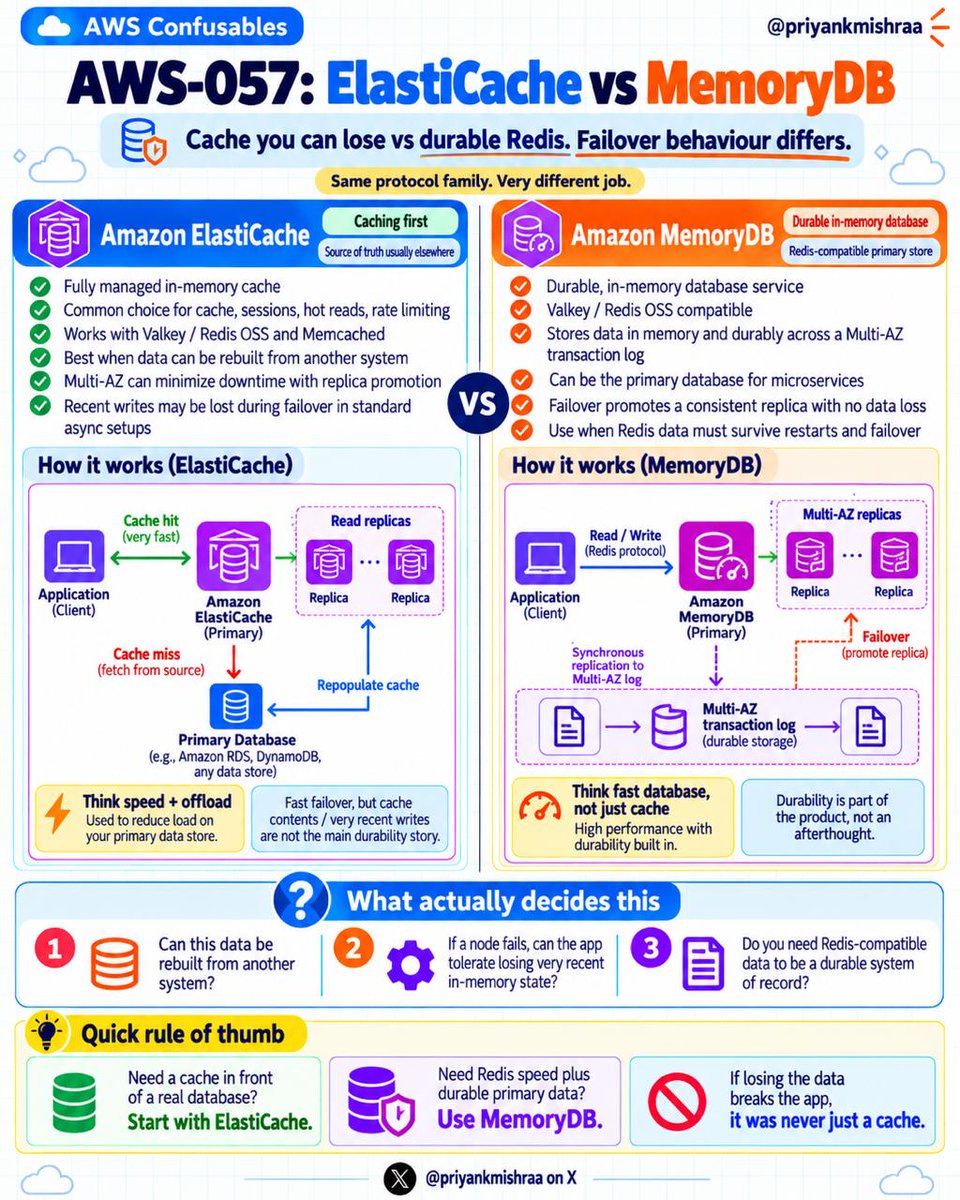
AWS Confusables: ElastiCache vs MemoryDB
This one is easy to mix up because both look like “Redis on AWS.”
But they are built for different jobs.
The simple version:
ElastiCache is usually a cache.
MemoryDB is a durable in-memory database.
That difference matters a lot in production.
Amazon ElastiCache
ElastiCache is a fully managed in-memory caching service.
It supports:
- Valkey
- Redis OSS
- Memcached
Most teams use ElastiCache to make applications faster and reduce load on the main database.
Common use cases:
- Caching hot reads
- User sessions
- Rate limiting
- Leaderboards
- Temporary tokens
- API response caching
- Frequently accessed metadata
The key idea:
Your source of truth is usually somewhere else.
For example:
- RDS
- DynamoDB
- OpenSearch
- Another primary database
If ElastiCache loses some recent data during failover or restart, your app should still be okay because the data can be rebuilt.
Example:
User opens a product page.
App checks ElastiCache.
If data exists, return it quickly.
If cache misses, fetch from database and repopulate cache.
That is normal cache behavior.
ElastiCache is about speed and offloading pressure from your primary database.
Amazon MemoryDB
MemoryDB is different.
MemoryDB is a Redis-compatible durable in-memory database.
It is designed for cases where Redis-style data is not just temporary cache data.
It stores data in memory, but also uses a durable Multi-AZ transaction log.
That means it is built to survive failover with stronger durability guarantees than a normal cache setup.
Common use cases:
- Durable session state
- Real-time user state
- Gaming state
- Streaming metadata
- Microservice primary storage
- Fast applications where Redis-compatible data must survive failures
The key idea:
MemoryDB can be the system of record for Redis-compatible data.
So if the node fails, you are not treating that data as disposable.
That is the big difference.
The practical difference
ElastiCache asks:
“Can this data be rebuilt from another source?”
MemoryDB asks:
“Does this Redis-compatible data need to survive failover and become durable?”
If the answer is yes, MemoryDB is closer to the right fit.
If the answer is no, ElastiCache is usually simpler and cheaper.
Common mistake
Teams put important state in ElastiCache and say:
“It is fine, Redis is fast.”
Then a failover happens.
Some recent writes disappear.
Suddenly everyone realizes it was not “just cache.”
It was being used like a database.
That is the problem.
If losing the data breaks the app, it was never only cache.
Quick rule of thumb
Need fast cache in front of a real database?
Use ElastiCache.
Need to reduce database load?
Use ElastiCache.
Need sessions, counters, or temporary data that can be rebuilt?
Use ElastiCache.
Need Redis-compatible speed with durable storage?
Use MemoryDB.
Need an in-memory primary database for critical state?
Use MemoryDB.
Cannot tolerate losing recent in-memory writes during failover?
Look at MemoryDB.
The naming makes them sound similar.
But the production question is simple:
Can the app survive losing this data?
If yes, cache it.
If no, treat it like a database.
That is where ElastiCache vs MemoryDB becomes less confusing.
#AWS #CloudComputing #DevOps #AWSCertification #SystemDesign #CloudArchitecture #Redis #Valkey #ElastiCache #MemoryDB
One more I'd add is not testing Redis failure scenarios. I've seen teams design everything assuming Redis will always be available. Then one connection timeout brings down the entire API. If Redis is just a cache, the application should ideally fall back to the database, with proper timeouts and circuit breakers. Also, test what happens during a cache stampede.
I'd build a unified data engineering platform, taking the best features from Airflow, dbt, Fivetran, and Databricks. One place for ingestion, transformation, orchestration, and monitoring.
The biggest risk? Building another complicated platform that nobody wants to migrate to. And realistically, getting a paying customer in 30 days would be harder than building the MVP itself.
@Nikita26rai I'd add query execution plans, CTEs, transactions, and isolation levels. Knowing SQL syntax is one thing, but understanding why a query runs slowly or produces unexpected results is equally important.
An important JavaScript concept, especially when debugging.
Understanding the call stack helps you trace function execution, identify stack overflow errors, understand recursion, and debug unexpected behavior.
Also worth exploring how the call stack works with the event loop and asynchronous operations. That’s where things get interesting.
@_ap_square_ Good to see someone thinking about costs before AWS sends its monthly surprise. Jokes aside, cost estimation is an important architecture skill. Also look into NAT Gateway charges, data transfer, and CloudWatch logs. These are easy to overlook and can get expensive. Keep going!
@fromcodetocloud Half the tech posts on X are either ragebait or people declaring something dead for engagement. I have a friend who still supports mainframes for a bank. Yes, mainframes, in 2026.
The real world works quite differently.
A few more from experience:
“We’re like a family” - boundaries might be optional.
“Self-starter” -don’t expect much onboarding.
“Work hard, play hard” -mostly the first part.
“Flat hierarchy” -everyone has an opinion, nobody makes a decision.
“Exciting challenges” -inherited technical debt nobody wants to touch.
Of course, not every company means these things, but I’ve seen enough to ask a few extra questions during interviews.
I don’t understand this fascination with extreme outliers. PewDiePie, MrBeast, Zuckerberg, Musk… these are exceptionally rare success stories.
Look at the most successful people in your own city, workplace, or community. People who started with circumstances similar to yours.
Their journeys are far more relatable, their decisions more practical, and their success often more achievable.
Nothing wrong with admiring billionaires, but inspiration is more useful when the path is realistic enough to follow.
I'd go in this sequence:
1. Check CPU, memory, error rates, and p99 latency.
2.Identify the bottleneck using metrics and traces.
3.Check database connections, slow queries, and dependencies.
4. Verify whether traffic is legitimate or abusive.
5. Scale horizontally if infrastructure is saturated.
6. Enable rate limiting or shed excess traffic.
7.Roll back recent deployments if correlated.
8. Monitor recovery and investigate the root cause.
Exactly. Kafka isn't a performance optimization tool by default. It introduces operational complexity, eventual consistency, retries, and duplicate processing concerns. Async makes sense when workloads need decoupling, buffering, or independent scaling. I've seen teams introduce Kafka for problems a simple database optimization could have solved. Measure before adding architectural complexity.
@techyoutbe Advanced RAG also benefits from query decomposition, metadata filtering, contextual retrieval, and evaluation. More complexity doesn't always mean better accuracy.