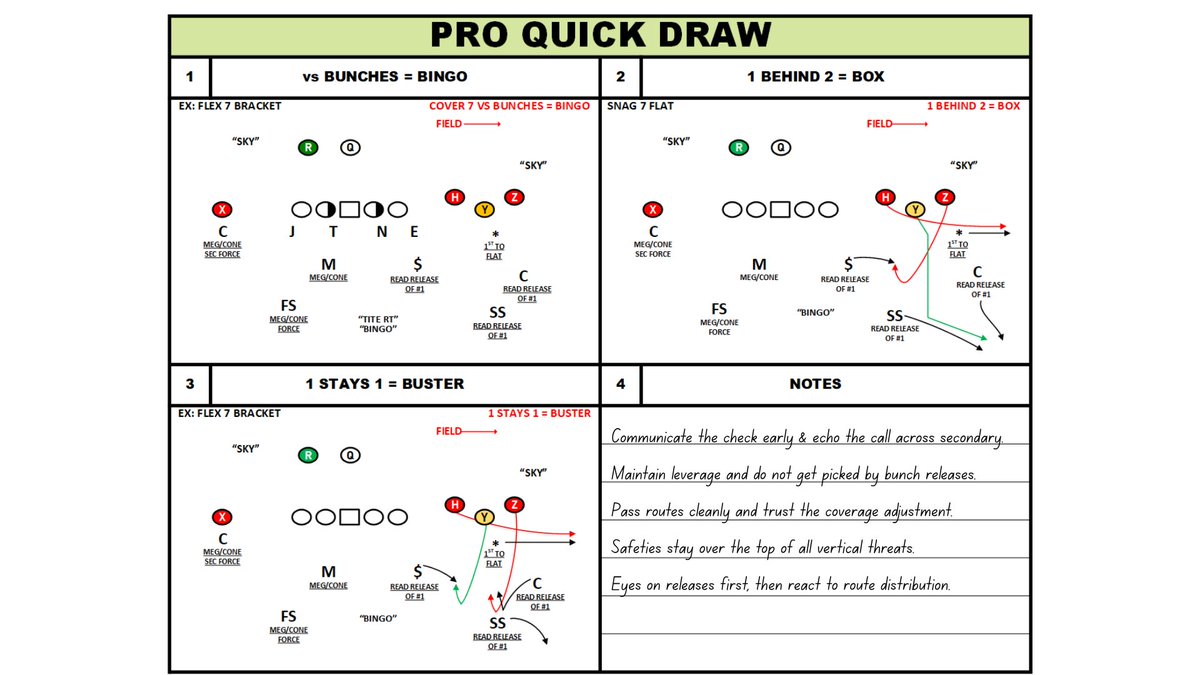
A powerful Playbook Platform to organize Playbooks, Scout Cards & Presentations efficiently through Microsoft® Visio & PowerPoint. Request a Virtual Demo ⬇️
One way to build out your PQD playbook faster...
1. Select a drawing and click edit.
2. Adjust the drawing.
3. Hit Fn + F12.
4. Save the new variation.
5. Repeat.
Spend less time handing out Scout assignments and more time getting reps.
Our GoRout integration sends play responsibilities straight to every player's device.
The PQD x @Go_Rout Integration
1. Select your play cards.
2. Export to GoRout.
3. Share to every device.
Seamless communication of play assignments on the field
Sunday cutups used to eat your whole day…
Now the Cutup Generator sorts your tags automatically — down & distance, formation, personnel — the moment your rules are set, you get your Sunday back.
Set your definitions once; let the Cutup Generator do the rest.
Get it before this weekend — have your whole film library organized before your staff's weekly meeting.
The PQD x @Go_Rout Integration
1. Select your play cards.
2. Export to GoRout.
3. Share to every device.
Seamless communication of play assignments on the field
Set your definitions once; let the Cutup Generator do the rest.
Get it before this weekend — have your whole film library organized before your staff's weekly meeting.
With Copy to Clipboard in PQD:
1. Snip your clip or image
2. Open PQD
3. Click Clipboard
4. It drops right into your next open space
5. Title it. Done.
That's it. That's the workflow.
With Copy to Clipboard in PQD:
1. Snip your clip or image
2. Open PQD
3. Click Clipboard
4. It drops right into your next open space
5. Title it. Done.
That's it. That's the workflow.
With Copy to Clipboard in PQD:
1. Snip your clip or image
2. Open PQD
3. Click Clipboard
4. It drops right into your next open space
5. Title it. Done.
That's it. That's the workflow.