How Secure Is Your Crypto Account? Let's Talk About Binance Security.
When we talk about crypto, we often focus on trading, market movements and new opportunities. But how often do we actually check whether our accounts are properly protected?
For me, crypto security is something every user should understand, whether they are new to Binance or have been using it for years.
Here is how Binance protects user funds and what we can do to secure our own accounts.
How Binance protects user funds
Most user funds are kept in cold storage, which means offline wallets. Only a smaller amount stays in hot wallets for withdrawals.
Moving funds requires multiple approvals through multi-signature and MPC technology, adding another layer of protection. Binance also uses withdrawal limits and manual reviews for large outflows.
Another important layer is the SAFU fund, established in 2018 for extreme platform level emergencies. According to the brief, it holds around 15,000 BTC, valued at approximately $1 billion. If its value falls below $800 million, Binance tops it back up to $1 billion.
SAFU is an emergency reserve, not protection against individual phishing attacks or scams.
Proof of Reserves: Don't just trust, verify.
Proof of Reserves allows users to check whether their account balances are included in Binance's published snapshots and whether reserves cover user liabilities.
It uses Merkle Trees and zk-SNARK technology to support verification without exposing individual account balances. Regular snapshots cover more than 40 tokens, according to the brief.
You can check it yourself: https://t.co/GeI25RefVP
5 security steps every Binance user should check
1. Enable stronger 2FA: Use a passkey or hardware security key as your primary protection. An authenticator app is a good backup. Avoid relying on SMS alone.
2. Set up an anti-phishing code: Your personal code appears in genuine Binance emails and helps you identify suspicious messages.
3. Enable the withdrawal whitelist: Restrict withdrawals to addresses you have approved. Newly added addresses may have a cooling off period.
4. Review your devices and sessions: Remove anything you don't recognize, use a unique password and enable login and withdrawal alerts.
5. Check your API keys: Delete unnecessary keys, restrict access to trusted IP addresses and avoid enabling withdrawal permissions unless absolutely necessary.
Also, certain security changes, such as changing your password or 2FA, can temporarily restrict withdrawals to help prevent unauthorized transfers.
Be aware of crypto scams
Phishing messages, fake support accounts, suspicious links and SIM swap attacks are common ways scammers try to access accounts.
Never share your password or verification codes. Binance will never ask you to move your crypto to a so called safe wallet, join a trading group or send funds to verify your account.
Security is a shared responsibility. Binance provides security systems and tools to protect its platform, but we also need to use those tools and stay alert.
You do not need to change everything at once. Start by checking your 2FA and enabling your anti phishing code today.
For more information, visit the official Binance Security page:
https://t.co/dfEOGg60zB
How many of these security steps have you already enabled?
#Binance #BinanceSecurity #StaySAFU #CryptoSecurity #ProofOfReserves #SAFU #Passkeys #ScamAlert
General information only. Binance products and services may not be available in all regions. Digital assets are subject to high market risk and volatility. Their value can go up or down, and you may not recover the amount invested. You are solely responsible for your investment decisions; Binance is not liable for your losses. This is not financial advice. Please review Binance's Terms of Use and Risk Warning.
𝗢𝗻𝗲 𝗕𝗶𝗻𝗮𝗻𝗰𝗲 𝗖𝗮𝗿𝗱. 𝗧𝗵𝗿𝗲𝗲 𝗖𝗮𝘀𝗵𝗯𝗮𝗰𝗸 𝗢𝗽𝗽𝗼𝗿𝘁𝘂𝗻𝗶𝘁𝗶𝗲𝘀. 💳
The Binance Black Friday Campaign is here!
The Binance Card Black Friday Campaign offers three different opportunities for new cardholders, existing users and those making larger eligible purchases.
Let's look at how each one works.
𝗦𝗰𝗲𝗻𝗮𝗿𝗶𝗼 𝟭: You're getting your first Binance Card.
Order your Binance Card during the campaign and make your first eligible purchase. You may receive 50% instant cashback, up to 5 USDC.
You must have no previous card transaction before 17 November 2026. This offer is limited to the first 80,000 eligible users.
𝗦𝗰𝗲𝗻𝗮𝗿𝗶𝗼 𝟮: You already have a Binance Card.
You don't need to be a new user to benefit.
Spend more than $50 during the campaign and you may receive 5 USDC cashback.
This offer is limited to the first 10,000 eligible users.
𝗦𝗰𝗲𝗻𝗮𝗿𝗶𝗼 𝟯: Your eligible spending goes above $1,000.
The Black Friday Booster offers an additional 6% cashback on eligible spending above $1,000.
Here's a simple example:
➜ Total eligible spending: $1,200
➜ Spending above $1,000: $200
➜ Extra cashback: 12 USDC
The Booster is capped at 20 USDC per user, with a shared reward pool of 250,000 USDC. Payments are scheduled by 31 December 2026.
These offers bring everyday card payments and crypto cashback opportunities together, giving eligible users different ways to benefit from the campaign.
𝗕𝗲𝗳𝗼𝗿𝗲 𝗽𝗮𝗿𝘁𝗶𝗰𝗶𝗽𝗮𝘁𝗶𝗻𝗴, 𝗿𝗲𝗺𝗲𝗺𝗯𝗲𝗿:
➜ Cash withdrawals, government payments, financial institution payments and gambling transactions are excluded from the Booster.
➜ Total November cashback, including regular monthly cashback, is capped at 100 USDC per user.
➜ KYC verification, an eligible region and a campaign notification through the Binance app, inbox or email are required.
➜ Campaign period: 17 November to 1 December 2026 (UTC).
Rewards are limited and first come, first served. Meeting the requirements doesn't guarantee a reward. The campaign is available in supported Binance Card markets, including Pakistan, subject to regional eligibility.
Explore the campaign details: https://t.co/iyVx5IYCsv
Educational content only. Not financial advice. Products and services may not be available in your region. Always DYOR.
#Binance #BinanceCard #CryptoCashback #BlackFriday2026 #PayWithCrypto #USDC
𝗦𝗲𝗰𝘂𝗿𝗲 𝗬𝗼𝘂𝗿 𝗕𝗶𝗻𝗮𝗻𝗰𝗲 𝗔𝗰𝗰𝗼𝘂𝗻𝘁 𝗪𝗶𝘁𝗵 𝟮𝗙𝗔 🔐
Binance Authenticator App adds an extra layer of security to your account.
Follow these simple steps:
➜ Open your Binance profile.
➜ Go to Account Settings.
➜ Tap on Security.
➜ Select Authenticator App.
➜ Scan the QR code using your authenticator app.
➜ Enter the 6 digit verification code.
➜ Tap Submit to complete the setup.
That's it! Your Authenticator App is now linked.
Watch the video and follow each step to improve your account security. 👇
Remember: Never share your verification code with anyone.
#Binance #BinanceAcademy #LearnWithBinance #2FA #CryptoSecurity
@Binance_intern@khadijabweb3@BinancePk@mahmod_alkenani@WessalGamal
The Binance Card Black Friday Campaign Is Here, and There’s More Cashback to Explore...
This Black Friday, Binance has brought some exciting cashback offers for both new and existing Binance Card users.
Whether you are planning to get your first Binance Card or already have one, there are different ways to benefit from this campaign. You can receive cashback in USDC on eligible purchases, with an extra offer for Black Friday spending.
Let's take a look at
1. New Card holders: Get 50% Cashback
If you're new to Binance Card, this offer is for you.
Order your Binance Card during the campaign and receive 50% cashback on your first eligible purchase.
• Maximum cashback: 5 USDC
• Limited to the first 80,000 eligible users
• You must have no previous Binance Card transaction before 17 November 2026.
2. Existing Cardholders: Get 5 USDC Cashback
Already using Binance Card? You can benefit too!
Spend more than $50 with your card during the campaign and receive 5 USDC cashback.
• Limited to the first 10,000 eligible users.
3. Black Friday Booster: Extra 6% Cashback
There i also something extra for users with higher spending.
Get an additional 6% cashback on eligible spending above $1,000.
For example, if your eligible spending reaches $1,200, the $200 above the threshold can earn you 12 USDC in extra cashback.
• Maximum reward: 20 USDC per user
• Total reward pool: 250,000 USDC
• Rewards will be paid by 31 December 2026.
Please note that cash withdrawals, government payments, payments to financial institutions and gambling transactions are excluded.
A Few Important Details
The total November cashback limit is 100 USDC per user, including regular monthly cashback.
The campaign runs from 17 November to 1 December 2026.
It is available to verified users in eligible regions where Binance Card is supported, including Pakistan. You must also meet the campaign requirements and have received the campaign notification through the Binance app, inbox or email.
Rewards are limited and distributed on a first-come, first-served basis. Meeting the requirements does not guarantee a reward.
Want to Explore the Campaign?
If you're interested in crypto cashback and want to explore how you can spend crypto through Binance Card, check the campaign details
🔗 Campaign page: https://t.co/iyVx5IYCsv
This is education content only. Not financial advice. Products and services may not be available in your region. Always DYOR.
#Binance #BinanceCard #CryptoCashback #BlackFriday #SpendCrypto #USDC #CryptoCard
How Secure Is Your Crypto Account? Let's Talk About Binance Security.
When we talk about crypto, we often focus on trading, market movements and new opportunities. But how often do we actually check whether our accounts are properly protected?
For me, crypto security is something every user should understand, whether they are new to Binance or have been using it for years.
Here is how Binance protects user funds and what we can do to secure our own accounts.
How Binance protects user funds
Most user funds are kept in cold storage, which means offline wallets. Only a smaller amount stays in hot wallets for withdrawals.
Moving funds requires multiple approvals through multi-signature and MPC technology, adding another layer of protection. Binance also uses withdrawal limits and manual reviews for large outflows.
Another important layer is the SAFU fund, established in 2018 for extreme platform level emergencies. According to the brief, it holds around 15,000 BTC, valued at approximately $1 billion. If its value falls below $800 million, Binance tops it back up to $1 billion.
SAFU is an emergency reserve, not protection against individual phishing attacks or scams.
Proof of Reserves: Don't just trust, verify.
Proof of Reserves allows users to check whether their account balances are included in Binance's published snapshots and whether reserves cover user liabilities.
It uses Merkle Trees and zk-SNARK technology to support verification without exposing individual account balances. Regular snapshots cover more than 40 tokens, according to the brief.
You can check it yourself: https://t.co/GeI25RefVP
5 security steps every Binance user should check
1. Enable stronger 2FA: Use a passkey or hardware security key as your primary protection. An authenticator app is a good backup. Avoid relying on SMS alone.
2. Set up an anti-phishing code: Your personal code appears in genuine Binance emails and helps you identify suspicious messages.
3. Enable the withdrawal whitelist: Restrict withdrawals to addresses you have approved. Newly added addresses may have a cooling off period.
4. Review your devices and sessions: Remove anything you don't recognize, use a unique password and enable login and withdrawal alerts.
5. Check your API keys: Delete unnecessary keys, restrict access to trusted IP addresses and avoid enabling withdrawal permissions unless absolutely necessary.
Also, certain security changes, such as changing your password or 2FA, can temporarily restrict withdrawals to help prevent unauthorized transfers.
Be aware of crypto scams
Phishing messages, fake support accounts, suspicious links and SIM swap attacks are common ways scammers try to access accounts.
Never share your password or verification codes. Binance will never ask you to move your crypto to a so called safe wallet, join a trading group or send funds to verify your account.
Security is a shared responsibility. Binance provides security systems and tools to protect its platform, but we also need to use those tools and stay alert.
You do not need to change everything at once. Start by checking your 2FA and enabling your anti phishing code today.
For more information, visit the official Binance Security page:
https://t.co/dfEOGg60zB
How many of these security steps have you already enabled?
#Binance #BinanceSecurity #StaySAFU #CryptoSecurity #ProofOfReserves #SAFU #Passkeys #ScamAlert
General information only. Binance products and services may not be available in all regions. Digital assets are subject to high market risk and volatility. Their value can go up or down, and you may not recover the amount invested. You are solely responsible for your investment decisions; Binance is not liable for your losses. This is not financial advice. Please review Binance's Terms of Use and Risk Warning.
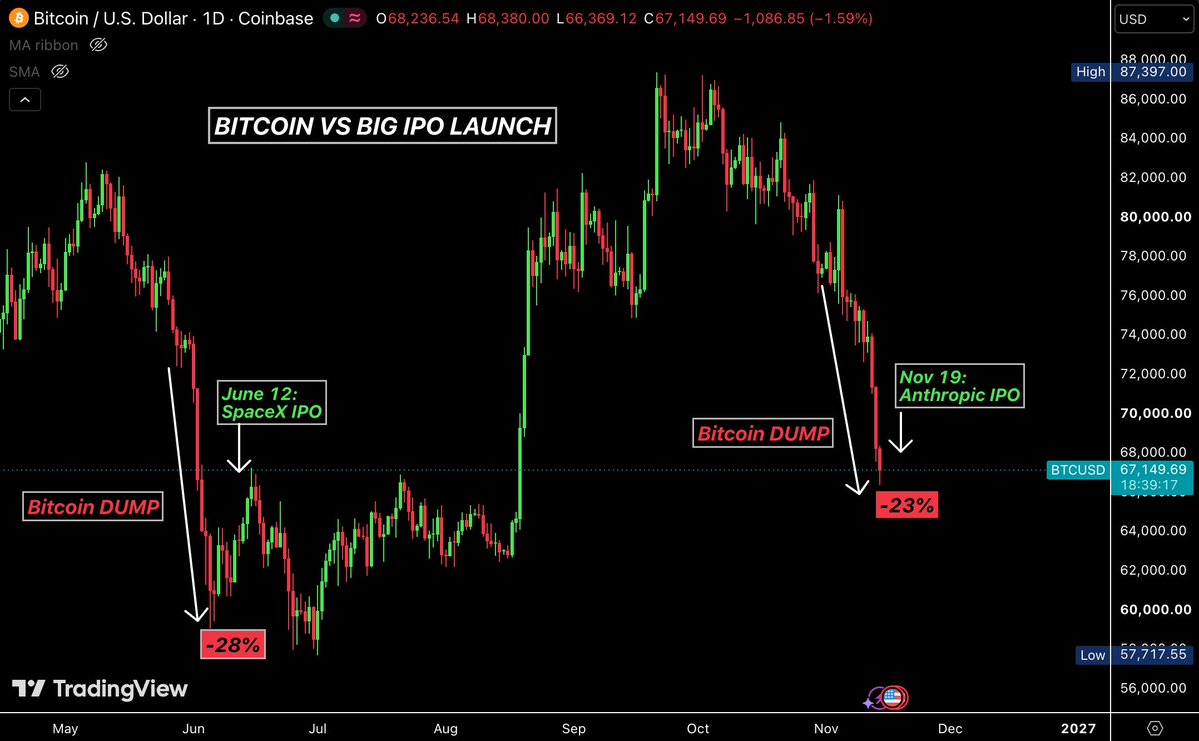
Why Bitcoin is dumping?
US investors are reportedly selling Bitcoin ETFs to get into the Anthropic IPO.
Nearly $2.35 BILLION worth of Bitcoin ETFs have been sold so far this month.
We saw something similar during the SpaceX IPO in June. Money moves to the next big thing, and crypto takes a temporary hit.
Such dips have historically created some of the best buying opportunities.