🚨 VALORANT Optimization Before & After 🚨
Client hit me up because his PC was full of Microsoft background junk and he kept getting random FPS drops.
After a full PureOS 3.0 optimization, he was shocked.
System:
AMD Ryzen 7 9800X3D NVIDIA RTX 5070 12 GB 32 GB DDR5 6000 CL30 EXPO
Result: ~900 FPS → ~1500 FPS (+66% / +600 FPS )
Want similar results? Discord link is below 👇
🚨 VALORANT Optimization Before & After 🚨
Client hit me up because his PC was full of Microsoft background junk and he kept getting random FPS drops.
After a full PureOS 3.0 optimization, he was shocked.
System:
AMD Ryzen 7 9800X3D NVIDIA RTX 5070 12 GB 32 GB DDR5 6000 CL30 EXPO
Result: ~900 FPS → ~1500 FPS (+66% / +600 FPS )
Want similar results? Discord link is below 👇
🚨 FORTNITE PLAYERS – DISABLE THESE 2 OPTIONS NOW 🚨
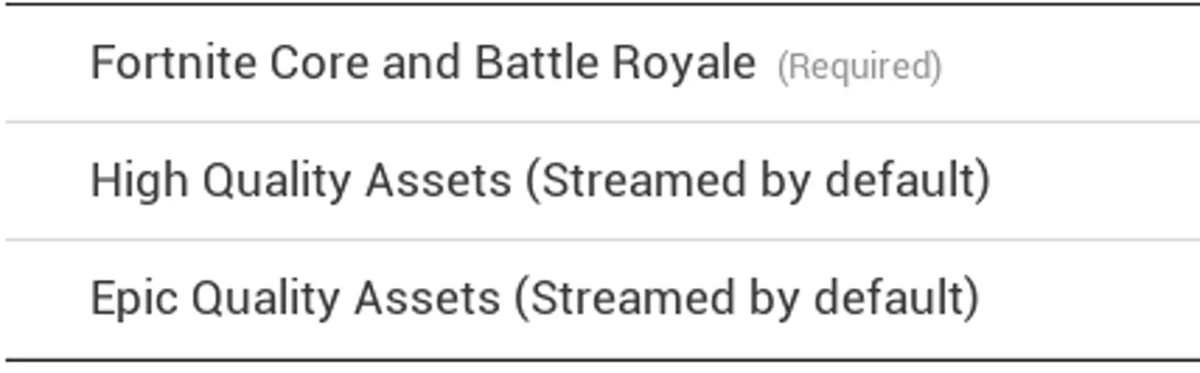
High Quality Assets + Epic Quality Assets download a ton of data and can eat a lot of storage.
Here’s the exact step-by-step how to turn BOTH off:
1. Open the Epic Games Launcher
2 Go to Library
3. Click the three dots next to Fortnite
4. Select Options
5. Uncheck:
→ High Quality Assets
→ Epic Quality Assets
Done.
Most people stop here… but if you actually want higher FPS, smoother 1% lows and lower input delay in Fortnite, this is only the start.
Get the full PureTweaks optimization that clients use to jump from laggy to buttery smooth.
Link is down below 👇
🚨INSANE RESULT🚨
STOCK WINDOWS + STOCK BIOS → OPTIMIZED WINDOWS + OPTIMIZED BIOS
Client came to me after having issues with hes FPS dropping to 400, and PureTweaks saved him by getting him 800 FPS.
From 400 FPS → 800 FPS (100%↑ DOUBLE FPS🫡)
i7 14700f NVIDIA RTX 5080
32GB DDR5 6000 MT/s
mobo-Z790 GAMING PLUS WIFI
Want results like this? Checkout our discord, link is down below 👇
🚨INSANE RESULT🚨
STOCK WINDOWS + STOCK BIOS → OPTIMIZED WINDOWS + OPTIMIZED BIOS
Client came to me after having issues with hes FPS dropping to 400, and PureTweaks saved him by getting him 800 FPS.
From 400 FPS → 800 FPS (100%↑ DOUBLE FPS🫡)
i7 14700f NVIDIA RTX 5080
32GB DDR5 6000 MT/s
mobo-Z790 GAMING PLUS WIFI
Want results like this? Checkout our discord, link is down below 👇
‼️PURE TWEAKS BCD EDIT UITILTIY‼️
I dropped a BCD edit utility in our discord, it creates a restore point first so you’re safe, then you can just hit APPLY or REVERT.
These BCD tweaks don’t really increase your FPS, they’re more for latency and input response, on some systems you can get better timer stability and a bit more direct feeling, but don’t expect big FPS gains.
It sets these BCD tweaks:
• disabledynamictick = yes
• uselegacyapicmode = no
• usephysicaldestination = no
• bootux = Disabled
• loadoptions = DDISABLE_INTEGRITY_CHECKS
• nointegritychecks = Yes
• testsigning = No
• hypervisorlaunchtype = off
Link is down below 👇
‼️PURE TWEAKS BCD EDIT UITILTIY‼️
I dropped a BCD edit utility in our discord, it creates a restore point first so you’re safe, then you can just hit APPLY or REVERT.
These BCD tweaks don’t really increase your FPS, they’re more for latency and input response, on some systems you can get better timer stability and a bit more direct feeling, but don’t expect big FPS gains.
It sets these BCD tweaks:
• disabledynamictick = yes
• uselegacyapicmode = no
• usephysicaldestination = no
• bootux = Disabled
• loadoptions = DDISABLE_INTEGRITY_CHECKS
• nointegritychecks = Yes
• testsigning = No
• hypervisorlaunchtype = off
Link is down below 👇