X Money: 6% on a CHECKING account with $1k monthly direct deposit + 3% debit cashback. 6% on checking is unheard of.
Find it in the X app (Money tab) or https://t.co/Bnf83w8BGY.
Exclusions: utilities, wholesale clubs, insurance, rent, taxes, colleges, jewelry, gambling, & more
T-Mobile’s iPhone Handoff feature is seriously underrated! 🔥
I can use my new iPhone Duo as my main phone, while keeping my iPhone 17 Pro around whenever I want to take advantage of its cameras. 📱📸
✅ Same phone number across both devices
✅ Messages stay synced and up to date
✅ Seamlessly switch between iPhones
✅ Never miss important communication
Is it a niche feature? Absolutely. Not everyone needs it.
But for someone like me who wants the best of both worlds, it’s AMAZING.
One of the most slept-on features T-Mobile offers! 👏
Would you actually use a feature like this, or are you strictly a one-phone kind of person? 🤔
Everyone said "Hey Grok" was impossible on iPhone. Even Grok said Apple keeps wake words for Siri only. So I kept digging, and I found a way. Now I just say "Hey Grok" and Grok Bot voice chat opens. No extra apps, no cost, all built into iOS.
How to set it up:
1. Make sure your Grok Bot app is up to date
2. Shortcuts app → + → Add Action → search "Grok Bot" → pick "Start Voice Chat with Bot"
3. Settings → Accessibility → Vocal Shortcuts → Set Up → pick that shortcut → type "Hey Grok" and say it 3 times
4. In the shortcut's details, turn on "Allow Running When Locked"
If your phone is locked, iOS asks for one tap first. If Face ID already unlocked it, it's fully hands-free.
Just turned the Camera Control button on my iPhone Duo (that has no Action Button) into a one-press Cybertruck precondition button using a Shortcuts automation. No more digging through the Tesla app. #Apple#Tesla
How To Bring the Action Button Back To iPhone Duo
1. Create a folder in Shortcuts called Action Button. Move all of the shortcuts you want to trigger in here.
2. Create a new shortcut called Action Button
Setup:
> Get shortcuts from [Action Button Folder]
> Choose from [My Shortcuts]
> Run [Selected Item]
3. Add the new Action Button shortcut to your lock screen
> if you want the list view, set the shortcut to run Action Button
> if you want a grid of 6 actions (shown in the next post), set the shortcut to Show Folder
I prefer the list view, personally.
Link below!
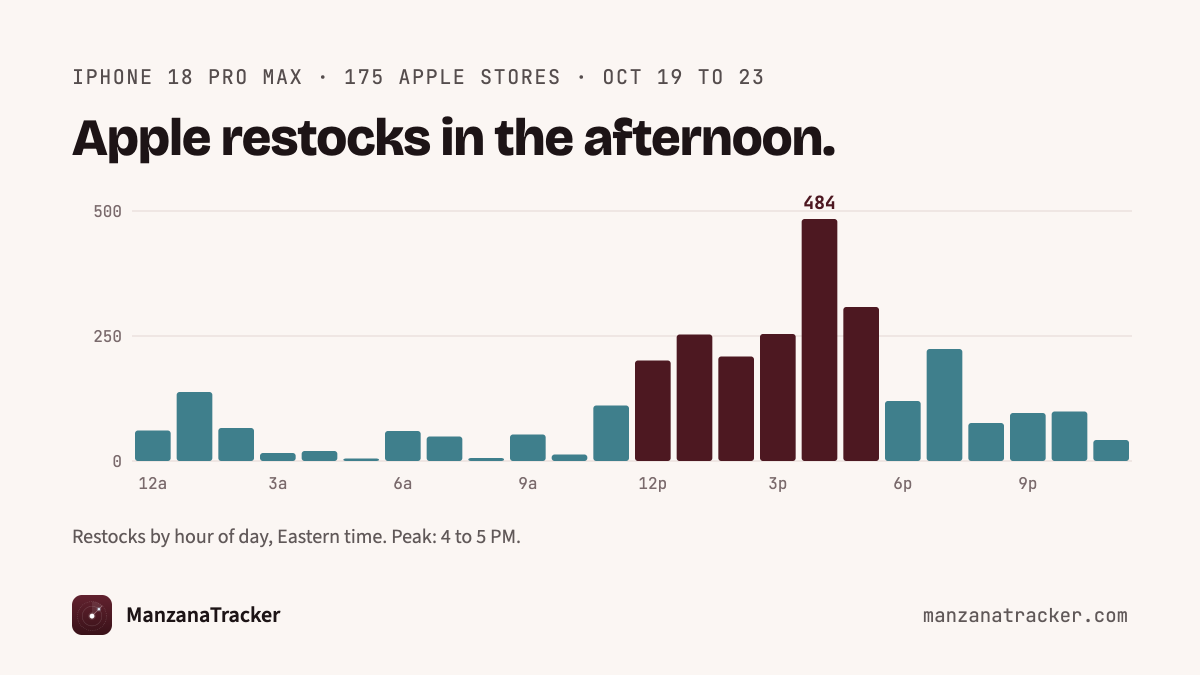
iPhone Duo pickup opens today. I watched Apple's pickup stock at 175 stores for 4 days:
Apple drips stock, store by store
Most restocks land noon to 6 PM ET
1 in 3 is gone within an hour
So check in the afternoon. The free checker I built: https://t.co/JelDRPtmBQ
Just turned the Camera Control button on my iPhone Duo (that has no Action Button) into a one-press Cybertruck precondition button using a Shortcuts automation. No more digging through the Tesla app. #Apple#Tesla
@elonmusk@Tesla Feature request for the Tesla app: Show the blue FSD steering wheel icon next to the speed when Full Self-Driving is active (e.g. “2 MPH [icon]”).
Helps owners instantly know FSD is on, even if someone else is driving.
My Cybertruck with v14 FSD drove me safely from garage to work parking spot, no interventions needed. Huge milestone! If you haven't bought Tesla stock yet, grab some now at the bargain price of $386.99.
@DaneCook You never leave your cart. God forbid somebody comes into the store and wants exactly that sh—. And they're like, What? Jackpot! This is everything I wanted.
@slye: good life/money hack? If your bank’s checking account requires 12 debit card transactions per month for a higher interest rate, use #CashApp to auto invest $10 a business day in a slice of stock IF YOU CAN. That’s 20+ transactions a month & savings for retirement!
@elonmusk How about an FSD feature to allow one Tesla vehicle to follow another Tesla vehicle so one, instead of two people can drop off at the body shop on Friday and pickup on Monday? 😀#mdmode or Momma Duck Mode.


![stetsondoggett's tweet photo. How To Bring the Action Button Back To iPhone Duo
1. Create a folder in Shortcuts called Action Button. Move all of the shortcuts you want to trigger in here.
2. Create a new shortcut called Action Button
Setup:
> Get shortcuts from [Action Button Folder]
> Choose from [My Shortcuts]
> Run [Selected Item]
3. Add the new Action Button shortcut to your lock screen
> if you want the list view, set the shortcut to run Action Button
> if you want a grid of 6 actions (shown in the next post), set the shortcut to Show Folder
I prefer the list view, personally.
Link below!](https://pbs.twimg.com/media/HVZv3pubwAACN4_.jpg)
![stetsondoggett's tweet photo. How To Bring the Action Button Back To iPhone Duo
1. Create a folder in Shortcuts called Action Button. Move all of the shortcuts you want to trigger in here.
2. Create a new shortcut called Action Button
Setup:
> Get shortcuts from [Action Button Folder]
> Choose from [My Shortcuts]
> Run [Selected Item]
3. Add the new Action Button shortcut to your lock screen
> if you want the list view, set the shortcut to run Action Button
> if you want a grid of 6 actions (shown in the next post), set the shortcut to Show Folder
I prefer the list view, personally.
Link below!](https://pbs.twimg.com/media/HVZv3XjbEAAM-Fq.jpg)
![stetsondoggett's tweet photo. How To Bring the Action Button Back To iPhone Duo
1. Create a folder in Shortcuts called Action Button. Move all of the shortcuts you want to trigger in here.
2. Create a new shortcut called Action Button
Setup:
> Get shortcuts from [Action Button Folder]
> Choose from [My Shortcuts]
> Run [Selected Item]
3. Add the new Action Button shortcut to your lock screen
> if you want the list view, set the shortcut to run Action Button
> if you want a grid of 6 actions (shown in the next post), set the shortcut to Show Folder
I prefer the list view, personally.
Link below!](https://pbs.twimg.com/media/HVZv3DsbQAAC278.jpg)


![QChard's tweet photo. @elonmusk @Tesla Feature request for the Tesla app: Show the blue FSD steering wheel icon next to the speed when Full Self-Driving is active (e.g. “2 MPH [icon]”).
Helps owners instantly know FSD is on, even if someone else is driving. https://t.co/HlCQcDm2U4](https://pbs.twimg.com/media/HJgiuWUWwAcDwnK.jpg)
![QChard's tweet photo. @elonmusk @Tesla Feature request for the Tesla app: Show the blue FSD steering wheel icon next to the speed when Full Self-Driving is active (e.g. “2 MPH [icon]”).
Helps owners instantly know FSD is on, even if someone else is driving. https://t.co/HlCQcDm2U4](https://pbs.twimg.com/media/HJgiuWNWYAIC1rn.jpg)






![stetsondoggett's tweet photo. How To Bring the Action Button Back To iPhone Duo
1. Create a folder in Shortcuts called Action Button. Move all of the shortcuts you want to trigger in here.
2. Create a new shortcut called Action Button
Setup:
> Get shortcuts from [Action Button Folder]
> Choose from [My Shortcuts]
> Run [Selected Item]
3. Add the new Action Button shortcut to your lock screen
> if you want the list view, set the shortcut to run Action Button
> if you want a grid of 6 actions (shown in the next post), set the shortcut to Show Folder
I prefer the list view, personally.
Link below!](https://pbs.twimg.com/media/HVZv35uacAA-j4P.jpg)