How to learn 80% of Claude Cowork in under 30 minutes — the parts that actually matter, skip the rest.
Cowork isn't a chatbot with extra steps. It's the same agentic engine behind Claude Code, wrapped in an interface that doesn't need a terminal. Here's the fast path to using it well.
Minutes 0-5: find it and turn it on
Open Claude Desktop (Mac, Windows, or ChromeOS — download from https://t.co/ZZzfwIWlua if you don't have it). Look for the Cowork tab next to Chat. Pro, Max, Team, and Enterprise all have access — Pro just hits usage limits sooner since Cowork tasks cost more than regular chat.
Minutes 5-10: give it a folder, not a prompt
The whole model shifts here. Instead of typing a question, click "Work in a folder" and point it at something real — start with Downloads or one messy project folder, not your entire filesystem. Cowork reads and writes those files directly.
Minutes 10-15: watch it plan before it acts
Describe a task in plain language: "organize this folder, sort by file type, rename anything with a generic name." Cowork shows you its plan before executing, not after. This is the single habit worth building early — read the plan, don't just approve blindly.
Minutes 15-20: connect one external app
Cowork isn't limited to local files. Connect Slack or Google Drive and it can pull real data across both — build a report from a Drive folder, summarize a Slack channel, cite back to the actual source file or message it pulled from.
Minutes 20-25: try computer use once
When Cowork doesn't have a direct tool for something, it can navigate your screen the way you would — clicking, typing, opening apps. It's a research preview, so treat it as an experiment, not a workflow yet. Try it once on something low-stakes so you know what it looks like when it happens.
Minutes 25-30: understand local vs. remote
This is the part most guides skip. Cowork now runs on desktop, web, and mobile. On desktop, sessions run locally with full file and browser access. On web or mobile, sessions run remotely on Anthropic's servers — meaning it keeps working after you close your laptop, and the same session follows you across devices.
That's 80% of it. The remaining 20% — deep MCP configuration, custom connectors, scheduled recurring tasks — you'll pick up naturally once you've actually delegated something real. #AI
How to build an AI second brain with Claude and Obsidian that actually gets smarter every day , not just a notes app with search.
Most "second brain" guides stop at note-taking. This one adds the part that makes it compound: Claude reading, writing, and connecting your vault every single day.
Why Obsidian specifically
Your notes are plain markdown files on your own machine. No vendor lock-in, no upload required, works with any model. Notion's better for team collaboration. Obsidian wins for a solo knowledge system because Claude can read and write the actual files directly.
Step 1: give Claude eyes into your vault
Install the mcp-obsidian MCP server (3,000+ stars, most established option) or mcpvault if you want zero dependencies and don't need Obsidian running while you work.
Add it to your Claude Desktop config, restart, then test with "list every file in my vault." If it reads your notes back, you're connected.
Step 2: structure it before you fill it
Three folders is enough to start: Inbox for anything captured mid-task, Daily Notes for a running log, and a sorted structure (PARA works well: Projects, Areas, Resources, Archives) for where things land after review.
Step 3: give it memory that survives closing the tab
This is the step most people skip, and it's the one that actually matters. Add a Memory MCP server on top of Obsidian.
Without it, Claude reads your vault fresh every session and forgets what it learned about you the moment you close it. With it, tell Claude once — "my vault uses PARA, my daily note template looks like X" — and it remembers that structure permanently, not just for one chat.
Step 4: let Claude interview you instead of typing your own profile
An empty vault is useless. Ask Claude to interview you like a new co-founder getting briefed — your work, your projects, your recurring questions.
Save the output as your core context file. This becomes what every future session builds on instead of you re-explaining yourself for the hundredth time.
Step 5: build the daily loop
Morning: "create today's daily note from my template, carry over unfinished tasks from yesterday." Mid-task: "add [thought] to my inbox" — you never context-switch to capture it. Weekly: a real review session where Claude surfaces patterns across the week's notes, not just a list.
Step 6: the part that makes it "smarter every day"
Karpathy posted a pattern earlier this year called the LLM Wiki: a raw/ folder holds untouched sources — articles, transcripts, screenshots — that Claude reads but never edits.
A wiki/ folder holds what Claude writes from them: summaries, concept pages, cross-links between ideas. Every new note doesn't just get stored, it gets connected to what's already there. That link density is what separates a notes app from an actual knowledge system.
If you don't want to build it from scratch
A few community repos already package this whole setup — self-organizing vaults with pre-built Claude Code skills for PARA and Zettelkasten, or starter kits that interview you and scaffold the structure automatically. Worth cloning and reshaping instead of starting from an empty folder.
Run it for a week, it's a notes app. Run it for six months, it's a reference system nothing you Google will replace, because every note already knows what it's connected to. #AI
🚨 3 narratives I'm actually farming going into rest of 2026 — not hype, here's the actual reasoning.
1. Polymarket (@Polymarket) — the biggest airdrop nobody's sleeping on
Their CMO already said it out loud: "there will be a token, there will be an airdrop." That's not a maybe.
Biggest prediction market platform on earth, billions in volume around major events, and prediction markets are sitting at the top of every 2026 narrative list right now.
Risk: depends heavily on the US relaunch and regulatory clarity. Kalshi's not sleeping either.
How to farm: trade volume, diversify across markets, reinvest winnings. Snapshot likely weights volume + activity, not just wallet age.
My take: ★★★★★ — this is the one every serious farmer and analyst keeps circling back to.
2. Base (@base) — the safest bet with real backing
Jesse Pollak (@jessepollak) himself confirmed Base is "exploring a network token." Coinbase-backed L2, TVL and user growth both climbing hard, institutional trust already built in.
If this launches with a real community allocation, we're talking billion-dollar value territory based on most analyst estimates.
Risk: no 100% official confirmation yet, and it's still tied to Coinbase's regulatory posture.
How to farm: bridge assets, use the Base App, interact with DeFi (Aerodrome etc.), build organic activity — don't just wallet-sit.
My take: ★★★★☆ — lower risk than most because the backing is real, not vaporware.
3. TxFlow (@TxFlow_L1) — early, invite-only, retroactive potential
A finance-focused L1 with shared liquidity across channels (no bridging needed) and a fully onchain CLOB perp DEX supporting crypto, stocks, and commodities. 30-day volume just doubled, and they just launched a second Channel — Probly, a prediction market app.
No live points program yet, but current activity has a real shot at counting retroactively. Community-owned, no VC allocation — that's rare this cycle.
Risk: very early, invite-only, and going up against Hyperliquid, Lighter, Variational in a brutal perp DEX market.
How to farm: get a Discord access code (https://t.co/af9v6jTk5P) → trade taker volume → join the daily fee credit campaign → hedge cross-exchange to hold positions longer → refer (10% fee share is strong).
My take: ★★★★☆ for early farmers — this is the one to move on now if you're going to move.
Bottom line: 2026 is still an airdrop + narrative year. Split your time across 2-3 hot narratives instead of going all-in on one. Watch official channels closely — snapshots and campaign terms shift fast.
Which one are you actually farming right now? Prediction markets, perps, or L2?
NFA. DYOR. Crypto is high risk, especially anything with leverage.
$POLY $BASE #airdrop #crypto #Web3 #PredictionMarkets
Opus 5: what's confirmed, what's rumor.
Claude Opus 5 doesn't officially exist yet. No model ID, no system card, no benchmark from Anthropic. But there's enough signal to be worth tracking.
Confirmed:
Anthropic's strongest public model right now is still Opus 4.8 (May 28) and Fable 5 (Mythos-class, June 9, briefly suspended then restored July 1). Sonnet 5 launched June 30, but it's not the flagship.
There's a real gap in the lineup: Sonnet 5 and Fable 5 sit far apart on price ($2-3/$10-15 vs $10/$50) and capability. A new Opus tier slotting between them is the logical product move — but that's inference, not confirmation.
The leak signals:
A codename "Honeycomb" surfaced in Cursor's EAP on July 9, reportedly with a 1M token context and an "xhigh" effort mode
Cursor has been where Anthropic models have shown up in EAP form before official launch — but it's also had EAP models pulled and never shipped
Recent Opus cadence: 4.5→4.6→4.7→4.8 landed 73, 70, and 42 days apart. If that holds from Opus 4.8 (May 28), the plausible window lands July 9-August 9
A Polymarket market on "next Opus launches before 2027" jumped from ~50% to ~93% in a single session on July 1 — someone was trading on a signal that wasn't public yet
Most reasonable prediction (not fact):
If it ships, $5/$25 is the strongest pricing hypothesis — it slots exactly between Sonnet 5 and Fable 5, and Opus has held that same price across four straight versions (4.5 through 4.8).
The part worth actually paying attention to:
Dario Amodei publicly admitted back in April (Axios) that Opus 4.7 trailed the unreleased Mythos model on benchmarks. The real question isn't "when does Opus 5 launch." It's whether Anthropic keeps Opus as a standalone flagship long-term, or lets Fable/Mythos quietly take over that role.
Watch: https://t.co/b1q0UY8XVe, changes in Cursor, and the next-Opus market on Polymarket.
Don't build anything on "Honeycomb" — that string has never appeared in a public API. #Anthropic
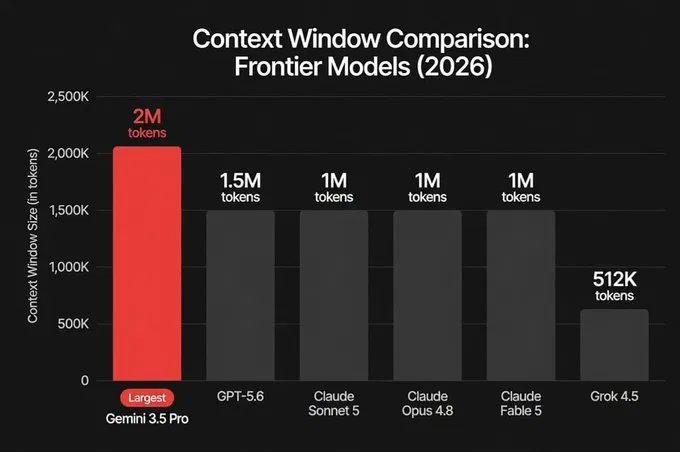
This chart is everywhere right now. One of its six numbers isn't confirmed yet.
most people are going to see this chart, glance at the red bar, and move on. worth slowing down on one thing first.
gemini 3.5 pro hasn't shipped.
google's targeting july 17 — tomorrow. everything about that 2M number is coming from leaks and third-party reporting, not an official model card. no benchmarks published. no pricing confirmed. the public api still only lists 3.5 flash and 3.1 pro preview. this would also be the model's second delay — it already slipped once from its original june target.
the other five bars are real. shipped, priced, benchmarked:
• gpt-5.6 — 1.5M, launched july 9 • claude sonnet 5, opus 4.8, fable 5 — 1M each, all in production • grok 4.5 — 512K, shipped july 8, same week as everything else
five real launches landing in the same two-week window is genuinely the story here. that's an unusual amount of frontier movement compressed into ten days.
here's the part the bar chart can't show you: context size and usable context aren't the same number.
google's own confirmed data on flash makes this concrete — 77% recall accuracy at 128K tokens, dropping to 27% at the full 1M setting. same model, same window, way less reliable the deeper you go. a 2M window that degrades the same way isn't twice as useful as a 1M window. it might not even be as useful.
so two separate questions get collapsed into one chart, and only one of them is answerable today:
which model has the biggest window → gemini 3.5 pro, if it ships on schedule which model actually uses its window well → nobody knows yet for any of these at the far end, gemini included
worth watching tomorrow. not worth building a workflow around tonight. #AI
How to build your first AI agent with Grok 4.5 — under 60 minutes, zero agent framework needed.
xAI shipped Grok 4.5 on July 8. It just took the #1 spot on agentic tool use benchmarks, and the API is fully OpenAI-compatible, so if you've touched any AI SDK before, this is mostly copy-paste.
Minute 0-10: get access
Go to https://t.co/YmMFtFZLuY, sign up, load a few dollars of credit, generate an API key from the API Keys page. Pricing is $2/1M input tokens, $6/1M output — cheap enough that testing costs pennies.
Minute 10-20: first call
from openai import OpenAI
client = OpenAI(api_key="YOUR_KEY", base_url="https://t.co/JxzFKy3USa")
response = https://t.co/yqeag6aVlk.completions.create(
model="grok-4.5",
messages=[{"role": "user", "content": "Explain what makes an AI agent different from a chatbot"}]
)
print(response.choices[0].message.content)
If that prints a response, you're talking to the model. Everything after this is just giving it hands.
Minute 20-35: give it a tool
An agent isn't a chatbot with extra steps — it's a model that can call functions and act on the result. Define one:
tools = [{
"type": "function",
"function": {
"name": "get_weather",
"description": "Get current weather for a city",
"parameters": {
"type": "object",
"properties": {"city": {"type": "string"}},
"required": ["city"]
}
}
}]
response = https://t.co/yqeag6aVlk.completions.create(
model="grok-4.5",
messages=[{"role": "user", "content": "What's the weather in Hanoi?"}],
tools=tools
)
Grok 4.5 returns a structured tool_calls object instead of guessing an answer. Your code runs the actual function, feeds the result back, and the model uses it to respond.
Minute 35-50: close the loop
The part that turns "one function call" into "an agent": run the tool, append its result as a new message, call the model again. Repeat until it stops requesting tools. That loop — call, observe, decide, repeat — is the entire mechanism behind every AI agent you've used.
Cap your loop at a fixed number of steps early on. An agent with no retry limit is a runaway API bill waiting to happen.
Minute 50-60: tune it
Add reasoning_effort: "high" for planning steps, drop to "low" for simple execution steps — this alone can cut your cost meaningfully on multi-step tasks. The 500K context window means you can hand it a full task history without truncating.
That's a working agent. Not a demo — an actual read → decide → act → observe loop, in under an hour, no framework required. #AI
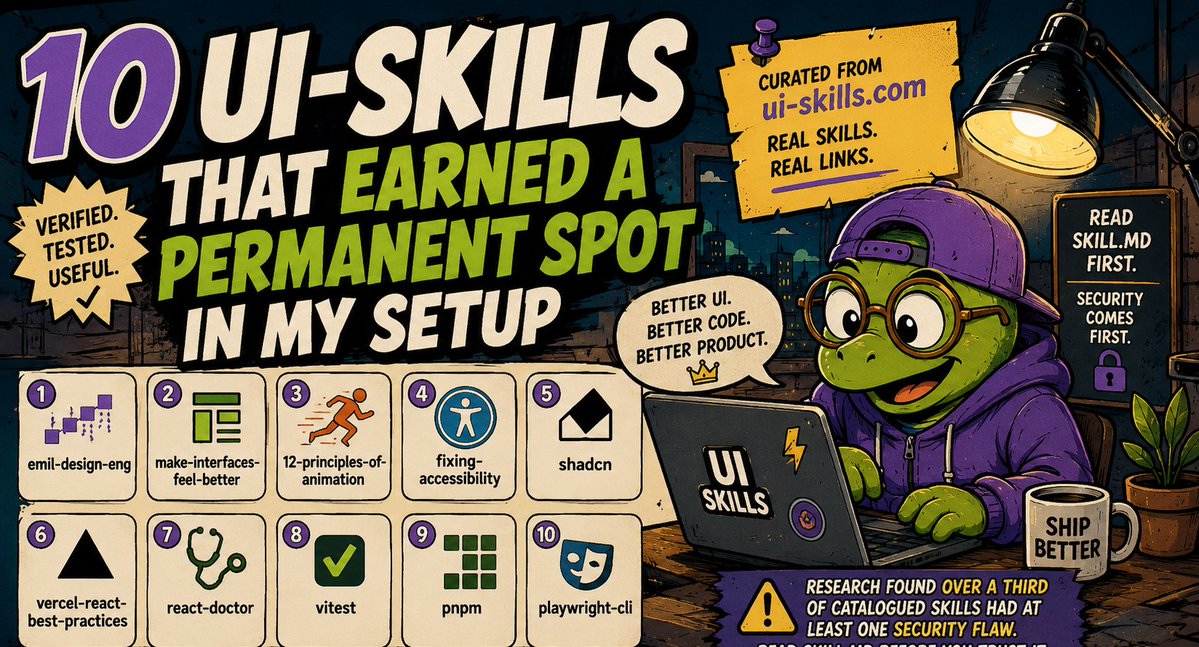
One-person Company | 10 skills can help your UI
1/ spent the last few weeks testing skills from https://t.co/a5AjHwfzI1. these 10 actually earned a permanent spot in my setup:
2/ emil-design-eng — codifies Emil Kowalski's whole animation philosophy. keeps ui motion under 300ms, kills the default ease-in slop https://t.co/vfVpriWIXD
3/ make-interfaces-feel-better — the fast pass for spacing, hierarchy, typography fixes when something just feels off https://t.co/2diPkWDPdO
4/ 12-principles-of-animation — disney's animation principles translated into actual motion code https://t.co/FcQHpIeN2C
5/ fixing-accessibility — audits aria labels, keyboard nav, focus management, contrast. catches what you'd miss under deadline pressure https://t.co/lYkI3vrwI4
6/ shadcn — project-aware component management. reads your actual components.json instead of guessing props https://t.co/LfqpgYF6JY
7/ vercel-react-best-practices — 70 performance rules ranked by actual impact. stops your app shipping with a request waterfall nobody noticed https://t.co/l0vMYrw8V2
8/ react-doctor — scores your codebase for security, performance, correctness regressions before you ship https://t.co/Bi4j1FbHfo
9/ vitest — antfu's testing setup, zero guesswork on config https://t.co/Jr5vXDKNnE
pnpm — same author, keeps package management sane https://t.co/xiaQ9j3qZL
10/ playwright-cli — microsoft's own e2e testing skill, straight from the source https://t.co/GkTxJ6r0qs
one thing worth knowing before you install any of these blind: research earlier this year found over a third of catalogued skills had at least one security flaw, some critical. read the SKILL.md before you trust it with your codebase, especially anything with bundled scripts. #ClaudeCode
The step-by-step guide to running a one-person business
McKinsey studied 2,400 solo operators. The ones using AI properly bill $127/hour of actual work. The ones doing it manually bill $31. That's not a tip, that's a different business model, and most people haven't switched yet.
Step 1: Replace your own thinking time first, not your busywork.
Everyone starts by automating email. Wrong order. Start with strategy — feed Claude your business plan, your last 6 months of client conversations, your competitors. Long context means it can hold the whole picture and give you one clean synthesis instead of a fragmented one.
Step 2: Build your second brain before you build anything else.
Notion AI or equivalent. Every client note, SOP, and piece of content lives in one place that can read itself back to you. Do this in week 1 — retrofitting it after 50 clients is a nightmare nobody warns you about.
Step 3: Automate the handoffs, not the tasks.
The real time sink isn't doing the work — it's moving information between tools. Zapier or Make connects your form, your invoice, your CRM, your content calendar so leads flow through without you touching them.
Step 4: Let AI carry the parts you're not actually good at.
You don't need to be a designer. Canva's Magic Studio generates on-brand visuals from text. You don't need to edit video. Descript cuts editing time by up to 80% with text-based editing.
Step 5: Put a night shift on your business.
Tidio's AI agent resolves up to 67% of customer questions with zero human involvement. Your inbox is clean by the time you wake up. This is the step most solo founders skip and then wonder why they're checking Slack at 11pm.
Step 6: Get a chief of staff that isn't a person.
Something that reads your inbox and calendar, tracks who hasn't replied, drafts your follow-ups in your own voice before you even open your laptop. This is the layer that makes you look like you have a team of 5.
Step 7: Track money like a CFO, not a spreadsheet.
QuickBooks' AI auto-categorizes expenses and forecasts cash flow 90 days out. Most solo businesses don't fail from bad ideas. They fail from not seeing the cash problem 60 days before it hits.
The people already doing this aren't smarter than you. They just stopped waiting for permission to run a company as a system instead of a job.
Free token - no limit Claude and Codex
Most people are burning through AI limits.
Power users are burning through AI accounts.
If you're logging in and out of 5+ Claude/Codex accounts every day just to find one with requests left...
You're wasting hours every week.
So someone built Headroom.
→ One dashboard.
→ Every Claude + Codex account.
→ Instantly shows which accounts still have capacity.
→ Auto-rotates to the next available account when one hits its limit.
The crazy part?
Checking your usage costs 0 tokens.
It reads the same read-only endpoints the official apps use. No guessing. No wasted requests. No "try again later."
When an account is exhausted, it gets parked until the reset window actually expires.
No dead accounts.
No blind switching.
No interruptions.
Python only. Stdlib only.
No pip installs.
MIT licensed.
Free.
This is one of those repos that quietly becomes part of every AI power user's workflow.
I wouldn't wait until everyone discovers it.
Repo ↓
https://t.co/jTpmOJY3tD
Earn $10k/month with Github
10 free GitHub repos for Polymarket trading.
The top wallets on Polymarket's leaderboard aren't faster or smarter than you. They're just better prepared — running tools most people don't know exist.
Paid versions of these run $50/mo+. All 10 below are free, open source, right now.
Analytics
1⃣SII-WANGZJ/Polymarket_data — the largest Polymarket dataset that exists. 107GB, 1.1 billion trades, 268K+ markets, built by 5 researchers out of Shanghai. This is the raw material for building your own edge.
https://t.co/vjxhCexAwA
2⃣evan-kolberg/prediction-market-backtesting — an actual backtester. Run your strategy against real historical markets before you risk anything on it.
https://t.co/dW9K6O1bEN
3⃣ent0n29/polybot — reverse-engineers any trader's behavior. Finds their repeated patterns, shows you the strategy underneath, tells you how to adapt it.
https://t.co/cMx2z1eliE
4⃣pmxt-dev/pmxt — one dashboard, every prediction market platform. Search historical markets, prices, and traders without switching tabs.
https://t.co/rQehYfAxIB
5⃣txbabaxyz/collectmarkets2 — pull any wallet's full trade history, export to CSV, get the stats and charts done for you.
https://t.co/zTzPfPiPMx
Trading Bots
1⃣alsk1992/CloddsBot — 118+ ready strategies: latency arb against Binance, momentum, penny clipper, smart routing, DCA, expiry fade. Built by a Cambridge CS student who won a hackathon with it.
https://t.co/HCRDHhLfPl
2⃣lihanyu81/polymarket_lp_tool — auto-manages your limit orders to maximize liquidity rewards without babysitting them.
https://t.co/cehoBiQKZA
3⃣MrFadiAi/Polymarket-bot — smart-money strategy. Finds top traders, filters by PnL and win rate, builds you a copy-trading list automatically.
https://t.co/8kpVL1LBxn
4⃣HarrierOnChain/Prediction-Markets-Trading-Bot-Toolkits — the everything-bot: copy trading, arbitrage, whale alerts, market making, spread farming, sports markets.
https://t.co/o3437YK5pe
5⃣Composio-HQ/polymarket-kalshi-arbitrage-bot — scans Polymarket and Kalshi simultaneously for arbitrage gaps.
https://t.co/sw6XWE2NSG
Most of these work on other prediction markets too, not just Polymarket. Test everything in dry-run first — every bot on this list touches a live wallet. #Polymarket
You prefer Claude Sonnet 5 vs GPT-5.6 ? Lemme tell you the difference
Both companies swapped their default model in the same 10 days.
Most people just read the announcement post and moved on.
I ran real work through both since launch. Here's what actually holds up.
1/ The headline benchmark is a trap
Everyone quotes SWE-bench Verified. Both sit at 88.6-88.7%, basically tied.
Except OpenAI itself flagged contamination on that benchmark across every frontier model. Nobody's real score is 88% anymore — it's memorized, not solved.
SWE-bench Pro is the honest read. Claude leads by ~10 points there. But only on messy, underspecified repos.
2/ The two models are actually built for different shapes of work
Sonnet 5 isn't even Anthropic's flagship. Fable 5 and Opus 4.8 sit above it. But Sonnet 5 still beats Opus 4.8 on GDPval, the real-world knowledge-work benchmark (1,618 vs 1,615 Elo).
Meaning: the "cheap" tier now beats the "expensive" tier on writing. If you've been defaulting to Opus for text-heavy work, that habit is costing you for nothing.
GPT-5.6 split into Sol, Terra, Luna. Terra matches old GPT-5.5 quality at half the price. Most ChatGPT users never see this — it's routed for you.
3/ Cost-per-token is the wrong number to look at
GPT-5.5 finishes a task set at $6.61, 21 minutes. Opus 4.8 at max effort: $12.58, 44 minutes, and scores 12 points lower.
Well-specified ticket queue? That gap alone settles it.
But hand Claude something ambiguous — a messy bug report, an undocumented refactor — and it needs fewer retries to get there. Cost-per-solved-task beats cost-per-token every time. Nobody puts that on the pricing page.
Before your next task, ask one question: "is this a clear, well-specified job, or a messy one that needs figuring out?"
Clear job → GPT-5.6. Messy job → Claude Sonnet 5.
📌 Full benchmark breakdown + pricing table in the reply.





![Ryan95322865's tweet photo. How to build an AI second brain with Claude and Obsidian that actually gets smarter every day , not just a notes app with search.
Most "second brain" guides stop at note-taking. This one adds the part that makes it compound: Claude reading, writing, and connecting your vault every single day.
Why Obsidian specifically
Your notes are plain markdown files on your own machine. No vendor lock-in, no upload required, works with any model. Notion's better for team collaboration. Obsidian wins for a solo knowledge system because Claude can read and write the actual files directly.
Step 1: give Claude eyes into your vault
Install the mcp-obsidian MCP server (3,000+ stars, most established option) or mcpvault if you want zero dependencies and don't need Obsidian running while you work.
Add it to your Claude Desktop config, restart, then test with "list every file in my vault." If it reads your notes back, you're connected.
Step 2: structure it before you fill it
Three folders is enough to start: Inbox for anything captured mid-task, Daily Notes for a running log, and a sorted structure (PARA works well: Projects, Areas, Resources, Archives) for where things land after review.
Step 3: give it memory that survives closing the tab
This is the step most people skip, and it's the one that actually matters. Add a Memory MCP server on top of Obsidian.
Without it, Claude reads your vault fresh every session and forgets what it learned about you the moment you close it. With it, tell Claude once — "my vault uses PARA, my daily note template looks like X" — and it remembers that structure permanently, not just for one chat.
Step 4: let Claude interview you instead of typing your own profile
An empty vault is useless. Ask Claude to interview you like a new co-founder getting briefed — your work, your projects, your recurring questions.
Save the output as your core context file. This becomes what every future session builds on instead of you re-explaining yourself for the hundredth time.
Step 5: build the daily loop
Morning: "create today's daily note from my template, carry over unfinished tasks from yesterday." Mid-task: "add [thought] to my inbox" — you never context-switch to capture it. Weekly: a real review session where Claude surfaces patterns across the week's notes, not just a list.
Step 6: the part that makes it "smarter every day"
Karpathy posted a pattern earlier this year called the LLM Wiki: a raw/ folder holds untouched sources — articles, transcripts, screenshots — that Claude reads but never edits.
A wiki/ folder holds what Claude writes from them: summaries, concept pages, cross-links between ideas. Every new note doesn't just get stored, it gets connected to what's already there. That link density is what separates a notes app from an actual knowledge system.
If you don't want to build it from scratch
A few community repos already package this whole setup — self-organizing vaults with pre-built Claude Code skills for PARA and Zettelkasten, or starter kits that interview you and scaffold the structure automatically. Worth cloning and reshaping instead of starting from an empty folder.
Run it for a week, it's a notes app. Run it for six months, it's a reference system nothing you Google will replace, because every note already knows what it's connected to. #AI](https://pbs.twimg.com/media/HNZ8Rc4bcAEojhY.jpg)

![Ryan95322865's tweet photo. How to build your first AI agent with Grok 4.5 — under 60 minutes, zero agent framework needed.
xAI shipped Grok 4.5 on July 8. It just took the #1 spot on agentic tool use benchmarks, and the API is fully OpenAI-compatible, so if you've touched any AI SDK before, this is mostly copy-paste.
Minute 0-10: get access
Go to https://t.co/YmMFtFZLuY, sign up, load a few dollars of credit, generate an API key from the API Keys page. Pricing is $2/1M input tokens, $6/1M output — cheap enough that testing costs pennies.
Minute 10-20: first call
from openai import OpenAI
client = OpenAI(api_key="YOUR_KEY", base_url="https://t.co/JxzFKy3USa")
response = https://t.co/yqeag6aVlk.completions.create(
model="grok-4.5",
messages=[{"role": "user", "content": "Explain what makes an AI agent different from a chatbot"}]
)
print(response.choices[0].message.content)
If that prints a response, you're talking to the model. Everything after this is just giving it hands.
Minute 20-35: give it a tool
An agent isn't a chatbot with extra steps — it's a model that can call functions and act on the result. Define one:
tools = [{
"type": "function",
"function": {
"name": "get_weather",
"description": "Get current weather for a city",
"parameters": {
"type": "object",
"properties": {"city": {"type": "string"}},
"required": ["city"]
}
}
}]
response = https://t.co/yqeag6aVlk.completions.create(
model="grok-4.5",
messages=[{"role": "user", "content": "What's the weather in Hanoi?"}],
tools=tools
)
Grok 4.5 returns a structured tool_calls object instead of guessing an answer. Your code runs the actual function, feeds the result back, and the model uses it to respond.
Minute 35-50: close the loop
The part that turns "one function call" into "an agent": run the tool, append its result as a new message, call the model again. Repeat until it stops requesting tools. That loop — call, observe, decide, repeat — is the entire mechanism behind every AI agent you've used.
Cap your loop at a fixed number of steps early on. An agent with no retry limit is a runaway API bill waiting to happen.
Minute 50-60: tune it
Add reasoning_effort: "high" for planning steps, drop to "low" for simple execution steps — this alone can cut your cost meaningfully on multi-step tasks. The 500K context window means you can hand it a full task history without truncating.
That's a working agent. Not a demo — an actual read → decide → act → observe loop, in under an hour, no framework required. #AI](https://pbs.twimg.com/media/HNP_hQybAAA8ybW.png)