These are tricks that I personally use for a more engaging/efficient meetings. Try it out for yourself and see if you can get back some time for deeper work🫡
btw, full blog post here : https://t.co/c7VOOSi3lI
How many times a week are you in a meeting and you're not sure why you were even invited?
Studies show almost 70% of workers think meetings are distracting them from their "deep work"
Let me share with you 5 tips on how you can run a more effective meeting
thread below🧵
5 - Be Assertive! Yea, ik this is not as specific as the other tips😅
But as the host, you are responsible of the outcome of this meeting. Cut people off if you have to (nicely of course) and they will still appreciate you at the end for it. Don't be scared to be assertive :)
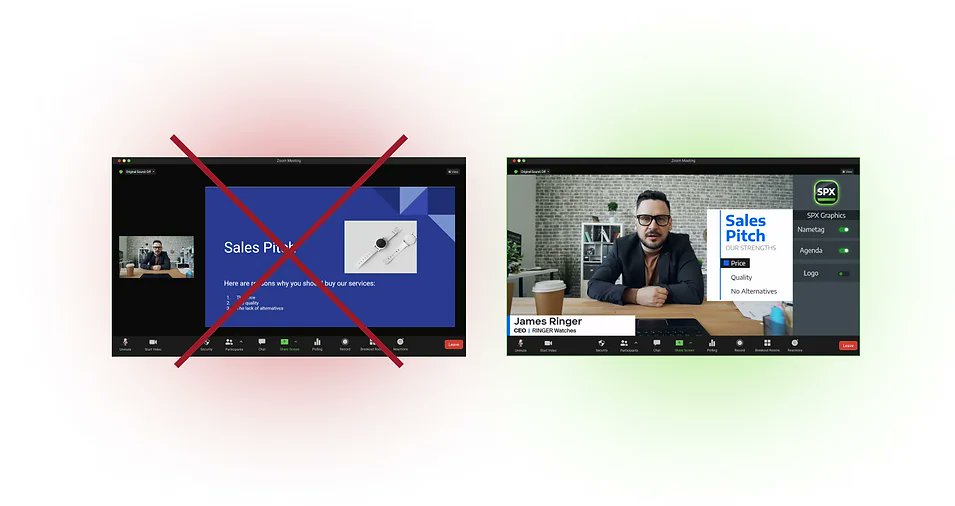
For example, if you book a videocall with a potential big client, your primary goal should be to make a human connection with them. And the only way to do this in a virtual setting is to keep their eyes on your face; and not your desktop screen...
So what to do?
Use overlay graphics instead!
There are graphics addons for Zoom (such as SPX) which can be used right inside of your Zoom UI to control dynamic graphics on top of your webcam video.
Now, for the record, I'm not saying that sales decks are not good, they're definitely still a powerful communication tool.
But what I am saying is that slideshows is not the optimal format for virtual presentations where screen real estate is gold.
are you still using virtual background and calling it "branding"?
There's a better way to brand and upgrade your @Zoom calls with real-time graphic overlays