Home
Language
English
Türkçe
Bahasa Indonesia
About
Privacy Policy
Terms of Service
Pricing
Sign In
Download All
Share
SSHS Tech Team
@SSHS_TechTeam
Official SSHS_TechTeam. Daily Tech tips. Need assistance or help with a problem tweet, call, email or come to our office in the tech center
Sulphur Springs, TX
Joined September 2016
131
Following
166
Followers
83
Posts
SSHS Tech Team
@SSHS_TechTeam
over 9 years ago
#EarthDay
Its Earth day🌎 do the Earth a favor and empty your computers recycling bin♻🗑 that hasn't been touched in 6 months🌳
SSHS Tech Team
@SSHS_TechTeam
over 9 years ago
--Public Service Announcement-- The sshs library now offers hot chocolate and the usual almond & mocha coffee flavors.
SSHS Tech Team
@SSHS_TechTeam
almost 10 years ago
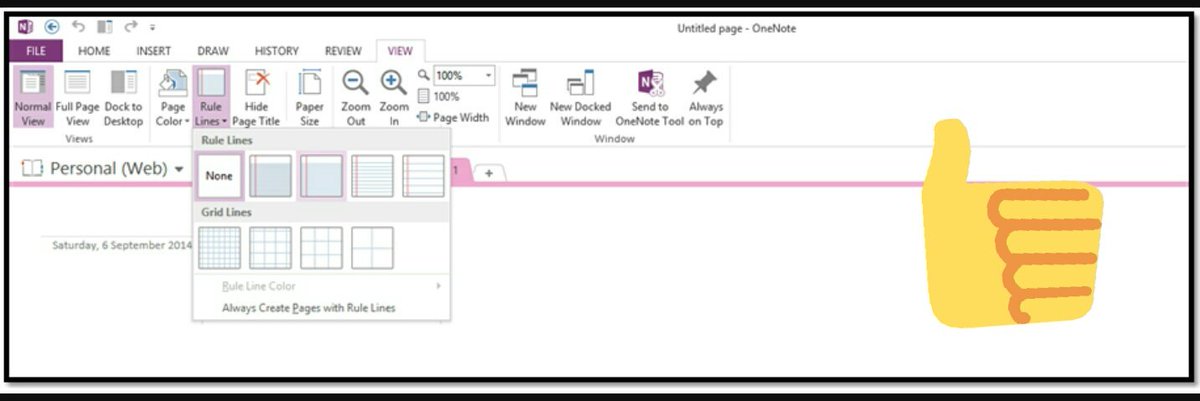
TechTip -28 For all you paper lovers who miss writing on physical paper. Try 1Note's paper template for typing notes on 1Note.
SSHS_TechTeam
retweeted
Microsoft OneNote
@msonenote
almost 10 years ago
@SSHS_TechTeam
Thanks for sharing this helpful tip out!
Who to follow
Jason Evans
@JasonEvansjab
Dad, Husband, Celeste Blue Devil, ETA&M Alum, Director for Accountability at Little Elm ISD, old Coach and ref.
Vanessa
@Vann052012V
School Administrator at #sulsprhs in #sulsprisd...Mom...loves children, football, and working out. Enjoy my job and friends and look forward to each day.
SSHS_TechTeam
retweeted
SSHS Tech Team
@SSHS_TechTeam
almost 10 years ago
#TechTip
-22 Theres always a faster way to do a task in Windows 10. One tool is open Quick settings by pressing the Windows key + I
SSHS_TechTeam's tweet gif.
SSHS_TechTeam
retweeted
SSHS Tech Team
@SSHS_TechTeam
almost 10 years ago
#TechTip
-23 It can be a jungle in Onenote when trying to & find your work an easy way to find ur stuff is using the built in search bar!
SSHS Tech Team
@SSHS_TechTeam
almost 10 years ago
Need help with your laptop? Ask a friend they may have encountered the same problem you have. If your still having problems come visit us.
SSHS_TechTeam's tweet gif.
SSHS Tech Team
@SSHS_TechTeam
almost 10 years ago
#TechTip
-27 Access and share your photos, docs, and more from anywhere using the
#Microsoft
#OneDrive
app on your mobile device!
SSHS_TechTeam's tweet gif.
SSHS Tech Team
@SSHS_TechTeam
almost 10 years ago
#TechTip
-26 On the go or just dont feel like using your laptop 4 your PowerPoint Microsoft has a slew of productivity Apps on iOS & Android
SSHS_TechTeam's tweet gif.
SSHS_TechTeam
retweeted
SSHS Tech Team
@SSHS_TechTeam
almost 10 years ago
Need 2 study but find carrying flashcards cumbersome! Try Cram flash 🃏s the mobile version on the appstore or go to https://t.co/VDQU7uzy15
SSHS_TechTeam
retweeted
SSHS Tech Team
@SSHS_TechTeam
almost 10 years ago
#TechTip
-4 OneNote like anything needs to sync from time to time. Try right clicking on your notebook title and clicking sync notebook.
SSHS Tech Team
@SSHS_TechTeam
almost 10 years ago
#TechTip
-25 Using 1Note but hate having to click back & forth between folders/notebooks Click Ctrl+M to open a new 1Note tab
#TheOffice
SSHS_TechTeam's tweet gif.
SSHS Tech Team
@SSHS_TechTeam
almost 10 years ago
#TechTip
24 Plug your Android/iOS phone to your Windows 10 computer this will launch Phone app scroll & select the Import photos and videos
SSHS_TechTeam's tweet gif.
SSHS Tech Team
@SSHS_TechTeam
almost 10 years ago
#sulsprhs
don't forget to check out our blog https://t.co/YGFhdEAK9Y! You can find helpful how-to blogs like https://t.co/YrEGB2xexN.
SSHS Tech Team
@SSHS_TechTeam
almost 10 years ago
#TechTip
-23 It can be a jungle in Onenote when trying to & find your work an easy way to find ur stuff is using the built in search bar!
SSHS Tech Team
@SSHS_TechTeam
almost 10 years ago
#TechTip
-22 Theres always a faster way to do a task in Windows 10. One tool is open Quick settings by pressing the Windows key + I
SSHS_TechTeam's tweet gif.
SSHS Tech Team
@SSHS_TechTeam
almost 10 years ago
#TechTip
-21 What's 9+10...21? Terrible at math? Just 🔍 "Calculator" in the search bar in the bottom left hand corner of your laptop!
SSHS_TechTeam's tweet gif.
SSHS Tech Team
@SSHS_TechTeam
almost 10 years ago
Hooray!! We just hit are 20th
#TechTip
👏👏
SSHS Tech Team
@SSHS_TechTeam
almost 10 years ago
#TechTip
-20 Quickly zoom in and out on your computer by pressing "Ctrl +" Or "Ctrl -"
SSHS Tech Team
@SSHS_TechTeam
almost 10 years ago
#TechTip
-19 la dee da dee da...Oops you just accidentally closed your browser tabs no worry press "Control + Shift + T"
#best
#tip
#ever
Last Seen Users on Sotwe
Anja
வெறியன்
Seen from
Singapore
Tom
Seen from
Vietnam
Lokalan Asoy
Seen from
United States
CD정연
Seen from
Korea
مجهولون
Seen from
Egypt
Shardanic
Seen from
Italy
analizör
Seen from
Austria
leyla❤️ali
Seen from
Turkey
emine
Seen from
Turkey
Trends for you
1
Brewers
Under 10K tweets
2
Eagles
Under 10K tweets
3
Yaxel
Under 10K tweets
4
Jay-Z
Under 10K tweets
5
#WWERaw
Under 10K tweets
6
Unite
Under 10K tweets
7
Tanner McKee
Under 10K tweets
8
#LaGranjaCapataz
Under 10K tweets
9
Giannis
Under 10K tweets
10
#Dragula
Under 10K tweets
Most Popular Users
1
Elon Musk
@elonmusk
241.5M followers
2
Barack Obama
@barackobama
118.8M followers
3
Cristiano Ronaldo
@cristiano
114.5M followers
4
Donald J. Trump
@realdonaldtrump
111.9M followers
5
Narendra Modi
@narendramodi
107.1M followers
6
Rihanna
@rihanna
98.7M followers
7
NASA
@nasa
92.3M followers
8
Justin Bieber
@justinbieber
91.8M followers
9
KATY PERRY
@katyperry
90M followers
10
Taylor Swift
@taylorswift13
84M followers
11
Lady Gaga
@ladygaga
75.5M followers
12
Virat Kohli
@imvkohli
73.5M followers
13
Kim Kardashian
@kimkardashian
70.9M followers
14
YouTube
@youtube
68.8M followers
15
Neymar Jr
@neymarjr
66.5M followers
16
Bill Gates
@billgates
65.3M followers
17
Selena Gomez
@selenagomez
63.1M followers
18
The Ellen Show
@theellenshow
62.2M followers
19
CNN
@cnn
61.7M followers
20
X
@x
60.7M followers
Olivia
Online
✨
⭐
💫