Brave's new Email Aliases feature* lets you register for websites by making new email addresses that forward to your main inbox. This protects your privacy and stops spam.
Right-click an email field and select "New Email Alias" to get started.
*Desktop only for now
⚠️ Today's browser update (v1.94.121) contains a fix for a Chromium vulnerability found to be exploited in the wild.
You may have received the automatic Brave update already. If not, you can manually update by visiting 'About Brave' from the browser's ☰ menu.
The Android update is waiting on Google Play Store review and should be out shortly.
This video of 9-11 in 2001 is trending in 2026 because many are saying it's the first time they've seen the video. It shows the plane hitting the second tower.
>Be google
>Income model is based off of serving advertisements
>overdo it with massive numbers of unskippable ads
>allow blatant scam ads and malware ads
>people use Adblockers to protect themselves
>Google doubles down and increases the number of ads for people still not using adblockers for some reason
>more people use adblockers because of how egregious it is
>Google gets big mad and tries to make it so adblockers are not longer as effective
>adblock creators work around it
>Google retaliates by changing the Chrome itself to make it harder for adblockers to work
>You are here
If you are still using Chrome, please do yourself a favor and switch to Brave or Firefox (with add-ons like Ublock). They clearly aren't getting the message that they're pushing too far.
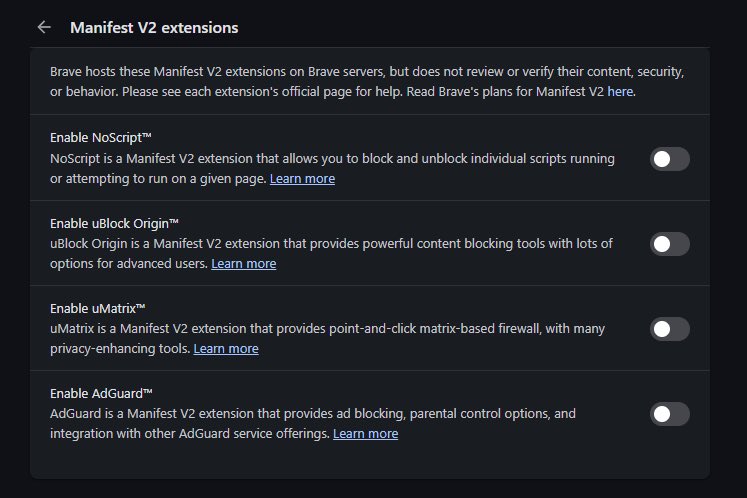
You can still use uBlock Origin in Brave.
We host uBO and other MV2 extensions on our servers so you can use them despite their removal from the Chrome Web Store.
Toggle them at Settings > Extensions > Manifest v2 extensions.
(Or use Brave's built-in ad/tracker blocking)
Brave on desktop just added Email Aliases, a feature that lets you sign up for online services without revealing your personal email address.
Email Aliases creates unique email addresses that forward to your primary inbox.
Apps ask for way more access than they need, you tap allow without thinking, and now there's a profile of your location/contacts/mic habits that gets sold to advertisers or brokers.
Brave just made your GPU boring on purpose.
WebGL and WebGPU exist to run 3D graphics in your browser. games. maps. product previews.
To do that they talk straight to your GPU.
And your GPU is basically a serial number. Vendor. Exact model. Driver version. Supported extensions.
Ben-Gurion University found WebGL fingerprinting alone identifies a device with 98 percent accuracy. In 150 milliseconds.
Faster than you can read this sentence.
No cookies required. Nothing to block. Nothing to delete.
Brave's fix, starting version 1.93.
Every Brave user's GPU now reports the same generic vendor and renderer string.
Not randomized. Identical. Your RTX 4090 and someone's decade old integrated graphics both say the same thing.
WebGPU adapter details get wiped out completely.
Extension list gets randomized so hash based trackers get a different answer per session.
Chrome does none of this.
Safari does some.
Firefox does some, behind a setting almost nobody finds.
Brave does it by default.
Brave also admits their own crawl found most sites only use these APIs for fingerprinting in the first place.
Not for graphics.
For tracking.
The 3D rendering was never the point.
Brave just added stronger protection against browser fingerprinting via WebGL and WebGPU.
you've heard of cookies. cookies get blocked. cookies get deleted. fingerprinting doesn't need any of that.
a fingerprint is built from details your browser leaks automatically. screen resolution. installed fonts. timezone. language settings. hardware specs. put enough of them together and your device becomes uniquely identifiable across every website you visit.
Research from Ben-Gurion University found WebGL fingerprinting alone can identify a device with 98% accuracy in 150 milliseconds.
WebGL and WebGPU are technologies that let websites run 3D graphics and visual effects in your browser. games. interactive maps. product visualizations.
but they do this by talking directly to your GPU. and your GPU has a very specific identity.
its vendor: NVIDIA, AMD, Apple, Intel.
its exact model: RTX 4090, M3 Pro, Iris Xe.
its driver version. its supported extensions. how it renders a hidden test image.
all of that combines into something close to a serial number for your device
Brave's approach is called farbling, their own term. Instead of blocking WebGL and WebGPU entirely (which breaks sites and is itself a fingerprinting signal), Brave adds subtle randomized noise to the values it returns.
your GPU reports slightly different parameters each session. the values are still plausible. sites that need WebGL for graphics still get working values. but the fingerprint changes every time.
a tracker trying to follow you across sites gets a different answer every visit.
Chrome doesn't do this. Safari does some of it. Firefox does some of it behind a hidden setting. Brave does it by default with Shields up.
Websites can collect information on your graphics card and drivers and use it to track you.
Starting with update v1.93 for desktop and Android, Brave is rolling out new protections against this type of fingerprinting. https://t.co/LS6q5nQHQ1
Unlike Edge, Brave will keep supporting uBlock Origin.
We host uBlock Origin and other Manifest v2 extensions on our servers so Brave browser users can still use them. Toggle them at Settings > Extensions > Manifest v2 extensions.
That's because your device doesn't need to contact the website, and the website isn't checking anything on your device.
The answer is that both your device & the app are doing the same math, at the same time, arriving at the same answer.
Here's how TOTP actually works 🧵
1/
Why is @ProtonVPN lying about running price sensitivity testing on their customers?
Their pricing page gives you one of two prices at random. This is A/B testing, but instead they're saying the price difference is due to remnants of a sale.
Their own code says otherwise.
1/5🧵