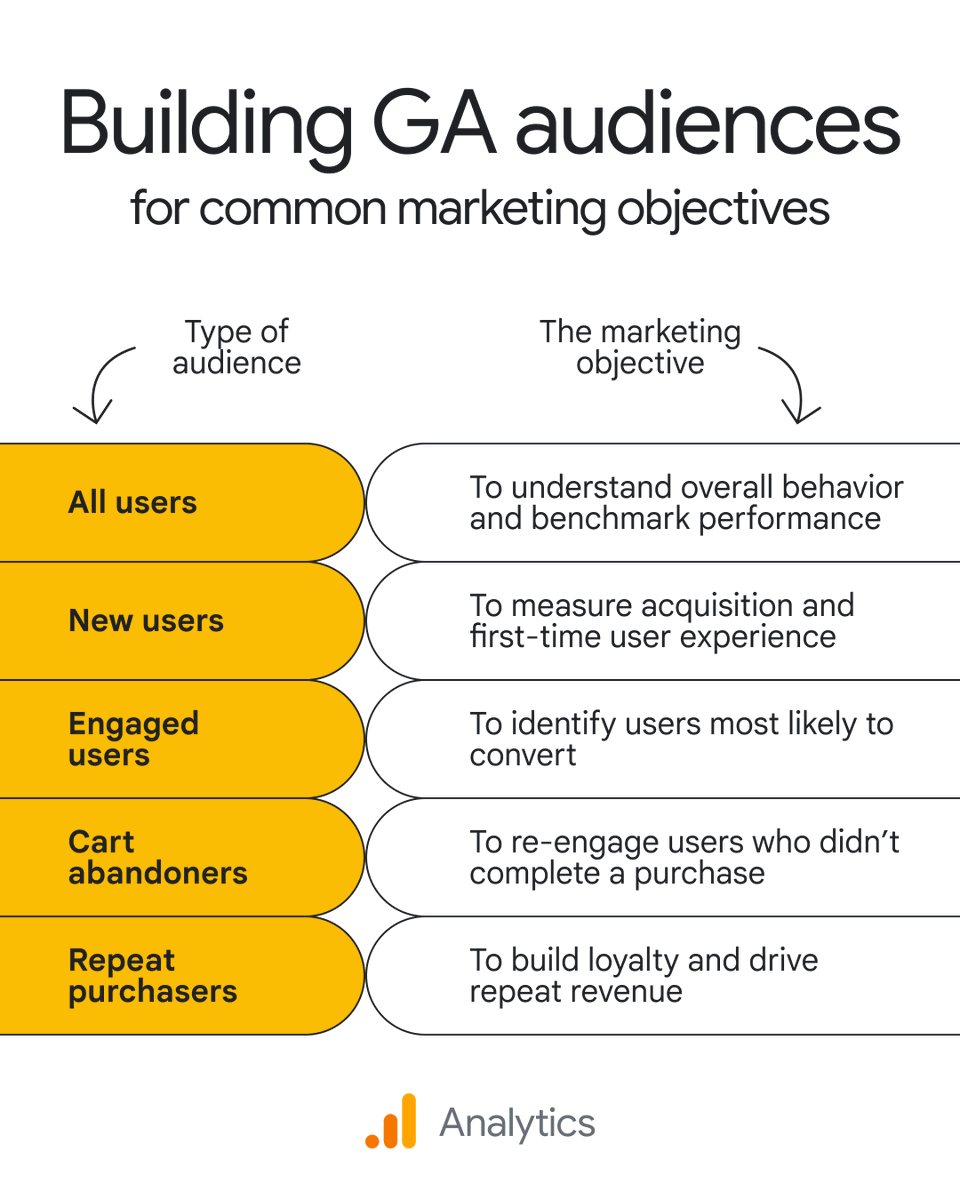
Reach the right users with the right message 📊
Google Analytics audiences help you connect your marketing objectives to the users who matter most.
Save this cheat sheet to reference when building your audiences. Learn more → https://t.co/urf0dnagbY
I made $14K in 30 days with an AI system that builds & runs ads for me.
No team
No stress
Just automation
It:
Generates 100+ variations weekly
Auto-repeats top performers
Works with 1 click
Want it? Im giving it away FREE for 24 hrs.
Like❤️, RT 🔁, comment “Send” (must follow)
I compiled 1,000+ n8n automation templates you can copy & paste into your business or sell to other companies.
Swipe & deploy systems for:
– Lead gen
- Email automation
- Content creation
– CRM
– AI workflows
– Slack/Discord bots
… and more.
1. 🩷 + 🔁 this post
2. Comment “YES” and I’ll send it over.
@zomato delivery partner bike is down. And he is not able to deliver my order. I have to leave for th station. You services are so cheap. I need refund.
Ecommerce SEO: a major opportunity for large stores can involve achieving the Top Quality Store badging, which can give products a ranking boost.
Some of the TQS categories (Shipping, Returns, Browsing, Purchase, and Store Rating) can be difficult to immediately have an impact on, with the Browsing Experience category being one that can have more wiggle room than others.
For instance, I often see stores that don't have a competitive rating for the 'high resolution images' sub-section. You may have a 'Good' rating for this criteria, but it can be possible to get to 'Great' through some improvements.
The major difficulty with this report is that while it does tell you the percentage of images that aren't classified as 'high res', there is no dataset within GMC Next that allows you to see the collection of images that are being categorised in this way.
This is where your crawler of choice comes in, where you'll need to compile a list of all relevant product images to find out the file size and whether there are any clear issues in the trends for the smaller/lower res images that are being flagged within the crawl data.
Tip: the approach I used recently for a client of mine involved extracting <image:loc> data from the product sitemap, uploading that list of URLs to Ahrefs and specifying that the image assets are the focus for the crawl. This allows you to run a relatively fast crawl to gain access to an important subset of the data.
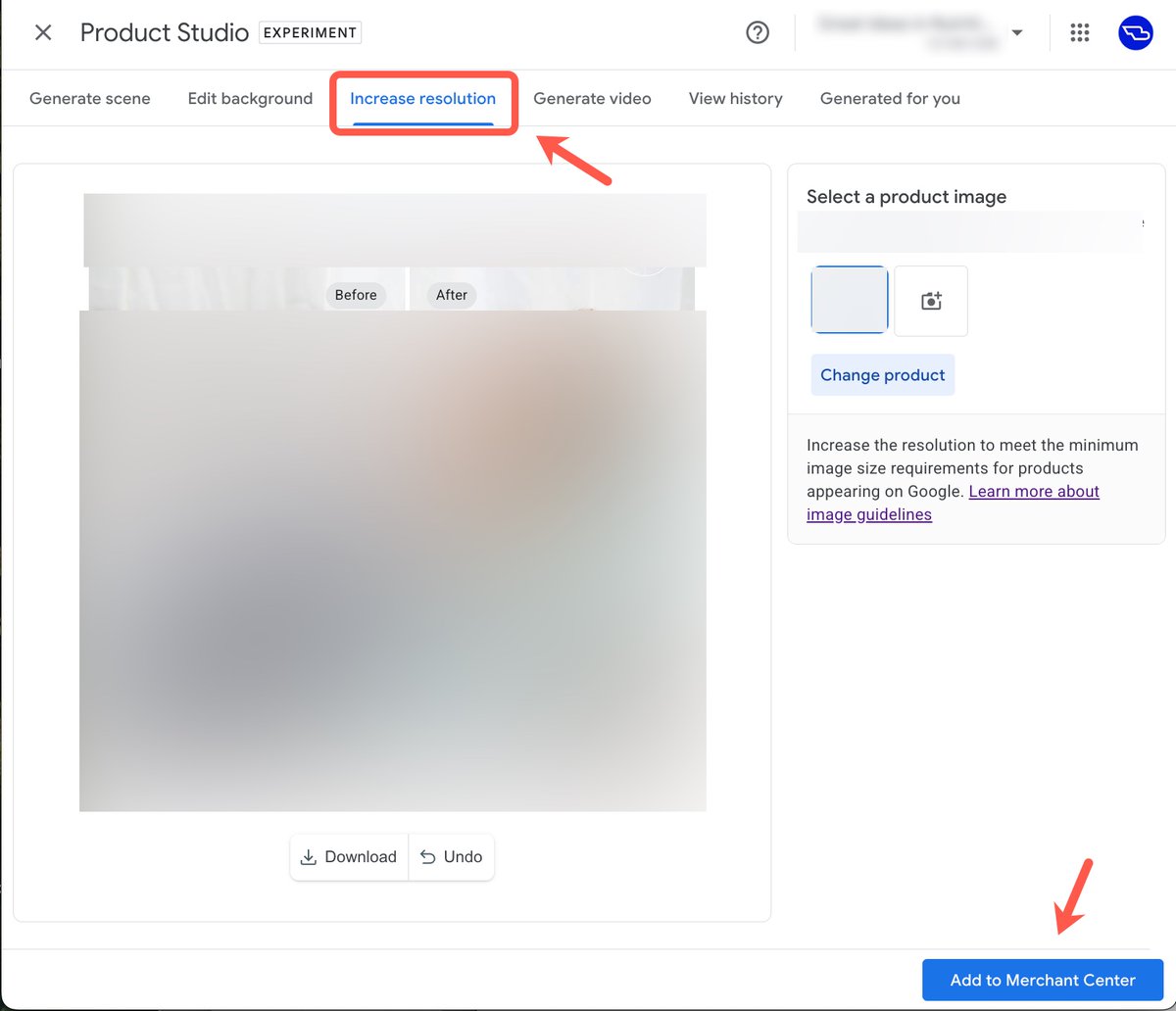
Once you've found your list of low res images that are for products that are in stock (don't worry about out of stock products for this process), you can then use the various features within Product Studio within GMC Next to enhance the existing product images.
While Product Studio is quite an impressive tool within GMC Next, it's important to understand exactly what the impact is of your changes and that the changes will be taking place within the feed itself, not on the PDP – which may also benefit from having a higher quality preview of the product.
There are various tabs within Product Studio where you're able to edit the background, generate a scene for the product, or increase the resolution, all being features that can be especially useful if the product image that you're working with isn't up to scratch.
Another point worth raising here is that by adding a higher res image, which may also have some additional engaging attributes (that still represent the product accurately), this will add an additional image to your free listing result. This essentially means that you have the potential to also influence the 'images per offer' sub-section within Browsing Experience.
If you're looking for opportunities to gain the Top Quality Store badging for your store, but you're struggling to be competitive, make sure to investigate the various feed-specific opportunities within the Browsing Experience category by using the Product Studio tool within GMC Next.
Optimizing for Traditional VS AI Search (SEO vs GEO) - I've created a chart featuring the differences/similarities between them through 👇
* User search behavior criteria
* Areas of optimization
* Goals and metrics
As you can see, there's a big overlap and the major differences come in user search behavior 👀
Link to bigger version here where I’ll be also adding the charts as tables: https://t.co/iajBoqWhVR
Thanks so much to @darth_na and @chrisgreenseo for their feedback/validation!
I built an MCP that chats directly with your Google Search Console data! With just a single-line prompt, you can instantly generate insightful and interactive SEO visualizations.
Check out more use cases in my quick 3-minute video:
https://t.co/3NkE3rS0Ng




![Tech_Marsha's tweet photo. 🚨 119𝐆𝐁+ 𝐆𝐎𝐎𝐆𝐋𝐄 𝐃𝐑𝐈𝐕𝐄 — 𝐀𝐋𝐋 𝐏𝐀𝐈𝐃 𝐂𝐎𝐔𝐑𝐒𝐄𝐒 🚨
𝐌𝐢𝐬𝐬𝐞𝐝 𝐢𝐭 𝐥𝐚𝐬𝐭 𝐭𝐢𝐦𝐞? 𝐈’𝐦 𝐝𝐫𝐨𝐩𝐩𝐢𝐧𝐠 𝐢𝐭 𝐚𝐠𝐚𝐢𝐧. 👌
This vault helped agencies close $9K+ clients using proven systems.
Inside the Drive:
📁 AI & Automation
📁 Ethical Hacking
📁 Cybersecurity
📁 Prompt Engineering
📁 Google Cloud
📁 Machine Learning
📁 DevOps + CI/CD
📁 Docker & Kubernetes
📁 Blockchain
📁 Power BI
📁 React + Node
📁 Cloud Security
📁 Linux
📁 Pen Testing
📁 Data Analytics
📁 Data Science
📁 Big Data
📁 SQL
📁 Tableau
📁 Python
📁 AWS
📁 Java
Everything organized. Everything premium. 119GB+ value.
Get it:
✔ Follow @Tech_Marsha [MusT]
✔ Like & RT
✔ Comment “ NEED ” To Get Auto DM.
⚠️ No follow = No Access ⚠️](https://pbs.twimg.com/media/HCAjZpMakAAMD4P.jpg)