SpaceKit 0.2.7 is out 🔥
The latest release of SpaceKit introduces several powerful features, along with seven brand-new interactive tutorial chapters.
In this guided experience, you’ll build and test a coin flip smart contract from scratch, learning how to handle randomness, token interactions, and more.
What’s New in This Release
This version adds new capabilities to help you express logic more clearly and test smart contracts more effectively.
1) Compare BigUInt Values with .min and .max
You can now retrieve the minimum or maximum of two BigUInt values using the .min and .max static methods.
Use these methods to simplify numeric comparisons within your contract logic.
2) Check for Smart Contracts with isSmartContract
Use the isSmartContract opcode to verify whether an Address represents a contract or a wallet. This makes it easy to restrict access to specific endpoints:
3) Add Randomness to Your Contracts
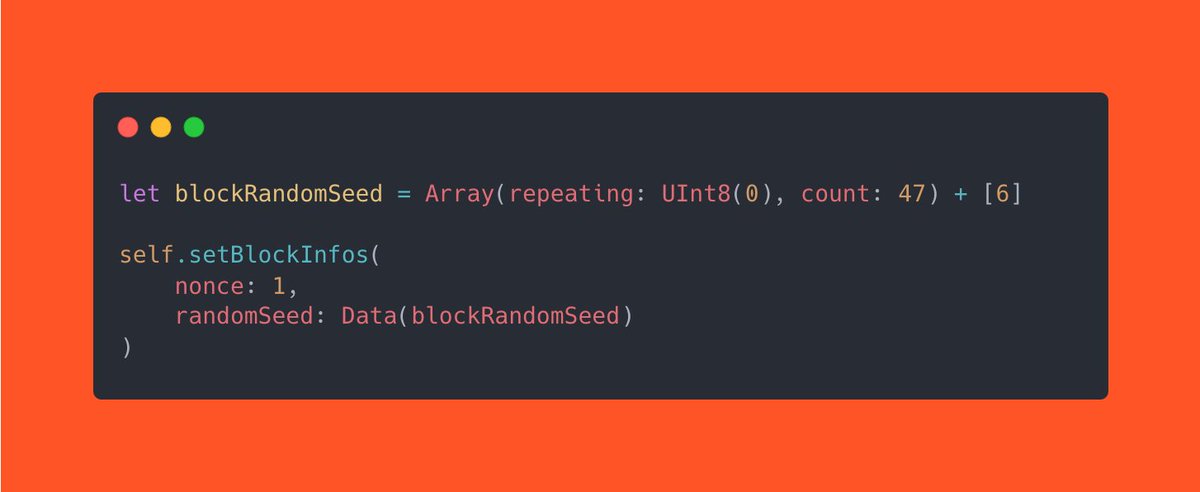
The SwiftVM now supports randomness, allowing you to test smart contracts that depend on random number generation. To ensure tests are deterministic, you can provide a custom seed:
Use this feature when simulating behavior like betting outcomes or lottery draws.
4) Return Mappers from View Functions
You can now return SingleValueMapper results directly from view functions. Mark your custom mappers as public to automatically generate the corresponding view:
This makes your data model both powerful and easy to access.
New Interactive Tutorial: Build a Coin Flip Contract
Start from a blank slate and implement a full-featured coin flip smart contract in Swift. In this seven-part tutorial, you’ll:
- Define admin-only endpoints to set minimum and maximum bet amounts
- Let users bet using either EGLD or ESDT tokens
- Use randomness to resolve outcomes
- Simulate success and failure cases in the SwiftVM
- Explore advanced testing features like setting block time, random seeds, multiple caller contexts, and various token types
A preview of the final contract view is included so you can visualize the outcome as you build.
To explore these updates, try the latest tutorials or upgrade your existing projects to use SpaceKit 0.2.7.
Ready to dive in? Let’s flip the coin.
Tips: The second argument of the SpaceKit require function is an error message and is marked as an autoclosure
This means it is only evaluated when needed, so if the assertion is true, the error message is never computed, resulting in no gas consumption at all
🚀 SpaceKit 0.2.6 is out!
This update introduces a new type: TokenIdentifier, a Buffer designed for handling operations on tokens.
You can use it as an endpoint parameter or instantiate it directly from a Buffer or a string literal:
It also includes helper functions to validate identifiers:
More details on the release: https://t.co/vJ9SytGt0W