Agents will become a common way people shop. So today we are releasing 3 tools to make adding commerce to those agents trivial:
- Checkout Kit: embed commerce widgets and checkout(!) directly into your agent and chat. This is already being used by Microsoft’s @Copilot.
- Shopify Catalog: low latency global product search across millions of merchants
- Universal Cart: shop from any store, anywhere, in one cart
With these, you can build seamless embedded commerce experiences quickly, starting with all the best products by the best merchants in the world instead of having to sign them all up individually. No need to build a complex new checkout, or dealing with regulatory marketplace rules. Commerce just plugs in and feels seamless in conversations.
We believe commerce should be everywhere people are, so we’re making that as easy as possible for the AI age.
The result?
When I open Cursor to build, it’s not guessing what I want.
It’s working with real context: users, goals, system plans, and rationale.
Now I’m building faster, with way less friction—and way fewer blind spots.
Today I used custom agents to go from idea to fully scoped MVP. Research, strategy, specs, design, user stories—all packed into one doc.
Now when I open Cursor, the IDE isn’t guessing. It’s building with full context.
Less friction. Better output. Way faster.
Then I had the Product Manager merge everything into a single, clean spec doc:
•Research
•Strategy
•Business case
•Design direction
•Technical roadmap
Everything in one place.
We just dropped UX as a title at @Shopify. Same for Content Design. If you design, you're a Designer. If you write, you're now a Writer. Simpler. Better. (1/3)
𝗣𝗿𝗲𝗱𝗶𝗰𝘁𝗶𝗼𝗻: 𝗜𝗻𝘁𝗲𝗿𝗳𝗮𝗰𝗲𝘀 𝘄𝗶𝗹𝗹 𝗳𝘂𝗻𝗱𝗮𝗺𝗲𝗻𝘁𝗮𝗹𝗹𝘆 𝘀𝗵𝗿𝗶𝗻𝗸
I see a lot of founders still building apps the same way they did before we had AI.
But if they don’t adapt, they will miss out.
Here’s why:
The way we interact with computers is fundamentally changing.
Historically, interfaces helped us communicate with computers because they couldn’t understand us. So we needed buttons, screens, and structured flows to tell them what to do and what we wanted.
But in the age of AI, that’s no longer relevant. We need to fundamentally rethink human-computer interaction.
AI is getting incredibly good at understanding intent. It can predict what we want before we even say it. It’s faster than any human, and with the right context, it can behave almost exactly like you would.
This has massive implications for interfaces and how we design products.
Take food delivery apps as an example.
Ordering food today takes 10+ clicks. You scroll, filter, customize, enter details, pick a payment method. Way too much effort for such a simple task.
Now, imagine an AI-powered flow.
The AI already knows your preferences and dietary restrictions.
Payment is set.
It suggests the best meal for you, right now.
You hit one button or just say "Go" and the job’s done.
Sure, the final step still needs your approval (for now), but everything else just happens.
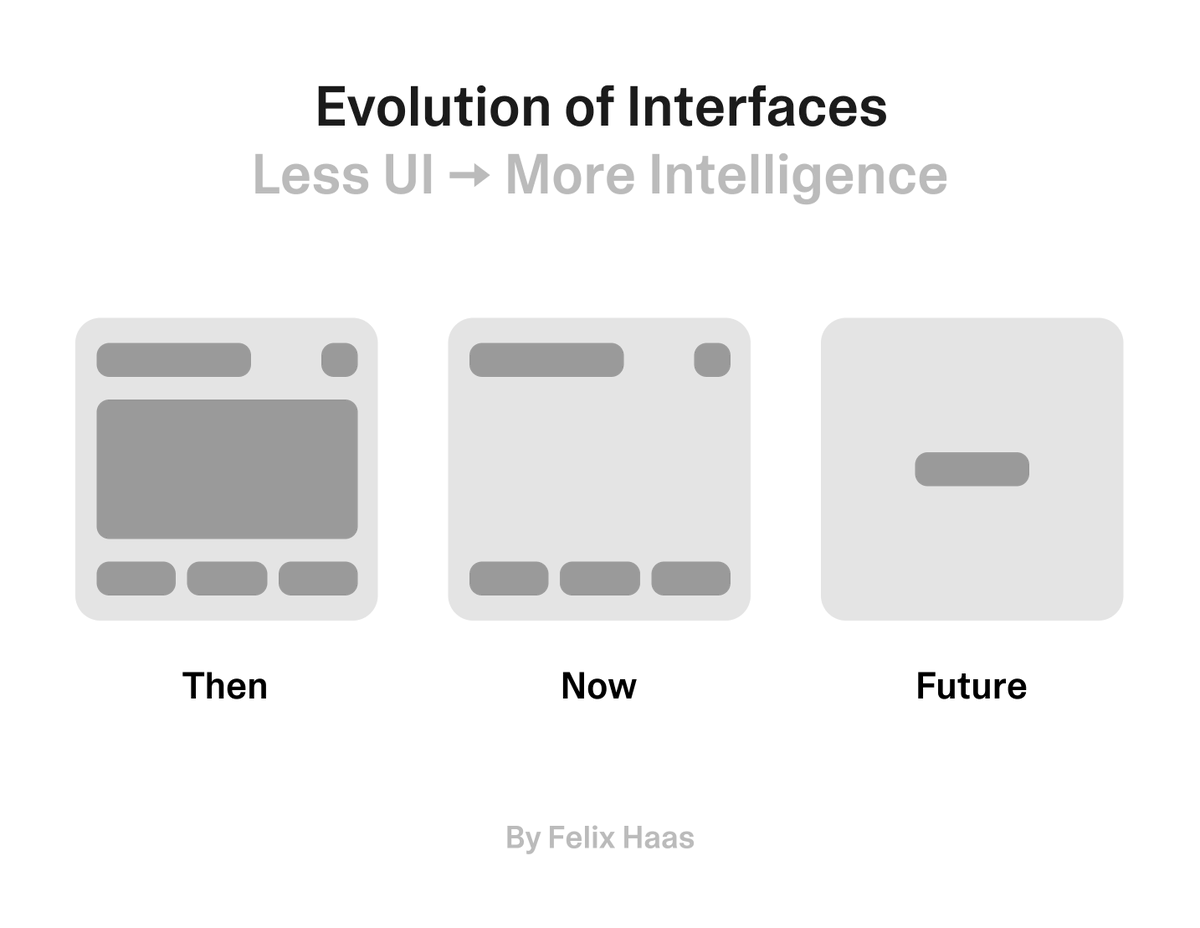
The UI of food delivery apps and most service-based experiences will become obsolete.
Once AI knows who you are and how you think, you won’t need a traditional interface to get things done. At least not the way we think about UI today.
We’re moving from apps with 10 screens to apps with one.
From cluttered interfaces to minimal triggers.
The smarter the system, the less UI you need.
Eventually, the best UI might be no UI at all.
And the sooner you prepare for that, the better.
Spotify is already on this path. The more I use it, the less I search. The UI is still there, but I barely need it. It’s optional.
So think about this when designing interfaces.
What are the most essential elements I truly need?
And what can I reduce to the absolute minimum?
The less, the better. That’s never been more important than it is today.
Interfaces aren’t going away.
They’re just becoming invisible.
What's your take on this?
I made a widget that lets you slap a ZYN can on the bottom of your site.
Because your code didn’t write itself.
It was powered by pure nicotine focus.
💻🧃 https://t.co/bpx5luCVSC
Drop this:
<script src="https://t.co/wjPgwqvhtr"></script>
#zyn#coding#Zynners