🚨 Herhangi birinin sesini 3 saniyede kopyalar ve ücretsiz!
Zaten 3.600 yıldız almış, tamamen yerel olarak çalışıyor ⬇️
Başka yerlerde aylık 1320 dolara mal olan bir özellik artık açık kaynaklı.
→ 646 dil, ElevenLabs sadece 32 dili destekliyor
→ Sesinizi özelleştirin: cinsiyet, yaş, aksan, ton, duygu, lehçe
→ Sadece bir YouTube bağlantısı ekleyin
Otomatik transkripsiyon → Çeviri → Ses değiştirme → MP4 çıktısı
→ Küresel dikte: Herhangi bir yazılımda ⌘ + ⇧ + Boşluk tuşlarına basın ve konuşun.
→ Demucs, arka plan müziğini korurken vokalleri ayırır.
→ Pyannote, hangi cümleyi kimin söylediğini otomatik olarak etiketler.
→ Toplu işlem kuyruğu: 50 video ekleyin ve işlem sona erer.
→ Dahili MCP, Claude ve İmleç doğrudan ayarlanabilir.
→ Dahili Meta AudioSeal filigranı
Bağlantı 🔗 👇
EV ALMADAN ÖNCE KESİNLİKLE BAKMANIZ GEREKEN SİTE
Hangi saatlerde güneşin binaya nereden vurduğunu gösteren mükemmel bi site. Ev alırken, kiralarken mutlaka bakılması gereken şeylerden.
el ingeniero que construyó Claude Code acaba de publicar un video de 28 minutos sobre cómo escribir prompts que realmente funcionan
he visto cursos de 300$ que no cubren lo que él muestra en los primeros 10 minutos
archivos CLAUDE.md, atajos de memoria, sesiones paralelas, patrones de prompting
todo en un video y completamente gratis
funciona seas desarrollador, principiante o alguien que lleva meses usando Claude
a partir de esto preparé 18 cosas que puedes copiar y usar en Claude hoy mismo
guía completa en el artículo de abajo
Ton téléphone vient d’être volé.
Tu ouvres Google Maps.
Dernière position connue : il y a 3 heures.
Avant, c’était game over. Aujourd’hui, non.
Voici tout ce qu’Android peut faire pour toi et que 95% des gens n’ont pas activé:👇
[ Ajoutez en signet 🔖 vous en aurez besoin]
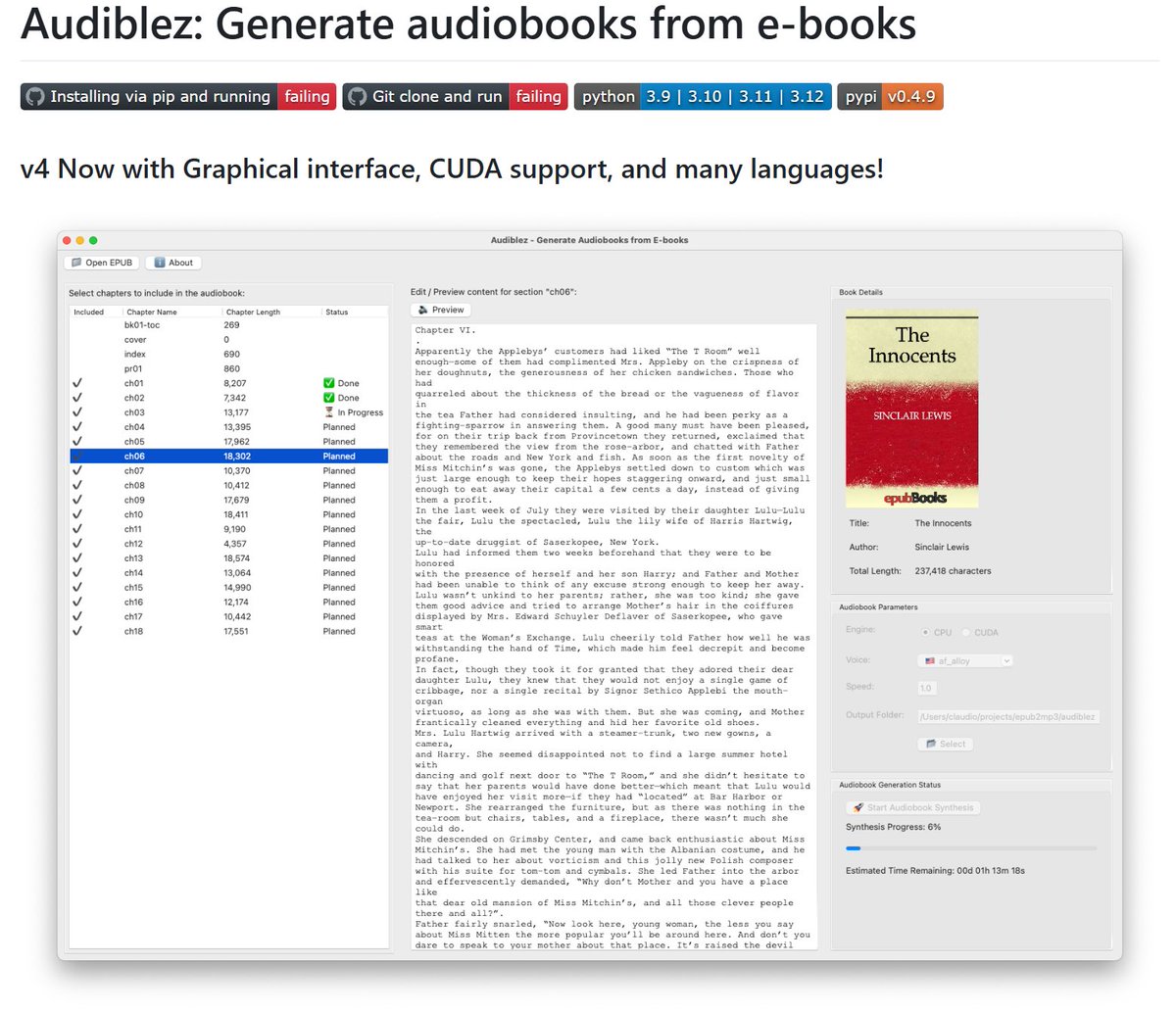
Un outil qui télécharge n’importe quelle vidéo YouTube, supprime proprement la voix, transcrit, traduit dans plus de 100 langues, clone la voix originale et redouble tout.
En moins de 2 minutes. 100 % local. Gratuit.
GPT Image 2 + Seedance 2.0 on @mitte_ai
Jump Rope Choreography
I’m still testing different storyboard approaches. I don’t think there’s a single “correct” storyboard system. You should use a storyboard style that fits the specific scene and type of video you want to create.
Even though current video models don’t follow storyboards 100% yet, I think future versions will dramatically improve in this area and storyboard usage will become essential.
Right now, you can already generate useful storyboards just by describing your idea. Soon, I’ll also share a prompt system I’ve been building that seems to work well for different storyboard types.
You can find the Seedance 2.0 prompt used for this video in the replies.
10 GitHub repos that print money while you sleep:
1. AutoHedge
https://t.co/vpAFgGlRRX…
2. Vibe-Trading
https://t.co/IUiBQyyuoJ…
3. Claude Ads
https://t.co/7012CDa2sx…
4. Toprank
https://t.co/15q8wnFqNB…
5. Fincept Terminal
https://t.co/mEvDhPbhn1…
6. Agentic Inbox
https://t.co/5sj1lAtIIi…
7. ClawRouter
https://t.co/1ZpLub24xv…
8. Camofox Browser
https://t.co/QM9xhWBQv4…
9. Open Higgsfield AI
https://t.co/HG8TM4Wj6J…
10. Hyperframes
https://t.co/xuJo3sY5it…
If you’d love to see more content like this, don’t forget to follow @I_am_Aiabir for more AI magic.
UN ARCHIVO QUE LE DA A TU IA AÑOS DE EXPERIENCIA EN DISEÑO
> 2.000+ DESIGN.md de los mejores productos del mercado
> Todo está ahí: colores, tipografía, espaciado, componentes
> La IA lo lee antes de generar, por fin tiene un marco de referencia real
> Gratis, compatible con Claude Code, Cursor, Lovable, Bolt
> Tú eliges un estilo, lo añades a tu repositorio
CapCut está quedándose obsoleto 👋
Gemini ahora hace TODO:
escribe, edita y monta videos en minutos.
Sin skills. Sin esfuerzo. Sin excusas.
7 prompts y listo👇🏽
CLAUDE + LINKEDIN = DINERO FÁCIL Y RÁPIDO.
Sin saber nada. Sin editar. Sin enseñarte.
Te dejo los 12 prompts exactos para imprimir dinero con esta herramienta.
URGENTE: O Claude agora monta o seu ecossistema de liberdade financeira melhor que muito consultor por aí.
Confira 8 prompts para automatizar sua clareza, lucros e paz mental:
20 ways to use Claude in 2026:
(bookmark this. You'll need it tomorrow.)
1. Bookmark this image. You'll need it tomorrow.
2. Full guide + prompts at: https://t.co/psB7XxAv8w.
3. Don't pay anything. It's free in the email.
---
1. ASK → Chat
☑ Quick questions. Quick answers.
☑ Don't use Cowork for "write a good email?"
2. THINK → Opus 4.7
☑ The smartest model. Always switch to it.
☑ For deep work, complex writing & thinking.
3. SPEED → Sonnet 4.6
☑ Faster, cheaper, still excellent.
☑ Use it for grammar, summaries, short answers.
4. REASON → Extended Thinking
☑ Toggle it on for hard problems.
☑ Turn it off for simple ones (saves tokens).
5. BUILD → Cowork
☑ Where serious work happens. .docx, .xlsx, .pptx.
☑ Point it at a folder. It works like an employee.
6. SHIP → Claude Code
☑ For developers (and curious non-devs).
☑ Build websites and apps from your terminal.
7. MODEL → Claude in Excel
☑ Install the add-in from the Excel store.
☑ Real formulas, real models, no copy-paste.
8. SLIDES → Gamma connector
☑ One prompt. Full presentation. With research.
☑ Connect Gamma inside Claude.
9. MOCKUP → Claude Design
☑ Go to claude .ai/design. Build websites in 1 hour.
☑ Upload a DESIGN .md. Export to Canva, PDF.
10. BROWSE → Claude in Chrome
☑ A browsing agent. Reads any page for you.
☑ Acts inside the browser, not just talks about it.
11. CLICK → Computer Use
☑ Settings > Turn it on.
☑ Claude clicks, types, browses on your Mac.
12. REMOTE → Dispatch
☑ Connect your phone. Text a task.
☑ It works on your computer while you're away.
13. SEARCH → Web Search
☑ Click the '+'. turn it on.
☑ It reads the live web before answering.
14. INVESTIGATE → Research
☑ For deep multi-source reports.
☑ 13 minutes. 50+ sources. One markdown file.
15. TRIGGER → Skills
☑ "Use the skill-creator to build a skill for [task]."
☑ Type /skill. It fires automatically.
16. STACK → Plugins
☑ Cowork > Customize > Browse Plugins.
☑ Bundles of skills for marketing, legal, sales.
17. PERSIST → Projects
☑ One Project per recurring deliverable.
☑ Upload one gold-standard example.
18. AUTOMATE → Scheduled Tasks
☑ Every Monday at 7am, Claude runs your report.
☑ Set it up once. No manual work.
19. CONNECT → Connectors
☑ Gmail, Drive, Slack, Notion, Granola, Calendar.
☑ 50+ apps. Claude reads, writes & acts inside.
20. RENDER → Artifacts
☑ Side pane where Claude opens charts, docs.
☑ Interactive. Editable. Shareable.
---
To download all of my other Claude infographics:
Step 1. Go to https://t.co/psB7XxAv8w.
Step 2. Subscribe for free. Don't pay anything.
Step 3. Open my welcome email (most skip this).
Step 4. Hit the automatic reply button inside.
Step 5. Download my infographics from my Notion.
Bonus. Enjoy my best copy-paste prompts, too.












![rubenhassid's tweet photo. 20 ways to use Claude in 2026:
(bookmark this. You'll need it tomorrow.)
1. Bookmark this image. You'll need it tomorrow.
2. Full guide + prompts at: https://t.co/psB7XxAv8w.
3. Don't pay anything. It's free in the email.
---
1. ASK → Chat
☑ Quick questions. Quick answers.
☑ Don't use Cowork for "write a good email?"
2. THINK → Opus 4.7
☑ The smartest model. Always switch to it.
☑ For deep work, complex writing & thinking.
3. SPEED → Sonnet 4.6
☑ Faster, cheaper, still excellent.
☑ Use it for grammar, summaries, short answers.
4. REASON → Extended Thinking
☑ Toggle it on for hard problems.
☑ Turn it off for simple ones (saves tokens).
5. BUILD → Cowork
☑ Where serious work happens. .docx, .xlsx, .pptx.
☑ Point it at a folder. It works like an employee.
6. SHIP → Claude Code
☑ For developers (and curious non-devs).
☑ Build websites and apps from your terminal.
7. MODEL → Claude in Excel
☑ Install the add-in from the Excel store.
☑ Real formulas, real models, no copy-paste.
8. SLIDES → Gamma connector
☑ One prompt. Full presentation. With research.
☑ Connect Gamma inside Claude.
9. MOCKUP → Claude Design
☑ Go to claude .ai/design. Build websites in 1 hour.
☑ Upload a DESIGN .md. Export to Canva, PDF.
10. BROWSE → Claude in Chrome
☑ A browsing agent. Reads any page for you.
☑ Acts inside the browser, not just talks about it.
11. CLICK → Computer Use
☑ Settings > Turn it on.
☑ Claude clicks, types, browses on your Mac.
12. REMOTE → Dispatch
☑ Connect your phone. Text a task.
☑ It works on your computer while you're away.
13. SEARCH → Web Search
☑ Click the '+'. turn it on.
☑ It reads the live web before answering.
14. INVESTIGATE → Research
☑ For deep multi-source reports.
☑ 13 minutes. 50+ sources. One markdown file.
15. TRIGGER → Skills
☑ "Use the skill-creator to build a skill for [task]."
☑ Type /skill. It fires automatically.
16. STACK → Plugins
☑ Cowork > Customize > Browse Plugins.
☑ Bundles of skills for marketing, legal, sales.
17. PERSIST → Projects
☑ One Project per recurring deliverable.
☑ Upload one gold-standard example.
18. AUTOMATE → Scheduled Tasks
☑ Every Monday at 7am, Claude runs your report.
☑ Set it up once. No manual work.
19. CONNECT → Connectors
☑ Gmail, Drive, Slack, Notion, Granola, Calendar.
☑ 50+ apps. Claude reads, writes & acts inside.
20. RENDER → Artifacts
☑ Side pane where Claude opens charts, docs.
☑ Interactive. Editable. Shareable.
---
To download all of my other Claude infographics:
Step 1. Go to https://t.co/psB7XxAv8w.
Step 2. Subscribe for free. Don't pay anything.
Step 3. Open my welcome email (most skip this).
Step 4. Hit the automatic reply button inside.
Step 5. Download my infographics from my Notion.
Bonus. Enjoy my best copy-paste prompts, too.](https://pbs.twimg.com/media/HHtQfCKbcAAqARq.jpg)


