Linux Roadmap
1. Linux Fundamentals
- What is Linux?
- Linux distributions
- File system hierarchy
2. Install Linux
- Choose a distro
- Install on a VM or dual boot
- Basic system setup
3. Master the Terminal
- Bash shell
- Navigation commands
- File and directory management
4. File Permissions
- Users and groups
- chmod, chown, chgrp
- Permission management
5. Text Processing
- cat, less, head, tail
- grep, sed, awk
- find and locate
6. Process Management
- ps, top, htop
- kill and nice
- Background and foreground jobs
7. Package Management
- apt, dnf, yum, pacman
- Installing and updating software
- Managing repositories
8. Shell Scripting
- Variables
- Loops and conditions
- Functions and automation
9. Networking
- IP addresses
- SSH
- Ping, curl, wget
- Network troubleshooting
10. System Administration
- Services with systemd
- Cron jobs
- Disk and memory management
- Log files
11. Security
- Firewalls
- SSH hardening
- User authentication
- File encryption
12. Real-World Projects
- Host a web server
- Automate backups
- Build a home server
- Deploy applications with Docker
Grab Linux Ebook: https://t.co/DeHjJ1X20N
DevOps Interview Series: #3
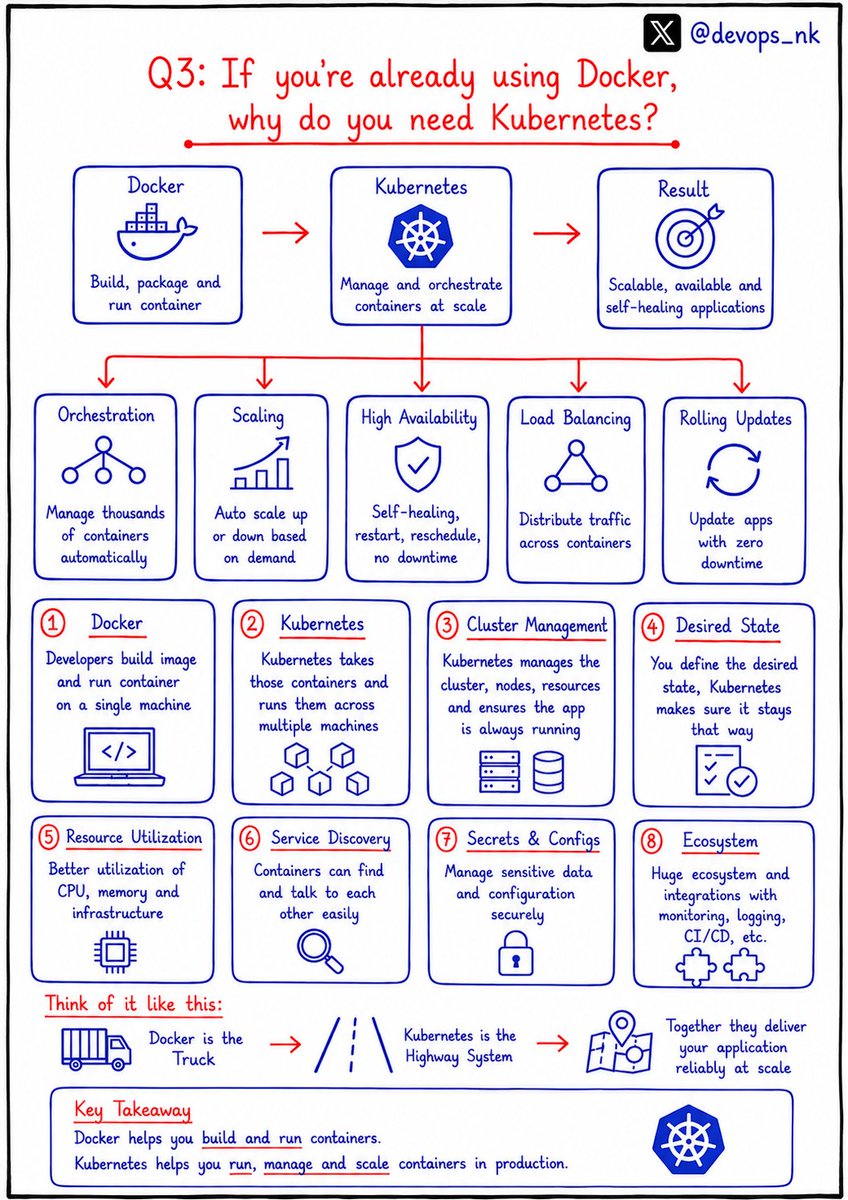
Q: If you're already using Docker, why do you need Kubernetes ?
Many candidates answer:
❌ "Kubernetes is used to run Docker."
That's not the complete answer.
Docker and Kubernetes solve different problems.
🐳 Docker packages your application into containers.
☸️ Kubernetes manages those containers in production.
Why do companies use Kubernetes?
✅ Auto Scaling
✅ Self-Healing
✅ Load Balancing
✅ Rolling Updates & Rollbacks
✅ High Availability
✅ Service Discovery
✅ Secrets & ConfigMaps
✅ Automated Container Orchestration
Best interview one-liner:
Docker is for containerization. Kubernetes is for container orchestration.
This is one of the most common DevOps interview questions.
Follow @devops_nk for more DevOps interview questions.
WHAT IS gRPC?
DEFINITION
-> gRPC (Google Remote Procedure Call) is a high-performance, open-source framework for communication between distributed applications
-> It enables clients and servers to communicate efficiently using Remote Procedure Calls (RPCs)
-> Uses HTTP/2 for transport and Protocol Buffers (Protobuf) for data serialization
CORE FEATURES
HIGH PERFORMANCE
-> Uses binary serialization with Protocol Buffers
-> Faster and more efficient than text-based APIs like JSON
HTTP/2 SUPPORT
-> Multiplexes multiple requests over a single connection
-> Supports header compression and bidirectional streaming
CODE GENERATION
-> Automatically generates client and server code
-> Supports many programming languages
CROSS-PLATFORM
-> Works across different operating systems and programming languages
-> Ideal for distributed systems and microservices
HOW gRPC WORKS
-> Client calls a remote method (RPC)
-> Request is serialized using Protocol Buffers
-> Request is sent over HTTP/2
-> Server receives and processes the request
-> Server executes business logic
-> Response is serialized using Protocol Buffers
-> Response is returned to the client
RPC TYPES
UNARY RPC
-> Client sends one request and receives one response
SERVER STREAMING RPC
-> Client sends one request and receives multiple responses
CLIENT STREAMING RPC
-> Client sends multiple requests and receives one response
BIDIRECTIONAL STREAMING RPC
-> Client and server exchange multiple messages simultaneously
KEY COMPONENTS
PROTOBUF (.proto) FILE
-> Defines services and message structures
-> Acts as the contract between client and server
SERVICE
-> Collection of remote procedures (methods)
MESSAGE
-> Structured data sent between client and server
STUBS
-> Auto-generated client and server code used for communication
KEY CHARACTERISTICS
-> HIGH PERFORMANCE
-> Optimized for low latency and high throughput
-> STRONGLY TYPED
-> Uses Protocol Buffers for strict data structures
-> LANGUAGE AGNOSTIC
-> Supports Java, Go, Python, C#, Node.js, Rust, and many others
-> SCALABLE
-> Ideal for microservices and cloud-native applications
ADVANTAGES
-> Very fast and efficient communication
-> Smaller payload sizes than JSON APIs
-> Automatic code generation
-> Supports streaming communication
-> Excellent for microservices architecture
DISADVANTAGES
-> Harder to debug than REST APIs
-> Less human-readable because it uses binary data
-> Browser support requires gRPC-Web
-> Learning Protocol Buffers adds complexity
REAL-WORLD USE CASES
-> Communication between microservices
-> Cloud-native applications
-> Real-time streaming systems
-> IoT platforms
-> Machine learning services
-> Internal APIs for large-scale systems
gRPC VS REST
-> gRPC uses HTTP/2, while REST commonly uses HTTP/1.1 or HTTP/2
-> gRPC uses Protocol Buffers, while REST commonly uses JSON
-> gRPC is optimized for speed and low latency, while REST prioritizes simplicity and broad compatibility
-> gRPC supports bidirectional streaming, while REST typically follows a request-response model
BEST PRACTICES
-> Design clear and reusable .proto files
-> Use streaming only when necessary
-> Implement authentication using TLS and tokens
-> Handle deadlines and request timeouts
-> Enable logging and monitoring for RPC calls
-> Version APIs to maintain backward compatibility
BACKEND ENGINEERING HANDBOOK
-> Grab Backend Engineering Handbook
-> https://t.co/t9mqUuRbjx
AI is not an option anymore. (FREE visual guide with Projects)
So this weekend, I decided to share one of my most powerful visual guides with this amazing community.
🎁 FREE for a limited time: AI Infrastructure Engineer Roadmap with 8 Production-Grade Projects
If you find it valuable:
❤️ Like this post
🔁 Share it with others (to help them to grab it)
💬 Leave a comment (quick feedback)
Your support helps me keep building and sharing simplified visual content that makes learning faster and easier for everyone.
Grab your free copy below 👇
https://t.co/jDN91mBamm
🐧 Day 23/30 — #Linux
Environment variables are one of the most powerful features in Linux.
They store configuration values that programs and the shell use to determine how the system behaves.
Linux Environment Variables – PATH, HOME, and Custom Variables
Understanding environment variables helps you configure applications, customize your shell, and manage development environments efficiently.
What Are Environment Variables?
Environment variables are named values available to the shell and running processes.
They control things such as:
→ Executable search paths
→ User home directories
→ Language settings
→ Application configuration
→ Temporary file locations
Viewing Environment Variables
→ printenv
Displays all environment variables.
→ env
Another command for listing environment variables.
→ echo $PATH
Displays the value of the PATH variable.
PATH – Executable Search Path
The PATH variable tells Linux where to search for executable programs.
Example:
→ echo $PATH
Typical output:
→ /usr/local/bin:/usr/bin:/bin
When you type a command like:
→ python
Linux searches each directory listed in PATH until it finds the executable.
HOME – User Home Directory
The HOME variable stores the path to the current user's home directory.
Example:
→ echo $HOME
Typical output:
→ /home/username
Many applications use HOME to store user-specific configuration files.
Creating Custom Variables
You can create your own environment variables.
Example:
→ export PROJECT_NAME="LinuxCourse"
Access it using:
→ echo $PROJECT_NAME
Making Variables Persistent
Temporary variables disappear after you close the terminal.
To make them permanent, add them to shell configuration files such as:
→ ~/.bashrc
→ ~/.profile
Then reload the configuration:
→ source ~/.bashrc
Why Environment Variables Matter:
→ Customize your Linux environment
→ Configure development tools
→ Simplify command execution
→ Store application settings
→ Improve automation and scripting workflows
Mastering PATH, HOME, and custom environment variables gives you greater control over your Linux system and makes working from the command line far more efficient.
🐧 Grab Linux Ebook: https://t.co/DeHjJ1Wubf
#Linux #LinuxTutorial #EnvironmentVariables #Bash #LinuxCommands #ShellScripting #DevOps #SystemAdministration #OpenSource #100DaysOfCode