A tiny after-work project that got more real than I expected.
I often find an image I love, want to generate something with a similar direction, and then lose the prompt somewhere in my chats.
Meanwhile, friends keep asking me for the prompts behind my images.
So I vibe-coded picpromptlab: capture an image, turn it into a structured prompt, generate from it, then publish the useful ones.
Here’s the full flow in 35 seconds.
Would this be useful for your workflow too? #buildinpublic #AIimages #promptengineering #indiehacker
English adaptation of the Miniature World prompt by AI Aesthetic Treasury (translated creator name). The artwork is the creator's example. This adaptation has not been tested to reproduce it.
PROMPT
Transform my supplied landscape or architecture photograph into a refined vertical miniature scene. Preserve the original subject, terrain or architectural structure, roads or paths, viewpoint, lighting and time-of-day atmosphere. Render the materials as tangible model craftsmanship, including miniature vegetation, wood, stone, metal and tiny lights, while keeping the spatial logic believable. Depict one complete place, rather than toy packaging, a display base or a collage. No human figurines, text, signs, borders, divided panels, embedded photographs, logos, watermarks or repeated subjects.
REPLACE / KEEP
Replace the input landscape or building and adapt the materials to what is actually present. Keep its routes, structural relationships, viewpoint, light and time-of-day atmosphere. Preserve the complete-place composition when changing the surface treatment.
#buildinpublic #promptlibrary #stunprompt
Asked for a miniature landscape and got a generic toy display instead of the place in your photo?
Keep the geography in the brief.
In AI Aesthetic Treasury's alpine example, the red train follows the stone viaduct, the stream runs below its arches, and the mountain valley continues behind it. Model-like textures change the scale impression while those relationships keep the place legible.
The source prompt explicitly excludes packaging and a display base. Save that constraint with the example. In StunPrompt, keeping the creator's input and result together lets you check what changed before reusing the idea.
Try it with another landscape: identify the main route, terrain and viewpoint before asking for miniature materials.
English prompt in the first reply
#buildinpublic #promptlibrary #stunprompt
English adaptation of Liulang's Y2K computer-frame photo prompt. Creator: Liulang (romanized creator alias). The attached artwork is the creator's example; this adaptation has not been tested to reproduce it.
PROMPT
Use my uploaded photograph to create one clean, balanced vertical comparison with two clearly separated stacked regions, each occupying approximately half the image.
UPPER REGION — ORIGINAL PHOTO
Display the original photograph in full. Preserve its composition, subjects, environment, colors, lighting, proportions and photographic texture. Do not redraw, illustrate or pixelate this region. Do not deliberately darken, brighten, increase saturation or change its natural color relationships and atmosphere.
LOWER REGION — Y2K COMPUTER-FRAME REINTERPRETATION
Reinterpret the photograph as a small digital artwork presented inside a nostalgic computer window, digital frame, old program page or desktop-software frame. Draw on the visual language of Windows 95, Windows 98, early Windows XP and classic Paint: gray-white toolbars, pixel borders, menu bars, buttons, a title bar, scrollbars and a status bar. Make the result cleaner, cuter and more deliberately designed than an ordinary software screenshot.
First identify the original photo's subject, scene relationships and recognizable details. These may be a person, pet, building, landscape, street, food, drink, plant, vehicle or interior. Re-create those core elements as a lightly pixelated, computer-drawn or early-digital illustration inside the window's main content area. Preserve the original composition logic, subject silhouette, color relationships and memorable scene cues. The image may use simple illustration, low-resolution digital texture or restrained pixel art, while remaining clearly derived from the photograph above.
Add a restrained selection of small Y2K desktop accessories around the window, in its surrounding blank space or at the corners. Possible accents include a cursor arrow, folder, CD, hourglass, dialog box, Start button, speaker, music note, monitor, small camera, headphones, star, loading bar, message bubble, warning box, recycle bin, globe, search icon, drawing tool, pixel dinosaur, pixel flower, menu button or old system button. Treat these as optional supporting details, not a requirement to include every item. Leave breathing room and keep the desktop cute, nostalgic, relaxed and orderly. If useful, include only a few short English labels such as Start, OK, Loading, Menu, Hello, Wow or Cool, with tidy typography.
Keep the lower composition centered, upright, balanced and uncluttered. Place the computer frame centrally or slightly below center, using roughly 40–60% of the lower region's visible area. Leave space around it. The window is the principal visual container, with smaller icons outside or floating around it. Avoid a dense technical interface or a full-bleed collage.
Retain the upper photograph's natural colors. In the lower region, draw the main image colors from the source photograph and combine them with restrained retro interface colors: gray-white surfaces, pale gray borders, blue-violet, misty blue, pale yellow, light green, silver-gray, black pixel outlines, soft cream or a small fluorescent accent. Avoid harsh saturation or garish combinations. A gentle source palette should remain gentle; a more vivid photograph can supply the stronger colors inside the window.
The final image must read as an unchanged photograph above and a cute, nostalgic computer-framed reinterpretation below, with only a few pixel accessories. Avoid pixelating the entire image, altering the upper photograph, excessive lower-region complexity, crowded icons, decorations overpowering the subject, a frame that looks like an ordinary literal screenshot, inconsistent styles or painfully bright colors.
REPLACE / KEEP
Replace the input photo and the recognizable subject shown inside the window. Select a few suitable desktop accents and short labels. Keep the two-region hierarchy, the unchanged upper photograph, source-based identity and colors inside the window, and restrained supporting icons outside it.
#buildinpublic #promptlibrary #stunprompt
A retro computer frame works best when the prompt separates three kinds of instructions.
In Liulang's cow example:
• The upper photo stays photographic.
• Inside the Paint-style window, the cow keeps its brown-and-white patches, horns and pose, but becomes a digital illustration.
• Outside that window, folders, a cursor and a camera supply the nostalgic desktop language.
The frame is a container; the animal is still the subject. The source brief gives the window a 40–60% size budget within the lower half and treats icons as supporting details. Those are useful controls when adapting the idea to a pet, a street or a travel photo.
For a reusable rewrite in StunPrompt, split the brief into “original photo,” “window content” and “surrounding interface.” Change the subject inside the window while keeping those roles explicit.
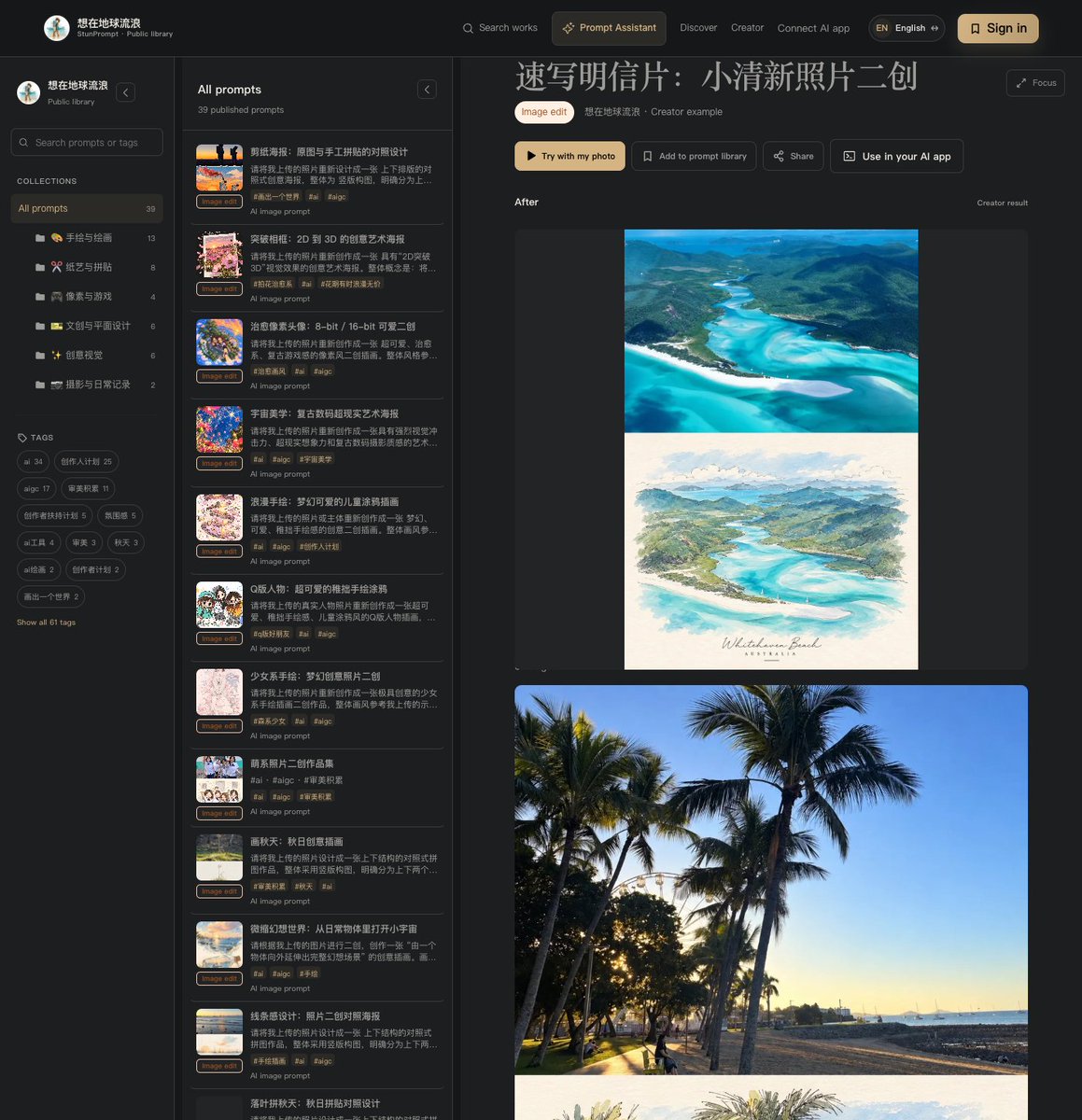
The second image shows the real case page with its associated creator examples.
English prompt in the first reply
#buildinpublic #promptlibrary #stunprompt
English adaptation of Liulang’s Sketch Postcard prompt. The attached artwork is the creator’s example.
PROMPT
Use my uploaded photo to make one clean vertical comparison with two stacked panels of roughly equal height.
Upper panel: Show the original photograph in full. Preserve its composition, subject placement, surroundings, color, light, proportions, and photographic texture as closely as possible. Keep the image unchanged, with no redrawing, stylization, added contrast, saturation, or darkening.
Lower panel: Reinterpret the same scene as a quiet hand-drawn travel postcard on warm off-white, cream, ivory, or pale warm gray paper. Give the paper subtle fibers and fine grain. Identify the main subject and the details that make the place recognizable, such as a landmark, figure, street, trees, window view, shoreline, mountain profile, or road.
Draw those details with fine, light pen lines and a few translucent watercolor washes. Keep the main contours readable and leave minor details loose. Use a restrained palette drawn from the photo: pale blue-gray sky, muted green foliage, or soft beige, brown, and gray for buildings where appropriate. Preserve the original color relationships while softening the tones.
Keep the illustration upright and slightly above the center of the lower panel. Aim for roughly 35–50% of that panel’s visible area, with generous clean paper around it. Leave some contours unfilled and let washes fade out at the edges. Avoid a tilted layout, collage, heavy oil paint, dense commercial illustration, or a crowded background.
If a caption suits the scene, place a small, airy line below the sketch. Use a place name, year, or short memory note that fits the photo. Set it in a fine serif, light handwriting, or simple English type. One line for the place and another for the year is enough. Keep the typography subordinate to the sketch.
The finished comparison should read as a real photo above and a delicate postcard below. Avoid thick outlines, heavy color, photorealistic rendering in the sketch, excessive lettering, and unrelated additions.
TO ADAPT
Swap the photo, landmark details, soft palette, and optional caption. Keep the equal stacked panels, unchanged upper photo, and smaller pen-and-wash sketch surrounded by paper in the lower panel.
#buildinpublic #promptlibrary #stunprompt
Ever asked for a travel postcard and gotten a full-bleed illustration with nowhere to put the caption?
Liulang’s seaside example gives the sketch its own space. The original photo sits above it. In the sketch below, the palm trunks and shoreline still guide your eye, while the open paper gives the small caption room to sit.
When you search your StunPrompt library, try describing the layout problem you need to solve. I’d look for a postcard with room for a caption, then borrow this brief’s starting point: let the sketch occupy roughly 35–50% of the lower panel and place it slightly above center.
English prompt in the first reply.
#buildinpublic #promptlibrary #stunprompt
English adaptation of the Screenprint Notes prompt by AI Aesthetic Treasury. The image is the creator’s example.
PROMPT
Turn my supplied city or everyday photograph into a vertical contemporary screen print. Keep its key subjects, their proportions, the perspective relationships, and the atmosphere of the original light. Identify the three to five most important color roles in the photograph and preserve how they work together.
Rebuild the scene with broad areas of color, grainy ink, slightly offset ink layers, and clean open space. Make the image read as a complete fine art print with a coherent composition. Omit text, numbers, titles, borders, collage, panels, embedded photos, logos, watermarks, and repeated scenes.
TO ADAPT
Swap the source photo and choose ink hues to suit its light and color relationships. Keep the subject proportions and perspective, the limited set of color roles, and the combination of broad shapes, ink grain, and open space.
#buildinpublic #promptlibrary #stunprompt
Before asking for a screen print, decide what each ink color does.
In AI Aesthetic Treasury’s harbor example, deep blue holds the hulls and shadows, orange carries the rope and reflected sunset, and warm paper shows through the lit areas. The large shapes establish the scene. Grain and slight shifts between ink layers give those shapes a printed surface.
When adapting this brief to a different photo, start by naming three roles: what anchors the darks, what draws the eye, and where the paper can show through. Pick colors from the new scene to fill those roles. Keep the original perspective and light so the simplified shapes still describe the same place.
StunPrompt keeps the input, creator result, and prompt together so you can trace those choices before adapting the brief. The second image shows the original and the result side by side.
English prompt in the first reply.
#buildinpublic #promptlibrary #stunprompt
English adaptation of Liulang’s Cosmic Aesthetics prompt. This adaptation has not been tested as a recreation of the attached creator example.
PROMPT
Reinterpret my uploaded photograph as one visually striking vertical art poster with surreal imagination and the texture of early digital photography. Use my supplied examples as style references. Combine Dreamcore, surreal photography, Y2K nostalgia, experimental photography, surreal collage and analog-film aesthetics. Retain photographic detail while introducing a clearly impossible visual idea. Aim for a mysterious, lonely, romantic, psychedelic, free and slightly uncanny dream atmosphere. Do not merely add a starry-sky filter or turn the image into a conventional fantasy landscape.
READ THE SOURCE
Identify the most recognizable people, buildings, plants, sky, water, roads, objects, actions and spatial relationships. Choose the single most promising visual motif and develop the surreal idea from it. Do not mechanically preserve the original composition or add unrelated decoration. Change the relationship between subject and space: float, enlarge, shrink, invert, extend, pierce, fold, fragment, repeat or suspend an existing element. Make gravity, scale, space or time behave unexpectedly while keeping a clear connection to the source.
PEOPLE
If the photo contains a person, preserve their facial shape, feature relationships, hairstyle, clothing silhouette, body proportions, pose and recognizable identity. Do not replace them with another person. Where composition calls for it, they may become a dark silhouette, backlit figure, luminous outline, translucent figure or floating figure. Alternatively, retain their realistic face while transforming the surroundings. They might float in deep blue sky, walk through an apparently endless luminous space, stand between enormous structures or interact impossibly with the moon, stars, water or light. A very small figure against a vast environment can convey solitude, freedom and mystery.
OTHER SUBJECTS
For landscapes, architecture, streets, plants, oceans or still life, reorganize the ordinary scene into a coherent impossible space. Water may become suspended sky; a road may lead into a cosmic distance; architecture may form a vast canyon of light; branches and flowers may frame an unreal opening; an everyday object may float against electric blue; a hand may support a glowing moon, star or miniature world. Make the moment feel familiar and strange at once.
COMPOSITION
Study the references’ bold spatial treatment. Use extreme perspective, scale contrasts, a central vanishing point, low or overhead views, weightless arrangements, large fields of color and isolated subjects where appropriate. A small figure may sit below center while space extends around it; an upward view may make a subject appear overhead. Buildings, roads, branches and light can guide the eye toward a tiny but conspicuous focal point. Bold cropping, magnification and impossible placement are allowed, but maintain one clear visual center. Build one strong idea into a complete image rather than combining unrelated scenes.
COLOR
Use saturated retro digital-photography colors: electric blue, cobalt, deep sea blue, indigo and royal blue as the main foundation, contrasted with fluorescent orange, bright yellow, neon red, fluorescent green, magenta and luminous white. Emphasize deep blue space against warm glowing elements. Sky can become electric blue, foliage orange-red, stars yellow, green or pink, and people near-black silhouettes. Natural lighting rules may bend through color spill, local overexposure, neon shifts and unusual color temperature. Preserve dense dark areas and luminous highlights. Avoid a generic orange-pink fantasy sunset.
TEXTURE
Make coarse, dense, visible colored grain, high-ISO digital noise, CCD-camera texture, mild JPEG artifacts, film-scan texture, shadow noise, light bleed and color shifts part of the image. Avoid a modern ultra-sharp, smooth and spotless AI finish. Selectively use slight defocus, motion blur, light trails, chromatic aberration, color crosstalk, soft halation, local overexposure and scanned texture. The result should suggest an experimental early-2000s photograph that has passed through rephotography, digital processing and artistic collage.
LIGHT
Use a restrained number of conspicuous four-point or six-point starbursts, cross-shaped flares, neon points, colored trails, thin light tracks, scattered halos or diffraction rays reminiscent of an old star filter. Give lights bright cores and slender rays in warm yellow, fluorescent orange, pink, teal or white. Vary dense and sparse regions so selected areas appear to flicker, flow or melt. An alternative is stretched vertical star trails with a person moving through them. Choose the treatment that suits the source; do not pile every effect into the frame.
EXPERIMENTAL COLLAGE
Create the collage feeling through impossible proportions, displaced perspective, abnormal lighting directions, selective repetition, contrasts between blurred and sharp areas, floating elements and color spill at edges. Avoid obvious clip-art borders or an ordinary puzzle layout. Allow a few imperfect edges, grain overlays, slight registration errors and old digital distortions as intentional aesthetic features. Make the composition feel designed, rather than like a stack of unrelated assets.
CHOOSE THE IDEA FROM THE PHOTO
For sky and trees, a strange canopy can frame deep blue space, with luminous foliage and a floating subject. For the sea, blur the boundary between water and sky and create impossible reflections. For buildings, use extreme upward perspective and vast geometry around a small luminous body. For roads, develop a glowing route into cosmic depth. For people, derive an impossible touching, holding, crossing or merging interaction from the original gesture, posture or gaze. Use one appropriate direction, rather than applying the same scene to every photograph.
FINISH
Keep Dreamcore’s unfamiliar familiarity, Y2K’s retro-futurism, surreal photography’s absurdity, experimental art’s freedom and a lonely romantic cosmic mood. The image may be quiet, ethereal, psychedelic or energetic. Avoid conventional science-fiction movie posters, commercial advertising and polished game concept art. Retain a young, free, casual, slightly rough independent-photography character, like an accidentally captured impossible dream. Output one complete vertical art poster, preferably in a 3:4 or 4:5 composition.
TO ADAPT
Replace the source photo, chosen motif, impossible interaction and supporting colors as needed. Keep the source-to-idea connection, identity constraints for people, one dominant spatial idea, one clear visual center, and the intentionally rough photographic treatment. Treat the listed surreal directions as alternatives, not a checklist to combine.
#buildinpublic #promptlibrary #stunprompt
To adapt a surreal image prompt, change a relationship before changing the color palette.
Liulang’s cosmic city example pairs upright towers with an inverted skyline overhead. Electric blue, warm windows and star trails reinforce the idea, but the spatial contradiction gives the scene its structure.
Try this three-part rewrite:
1. Choose one motif already present in your photo.
2. Give it one impossible relationship: inverted architecture, a floating subject or a road with an impossible destination.
3. Add the camera texture and light treatment around that decision.
These are alternatives to choose from. Combining every option can bury the focal point.
StunPrompt’s full case prompt gives you the material to rewrite that structure for another subject, instead of copying only a list of style words.
Image 1: creator example by Liulang. Image 2: the same case’s expanded prompt in StunPrompt. English prompt in the first reply.
#buildinpublic #promptlibrary #stunprompt
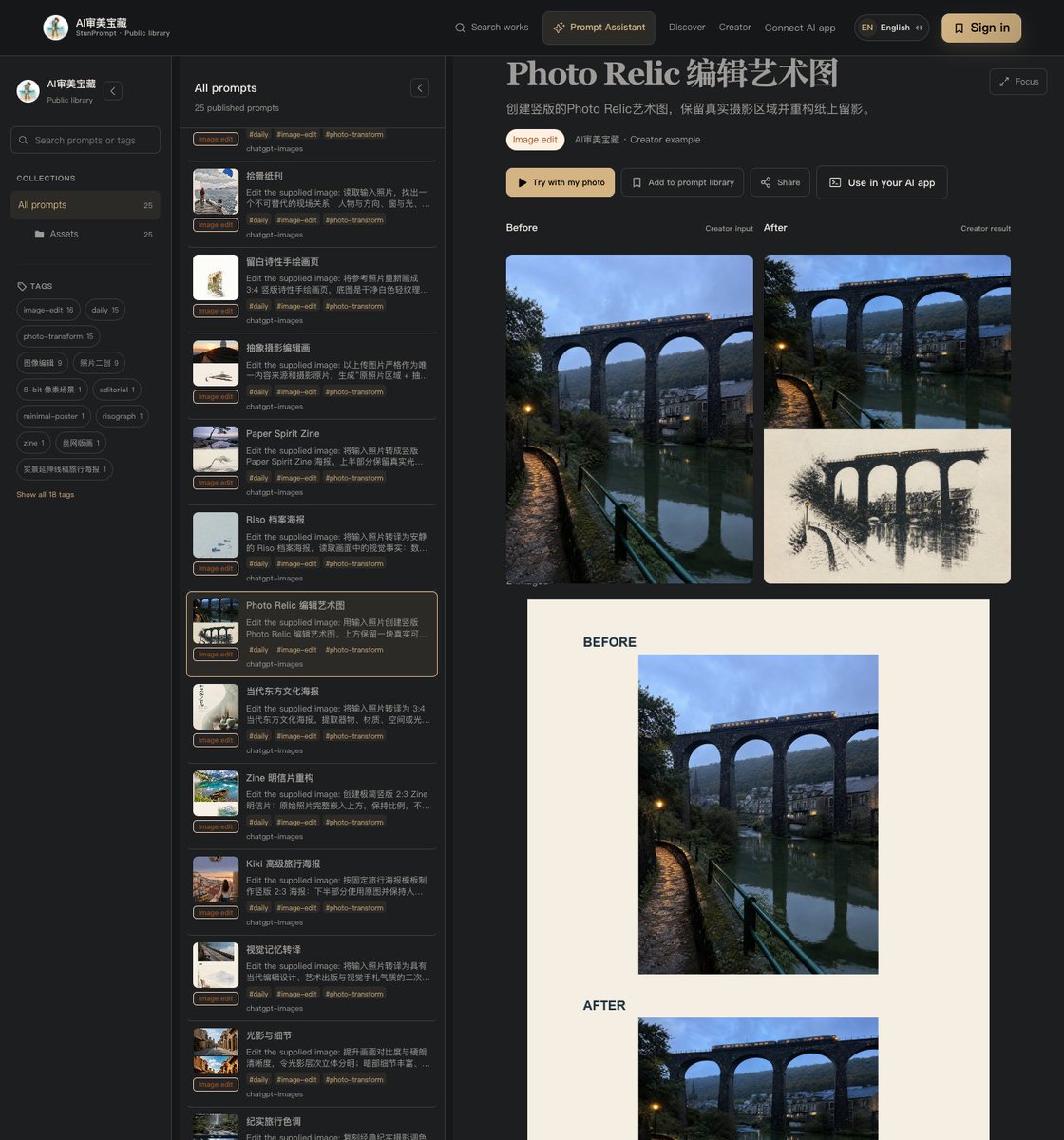
English adaptation of AI Aesthetic Treasury’s Photo Relic editorial-art prompt. The creator name is translated from Chinese. This adaptation has not been tested as a recreation of the attached creator example.
PROMPT
Use my input photograph to create one vertical Photo Relic editorial artwork.
UPPER REGION
Retain a credible photographic area. Do not redraw, replace, beautify, blur or change the people, buildings, objects, sky, weather, lighting or contents of the scene.
LOWER REGION
On warm ivory paper, create a recognizable but restrained visual impression derived from the subjects, light, colors, edges, scale and mood visibly present in the original photograph. Use deep ink-colored masses, softened edges, cuts of negative space, sparse lines and controlled fragmentation.
TO ADAPT
Replace the input photograph and its subjects. Keep the two-region structure, the protected photographic area and the requirement that the lower impression comes from visible evidence in the source. Choose a few defining shapes and light accents to carry into the lower region; change the abstraction without inventing a different place.
#buildinpublic #promptlibrary #stunprompt
Want to turn a travel photo into art without losing the place you remember?
Give different regions different permissions.
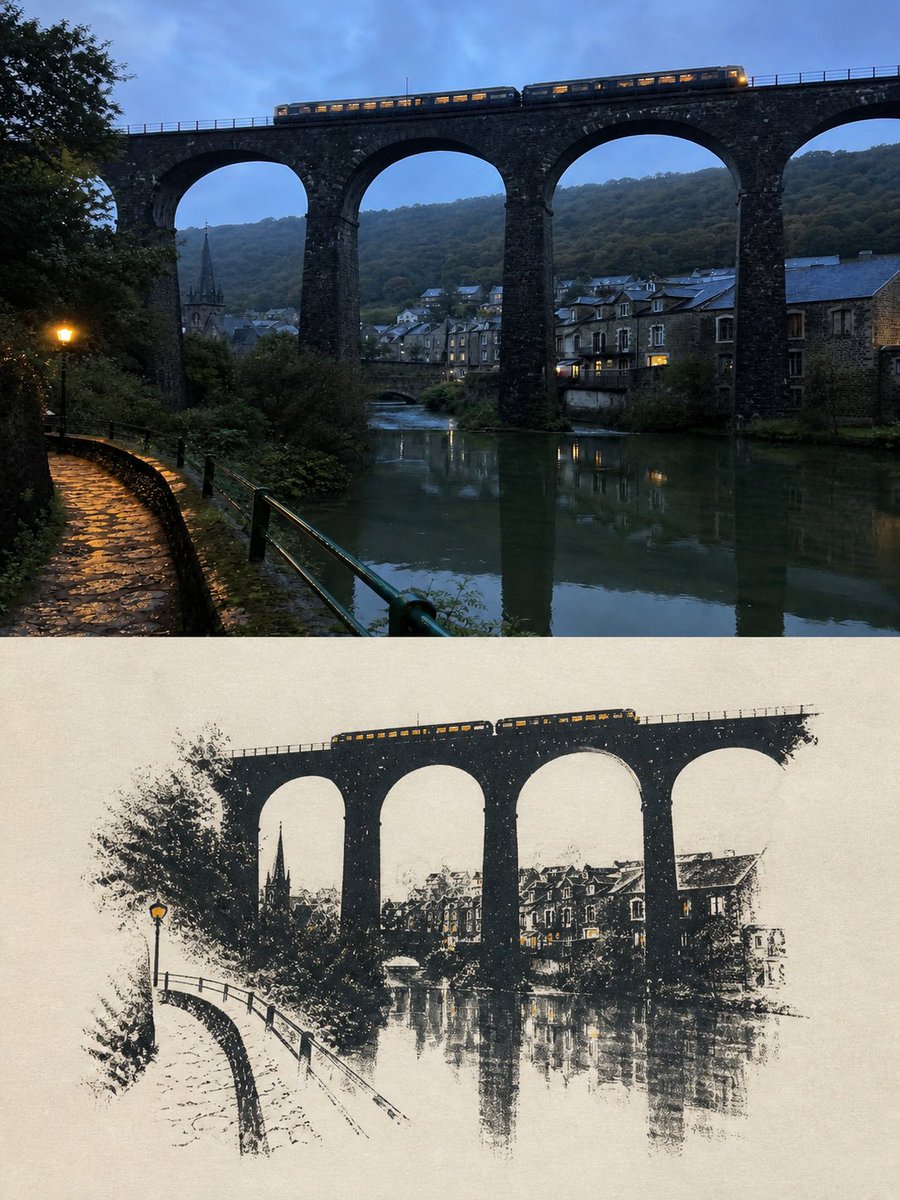
In AI Aesthetic Treasury’s Photo Relic example, the upper photograph keeps the train, viaduct and riverside town recognizable. Below it, the same arches and warm lights survive as a restrained ink impression on ivory paper.
The reusable structure is specific:
• Upper region: protect the photographic scene.
• Lower region: reinterpret only what the source actually shows.
• Carry the key shapes and light accents across the boundary.
In StunPrompt, keeping the original, creator result and prompt together makes that boundary available to study before you adapt the idea to another photo.
Image 1: creator artwork by AI Aesthetic Treasury. Image 2: this case in StunPrompt. English prompt in the first reply.
#buildinpublic #promptlibrary #stunprompt
English adaptation of Dua Fatima’s Bakso Urat Madam food-commercial prompt, shared in Ad Prompts. This rewrite has not been tested as a recreation of the attached creator example.
PROMPT
Create a 35-second, vertical 9:16 cinematic food commercial for the Indonesian meatball restaurant “Bakso Urat Madam.” Use realistic food textures, warm restaurant light, rich reds, golden highlights and natural shadows. Aim for clean 4K detail.
CHARACTER CONTINUITY
Use one stylish young adult woman with red sunglasses and elegant black-and-gold patterned clothing. Keep her face, hairstyle, outfit and accessories consistent whenever she appears.
0–3s — ESTABLISH THE PLACE
Open with a smooth aerial view of a busy modern Indonesian city street, with buildings and moving traffic. Move toward the restaurant.
3–6s — INTRODUCE THE RESTAURANT
Show the exterior and a clear red “Bakso Urat Madam” sign. Show the woman at a table in front of the restaurant, presenting a bowl of bakso soup in an inviting setting.
6–12s — FOOD DETAILS
Use macro close-ups of steaming meatballs, glossy noodles, rich broth, fresh green herbs and crisp toppings. Lift noodles with chopsticks. Keep steam and food movement believable, with shallow depth of field.
12–20s — SIGNATURE TEXTURE
Slowly lift one large beef meatball with a spoon. Emphasize its textured brown surface, moisture and visible interior where exposed. Use warm directional highlights and restrained slow motion to make this the sustained product-detail beat.
20–24s — COMPLETE DISH
Show a carefully arranged bowl with several meatballs, noodles, vegetables and garnishes. Move smoothly around it to reveal the complete serving.
24–29s — TASTING
Return to the same woman. Show a natural tasting gesture with soup and noodles, followed by a relaxed, satisfied expression. Use close framing and credible mouth, hand and utensil movement.
29–33s — OVERHEAD AND POUR
Show the bowl directly overhead on a rich red tablecloth, then cut to hot broth pouring over the meatballs and noodles. Capture liquid flow, steam and texture.
33–35s — BRAND FINISH
Hold a clean red end card with “BAKSO URAT MADAM” in bold white lettering, a small crown above it and a simple call to action reading “ORDER NOW.” Keep the typography stable and legible.
CAMERA AND SOUND
Combine smooth tracking, macro detail, overhead views and restrained slow motion. Use coherent cuts timed to upbeat commercial music, with subtle restaurant ambience and realistic serving sounds.
CHECK
Avoid distorted hands, duplicated food, inconsistent character identity, unnatural facial motion, flickering objects and misspelled brand text. Keep food appetizing and spatially credible throughout.
TO ADAPT
Replace the restaurant, dish, character styling, colors and call to action together. Preserve the sequence’s shot roles and the emphasis on the signature food detail. Rewrite the hero action for the new dish, then rebalance the seconds to match it. Verify the actual edit’s duration and continuity rather than assuming the requested timing was followed.
#buildinpublic #promptlibrary #stunprompt
A restaurant ad does not need equal time for every shot.
Dua Fatima’s Bakso Urat Madam brief assigns 8 seconds to the signature meatball close-up, 3 seconds to the city introduction and 2 seconds to the end card. The timing tells you what the brief wants the viewer to study.
To transfer the technique:
1. Name the detail that sells the dish: texture, filling, steam or a serving action.
2. Give that detail a deliberate time budget.
3. Keep the location and brand beats short enough to protect it.
For another dish, rewrite the hero action as well as the ingredient. A spoon lift, a slice revealing the filling and a broth pour need different framing and motion. Check the finished edit against the timing; a prompt is only the plan.
StunPrompt keeps the associated storyboard with the full brief. That pairing lets you inspect the intended shot roles before adapting the sequence.
Image 1: the creator’s associated AI storyboard. Image 2: this case’s expanded prompt in StunPrompt. English prompt in the first reply.
#buildinpublic #promptlibrary #stunprompt
English adaptation of Liulang’s sticky-note miniature collage prompt. This adaptation has not been tested as a recreation of the attached creator example.
PROMPT
Create one clean vertical comparison poster using my uploaded photograph, divided into two approximately equal areas.
UPPER HALF
Display the original photograph with its composition, subjects, environment, colors, lighting, proportions and photographic texture preserved. Do not redraw, illustrate or collage this half. Do not darken, brighten or increase its saturation.
LOWER HALF
Use warm ivory, cream or pale warm-gray paper with subtle fibers, fine grain and generous negative space. Read the source photograph and select 3–6 essential elements that carry its scene and mood: for example a person, window frame, building, street, mountain, road, plant, vehicle, pet or food. Recombine these into one small, coherent paper-collage scene rather than applying a filter to the entire photograph.
Construct the scene from many small square or slightly irregular paper pieces and sticky-note fragments. Show delicate thickness, visible edges, layered overlaps and soft contact shadows. Allow a little hand-torn texture while keeping the arrangement orderly. Build the subject through joined color blocks, stacked fragments and a few deliberate gaps instead of drawing one smooth continuous surface. Keep the center relatively complete; let a restrained scattering of small pieces extend around its perimeter. The image should feel as though it is gradually assembling, while remaining easy to recognize.
Display the miniature upright, slightly below the center of the lower area. Aim for about 30–45% of that lower area, surrounded by clean paper. Keep the composition stable, balanced and uncluttered; avoid a tilted or casually scattered presentation.
Follow the photograph’s natural palette, light/dark relationships and atmosphere. Simplify its colors into restrained paper tones with small value differences to suggest layers. Do not add unrelated vivid colors or heavy shadows. If people appear, retain their poses, silhouettes and positions. Preserve key environmental structures such as a window, doorway, street, ridge, tabletop, coastline or facade through paper construction.
Optionally add one tiny, understated English title of 2–4 words below the collage, chosen to fit the scene, such as “Still Moment” or “Autumn Memory.” Keep it secondary to the artwork.
Avoid cartoonizing the entire poster, filling the lower half, chaotic fragments, oversized coarse paper pieces, excessive saturation, heavy shadows, busy backgrounds, unbalanced composition and unrelated new objects.
TO ADAPT
Replace the photograph, its 3–6 scene anchors, sampled paper palette and optional title. Keep the upper-photo/lower-collage structure, recognizable relationships, small layered pieces and readable center. The creator’s autumn example contains specific framing and lettering; this general template does not guarantee that exact result.
#buildinpublic #promptlibrary #stunprompt
Want a paper collage of your photo, but still need it to feel like the same memory?
Start by choosing 3–6 scene anchors before specifying the paper texture. A bus, a person’s position and the line of autumn trees can matter more than reproducing every leaf.
Liulang’s sticky-note collage brief makes that selection explicit: extract the core elements, then rebuild them from small paper fragments. Keep the center readable; let a few fragments loosen around the edge. The autumn example shows how the scene can remain recognizable through a different construction method.
In StunPrompt, the full brief is visible with this case. The detail worth capturing with the reference is the selection rule—what makes the memory recognizable—so your next prompt has more to work with than “paper collage.”
Image 1: Liulang’s creator example. Image 2: the same case’s full prompt in StunPrompt. English prompt in the first reply.
#buildinpublic #promptlibrary #stunprompt
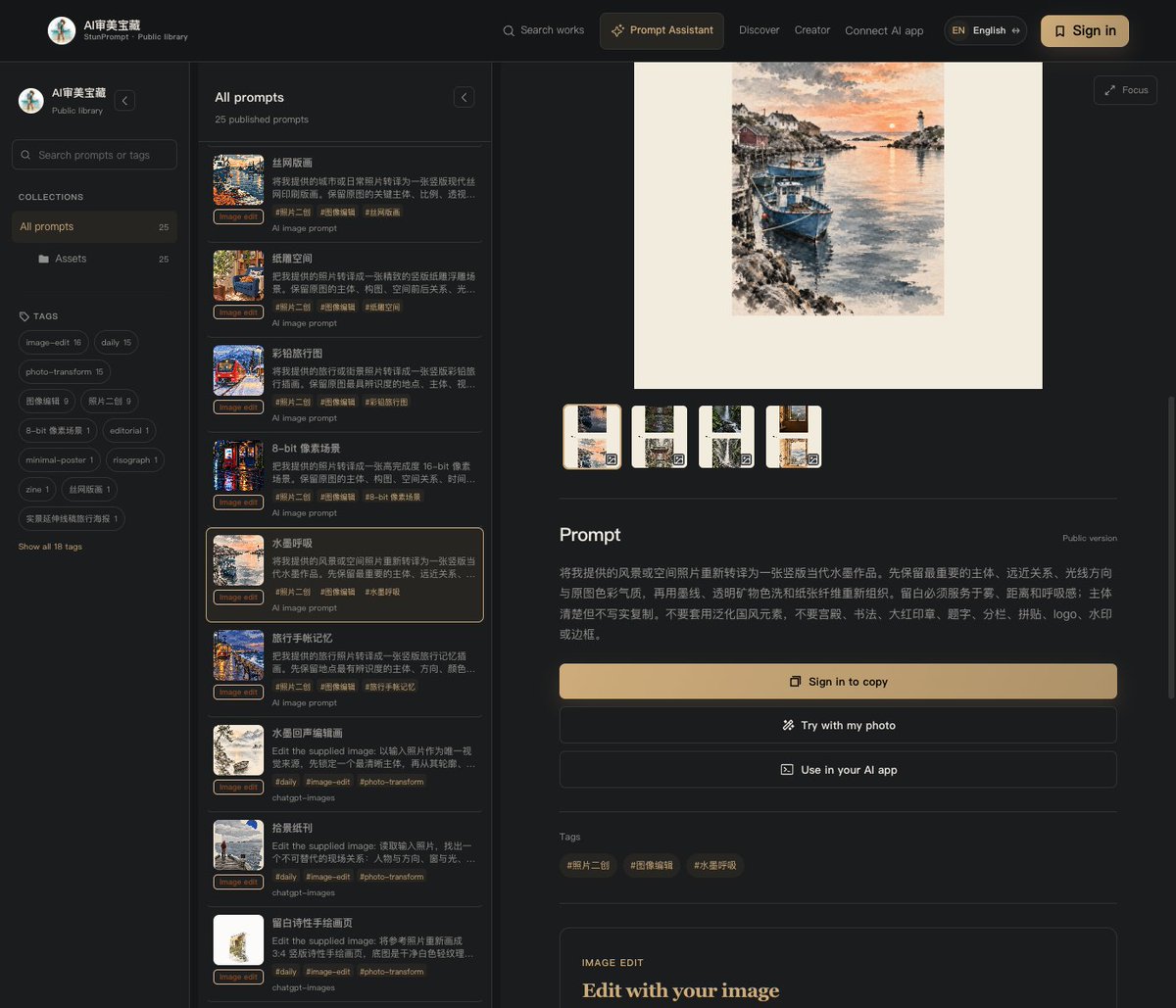
English adaptation of AI Aesthetic Treasury’s “Ink-Wash Breathing” prompt. This translation has not been tested as a recreation of the attached creator example.
PROMPT
Reinterpret my supplied landscape or spatial photograph as one vertical contemporary ink-wash artwork. First preserve the most important subject, the relationships between near and distant elements, the direction of light and the original image’s color character.
Reorganize the scene through ink lines, transparent mineral-color washes and visible paper fibers. Use unpainted space to convey mist, distance and breathing room. Keep the subject clear and recognizable while allowing it to become a painterly interpretation rather than a literal photographic copy.
Do not apply generic traditional motifs. Do not add palaces, calligraphy, large red seals, inscriptions, divided panels, collage elements, logos, watermarks or borders.
TO ADAPT
Replace the input photograph. Before changing the medium, identify its spatial anchors: what is near, what is far and where the light comes from. Choose which low-detail areas can become open paper while preserving those relationships. For a harbor, this might be water or sky; for an interior, it might be an uncluttered wall around a lit window. These are optional directions for your next brief, not details required by the original prompt.
Keep the functional role of empty space, the recognizable subject and the connected depth. If you replace ink wash with another medium, rewrite the marks, transparency and surface behavior together.
#buildinpublic #promptlibrary #stunprompt
Give unpainted paper a job in your prompt.
AI Aesthetic Treasury’s ink-wash harbor example is useful to study because the scene stays legible while its edges become less literal. Boats and quay anchor the foreground; the lighthouse and warm horizon still establish distance. Broken washes let the paper show through the water, sky and outer edges.
The source brief has three decisions worth separating:
• Spatial anchors: retain the main subject, near/far relationships and light direction.
• Material language: rebuild with ink lines, transparent mineral-color washes and paper fibers.
• Purpose of empty space: support mist, distance and breathing room.
That last clause is more useful to rewrite than “make it minimal.” For a new landscape, decide where detail can fade without losing the route from foreground to background. For an interior, ask whether a quiet wall or window light should carry that pause. Those are adaptation choices, not claims about a tested result.
StunPrompt gives me the original brief to inspect before rewriting it. My next version should name what the open space does, as clearly as it names the medium.
Image 1: creator example by AI Aesthetic Treasury. Image 2: this case’s full prompt in StunPrompt. English prompt in the first reply.
#buildinpublic #promptlibrary #stunprompt
English adaptation of Dua Fatima’s Orange Serum commercial prompt, shared in Ad Prompts. This adaptation has not been tested as a recreation of the attached creator example.
PROMPT
Create a premium, photorealistic beauty-product video featuring one small transparent glass serum bottle filled with luminous orange liquid. Place it at the center of a bright, clean composition in sparkling clear water, surrounded by fresh, juicy orange slices.
Let the bottle float gently while the slices drift naturally around it. Show tiny bubbles rising and catching the light. Keep the movement restrained, smooth and physically plausible so the product remains readable.
Send soft, warm sunlight through the orange flesh, liquid and glass. Show golden highlights, realistic refraction and subtle caustic reflections. Preserve crisp glass edges and believable transparent materials; avoid a plastic appearance.
Use a slow cinematic top-down camera move, macro product-photography detail and shallow depth of field. Maintain a sophisticated, uncluttered skincare-advertising composition, natural water movement and realistic liquid behavior. Aim for clean high-resolution detail and polished commercial lighting.
Do not add overlay text, people or unrelated objects. Avoid distorted existing packaging marks, duplicated products, abrupt camera moves and unnatural floating motion.
TO ADAPT
Replace the bottle, liquid color and surrounding ingredient as a coordinated set. Keep one readable central product, gentle motion, a clean background and lighting that behaves plausibly as it passes through the chosen materials. If the replacement packaging is opaque, rewrite the transmission and refraction instructions accordingly.
#buildinpublic #promptlibrary #stunprompt
For a skincare brief, I want to browse skincare references before comparing individual effects.
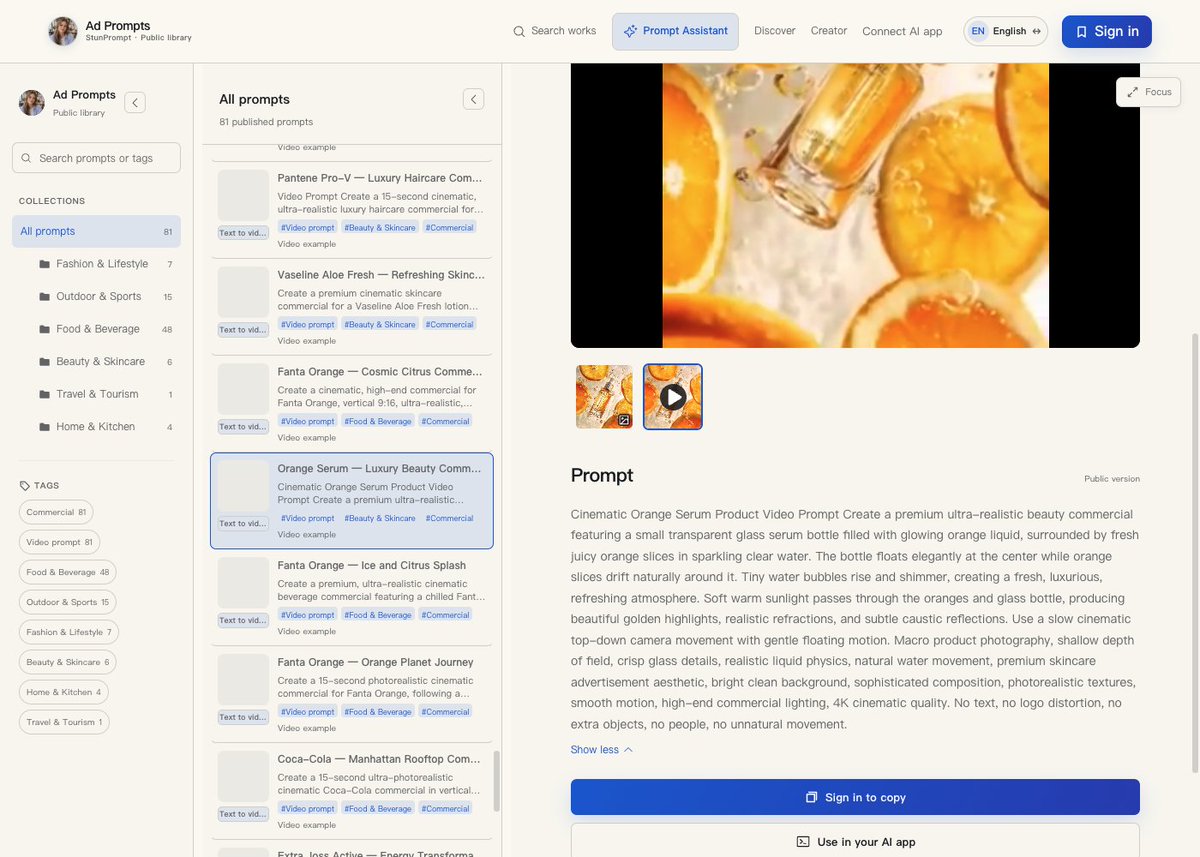
I tried that path in StunPrompt’s Ad Prompts library:
1. Selected the Beauty & Skincare collection: the gallery narrowed from 81 works to 6.
2. Opened Orange Serum and expanded its full prompt.
3. Checked the associated image and played the video before deciding what to reuse.
The useful detail in this brief is the connection between materials and light: warm light passes through orange slices, liquid and glass; the motion stays gentle enough to keep the bottle readable.
Collections give a reference a useful place to live. Start with the kind of brief you are writing, then inspect the actual instructions inside each case.
Image 1: Dua Fatima’s associated AI reference image. Image 2: the same case’s expanded prompt in StunPrompt. English prompt in the first reply.
#buildinpublic #promptlibrary #stunprompt