Tip Tuesday! Clicking another person’s avatar in Google Slides' top bar allows you to follow and move with them as they navigate and make changes to a presentation. Click the avatar again to stop following.
⚡️JUST ANNOUNCED!⚡
Check out the 💥ALL NEW💥 @canva ✨MAGIC EDIT!🪄✨
Highlight a selected area, then replace that area with something else! 🗽 📱
Check it out and for more @CanvaEdu tips, check out our blog post ⤵️
https://t.co/iI2v7s5Jub
#interACTIVEclass#Canva#CanvaEDU
“If My people who are called by My name will humble themselves, and pray and seek My face, and turn from their wicked ways, then I will hear from heaven, and will forgive their sin and heal their land.” (2 Chronicles 7:14)
“For God so loved the world, that he gave his only begotten Son, that whosoever believeth in him should not perish, but have everlasting life.” (John 3:16)
How did I not know this?!? 😲
🆓Google's icons are free and downloadable here: 💾
https://t.co/16iM5ymZI3
💯 Hundreds of icons
🖼 Download as PNG or SVG
🎨 Available in several sizes and densities
#GoogleEDU#DitchBook#techlap#googleei
🤔 @apsitjen has questions to help you choose Google Slides, Google Drawings, or Google Jamboard. Her post includes a diagram and a video: https://t.co/lbqmVR75Mj
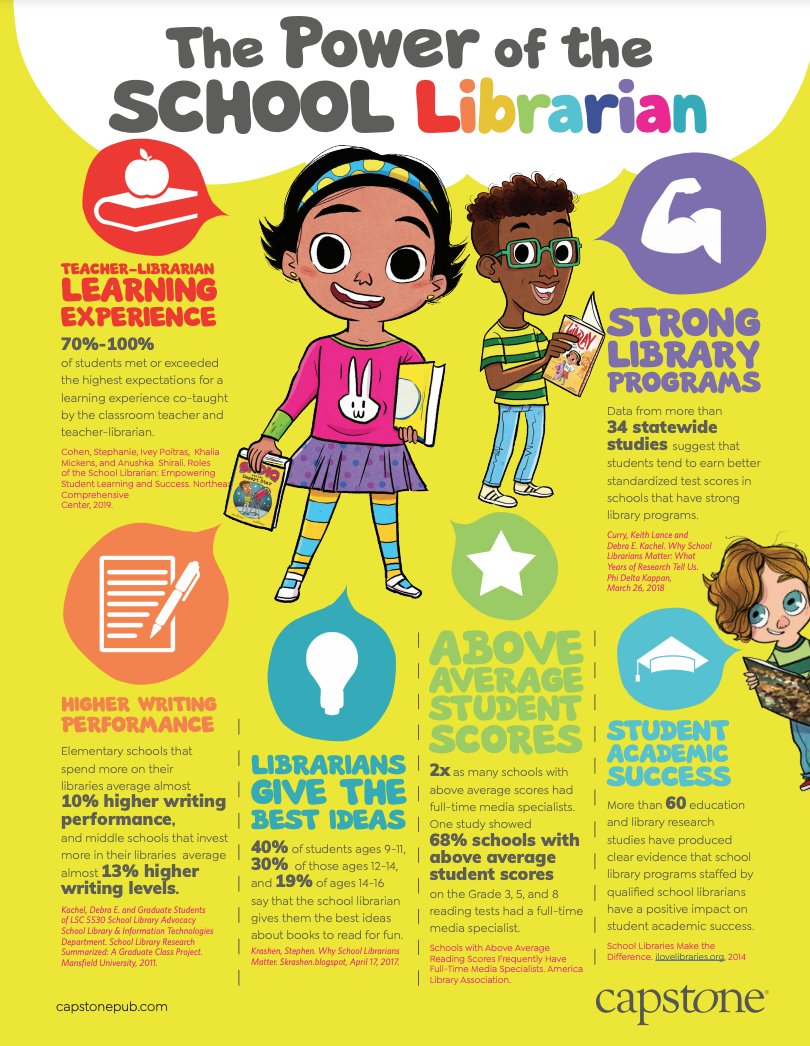
Check out @CapstonePub's infographic on the power of school librarians! Did you know 2x as many schools with above average scores had full-time media specialists? Download the infographic here: https://t.co/nrxqLzbFbx #TLChat#PaLibChat
Tip Tuesday! Is your Google Drive filling up? Open the link below to see all your Drive files sorted by size. See if there are any large files you no longer need and delete them.
https://t.co/VZmnoLGQtG