🦒🤫 Shhh… don’t scare the animals!
Shy Safari is a FREE website that helps manage classroom noise!
Display it on your Cleverboard during work, reading, or partner activities. https://t.co/NuE165THle
#TechTip#TeacherTools#ClassroomManagement#EdTech#ShySafari
⏰ Save time with these Chrome tips!
🔄 Reopen your previous tabs to pick up where you left off.
💻 Set your daily websites to open automatically.
☁️ Use Cloud Tabs to save lesson tabs for later.
#ChromeTips#TeacherTech#EdTech#TechTips
https://t.co/C6iQDfsUJj
Now that you’ve mastered split-screen on your Cleverboard, let’s keep building those tech skills! 💻 Next up: learn how to open two Chrome browser windows side by side.
#TechTips#TeacherTech#Cleverboard#GoogleChrome#EdTech
I am excited to team up with BER again this year to share my knowledge and experience with AI in the Gifted & Talented Classroom! You can learn more and sign up for a session at the link below! https://t.co/jcyw4H9gOb
💡 Help me out! 💻
What fun names or memory tricks help staff and students remember Google icons and symbols? 🎨☃️🥞
👇 Share your favorites so we can learn from each other!
#EdTech#GoogleTips#TeacherTips#TechCommunity
📚✨ Top Two Tech Tools – Episode #11 is here! This week, an elementary librarian shares two favorite tools to inspire learning, spark creativity, and engage students. 🦉💻
▶️ Tune in for ideas to bring to your classroom or library!
#TopTwoTechTools#EdTech#SchoolLibrarian
🎃 Make Google Sheets less scary: create charts 📊, track tasks ✅, and stay organized with dropdowns ✨. Happy spreadsheet boo-tifulness! 👻 #GoogleSheets#Halloween#EdTech https://t.co/w0s54JtPTd
🎉 3 new Canva for Education tools to try! 🎉
Carnival Scoreboard — bring a little friendly competition to classroom activities. 🏆
Hall Pass Tracker — keep track of student hall passes. 🚪
Seating Chart — plan and organize classroom seating. 🪑
@CanvaEdu https://t.co/jRXMNx7UN2
One of our Kinder teachers started a YouTube channel to help parents practice skills at home! Take a look and give it a follow! https://t.co/pvuXhDJTRJ
🎙️ Episode 10 of Top Two Tech Tools is live! I chat with a CTE coordinator about their top two tech picks and how those tools help students build future-ready skills. 💻🛠️ #TopTwoTechTools#CTE#EdTech
Chrome’s Reading Mode reduces on-screen distractions so you can focus. It makes reading easier for different readers and helps students concentrate and comprehend during research. https://t.co/S4MGzutQzm
#ChromeTips#ResearchSkills#ReadingComprehension#Accessibility
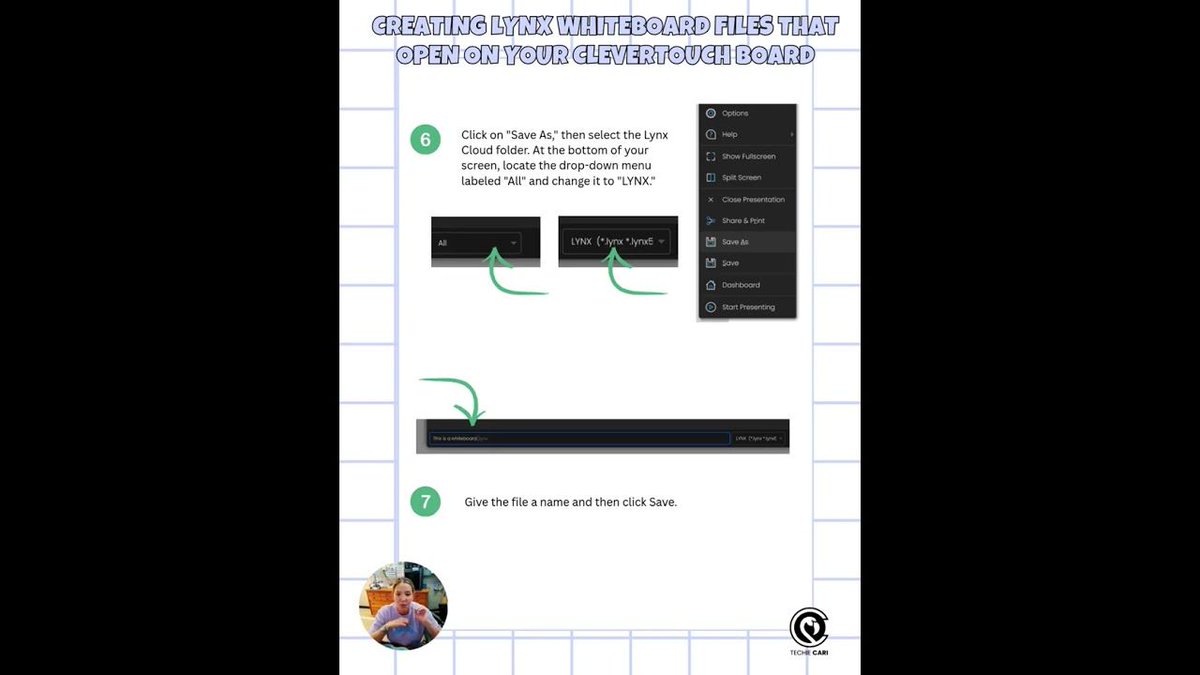
Feeling confident using the Whiteboard app on your Clevertouch board? Take the next step: create custom lessons in the desktop app, then share them through the cloud straight to your board. ✨ #Clevertouch#EdTech#TeachingTips
https://t.co/PyYYyqknyW
🎙️ Top 2 Tech Tools | Episode 9
This week, we’re joined by a choir teacher to talk about the tech tools that help bring music and learning together. 🎶📱 Tune in for two favorites you can add to your teaching toolkit!
#Top2TechTools#MusicEducation#ChoirTeacher#EdTech