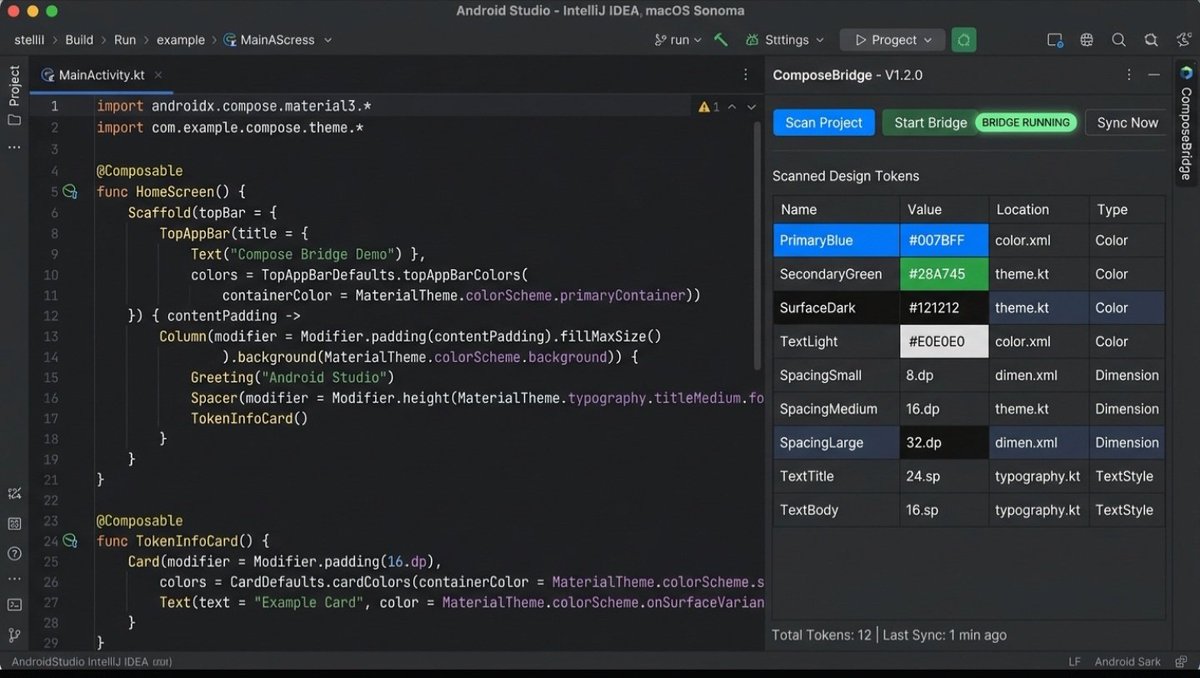
thanks @androidweekly team! Just saw ComposeBridge featured in
your roundup — thank you! 🙏
Latest Android Weekly Issue 746 is out!
https://t.co/gIwINZ77WT #AndroidDev#Kotlin@androidweekly
Spot on! Having a predictable schema shape is critical to keep the agent deterministic.
On failure, it follows that exact contract:
```json
{
"success": false,
"error": "ConflictDetected",
"message": "Token mismatch in Theme.kt",
"location": {"file": "Color.kt", "line": 42},
"current_value": "0xFF1E1E1E",
"attempted_value": "0xFF000000"
}
This lets the agent branch immediately and self-correct within the same turn instead of entering a blind retry loop. Appreciate the feedback!
Cloud IDEs like @googledevgroups@AndroidDev@AndroidStudio Project IDX (Firebase Studio) are the future of Android dev. But AI agents still “code blind” without runtime feedback.
I built ComposeBridge to fix this: an MCP server that enables real-time AST source mutations & live device preview. No Gradle rebuilds.
Here’s how you can bring real-time AST editing to Project IDX. Let’s bridge the gap. 👇
🔗 GitHub: https://t.co/sSNdZlGI5G
🧩 JetBrains Plugin: https://t.co/jhzyzBSoLc
#AndroidDev #JetpackCompose #GoogleDevelopers #ProjectIDX #FirebaseStudio #MCP #AI #Kotlin
Hi ,
Saw your post on building at the frontier.
I’m an Android developer and built an open-source tool called ComposeBridge (MCP). It solves a painful bottleneck in Compose development: eliminating the constant 1-minute Gradle rebuild cycle for UI/token tweaks.
Using an ultra-lightweight MCP schema (~176 tokens) and WebSocket live-sync, AI agents (like Gemini) can directly inspect and update running UI tokens on physical Android devices in sub-seconds with zero AST breakage and built-in conflict prevention.
The JetBrains plugin is live, and we’re designing it to bridge the gap between AI developer agents and running runtimes.
Would love to share a 30s demo or get your thoughts on how this aligns with Google Labs/AI Studio agentic developer workflows.
Best,
Jalal
Exactly—relying solely on vision/screenshots burns context and is too slow for autonomous loops.
Yes, the MCP server returns structured JSON for each operation. For runtime token mutations (`set_token`), it returns:
`{"success": true, "token": "...", "value": "...", "notified_live": true, "agent_started": true, "agent_ended": true}`
For validation/builds, it returns structured execution details (exit codes, exact error counts, compiler/runtime diagnostics) without dumping raw logs into context.
If there's a conflict or runtime issue, it emits typed errors (e.g. `conflict_type: "same_name_different_value"`, existing vs incoming AST values) so the agent can self-correct deterministically without guessing.
Thanks! That instant feedback loop without breaking the codebase is exactly what we aimed for.
Sketch annotations alongside property edits make total sense—especially when paired with MCP agents, where spatial hints/drawings on the phone can directly guide code or token generation without manual typing.
Would love to explore how we could align or integrate on this. Are you thinking of sending raw vector/stroke data over the bridge, or interpreting annotations into layout constraints?
I built ComposeBridge 🌉
Real-time UI visual editor for Jetpack Compose via WebSocket.
Zero-rebuild live tuning (<50ms)
🎯 Tap Composable to inspect
💾 AST-guided source splicing (1-line git diff)
Repo: https://t.co/eklrqo2Y0s
#AndroidDev#JetpackCompose#Kotlin
Cloud IDEs like @googledevgroups@AndroidDev@AndroidStudio Project IDX (Firebase Studio) are the future of Android dev. But AI agents still “code blind” without runtime feedback.
I built ComposeBridge to fix this: an MCP server that enables real-time AST source mutations & live device preview. No Gradle rebuilds.
Here’s how you can bring real-time AST editing to Project IDX. Let’s bridge the gap. 👇
🔗 GitHub: https://t.co/sSNdZlGI5G
🧩 JetBrains Plugin: https://t.co/jhzyzBSoLc
#AndroidDev #JetpackCompose #GoogleDevelopers #ProjectIDX #FirebaseStudio #MCP #AI #Kotlin
Cloud IDEs like @googledevgroups@AndroidDev@AndroidStudio Project IDX (Firebase Studio) are the future of Android dev. But AI agents still “code blind” without runtime feedback.
I built ComposeBridge to fix this: an MCP server that enables real-time AST source mutations & live device preview. No Gradle rebuilds.
Here’s how you can bring real-time AST editing to Project IDX. Let’s bridge the gap. 👇
🔗 GitHub: https://t.co/sSNdZlGI5G
🧩 JetBrains Plugin: https://t.co/jhzyzBSoLc
#AndroidDev #JetpackCompose #GoogleDevelopers #ProjectIDX #FirebaseStudio #MCP #AI #Kotlin
I built ComposeBridge 🌉
Real-time UI visual editor for Jetpack Compose via WebSocket.
Zero-rebuild live tuning (<50ms)
🎯 Tap Composable to inspect
💾 AST-guided source splicing (1-line git diff)
Repo: https://t.co/eklrqo2Y0s
#AndroidDev#JetpackCompose#Kotlin
For all Android and GitBack Compose developers, we all know how time-consuming and time-consuming it is to constantly wait for a project to be rebuilt using Gridl, just for a simple padding adjustment or a color change within the interface.
This is where the idea for Compose Bridge came from. It's an open-source plugin, now officially available on the GitBrains store, designed to radically accelerate the interface building and modification cycle.
The tool allows you to connect your app running directly on your device or emulator to the Android Studio environment, enabling you to modify design elements, color schemes, and dimensions in real time from your phone's screen. Its key feature lies in its code rewriting process. The plugin surgically rewrites and modifies the source code within Kotlin files with precision and security, allowing you to review differences and revert to the previous version with a single click.
The tool also provides an integrated model context protocol server, enabling AI tools and agents to inspect the live interface tree and provide accurate and responsive solutions that are compatible with your actual screen.
The project is available for everyone to use, contribute to and develop via GitHub and the GitBrains Add-ons Store. I would be very happy for you to try it out and share your feedback and opinions to further develop the experience.https://t.co/jhzyzBSoLc
#AndroidDev #JetpackCompose #Kotlin #AndroidStudio #JetBrains #OpenSource #MobileDevelopment #DevTools #KotlinMultiplatform #MCP
@corhoonx Appreciate it @corhoonx! Nothing kills momentum faster than a full rebuild for a 4dp adjustment.
Hope ComposeBridge saves you some solid dev hours! 🚀
🚀 ComposeBridge v1.0.0 is officially live on the JetBrains Marketplace!
Testing and tweaking Jetpack Compose UI has always involved a painful bottleneck: waiting for slow Gradle rebuilds and redeployments just to adjust padding, change a color, or fix a typo.
We built ComposeBridge to solve this from the ground up:
🔹 Direct On-Device UI Tweaks: Adjust layout tokens, colors, dimensions, and text directly on your connected device.
🔹 Surgical AST Mutation: No dirty string replaces—changes are patched deterministically into your Kotlin source code via the IntelliJ PSI/AST engine.
🔹 Visual Diff & Full Rollback: Review every change with an inline diff viewer right inside Android Studio before confirming.
🔹 MCP Server Built-in: Connects your running UI context to AI coding agents for autonomous refactoring workflows.
You can now install it directly from your IDE:
Settings -> Plugins -> Marketplace -> Search "ComposeBridge"
🔗 JetBrains Marketplace:
https://t.co/jhzyzBSoLc
🐙 GitHub Repository:
https://t.co/sSNdZlGI5G
Give it a spin on your Compose projects, and let me know your thoughts and raw feedback!
#AndroidDev #JetpackCompose #Kotlin #AndroidStudio #JetBrains #OpenSource #MobileDevelopment #DevTools
Spot on! "Restart and pray" has been slowing Compose iteration down for way too long.
By mutating the AST directly at the PSI level with inline diffs, we keep the live state fully intact while locking edits deterministically back into source.
Integrating a unified NavController context makes remote UI navigation & live sync across multiplatform targets feel completely natural.
Glad you appreciate that part of the architecture!
@BhanuNagpure82 100% agree! Centralizing them in a single theme/token file is the ideal workflow to prevent drift. The surgical AST edits work best when pointed at that single source of truth. Appreciate your thoughts on this!
🚀 Announcing ComposeBridge v1.0.0 — Real-Time Visual UI Editor & MCP Server for Jetpack Compose!
Tired of endless Gradle rebuilds just to tweak paddings, colors, and layout tokens in Compose?
I’ve just released ComposeBridge v1.0.0, an open-architecture developer tool and IntelliJ/Android Studio plugin that enables live, on-device UI editing directly synced back to your Kotlin source code.
✨ What’s inside v1.0.0:
🎯 Focus Mode: BottomSheet highlights only the exact element tapped—no digging through deep UI hierarchies.
🌐 Global vs. Split: Mutate tokens globally across the codebase or create isolated values on the fly.
📦 Pending Edits Queue: Batch your visual changes and sync them in a single surgical pass.
📐 Full Dimension Support: Live adjustments for paddings, widths, heights, and font sizes (<50ms latency).
🛡️ Review & Rollback: Git-status-like diff in the IDE; inspect exact changes or do a byte-for-byte rollback.
🤖 17+ MCP Server Tools: AI agents can now inspect layouts, run builds, and safely mutate source code via deterministic AST operations.
Direct downloads for the IDE plugin (.zip) and Compose Agent (.aar) are live in the GitHub release.
🔗 GitHub Repo & Quick Install:[https://t.co/sSNdZlGI5G]
Would love to get feedback from fellow Android & Kotlin developers! Let me know what you think. 👇
#AndroidDev #JetpackCompose #Kotlin #AndroidStudio #OpenSource #DeveloperTools #MCP #AI
Thanks again for the invite to add ComposeBridge to the HOL registry.
I have successfully addressed all the feedback from the automated CI bots (Qodo, CodeRabbit, and Gitar). The contribution schema has been aligned with guard.mcp-server-contribution.v1, and the trust binding has been generated and verified successfully.
As you can see, all checks have now passed (3/3 successful).
This PR is fully ready for your review whenever you have a moment. Let me know if you need any further adjustments!
Best,
Jalal
@Kantorcodes Awesome, thanks for the clear instructions! I'll prep the mcp.compose-bridge.json file listing the MCP tools, run the refresh script, and open a draft PR shortly. Appreciate your guidance! 🚀
Great question! The engine uses optimistic concurrency control with AST node fingerprints:
When an edit is queued, it captures the target PSI node's hash and structural path.
Before applying the sync batch, it validates the current file AST against that snapshot.
If the file was modified externally or the token reference shifted, the engine detects the conflict, rejects the stale mutation, and alerts you in the IDE diff viewer instead of risking an unsafe overwrite.
@Kantorcodes That sounds great! The deterministic AST mutation and diff safety are core design pillars here, so I'd love to have compose-bridge registered in the catalog. I'll open a PR to hashgraph-online/hol-guard shortly. Appreciate the invite! 🚀