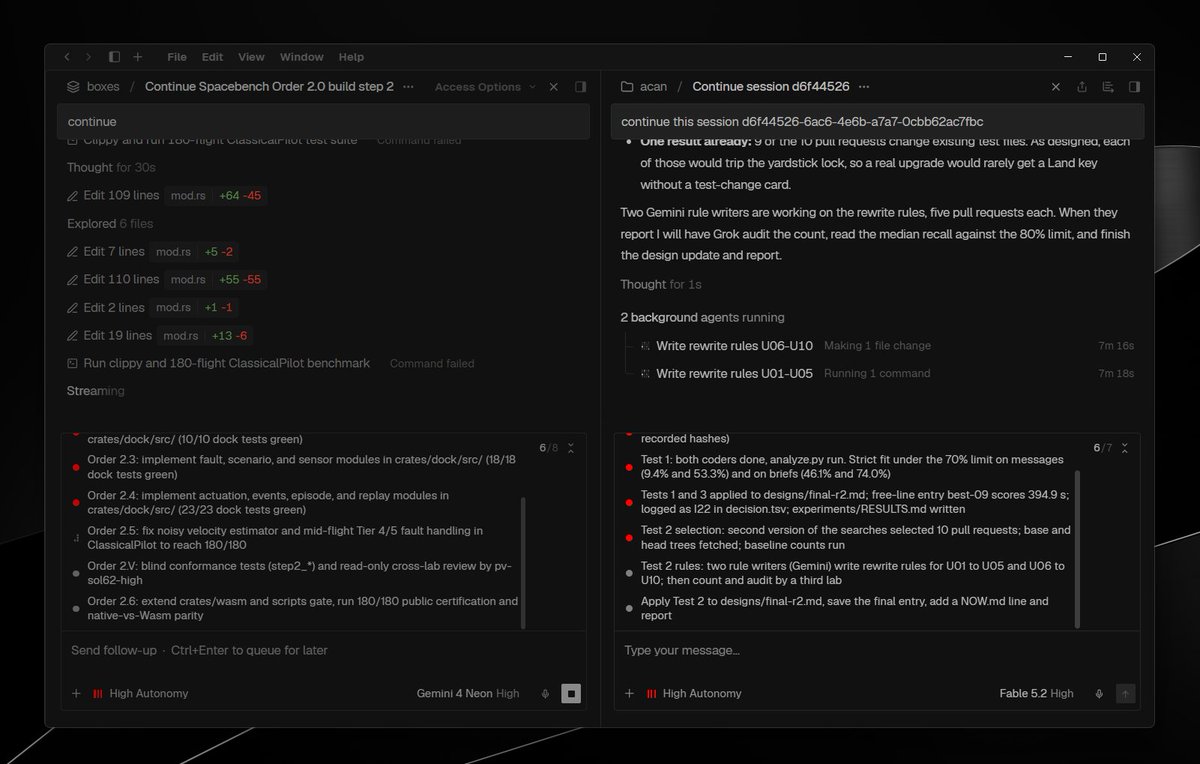
Stop managing coding agents in chat tabs.
Introducing Acan
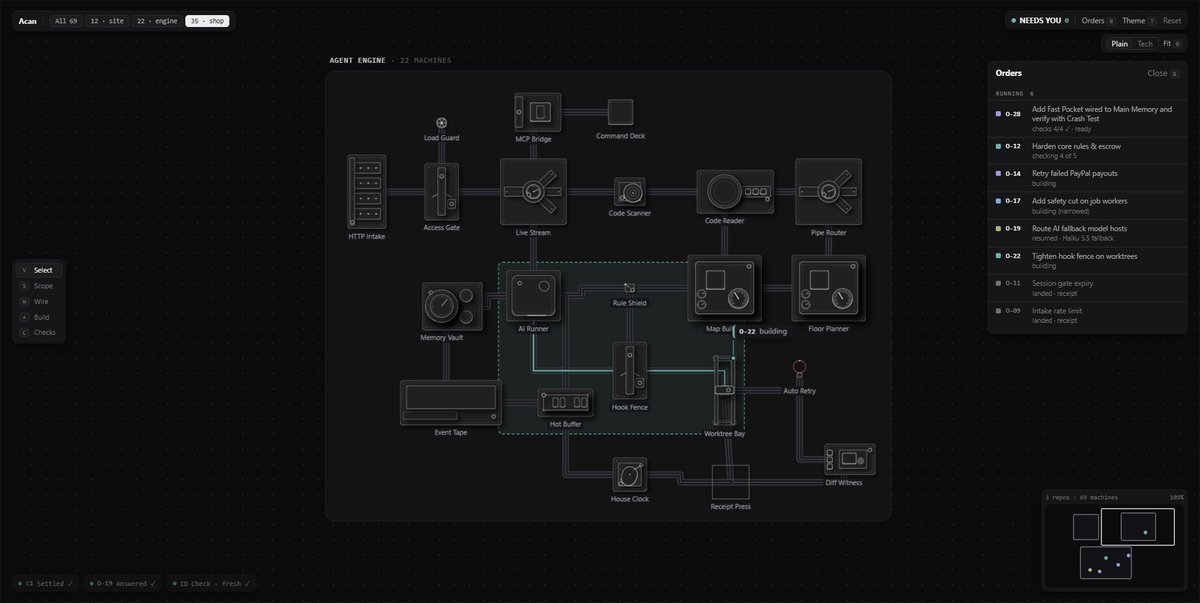
Acan is a live map of your codebase for a fleet of agents.
Every agent is a little drone on the map, so you can see who's working where and step in whenever you want.
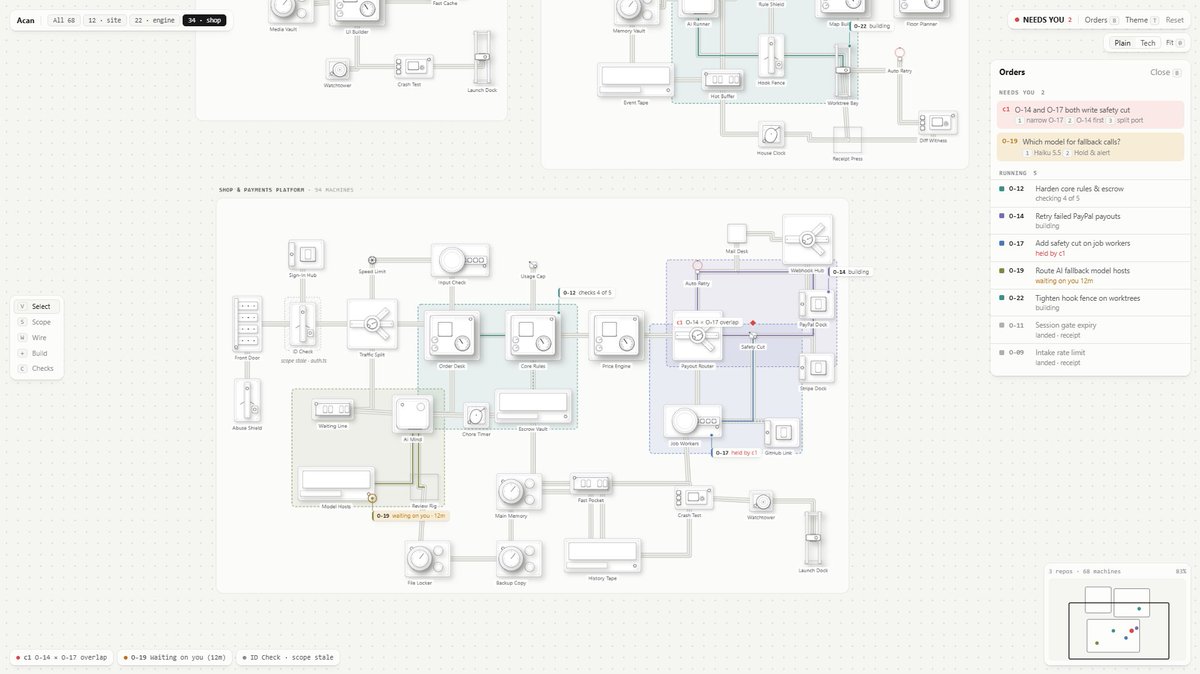
Two coding agents working on one codebase, drawn as a live map. They're about to want the same file.
This is Acan. It holds both before either writes, then runs the app to check what actually changed.
I built it because my agents kept passing their tests and still changing the app.
Before any code: Muse Spark drafts the scope, I seal it.
Same file twice: held before any write.
Gate: old app run twice, new app once, on the commit that would land.
Outside the scope: back to the agent with a reproducer.
Today's run:
2 agents
6 clashes held before any write
0 tasks landed. The gate refused, and the receipt says why.
Built Oct 26 to Nov 4, solo, for the Meta hackathon. Before that: research, mockups and throwaway prototypes in a separate repo, no code reused. Open source. Repo and a keyless replay in the first reply.
The Acan UX results are finally in, and honestly the best part was watching two of my biggest ideas fail before we wrote a single line of code.
The multi-model hillclimb gave us a solid design on paper, moving orders right onto the canvas instead of a separate text board.
Before building any of it, I ran /sharpen in @droid and set pass or fail cutoffs upfront to test our main assumptions against my own past work and public repos, splitting the roles across Fable 5.2, Sol 6.2, Gemini 4 Neon, and Grok 4.7 so no model was grading its own homework.
First, we tested whether 6 fixed action keys (Build, Fix, Upgrade, Rename, Investigate, Wire) could replace typing most orders.
Sol 6.2 and Grok 4.7 graded 300 of my past messages and 105 task briefs against a 70% bar, and both sets failed.
Day-to-day coding is way messier than 6 neat boxes. Fixes almost never start with a failing test, plenty of tasks are small tweaks or refactors where nothing is broken, and over half of what I type to an agent isn't a new order at all.
It's quick answers, redirects, or saying continue. So the free text box is back as the main way to write an order, with those keys kept as optional shortcuts.
Next, we tested whether big dependency upgrades could be summarized with rewrite rules so you barely have to read the diff.
Sol 6.2 picked 10 merged major-version upgrade PRs on GitHub without looking at the diffs, and Gemini 4 Neon tried to reproduce them using only renames, import changes, and simple call swaps.
Against an 80% bar, the median was only 9% (801 of 6,472 changed lines). Big upgrades are mostly new wrapper files, rewritten functions, and extra error handling, and 9 out of 10 touched existing test files too. So we dropped that shortcut and brought diff samples back onto the receipt.
We also checked whether passing tests alone can tell if an out-of-scope edit was unnecessary, using 20 landed units from the hackathon build.
Only 3 were small enough to re-run locally, too few for a firm rate, but in the one clean case we could revert, all 213 tests still passed even though that edit was meant to land.
Passing tests doesn't mean nobody wanted the change, so any dropped piece now stays visible on the receipt with a key to keep it.
Catching all of this early saved me weeks of building the wrong thing. Everything so far is still design work and model estimates on paper, and my standard @droid usage ran out right in the middle of Grok's final audit on the upgrade test.
Next up is finishing that audit and getting a working prototype under real hands.
A single-model setup uses the same big model for a two-line bug and a tricky rate limiter.
So I built a terminal coding agent where a smaller model triages each ticket first and decides whether to escalate to a bigger model with @gmi_cloud .
The six-ticket direct GMI benchmark cost $0.173 across 24 live calls, and two short Droid SDK probe turns used 8,180 and 8,509 total input tokens.
The TUI, 6-ticket fixture, 72 offline tests, and full cost log are open here if you want to try it on harder bugs.
https://t.co/Jhkf09a6qj
Sponsored by GMI Cloud @gmi_cloud #GMICloud
Here is what surprised me when the numbers came back.
All three setups passed 6 out of 6 tickets with zero regressions.
Multi-model routing cut cost by 31.2% compared to running GLM-5.1 on everything ($0.058 vs $0.084).
But running Qwen3.6-35B alone also passed all 6 tickets for $0.031. And on the one bug that escalated, both the extra triage call and a longer GLM-5.1 edit made routing cost more than calling GLM-5.1 directly.
On this suite, routing added cost over fast-only without changing the pass rate.
Honestly, I think I finally nailed what a software factory for AI agents should look like.
This whole thing started from a tweet I bookmarked where @poteto said that "agent UIs of the future will look like Factorio." I love Factorio, so that line stuck with me. I wanted to build it, but I kept failing over and over because I just couldn't explain the picture in my head clearly enough to my agents.
When I started building Acan for the Meta AI hackathon, I drifted away from that original idea and went 3D. That was the worst decision I made. An engineer from @factory caught it and gave me honest feedback that pulled me right back to 2D. (@AndreyRisuka, this is just an mjs UI render, the final wired version will look much more reasonable, I promise.)
Even after dropping 3D, I still struggled to describe the exact look and feel I wanted. Then @poteto released her new /reframe skill in pstack, and it understood what I was trying to say better than anything I had tried before.
In Antigravity with Gemini 4 Neon, /reframe helped me work out how the canvas should behave, a live multi-repo map instead of chat tabs, plain or tech labels, floating overlays, and wiring machines directly.
In @droid on Fable 5.2, /reframe nailed the visual style itself, flat top-down paper machines that stay gray at rest so color only appears for active agents, waits, and clashes.
Then I brought both halves together in Antigravity on a soft dot canvas with compact frosted floors for each repo and short, clean belts, tested up to 34 machines in one repo.
Today finally feels like the real first step on this journey. I'm happy to call this World Canvas v1, and from here it's only improvements.
I never thought this project would go viral like this.
I've gotten so many positive comments and so much valuable feedback.
I'll make sure to push this concept further and revolutionize how we interact with AI agents.
Thanks for all the support!
Honestly, I think I finally nailed what a software factory for AI agents should look like.
This whole thing started from a tweet I bookmarked where @poteto said that "agent UIs of the future will look like Factorio." I love Factorio, so that line stuck with me. I wanted to build it, but I kept failing over and over because I just couldn't explain the picture in my head clearly enough to my agents.
When I started building Acan for the Meta AI hackathon, I drifted away from that original idea and went 3D. That was the worst decision I made. An engineer from @factory caught it and gave me honest feedback that pulled me right back to 2D. (@AndreyRisuka, this is just an mjs UI render, the final wired version will look much more reasonable, I promise.)
Even after dropping 3D, I still struggled to describe the exact look and feel I wanted. Then @poteto released her new /reframe skill in pstack, and it understood what I was trying to say better than anything I had tried before.
In Antigravity with Gemini 4 Neon, /reframe helped me work out how the canvas should behave, a live multi-repo map instead of chat tabs, plain or tech labels, floating overlays, and wiring machines directly.
In @droid on Fable 5.2, /reframe nailed the visual style itself, flat top-down paper machines that stay gray at rest so color only appears for active agents, waits, and clashes.
Then I brought both halves together in Antigravity on a soft dot canvas with compact frosted floors for each repo and short, clean belts, tested up to 34 machines in one repo.
Today finally feels like the real first step on this journey. I'm happy to call this World Canvas v1, and from here it's only improvements.
Getting the look of a software factory right was only half the problem. Now comes the part that actually matters, the UX.
I'm happy with where Acan's visual canvas landed, even though I still need to run /sharpen to lock in the final spec. A clean map doesn't mean much if using it feels slower than what developers already live in every day.
Right now, tools and products like Droid workstreams, Cursor projests, Grok bot, Claude duet, T3 Code and Capy(.)ai set a really high bar for working with AI agents. T3 Code's inbox-style sidebar with orchestrator v2 and Capy(.)ai's captions feature made shipping with AI feel really smooth.
I want Acan to go further than that, helping people ship faster while actually raising the quality of what lands.
Instead of guessing my way through it with one model, I kicked off a multi-model research and hillclimb run today.
First, inside @droid, I have a Haiku 5.5 swarm doing a deep pass across our previous UI session, research papers, and outside references so the models aren't working from thin air.
Once that research is in, Fable 5.2 High, Gemini 4 Neon High, and Sol 6.2 High are running a hillclimb together using the /reframe skill. All three are pushing and critiquing each other's ideas to see if we can find a way of working with agents that genuinely beats chat tabs and sidebars.
I haven't seen where they land yet, so I'm curious to watch this play out. Once the UX clicks, I'll run /sharpen and start wiring it for real.
I'll keep you guys posted when the results are out.
Factory just dropped a free tier for individual devs. Bring your own inference and you’re good.
They’re also tossing in free Droid Computer hours as a holiday bonus for a limited time.
Worth trying.
Factory is now free for individual developers when you bring your own inference.
As a holiday bonus, we are also adding free Droid Computer hours to each account for a limited time.
Go to https://t.co/B1btaOaRZ6, download the app, add your API key, and start your first task.
All six factory images cost $0.51 at Seedream 5.0 Pro list price. You can adapt the brief, anchors, and templates for another brand.
Both GMI Studio workflow templates, the CIELAB verifier, all eight real PNGs, and the full cost log are open here.
https://t.co/Zy2zuZ0IPt
Sponsored by GMI Cloud @gmi_cloud #GMICloud #GMIStudio
If you prompt an image model one asset at a time, the style drifts fast.
So I packaged a two-phase asset factory patterned on GMI Studio by @gmi_cloud.
One JSON brief expands into six locked prompts, creates two anchors, batches both references, and fans out across four formats.
I ran an offline CIELAB script on all eight images to check the numbers honestly.
Lightness standard deviation dropped 57.5%, from 12.94 to 5.50 L*, and terracotta accent detection went from 0 of 2 baselines to 6 of 6 factory assets.
The tradeoff was real too. Mean delta E was 8.16 vs 7.85 and palette adherence was 83.97% vs 91.97% because the gray baseline screen sat close to a neutral palette by luck while missing the accent and box style.