FortiBleed
A newly discovered data leak: collection of Fortinet and FortiGate VPN credentials for 73,932 firewall URLs at organizations worldwide.
The exposed data was first discovered by security researcher Bob Diachenko, who says he found a server containing what appeared to be valid Fortinet VPN credentials, including usernames, email addresses, and plaintext passwords.
Stop writing 500-word prompts that don't work.
Here's the exact 3-part structure that works better:
Part 1: Context (.md) files.
Part 2: Clear instructions.
Part 3: "Don't start yet - ask me questions first."
That's it. But most people skip all three. Here's what each one fixes:
Part 1 - Context files.
Step 1. Create a file called "ABOUT ME."
Step 2. Put in your role, audience, goals, and tone.
Step 3. Create a second file: "WRITING STYLE."
Step 4. Add 3–5 examples of your best past writing.
Step 5. Save both as .md files.
Step 6. Upload them before you type a prompt.
Step 7. It knows who you are before it writes a word.
Part 2 - Clear instruction.
Step 1. State the task in one sentence.
Step 2. Name the format. (Post, email, thread, ad.)
Step 3. Name the audience. (Founders, marketers.)
Step 4. That's your prompt. Not 500 words. 3 lines.
Part 3 - "Ask me questions first."
Step 1. Add this line at the end of every prompt:
"DO NOT start writing yet. Ask me clarifying questions first."
Step 2. Claude will ask 3–6 questions.
Step 3. Answer them by clicking buttons.
Step 4. Now Claude writes something that actually sounds like you said it.
Or skip all of that. To download my exact files:
Step 1. Go to https://t.co/psB7XxB2Y4.
Step 2. Subscribe for free. Don't pay anything.
Step 3. Open my welcome email.
Step 4. Hit the automatic reply button inside.
Step 5. Download my .md files. Upload to Claude.
✦ Here's why your current prompts fail (red flags):
"Write me a LinkedIn post about AI tools."
"Make it engaging and professional."
"Keep it under 200 words."
One sentence. No context. No style. No voice.
You gave Claude nothing to work with.
That's like handing someone a blank page & saying, "write something amazing." No reference, examples & direction.
The fix isn't a longer prompt. It's a smarter setup.
Bad prompt: one vague sentence → generic AI slop.
Better prompt: clear task + "ask me questions first"
Best prompt: .md files + clear task + "ask me questions first" → sounds like you wrote it.
To get my exact files, subscribe to https://t.co/psB7XxB2Y4.
♻️ Repost to help one person, prompt better.
👨🔧👩🔧🔺 The Beginning of a Founder Movement.
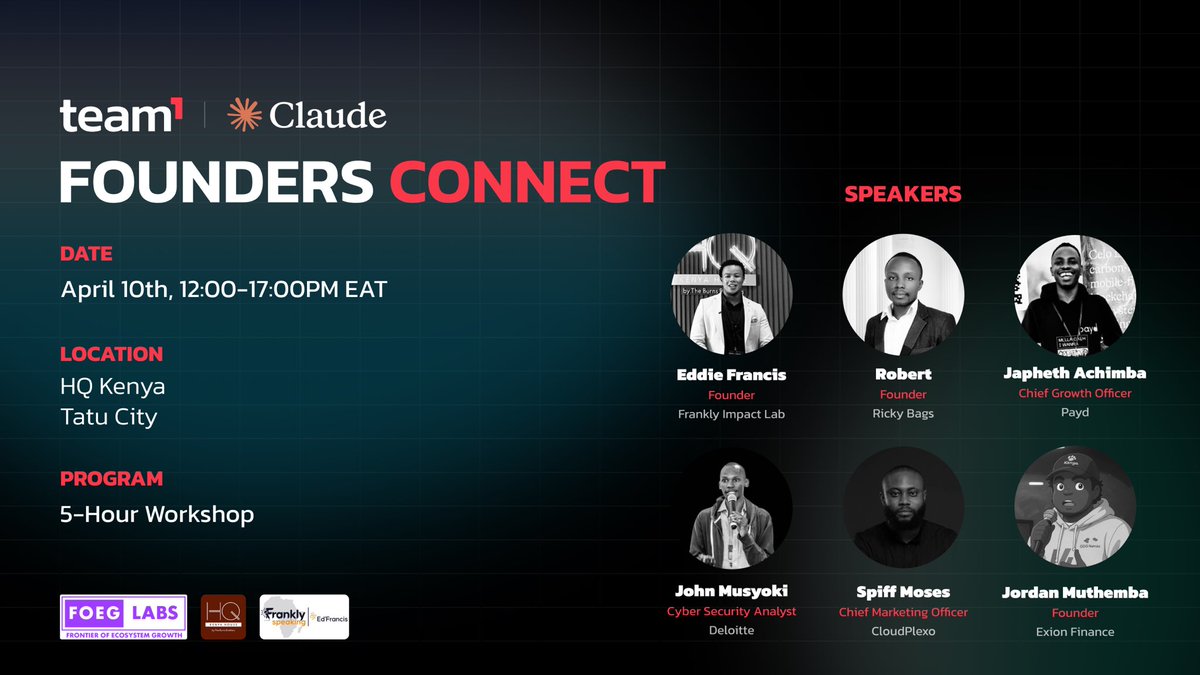
What started as a pilot founders event in Nairobi is quickly becoming something much bigger.
Founders Connect wasn’t just an event it was a signal.
150+ founders signed up to be part of something big.
60+ showed up and leaned in.
Thousands more tuned in live, curious about what’s building here.
But the real impact wasn’t in the numbers.
It was in the moments:
• A founder realizing they’re not building alone
• A conversation that unlocked a new direction
• A connection that could turn into a partnership, a product, or a company
This is how ecosystems actually start not with noise, but with intentional rooms where builders meet, challenge each other, and move faster together.
And this was just the first.
Founders Connect is becoming a consistent space where:
• Ideas get refined
• Builders find each other
• And execution gets sharper
The goal isn’t to host events.
It’s to build infrastructure for founders to win.
One room at a time.
TY to our partners @foeg_Labs Frankly speaking @claudeai@KenyaTechEvents for making this happen.
Hosted by @AvaxTeam1 Kenya 🇰🇪
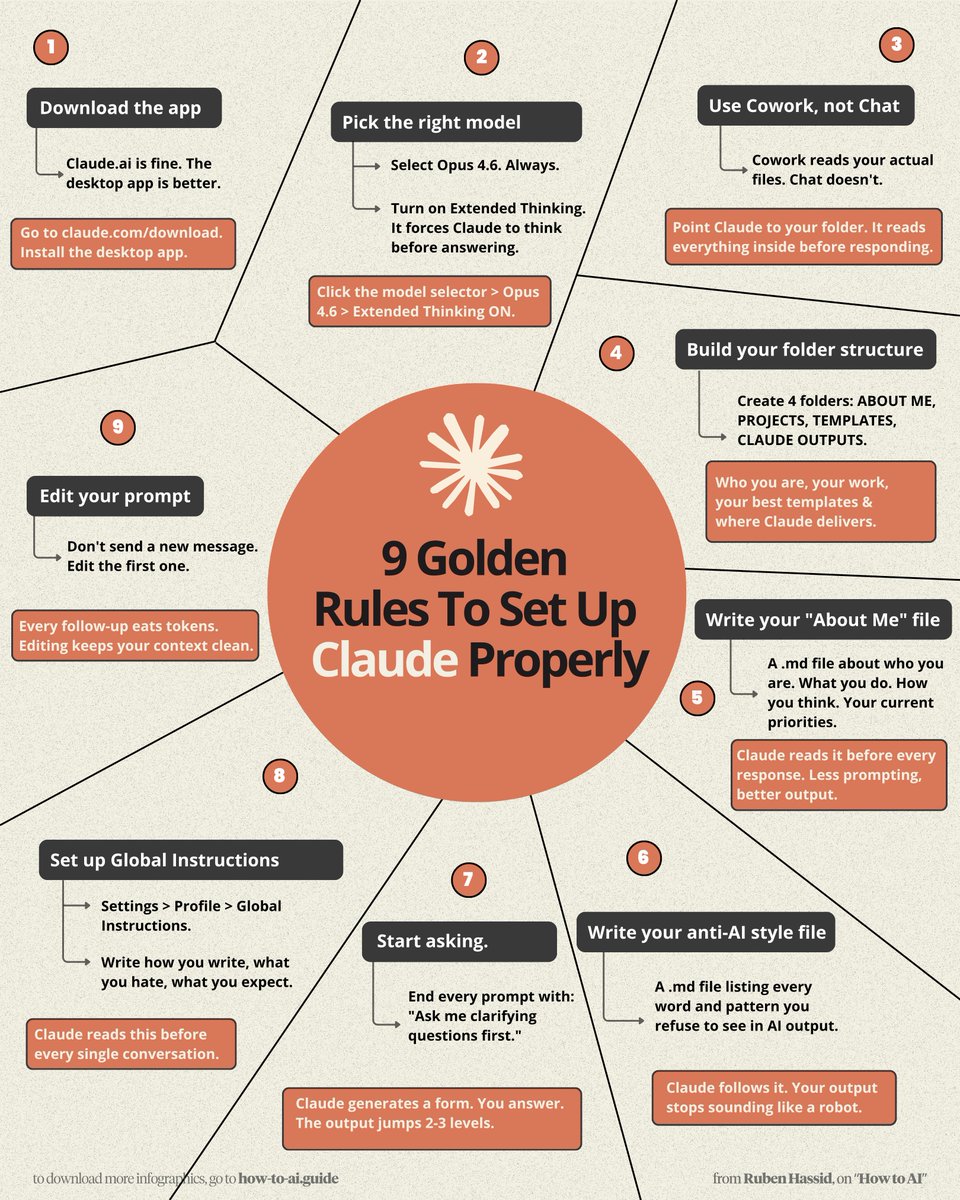
Don't type another prompt into Claude.
Do these 9 simple things first:
1. Download the Claude app
Claude .ai works. But the desktop app is better.
Go to claude .com/download. Install it now.
2. Pick the Right Model
Select Opus 4.6. Turn on Extended Thinking.
Click models → Opus 4.6 → Extended Thinking ON.
3. Use Cowork, Not Chat
Cowork reads your actual files. Chat doesn't.
Point Claude to your project folder.
It reads everything before responding.
4. Build Your Folder Structure
Create 4 folders: ABOUT ME, PROJECTS, TEMPLATES, CLAUDE OUTPUTS.
Example: Who you are, your work, your best templates & where Claude delivers.
5. Write Your "About Me" md File
.md file about who you are, your work, thinking.
Example: Claude reads it before every response. Less prompting, better output.
6. Write Your Anti-AI Style File
A .md file listing every word & pattern you refuse.
Example: Ban "delve," "landscape," "leverage." Claude follows it. You stop sounding like a robot.
To download mine, go here: https://t.co/psB7XxB2Y4.
Don't pay anything. It's free in the welcome email.
7. Start Asking
End prompt with: "Ask me clarifying questions first."
Example: Claude generates a form. You answer. The output jumps 2–3 levels.
8. Set Up Global Instructions
Go to Settings → Profile → Global Instructions.
Example: Write how you write, what you hate & like.
Claude reads this before every single conversation.
9. Edit Your Prompt
Don't send a new message. Edit the first one.
Example: Every follow-up eats tokens. Editing keeps your context clean.
I made over 100+ infographics like this.
If you want to download all of them, just:
1. Go to https://t.co/psB7XxB2Y4.
2. Then enter your work email.
3. It will ask you to pay or not. Don't pay.
4. Wait 2 min. Then open the welcoming email.
5. Click on my Notion library with everything in it.
Disclaimer: you will be subscribed to my newsletter. It's free, and always will be. Some people pay only to join my community & get answers faster.
400,000 readers enjoy it twice a week.
To always stay ahead of the AI curve.
To master AI, before it masters you.
♻️ Help others get better at Claude.
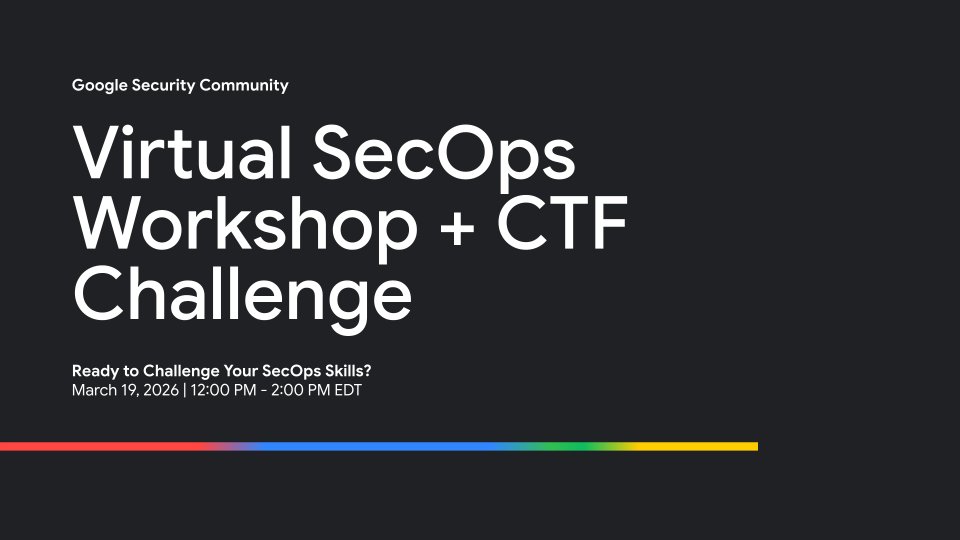
🚀 Ready to level up your SecOps game?
Join our Virtual SecOps Workshop + CTF Challenge! Hands-on learning, real skills, and a friendly competition to test what you’ve learned.
Register today → https://t.co/Hb944whi2C