#SuccessTRAIN#ThriveInAI
It's critical to learn #AI to be secure or successful.
Essential AI Guidebook - https://t.co/UxsUjIN7WY
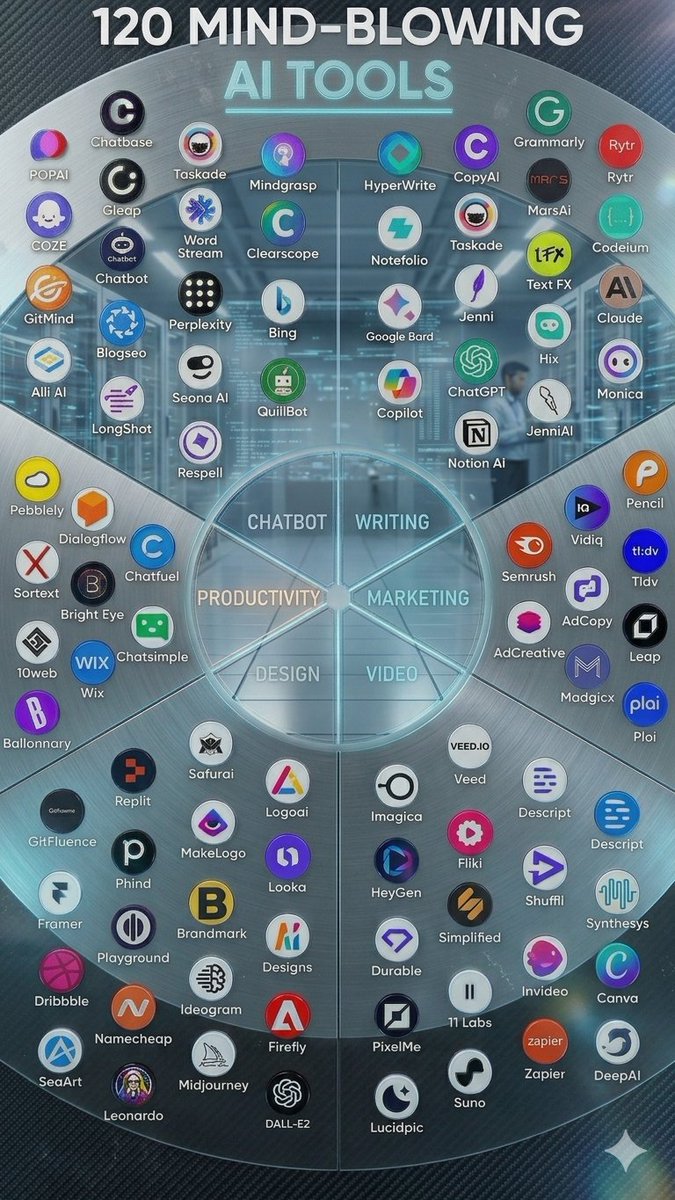
✔Top 100 Generative AI Tools <+777 Best #AITools>
✔How to Get Started in AI
✔40 Income Streams to Make Money with AI
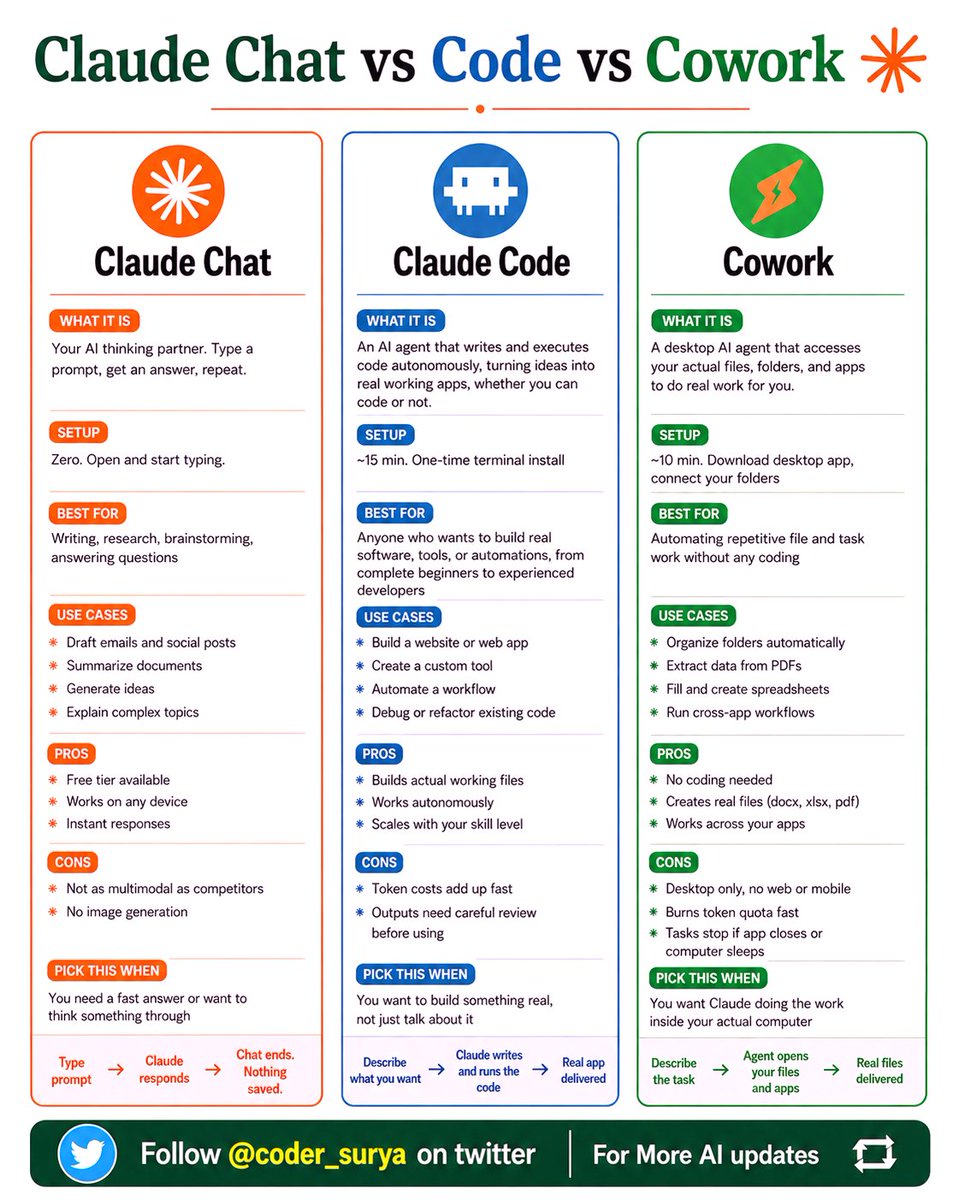
Claude Chat vs Code vs Cowork
__________
Stop defaulting to Claude Chat for everything.
Here's how to pick the right Claude for the job:
Claude has 3 versions now.
Most people have only ever opened one.
✦ Claude Chat
-Type a prompt. Get an answer. Chat ends. Nothing saved.
-Best for: writing, research, quick answers, brainstorming.
-Setup time: zero. Open and start typing.
✦ Claude Code
-Describe what you want. Claude writes and runs the code. A real working app gets delivered.
-No coding experience needed. Best for: building tools, automations, and web apps.
-Setup time: 15 minutes. One terminal install.
✦ Cowork
-Claude opens your actual files and apps. Does real work. Organizes folders. Fills spreadsheets.
-Runs cross-app workflows. Best for: repetitive tasks without any coding.
-Setup time: 10 minutes. Download the desktop app.
The difference that matters:
Chat ends when you close the tab.
Code ships something that doesn't.
Cowork does the work while you watch.
One image. Three tools. Zero confusion.
Save this. Send it to your team.
1. Follow @coder_surya
2. Save the post.
3. Repost to your network.
4. Join AI Community: https://t.co/ioQEJKhR1q
____________________________
Most people use Claude Code like a basic AI assistant.
But power users know the real advantage comes from mastering the commands behind the workflow.
Here are 26 essential Claude Code commands every developer, builder, and AI workflow operator should know 👇
━━━━━━━━━━━━━━━
SESSION & WORKFLOW CONTROL
━━━━━━━━━━━━━━━
🔹 /clear → Reset conversation history instantly
🔹 /resume → Continue previous coding sessions without losing context
🔹 /branch → Create alternate conversation paths for experiments
🔹 /rewind → Jump back to earlier checkpoints in your workflow
🔹 /rename → Organize sessions with custom names
🔹 /export → Save chats, outputs, and project discussions
These commands make long AI-assisted projects far easier to manage.
━━━━━━━━━━━━━━━
MODEL & TOKEN MANAGEMENT
━━━━━━━━━━━━━━━
🔹 /model → Switch between Claude models depending on task complexity
🔹 /cost → Estimate current session spending
🔹 /usage → Track model and token usage
🔹 /extra-usage → Detailed analytics for optimization
Small monitoring habits can dramatically reduce wasted tokens and API costs.
━━━━━━━━━━━━━━━
PROJECT INITIALIZATION
━━━━━━━━━━━━━━━
🔹 /init → Start Claude Code inside a project directory
🔹 /memory → Store persistent project instructions and context
🔹 /add-dir → Include extra folders in the working environment
🔹 /config → Modify project-level settings and preferences
This is where Claude starts behaving more like an actual coding teammate.
━━━━━━━━━━━━━━━
CODE OPERATIONS & REVIEW
━━━━━━━━━━━━━━━
🔹 /diff → Compare generated changes against your codebase
🔹 /security-review → Scan code for vulnerabilities and risky patterns
🔹 /plan → Generate structured implementation roadmaps
🔹 /permissions → Control file access permissions safely
🔹 /compact → Compress project context for better efficiency
These commands help maintain clean, scalable AI-assisted development workflows.
━━━━━━━━━━━━━━━
AGENTS & EXTENSIONS
━━━━━━━━━━━━━━━
🔹 /agents → View specialized AI agents
🔹 /skills → Add or manage agent capabilities
🔹 /plugin → Manage installed plugins
🔹 /reload-plugins → Refresh plugin configurations
🔹 /mcp → Connect external tools using Model Context Protocol
This layer unlocks automation beyond simple prompting.
━━━━━━━━━━━━━━━
INTERFACE CUSTOMIZATION
━━━━━━━━━━━━━━━
🔹 /theme → Change terminal appearance
🔹 /color → Customize terminal color schemes
Because developer experience matters too.
The biggest productivity jump in AI coding doesn’t come from better prompts alone.
It comes from learning how to control the entire workflow system around the model.
❤️ Like
🔁 Retweet
🔖 Bookmark
Follow @akhilesh9235 for more AI Posts
#AI #ArtificialIntelligence #AISkills #AIAgents #RAG #LLM #PromptEngineering
B2B Companies Are Struggling to Derive ROI from AI.
Only 5% say that AI is exceeding expectations at achieving ROI, compared to almost one-third of B2C / hybrid companies.
#marketing via Marketing Charts
AI is not the future anymore. It’s the skill gap of today. 🤖
The problem?
Most people want to learn AI… but don’t know where to start.
Good news:
Some of the world’s top universities and companies are offering free AI courses.
No expensive degree.
No complicated setup.
Just curiosity and internet.
Here are 10 Free AI Courses you can start today:
1️⃣ Harvard – Introduction to AI with Python
https://t.co/4OjvEyjUad
2️⃣ Microsoft – AI for Beginners
https://t.co/Iej7bWhLuZ
3️⃣ Google – Introduction to Generative AI
https://t.co/WiTAKsn6I4
4️⃣ https://t.co/G9hD795fvr – Generative AI for Everyone
https://t.co/ojf99oshlh
5️⃣ LinkedIn – Generative AI Courses
https://t.co/DW60knA15t
6️⃣ Vanderbilt – Prompt Engineering for ChatGPT
https://t.co/k8kyXmkJlt
7️⃣ OpenAI – ChatGPT Prompt Engineering for Developers
https://t.co/UvtHTQ4XTf
8️⃣ edX – AI Applications and Prompt Engineering
https://t.co/6yILcMT6Cf
9️⃣ AWS – Foundations of Prompt Engineering
https://t.co/HhGVEMOnLG
🔟 UC Davis – Big Data, AI, and Ethics
https://t.co/fZNDnwX17r
Whether you're a student, founder, HR professional, or working professional, understanding AI is becoming a career superpower.
Save this post. Start one course this week. Your future self will thank you.
❤️ Like
🔁 Retweet
🔖 Bookmark
Follow @MeenakshiYACS for more such posts
Which one will you start first? 👇
#AI #ArtificialIntelligence #GenerativeAI #CareerGrowth #Upskilling
ChatGPT is smart, but only if you ask the right way.
10 prompt templates to get better results faster.
(🔖 bookmark this to improve your prompts)
1. Expert Role Prompt
Let ChatGPT act like an expert to guide your work.
2. Step-by-Step Instruction
Get clear, simple steps for any process or task.
3. Compare Options
Compare choices and get help deciding what’s best.
4. Idea Generator
Quickly generate tailored ideas for any goal or niche.
5. Rewrite Text
Improve tone, clarity, or style with one simple prompt.
6. Review & Improve
Get AI feedback to make your content stronger.
7. Scenario Simulation
Run realistic mock conversations or meetings.
8. Format-Based Request
Ask for content in a specific format, like posts or scripts.
9. List Essentials
Build useful checklists, outlines, or summaries instantly.
10. Brainstorm Prompt
Explore ideas with AI, including pros and cons.
Smarter prompts mean better results.
📌 Get Advanced ChatGPT Guide (free): https://t.co/kOBWfKrBaX
👉 Follow me @AndrewBolis for more and 🔄 Repost this to help others use AI