Build your perfect trading dApp— Mesh is a modular tri-feed trading dApp built to enhance your trading.
CA: 9StMTY87VzGdVNguvFWxoL8i7tKyXAMWkJH1P3opCNMt
10k, 100k, or 1m— the market cap is inconsequential to real builders building real tech. We strongly believe in the usefulness of Mesh and continue to build regardless of price action.
We are deeply thankful to the small community that Mesh has and look forward to the future!
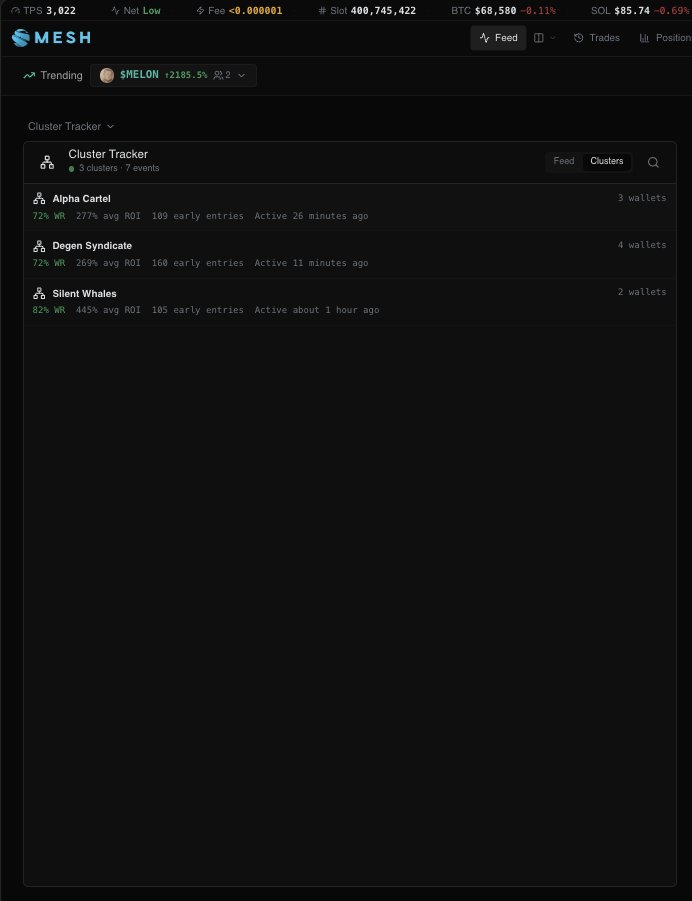
Scaffolding done for the 8th Mesh feed: Valuable Cluster Tracker. This feed automatically monitors and cross-references profitable and early wallets in high-performing tokens and groups them based on similar movements and co-trading patterns; easily monitor where cabal groups, profitable trench hunters and many more quality clusters are moving to, and from.
Releasing in V2.2.
Part 1 (the quoted article) had a media limitation— we are finishing up Part 2 of the Trading with Mesh's Fully Customizable User-Focused Terminal to highlight some of the lesser-known features on the dApp that are incredibly useful!
Today's agenda:
- Release V2.2 of the Mesh dApp
- Conclude source-specific autonomous buying and selling & release
- Conclude scaffolding and infrastructure for private swaps
- Release the 8th Mesh data feed: Valuable Cluster Tracking (watch in real-time where the most probabilistic cabal movements are moving to and from and trade with them).
UI/UX updates pushed to the dApp just now:
- Centered header better
- Changed feed layout text button to an icon button next to the Feed button
- Removed extraneous information from feed cards for better viewing
Upgrading the Mesh AI functionality as well to easily manage your positions— set stop losses, take profits, and much more directly from the Mesh AI modal in the top-right of your dApp.
Quick look on the Mesh auto-buying mechanism; every channel, account and source are individually configurable to allow you to build full autonomous trading parameters tailored to specific sources.
Quickly configure auto-trading settings when adding a new source or go into your auto-trading panel later and configure your settings. Every source can be toggled to enable/disable auto-trading.
Inherent safety checks:
- No duplicate auto-buying (if a source on Telegram posts a token and your Mesh system automatically purchases it, it won't buy the same token if another source posts it on X/Telegram, etc).
- Minimum/maximum market cap and liquidity.
- Max buys per hour (if toggled on).
- Max SOL per day (if toggled on).
This will contain very hefty configurable safety limits such as:
• No duplicate auto-buying.
• Max SOL per day (if opted).
• Max buys per hour (sometimes channels & accounts get very active and post a lot, you can toggle the safety switch for these).
• Min market cap/liquidity
Along with a few other safety-related settings. Users will have per-source settings meaning you can configure different auto-buy amounts, sells, TP/SL, etc for every single individual account, channel, source, etc.
Now that V2.1 has been released, let's continue onto V2.2!
Today's focus is now on finishing the autonomous trading of tokens posted by the user-specific channels/accounts on Telegram/X for the V2.2 update.
Now that V2.1 has been released, let's continue onto V2.2!
Today's focus is now on finishing the autonomous trading of tokens posted by the user-specific channels/accounts on Telegram/X for the V2.2 update.
V2.1 of the Mesh dApp has been released and is now available for use.
What does this update contain?
- Laddered limit orders for both Stop Loss and Take Profit capability.
- Configurable SL/TP levels via both market cap and token price.
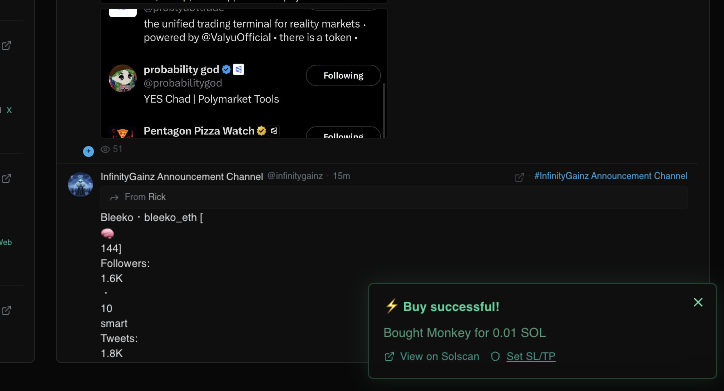
- Toast notifications for buys now have a quick button to configurable SL/TP so you can set them directly after buying within the dApp.
- OCO capability.
- Auto-execution polled every ~3s for rapid transaction landing; built for the volatility of the Solana trenches.
V2 of the Mesh dApp has been pushed to live!
What came with this version?
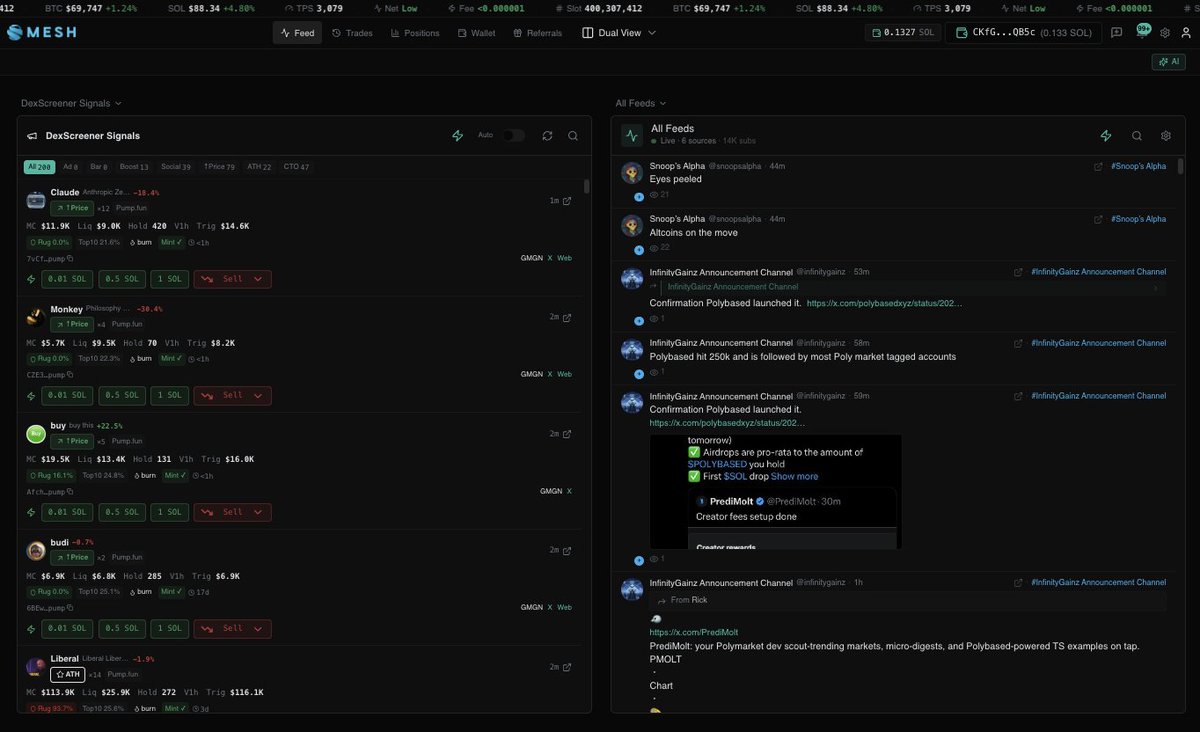
- An entirely new UI/UX— proper data lines, a more compact arrangement for easier viewing and quickly-digestible reading, smoother fonts and all-around general quality-of-life updates.
- 2 new feeds:
1. DexScreener Signals (real-time monitoring of tokens that paid for ad, paid for updated token profiles, CTOs, boosts, upwards price deviations and ATHs)
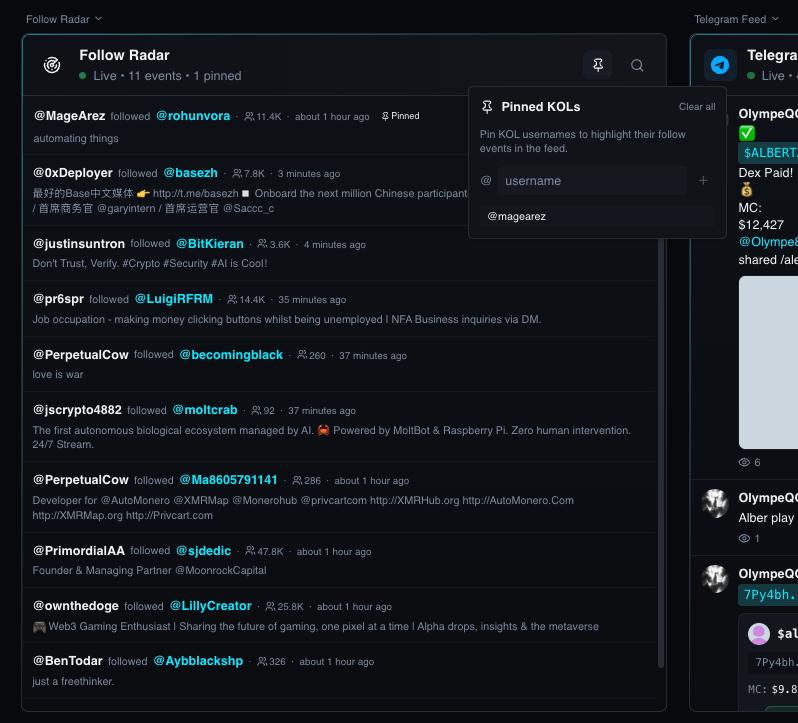
2. Follow Radar (watch who your favorite accounts are following in real-time; tokens mentioned by the followed account or tokens in the mentioned accounts bio are automatically propagated with information) + pinnable accounts (decide which ones are most important so they are always at the top of the feed)
- Updates to the Single View layout, the Dual View layout and the Triple View layout
- Updated transaction flows for quicker transaction speeds and more intuitive usage
Quick look on the new UI; a lot more compact with proper data lines, easier to read and digest information quickly and much more responsive. Opted out of the gray-ish background and going with a smooth glossy black.