🔞 Trivia About You R18 Patch
Adds adult scenes for players 18+ only. It's optional and doesn't change the main story.
🔗Download: https://t.co/pn28DBwWoA
X's auto-translate may hide this link. If it's missing, tap "Show original" or see our reply below.
⚠️ The demo patch does NOT work with the full game and can cause missing CGs or white squares in the Gallery. If you installed it, remove it before Step 3: in the game folder, open "TriviaAboutYou_Data" and delete the "StreamingAssets" folder.
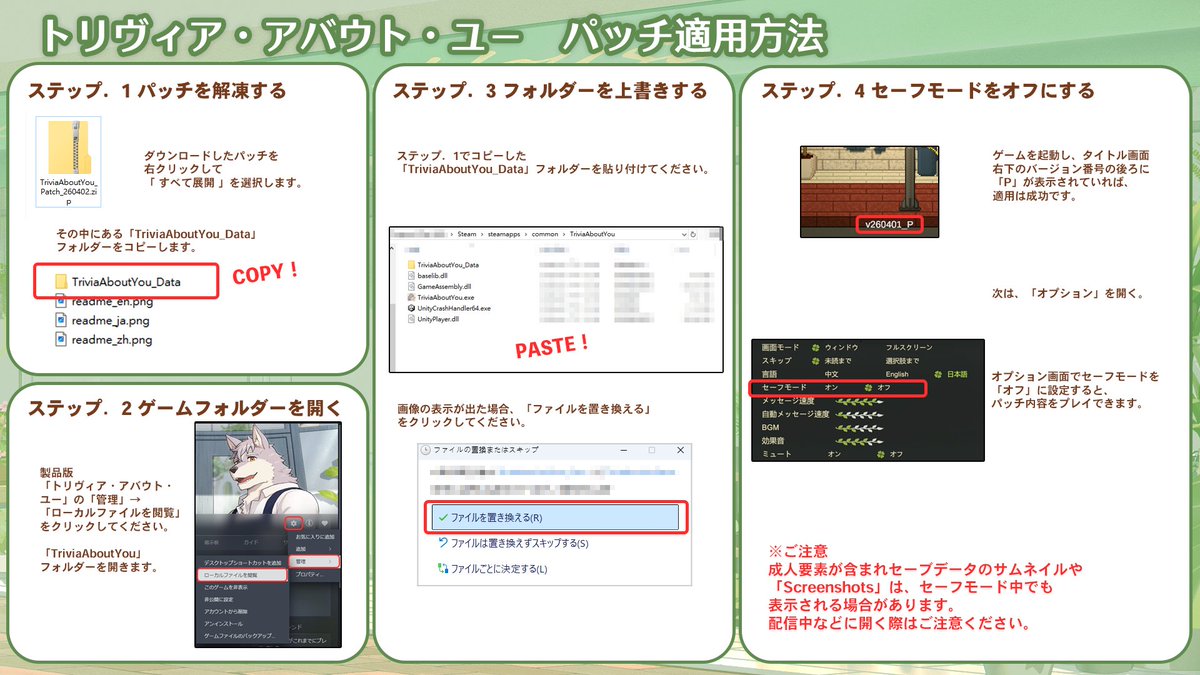
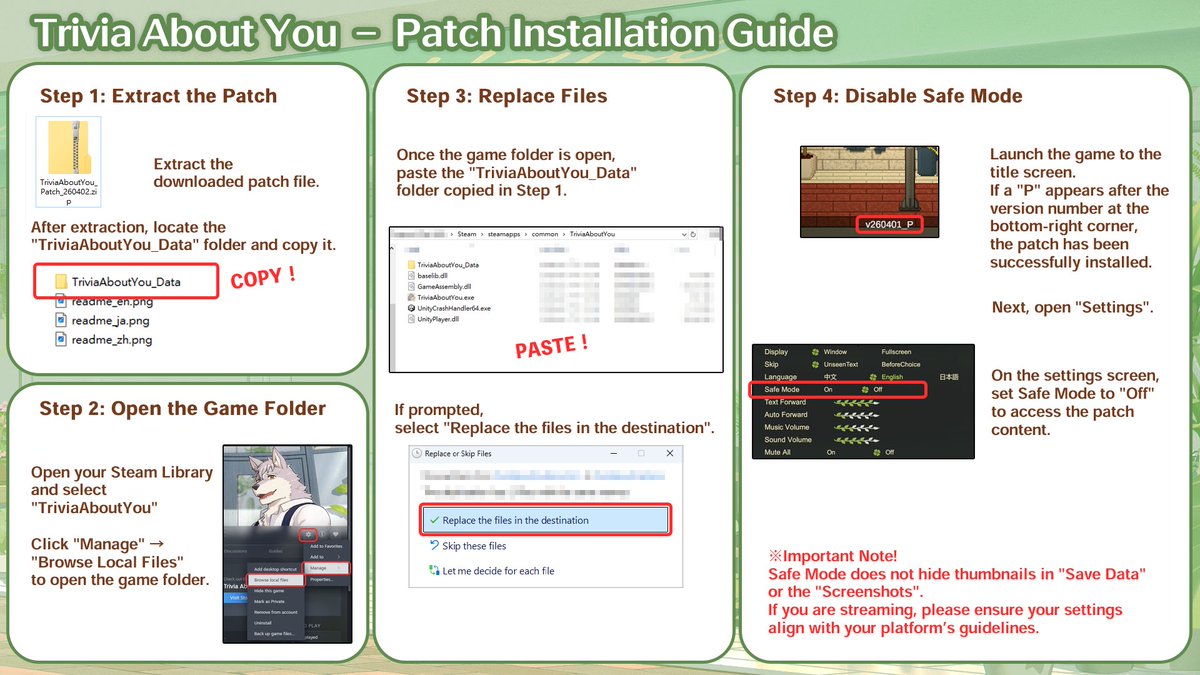
Step 1: Extract the Patch
Extract the downloaded patch file. After extraction, locate the "TriviaAboutYou_Data" folder and copy it.
Step 2: Open the Game Folder
Open your Steam Library and select "Trivia About You". Click the gear icon, then "Manage" → "Browse Local Files" to open the game folder.
Step 3: Replace Files
Once the game folder is open, paste the "TriviaAboutYou_Data" folder copied in Step 1. If prompted, select "Replace the files in the destination".
Step 4: Disable Safe Mode
Launch the game to the title screen. If a "P" appears after the version number at the bottom-right corner, the patch has been successfully installed. Next, open "Settings" and set Safe Mode to "Off" to access the patch content.
Important Note: Safe Mode does not hide thumbnails in "Save Data" or "Screenshots". If you are streaming, please ensure your settings align with your platform's guidelines.
#TriviaAboutYou
📦 Pre-orders for the Merch Complete Sets close in 3 days!
Order yours directly from our official store. We ship worldwide! 🌎✈️
🔗 https://t.co/YVPKxfuLOZ
グッズセットの予約受付はあと3日で終了します!
海外発送にも対応しています!🌎✈️
#TriviaAboutYou#��リヴィア・アバウト・ユー #トリアバ
📦 Pre-orders for the Merch Complete Sets close in 3 days!
Order yours directly from our official store. We ship worldwide! 🌎✈️
🔗 https://t.co/YVPKxfuLOZ
グッズセットの予約受付はあと3日で終了します!
海外発送にも対応しています!🌎✈️
#TriviaAboutYou#トリヴィア・アバウト・ユー #トリアバ
🔞You can add adult-only scenes to Trivia About You by installing the R18 Patch.
The patch does not affect the main story and is provided as optional extra content.
Please decide for yourself whether you wish to use it.
📥 After downloading the patch, follow the instructions below:
Step 1: Extract the patch
1. Right-click the downloaded patch file
2. Select “Extract All”
3. Click “Extract”
A folder containing the patch will appear after extraction
Step 2: Open the game installation folder
1. Open Steam
2. Go to your Library
3. Find “Trivia About You”
4. Click the gear icon next to the game title
5. Select “Manage”
6. Click “Browse Local Files”
Steam will open the game’s installation directory
Step 3: Copy and replace the files
1. Copy the “TriviaAboutYou_Data” folder extracted in Step 1
and paste it into the game installation folder opened in Step 2
2. If prompted, Select “Replace the files in the destination”
Step 4: Disable Safe Mode in the game
1. Launch “Trivia About You Demo”
2. Open Settings
3. Set “Safe Mode” to Off
※This patch contains adult-only (18+) content.
Please ensure you are 18 years or older before downloading
※Important Note!
Safe Mode does not hide thumbnails in "Save Data" or the "Screenshots" menus.
If you are streaming or recording content, please ensure your settings align with your platform’s guidelines.
Patch download: https://t.co/pn28DBwWoA
📦 Pre-orders for the Merch Complete Sets close this week!
Order yours from our official store. We ship worldwide! 🌎✈️
🔗 https://t.co/NpCeONwqT0
グッズセットの予約受付は今週で終了します!
海外発送にも対応しています!🌎✈️
#TriviaAboutYou#トリヴィア・アバウト・ユー#トリアバ
📦 Pre-orders for the Merch Complete Sets are closing soon!
Get yours from our official store. We ship worldwide! 🌎✈️
🔗 https://t.co/NpCeONwYIy
グッズセットの予約受付はまもなく終了します!
海外発送にも対応しています!🌎✈️
#TriviaAboutYou
✨Sharing our new art for the Infurnity 2026 conbook!✨
Miliarium is our upcoming furry visual novel about gladiators, fate, and the bonds you choose.
🎬 Opening scenes: https://t.co/PSYhxbwZ9f
🔗 Wishlist: https://t.co/ID2DAiVsNc
#Miliarium#Infurnity#Infurnity2026
✨Miliarium's full opening, first shown at Infurnity, is now on YouTube in English!✨
Our upcoming furry visual novel about gladiators, fate, and the bonds you choose.
🎬Watch: https://t.co/PSYhxbwZ9f
🔗Wishlist: https://t.co/z3BEhpWD1B
#Miliarium#Infurnity#Infurnity2026
Heading to Infurnity 2026!
Find us at the Dealers Den on Sunday, Nov 1 (B39–B40). ✨🐺
Merch sets are also open for preorder (shipping later):
🔗 https://t.co/YVPKxfudZr
Infurnity 2026 ディーラーズデン【B39・B40】(11/1)に出展します!
公式ストアでもグッズセットの予約を受付中です(後日発送)。
#TriviaAboutYou
#トリヴィア・アバウト・ユー #トリアバ
#Infurnity #Infurnity2026
📦 Pre-orders for the Merch Complete Sets are now open!
Grab yours on our official store. We ship worldwide! 🌎✈️
グッズセットは現在予約受付中です!
海外発送にも対応しています!🌎✈️
🔗 https://t.co/NpCeONwYIy
#TriviaAboutYou#トリヴィア・アバウト・ユー#トリアバ