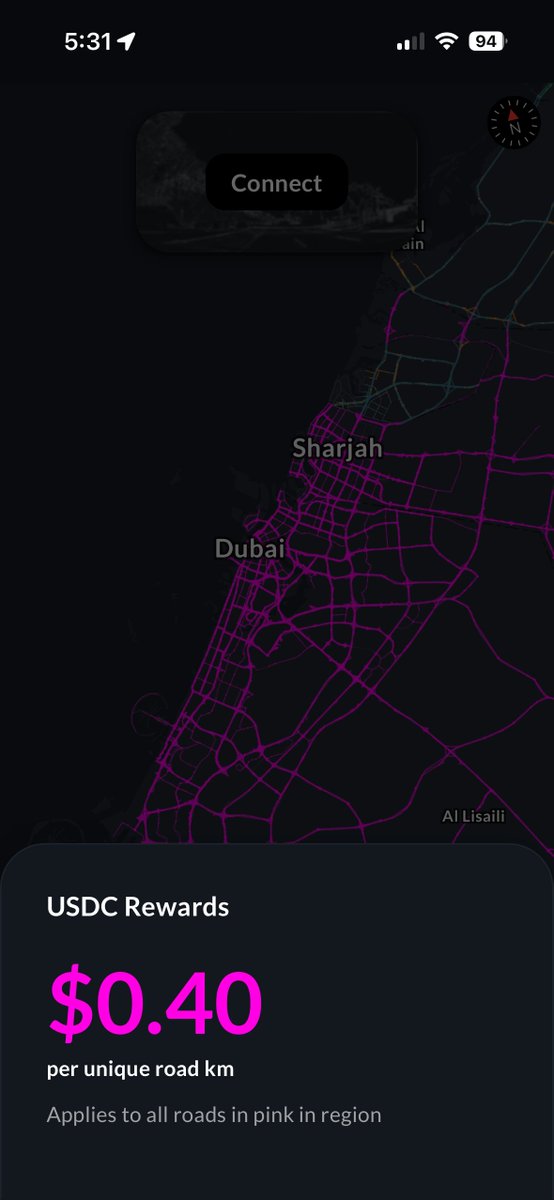
Bee Maps has launched a beta that pays contributors in USDC for mapping priority roads in select regions.
These rewards are funded directly by Bee Maps and offered at our discretion to accelerate coverage where customer demand is highest.
These rewards are separate from any other rewards.
Following the beta, we expect to expand USDC rewards to most roads and regions.
Some quick FAQs...
1. Do I need to create a new Circle wallet to receive USDC?
Yes.
2. Can I still upload via the App, via LTE, and via WiFi Connect?
Yes.
3. Can I access the Circle Wallet on https://t.co/CAGZLuJJWO?
Yes. See here:
https://t.co/tITkkp1jyG
4. Does Fleets work now with USDC?
Yes.
We will soon disconnect Phantom and Breeze from the Bee App. Starting Sunday August 2nd, the Bee App will only issue USDC Rewards.
Please setup your Circle Wallet in the Bee App under Settings > Rewards to receive USDC.
@MondoARG@aseidman What region are you mapping in?
USDC Rewards are only in certain regions at the moment and they are indicated by purple and red roads.
We will soon disconnect Phantom and Breeze from the Bee App. Starting Sunday August 2nd, the Bee App will only issue USDC Rewards.
Please setup your Circle Wallet in the Bee App under Settings > Rewards to receive USDC.
Update on the transition to USDC and more...
It's Live
1. Email sign-in on the Bee App
2. Use the same email to sign-in across Bee App and https://t.co/CAGZLuJJWO
3. Circle Wallet is available to all users (unless you are part of a fleet)
Coming soon
The ability to connect a Circle Wallet via https://t.co/ADv4ypFWeF
Update on the transition to USDC and more...
It's Live
1. Email sign-in on the Bee App
2. Use the same email to sign-in across Bee App and https://t.co/CAGZLuJJWO
3. Circle Wallet is available to all users (unless you are part of a fleet)
Coming soon
The ability to connect a Circle Wallet via https://t.co/ADv4ypFWeF
ICYMI
We are transitioning to USDC Rewards and the existing wallets (Phantom and Breeze) will be disconnected and removed from the Bee App.
Please setup your Circle Wallet to receive USDC rewards.
An update on August Transition Plan
Starting in August 2026, email will become the default way to sign in to the Bee App and https://t.co/ADv4ypFWeF.
USDC will become the default rewards system, and Phantom and Breeze wallet connections that support HONEY rewards will be removed from the Bee App.
Learn more
https://t.co/OuItl9nzOZ
An update on August Transition Plan
Starting in August 2026, email will become the default way to sign in to the Bee App and https://t.co/ADv4ypFWeF.
USDC will become the default rewards system, and Phantom and Breeze wallet connections that support HONEY rewards will be removed from the Bee App.
Learn more
https://t.co/OuItl9nzOZ
The Beta is live and picking up speed. Thanks to everyone sending feedback — a lot of it is already shaping what ships next.
Starting in August:
1. Email sign-in becomes the default across the Bee App and https://t.co/ADv4ypFWeF.
2. Circle Wallet becomes the default for USDC rewards.
3. Phantom and Breeze support winds down after that.
The TLDR is that the Bee App will become USDC rewards by default.
Later this month, we're fully integrating https://t.co/ADv4ypFWeF and the Bee App into one account.
What that means for you: the Bee App is moving to email-based sign-in.
Right now we're mid-transition, which is why the app is asking you to add your email address.
One email gets you into both https://t.co/ADv4ypFWeF and the Bee App.
Bee Maps has launched a beta that pays contributors in USDC for mapping priority roads in select regions.
These rewards are funded directly by Bee Maps and offered at our discretion to accelerate coverage where customer demand is highest.
These rewards are separate from any other rewards.
Following the beta, we expect to expand USDC rewards to most roads and regions.
To address the Bee connectivity issue, a new version of the app is coming.
App Versions: iOS: 10.10.30 Android: 10.10.29
Here is what you need to do:
1. Download the new version of the app
2. Connect to Bee via WiFi from phone's settings
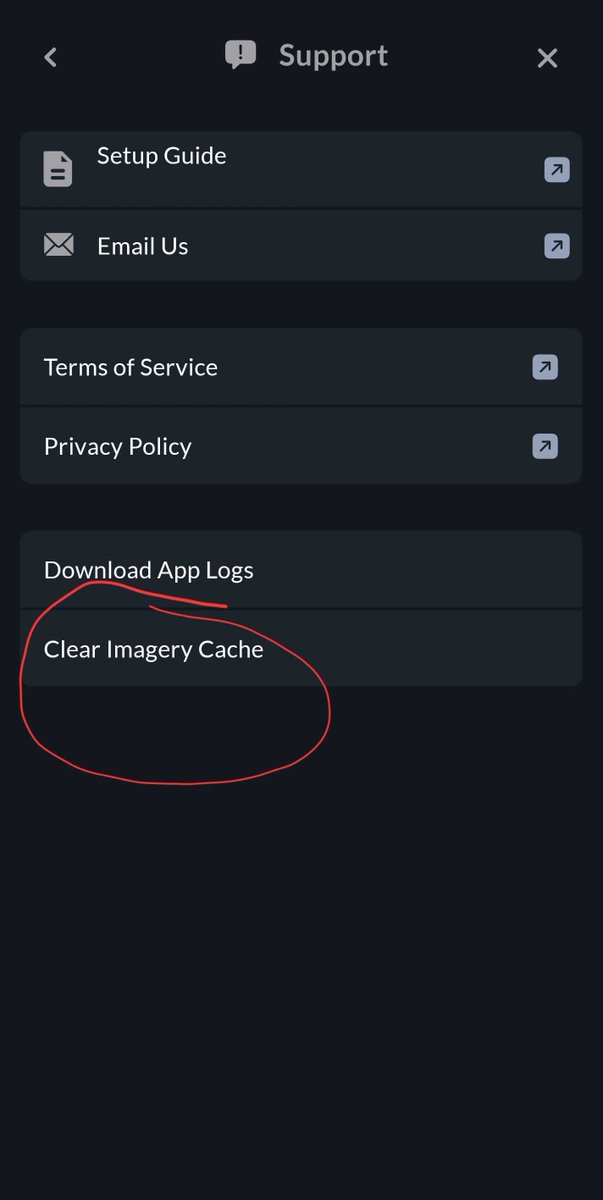
3. Open App and Go to Settings → Support
4. Click on Clear Image Cache button, click Clear when prompted
5. Once this is complete you will be able to connect to the Bee as usual
(If you are not experiencing Bee connectivity issues, no need to do this.)
Get paid in USDC to map your city.
In July, the Bee starts paying drivers in stablecoin for select regions and roads.
Beta, invite-only to start.
Want in? Link in next tweet...
Your Bee has been mapping the world.
Now you can see the results.
Toggle map features to explore every stop sign, speed limit, and turn restriction the network has detected.
All placed at real-world coordinates.
Read more 🐝 👇
https://t.co/Mzux9hiyUs
You see the road.
The Bee sees the map.
Every sign. Every restriction. Every frame tied to precise position.
The Bee never blinks 🐝.
Read more 👇
https://t.co/DJ0TjeRu8l
Maps aren’t static layers anymore.
They adapt as models learn from the world.
Bee Maps provides the signal that makes that possible 🐝.
How the map learns 👇
https://t.co/oEjVLzIq9b
A clip isn’t enough.
A coordinate isn’t enough.
To understand a driving event, you need context.
Video + Position + Force
New from Bee Maps 🐝 👇
https://t.co/RiG0sZe3ZD