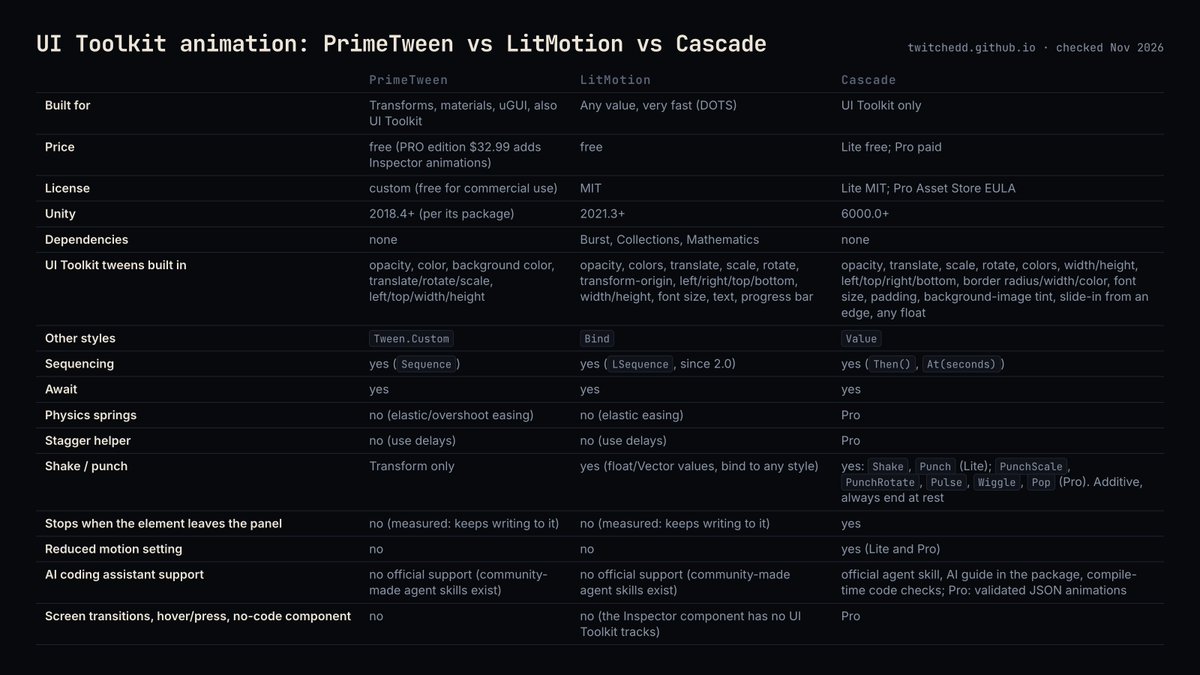
I make a UI Toolkit animation library, so I tested it against PrimeTween and LitMotion: same animations in all three, a benchmark and an AI coding assistant test.
LitMotion was the fastest. Remove a VisualElement mid-tween, though, and both other libraries keep writing to it.
The free Lite tier gets Shake, Punch, At() timelines and code checks: compiler warnings for animation code that compiles but is wrong, like a duration in milliseconds.
Lite: https://t.co/EbK93GwncI
Pro: https://t.co/XKRG1H0gvX
Docs: https://t.co/EIsvJJio7J
Cascade 1.2.0 is out. The redesigned combat HUD, medieval shop and SaaS dashboard are now in Cascade Pro.
New in the engine: Shake, Punch, Pulse and Pop. They layer on top of whatever is already moving and always settle back at rest, even when a player hammers the button.
Five screens built in Unity UI Toolkit, all animated with Cascade: a MapleStory-style shrine, a music app in three moods, a space combat HUD, a medieval shop and a SaaS dashboard.
HUD, shop and dashboard join Cascade Pro next update.
#ScreenshotSaturday#gamedev
Stayed up too late hitting slimes on Victoria Island? This one's for you.
Sakura Shrine is my love letter to MapleStory, one of the best games I played. Built in Unity UI Toolkit with Cascade as the animation layer.
Coming as a Cascade sample.
#ScreenshotSaturday#MapleStory
Redesigned the combat HUD sample for Cascade's next update. Top: before. Bottom: after.
Hit flashes, lock-on, a shield arc and an Overdrive mode that turns the whole HUD amber. Every move is a Cascade tween on Unity UI Toolkit.
#WIPWednesday#madewithunity#unity3d#gamedev
Small giveaway: reply with what you'd build with Cascade. I'll pick the 3 ideas I like best and each gets a free Cascade Pro voucher.
Closes Mon Nov 2, 12:00 UTC. One entry per person.
I built a music player in Unity UI Toolkit where the whole room follows the song: fire for metal, lasers for synthwave, rain for lo-fi.
Loud parts make the fire roar and the rain pour, and each beat lands as a surge, flash or gust.
#screenshotsaturday#madewithunity#unity3d
Play it in your browser (click once for sound): https://t.co/rKmtwcbbMv
How it was built, with the code and what broke along the way: https://t.co/nJnVR3z7L7
All the motion is Cascade, my tween library for UI Toolkit.
Record scratch in Unity UI Toolkit. The spin isn't a looping rotation, it's a motor: one speed value that tweens for start-up, braking and the recovery after you let go.
motor = vinyl.Animate().Value(spin, 0f, 1.4f, v => spin = v);
Playable: https://t.co/rKmtwcbbMv
I built a music player in Unity UI Toolkit where the whole room follows the song: fire for metal, lasers for synthwave, rain for lo-fi.
Loud parts make the fire roar and the rain pour, and each beat lands as a surge, flash or gust.
Made with Cascade, my animation library for Unity UI Toolkit. The HUD uses Pro features, and Pro is 30% off until Oct 21.
Pro: https://t.co/QZ2wgqc7xe
Free Lite (MIT): https://t.co/kPDhbgvQ7Z
Wanted to see if Cascade holds up as a real game HUD, so I built one: damage chip on the health bar, screen shake, cooldown fills, a wave banner. All UI Toolkit.
What screen should I build next?
#WIPWednesday#MadeWithUnity#gamedev
UI Toolkit tip: USS transitions don't run on display: none.
To fade a panel in, set display: flex first, wait one frame, then change opacity. To fade out, change opacity and only set display: none after the transition ends.
#unity3d#gamedev
UI Toolkit transitions handle the basics. Sequences and staggered lists? Back to hand-written scheduler code.
I built Cascade to make that easier. Free MIT core, more in Pro.
https://t.co/D9f2NjLJH7
What UI animation do you keep rewriting?
#ScreenshotSaturday#MadeWithUnity