Committed to delivering high-quality, easy-to-understand #UnrealEngine resources that follow best development practices, all created and maintained by @Tezenari
So... I rebuilt the Unreal Directive website from the ground up. A sleek new design, vastly revamped resources, amongst other improvements.
This is just the beginning, please let me know what you think 🙏
https://t.co/UFlUEJkbeO
Uncertain about the future of the Directive Utilities plugin with the direction Unreal Engine is taking. Will have to see how things turn out.
https://t.co/7dZfbm49ZV
https://t.co/3xsRq5huvh
UE C++ reminder: never put required work inside check().
In Test and Shipping builds the expression isn't evaluated. check(Inventory->RemoveItem(Id)) works in the editor, then skips the removal in a packaged build.
Use verify() when it has to run.
https://t.co/7A0UfVQwsl
UE Tip: The Depth Fade Node
If you're seeing hard seams where translucent materials intersect geometry, try the Depth Fade node. It fades opacity as the surface gets close to what's behind it, and Fade Distance controls the falloff.
https://t.co/R5buSDQ6ii
It can change words based on the value too. {Count} {Count}|plural(one=item,other=items) prints "1 item" or "3 items" using the current culture's plural rules.
If the Format pin is wired from another node, the pins won't generate. Use Add pin and name each one to match.
UE Tip: The Format Text Node
Instead of chaining Append nodes for UI text, type something like {Name} has {Health} HP into the Format pin. Each {word} becomes its own input pin.
The output stays Text, so it's still localizable.
https://t.co/7co2xlgDBX
UE Tip: Temporarily Change Actor Pivot
Need to rotate a door around its hinge? Hold ALT and middle-mouse drag the gizmo to move the pivot there. It resets when the selection changes.
To keep it, right-click the actor > Pivot > Set as Pivot Offset.
https://t.co/pLuTTvH79G
UE Tip: Lighting Channels
To light a character without lighting the walls behind them, enable Channel 1 on the mesh and the light, then disable Channel 0 on the light.
Use Stationary or Movable lights. Static lights bake and ignore channels.
https://t.co/w4x0e0imCR
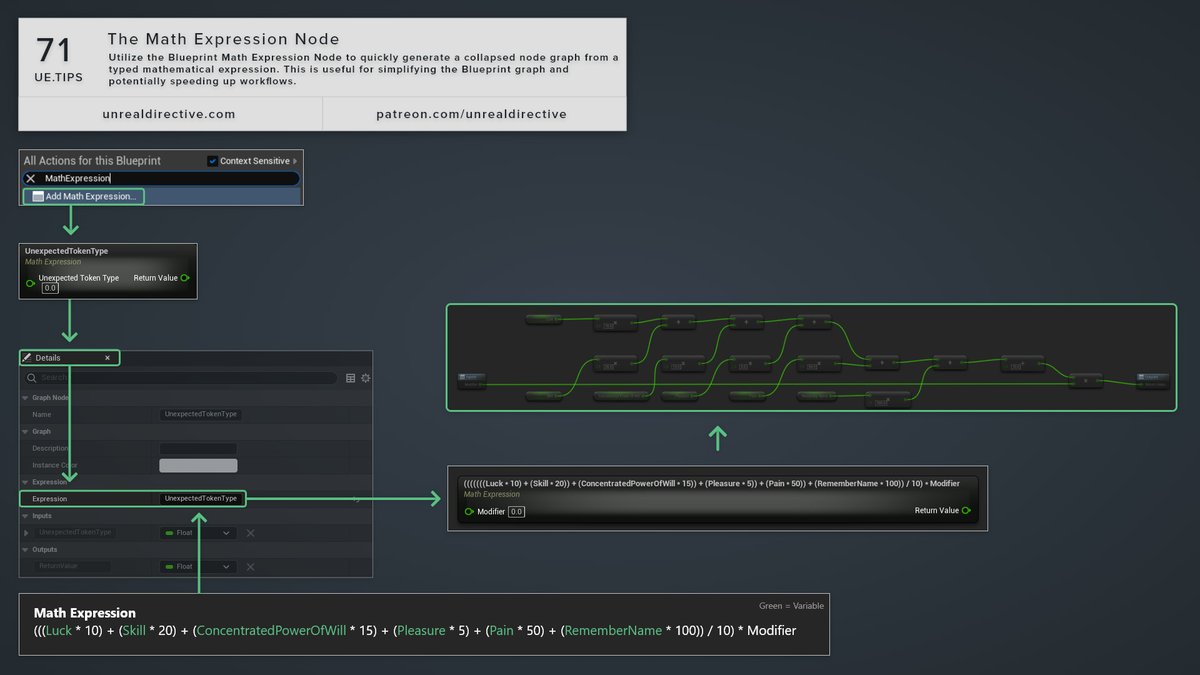
Names that match a Blueprint variable become Get nodes. Any other name becomes a new float input pin.
Need to change it later? Edit the Expression property in the Details panel and the graph regenerates.
UE Tip: The Math Expression Node
Right-click a Blueprint graph > Add Math Expression and type something like clamp(Health + Heal, 0, MaxHealth). The nodes get built for you in a collapsed graph.
Much faster than wiring the math by hand.
https://t.co/O7fq2pCNmL
@ExploredFiction Named reroutes were largely introduced to solve the massive sprawling material graph issue that was plaguing the engine. Blueprints, on the other hand, already had local variables, functions, and other methods to circumvent that.
UE Tip: Named Reroutes
Long wires across a material graph get hard to follow fast.
Double-click a wire to add a reroute, then right-click it > Convert to Named Reroute. You get a named declaration and usage node with no wire in between.
https://t.co/5Zj07wLcAu
UE Tip: Keep Simulation Changes
Physics props you drop during Simulate snap back to their original transforms when you stop.
Select them while Simulate is still running and press K. They keep their simulated positions. Great for set dressing ;)
https://t.co/z9aKldKFdW
Directive Utilities 2.3.0 is out.
You can now read and write files, edit .ini settings, and import CSVs into DataTables, all from Blueprints. Works in Editor Utility Blueprints too.
GitHub: https://t.co/Rgp1cdrvpm
Fab: https://t.co/7dZfbm49ZV
UE Tip: Drag & Drop Variable Modifiers
Hold CTRL while dragging a variable onto the graph for a Get. Hold ALT for a Set. Skips the Get/Set popup.
https://t.co/GCyPRXkVkk
UE Tip: Find In Blueprints
CTRL + SHIFT + F opens Find In Blueprints so you can search every Blueprint for functions, events, variables, and comments. CTRL + F only searches the open graph.
https://t.co/H9i0YYJJ5P
UE Tip: Quick Property Copy & Paste
SHIFT + RMB copies a property value. SHIFT + LMB pastes it. The field flashes when it works. Much faster than the right-click menu when you’re copying across structures and arrays.
https://t.co/TjT0yw9nNk
UE Tip: Delete and Reconnect
SHIFT + DELETE removes the selected nodes and reconnects the execution pins, so you don’t have to rewire the chain by hand.
https://t.co/6FXBF2nZPo
It's taken a while, but my team and I at @NyarenariLLC have finally released Project Feed to the public.
We've been building it for a long time and using it to manage its own development, along with several projects we haven't announced yet. It's exciting to finally share something that's become part of how we work.
Project Feed is a project management web app with built-in media review, built around the needs of creative teams.
You can share rich progress updates and pin feedback directly to 3D models, 2D sprites, images, videos, and audio. You can also track tasks, collaborate on docs, and work through ideas together on canvases.
For us, reviewing the work is a big part of managing the project. A task description can tell you what needs doing, but seeing the latest version and pointing to exactly what needs changing makes the conversation much clearer. We wanted that feedback to live alongside the work and the updates that explain it.
That's what we've been building toward. A place where game developers and other media teams can share what they're making, review it together, and keep their projects moving.
We've put a lot of time into this, and I'd love to hear from people doing similar work. Give Project Feed a try and tell us what works for your team and what you'd like us to improve.
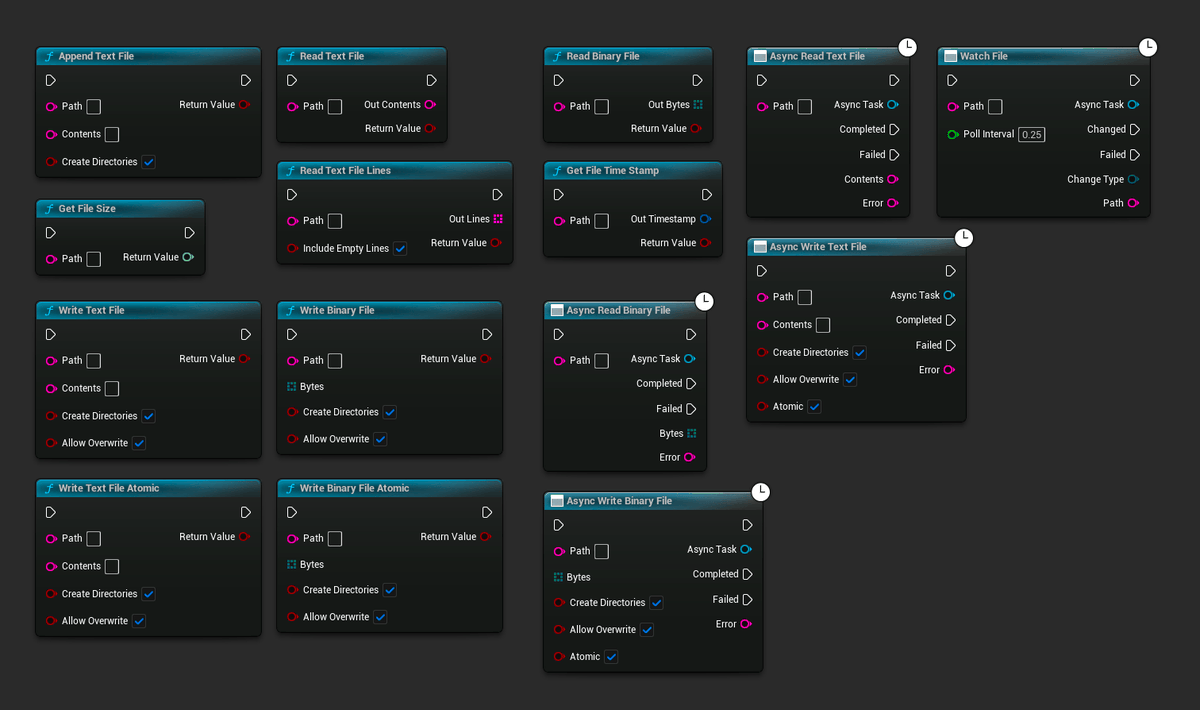
File I/O utilities (amongst other data utilities) are coming to Directive Utilities in v2.3, though I don’t have a release date yet.
This set covers text and binary files, with both synchronous and async nodes, plus atomic writes and a file watcher:
- Read / write / append text files
- Read / write binary files
- Read text file lines
- Async read / write for text and binary
- Atomic text and binary writes
- Get file size and timestamp
- Watch File (poll interval, changed, failed, change type)
Sync nodes are there for small files and tooling. The async variants keep large reads and writes off the game thread, and the atomic write nodes go through a temp file first so a crash mid-save doesn’t leave a half-written file on disk. Watch File polls a path and fires when it changes, which is useful for live configs, logs, and editor pipelines that shouldn’t require a restart.
These are the kinds of nodes I’ve ended up rewriting on project after project, so they’re going into the plugin as part of the realtime data work for v2.3.
If you’re unfamiliar, Directive Utilities is a free open-source plugin I’ve been developing based on my 10+ years of professional experience.
Source Code: https://t.co/Qb8UY8j9um
Fab: https://t.co/wVNdQISgtr