I'm not planning to launch a course, but I'm considering revamping @UntalkedSEO into a regularly updated learning platform for SEO. I haven't thought it through much yet, but here's the rough idea:
1/ Mostly text, with short videos explaining key concepts
2/ Kept up to date with what still works after the latest updates
3/ Covers everything, but in a way that's simple for non-SEO folks
4/ Not public – users would need to log in to access the content
5/ Might also add an AI chatbot for users to chat and discuss SEO strategies (guides won't be AI-generated, obviously)
Also, if any SEOs want to collab on this, please reach out.
PS: I'm just thinking about it, nothing is final yet. So... if I again abandon UntalkedSEO after this, apologies.
From multiple SEO experiments over the last few years, one thing I have understood is this – if your website is "nothing" outside of Google, there are high chances it will not perform well in SERPs, or it can even completely disappear.
Here is an analogy (👀) that makes it easier to understand:
Google hates parasites! You need something that signals you're not a parasite feeding off the host (Google itself in this case). And these signals can be (in random order):
1/ Social media mentions and engagements
2/ Navigational/branded searches on Google
3/ UGC/community discussions about your brand
4/ Unlinked mentions across the internet
5/ And of course, legit backlinks, etc.
Basically, you should establish a real brand that people know, search for, mention, and trust.
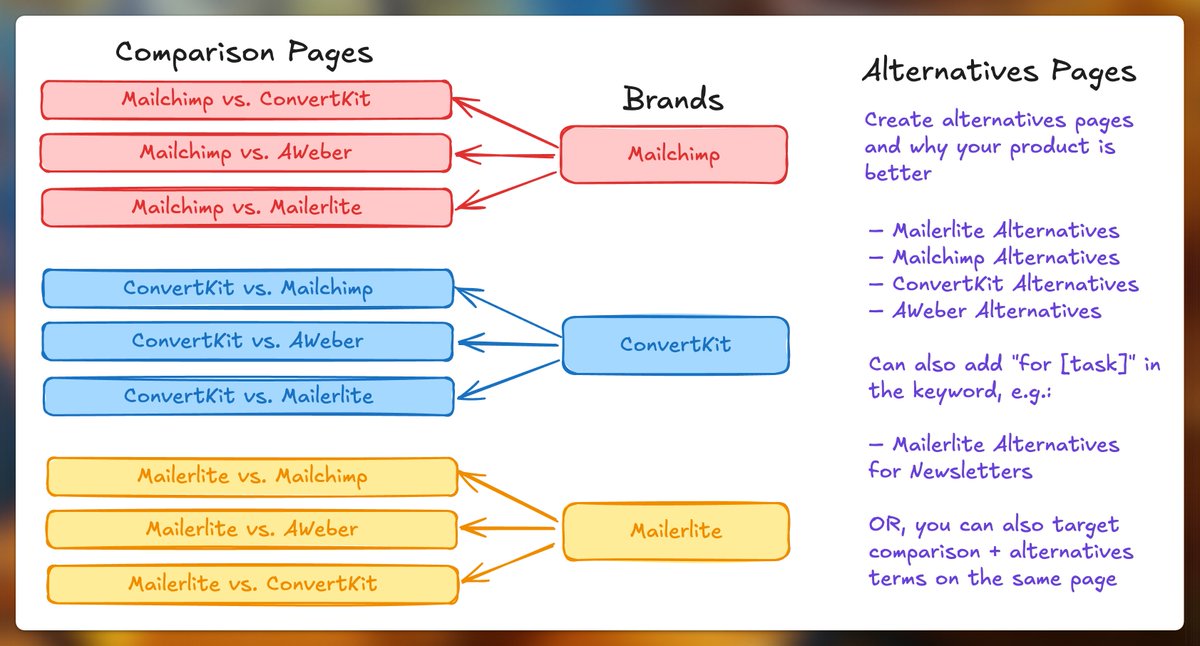
Indie Hackers: Why aren't you creating "comparison" and "alternatives" pages featuring your competitors – especially when your potential customers are already searching for them?
This is one of the simplest ways to capture high-intent traffic. These pages work because they target people who are:
– Comparing different tools to make a decision
– Unhappy with their current provider
– Actively searching for better solutions
🧭 Why This Works
Most buyers don't start by visiting your homepage – they start with a Google search.
– "Mailchimp vs ConvertKit"
– "Best Mailchimp alternative for newsletters"
– "ConvertKit vs AWeber"
– "MailerLite alternatives"
If you're not showing up on these pages, your competitors are. These pages let you control the story and guide the user toward your product, right when they're about to make a decision.
🆚 Comparison Pages
These are for people in the decision-making phase. They're already comparing options and looking for a reason to pick one over the other.
You can use these pages to:
– Highlight key feature differences
– Showcase pricing/value comparisons
– Point out where competitors fall short
– Show off use cases where you're stronger
Example pages for the email marketing field:
– Mailchimp vs ConvertKit
– ConvertKit vs AWeber
– MailerLite vs Mailchimp
🔄 Alternatives Pages
These target people who are unhappy or underserved by their current tool. Maybe it's too expensive, missing a key feature, or just not working well for them.
You can use these pages to:
– List your product as a better alternative
– Explain how you solve the pain points the other tool doesn't
– Include comparisons, testimonials, and feature highlights
Example keywords:
– Mailchimp alternatives
– ConvertKit alternatives
– MailerLite alternatives for newsletters
📑 How to Best Create these Pages:
If you have only 1 or 2 competitors, then it's the best to create these pages manually, but if there will be multiple combinations it's best to use programmatic SEO to create these pages.
Because creating the pages programmatically not only accelerates the process, but also lets you update the pages faster, in case your competitor's pricing or features change.
📌 But do not publish too many pages fast. Publish a few, wait, test, and then publish a few more.
And... if you're feeling skeptical about directly mentioning competitors on your website, a lot of SaaS businesses do it. You can go through the examples in the next tweets:
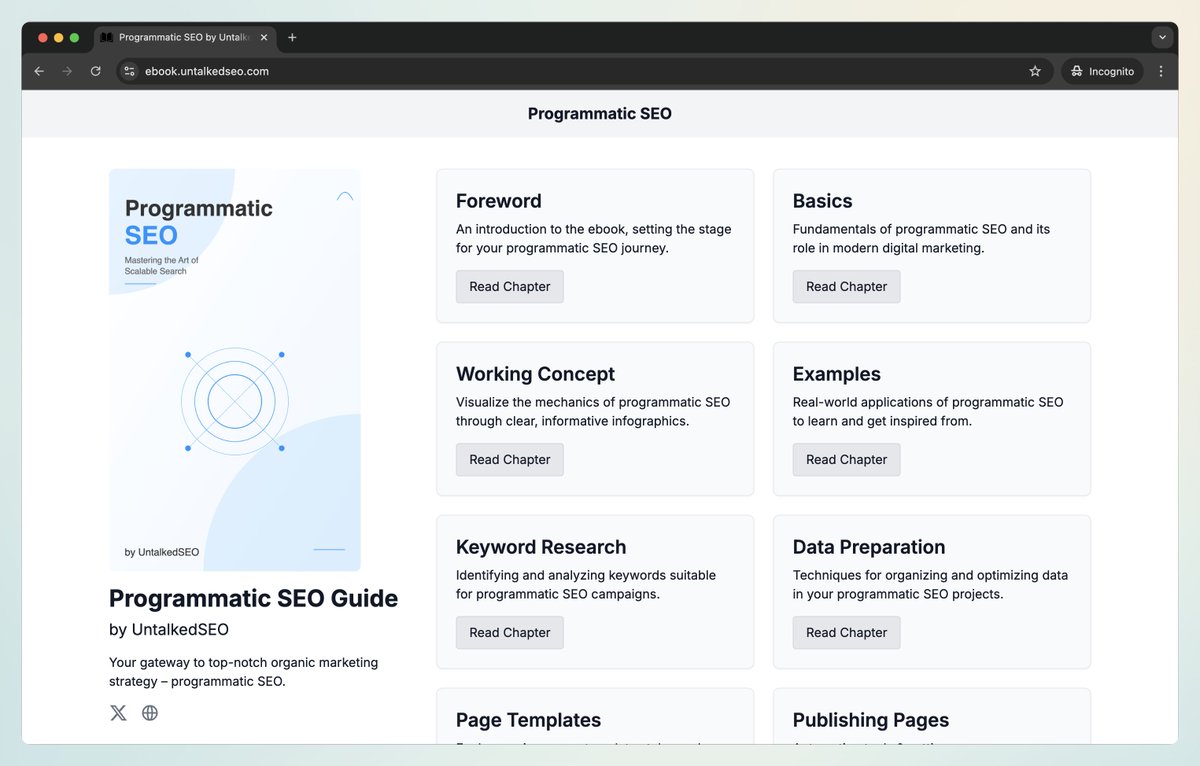
Covered all the "technical parts" of programmatic SEO in WordPress in this 1-hour video.
From here, you should be able to create any kind of programmatic pages on WordPress – article-style as well as landing page-style pages.
More details 👇
Programmatic SEO is just a publishing method – the quality depends on how you use it.
But I keep seeing 100% automated pSEO tools pumping out low-effort, one-click, AI-generated bulk pages. That’s pure garbage, and it won’t work in the long run.
🚨 Programmatic SEO ≠ AI-generated spam.
Here’s how to actually do programmatic SEO the right way:
1/ Research is everything:
Spend most of your time finding the right pSEO topics. Only consider:
✅ If people are actually searching for them
✅ If your site can rank for them
✅ If you can create better pages than your competitors
📌 Skip Glossary pages ("what is [something]") unless you’re in a completely new category. The web is already flooded with them.
I’ll share more about topic research in a future tweet.
2/ Prepare solid data:
After picking your topics, collect the necessary data points. First, choose the topic that will have the biggest impact on your business.
🚫 Don’t just scrape a dataset and call it a day. That won’t make your pages better. Instead:
– Scrape from multiple sources
– Manually enrich where needed
– Use external APIs & datasets
📌 Actually, AI can help generate parts of your content, like product descriptions, based on structured data. But don’t rely on it blindly.
💡 I once worked on a pSEO project where writers manually created 100+ data columns for 100s of rows. That’s the level of effort required.
3/ Don’t ignore images:
High-quality visuals make pages more engaging and skimmable. Create:
📸 Relevant photos
📊 Infographics
📌 Screenshots
Use tools like PlacidApp API to generate infographics or screenshot APIs to automate visuals.
🔰 Don’t stop at images – your goal is to make the content as user-friendly as possible. Use charts, graphs, and other visuals to break down information, make it skimmable, and keep users engaged.
4/ Design matters:
Wherever possible, structure your pages like landing pages, not blog posts.
– Make them visually appealing
– Present info in a user-friendly way
– Interlink related programmatic pages
Once ready, slowly publish your pages using a drip schedule.
5/ Random tips:
🔹 Merge thin topics into one page (e.g., “Best time to visit {place}” + “Worst time to visit {place}”)
🔹 Update pages regularly – don’t just publish & forget
🔹 Always manually verify every row of data before it goes live
That’s it for now.
Hope this helps! 🚀
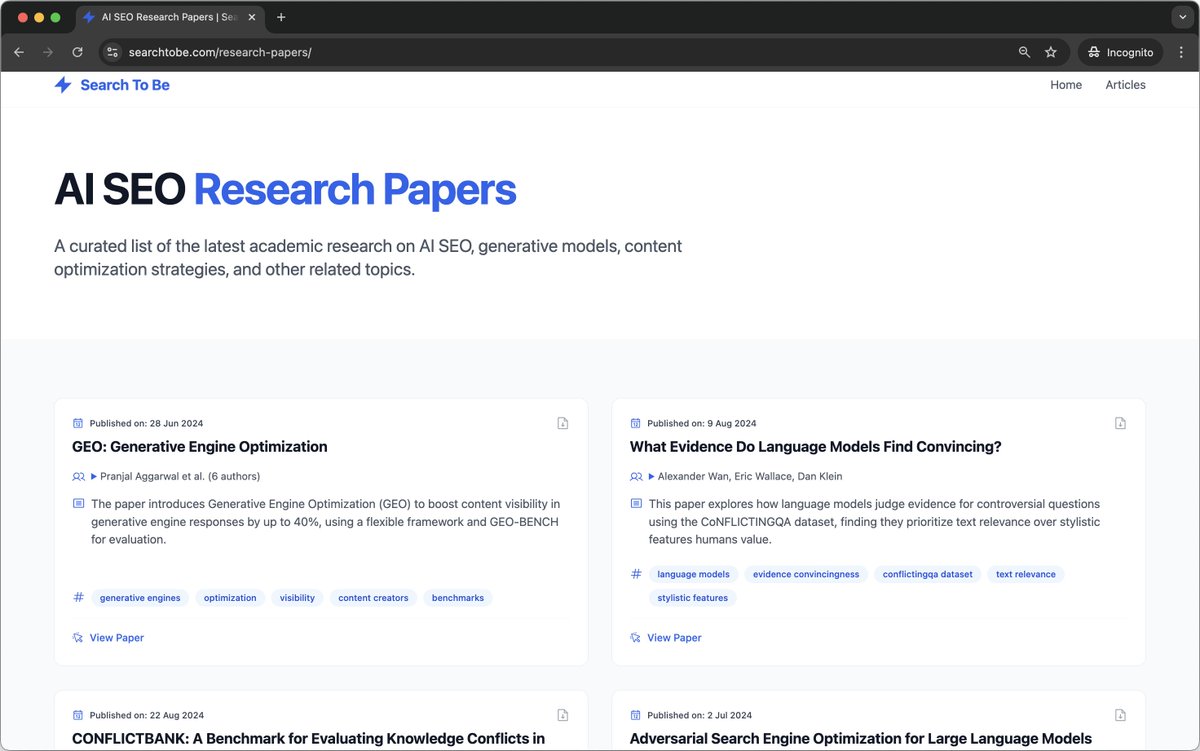
Organized valuable AI SEO research papers into beautiful, easy-to-browse cards on this page. Adding more as I find them!
If you're serious about the future of search, these are a must-read.
Link below 👇
I spent 6 hours writing this post on "how to optimize your content for AI."
Have done my best to use fewer buzzwords.
See if you find this useful:
https://t.co/h1WAMaI93X
We have an amazing Google Sheets script that can not only generate meta tags for posts in bulk, but can also generate other parts of your programmatic pages by utilizing different AI models. Here's a video that you can watch for more info: https://t.co/a9yP7upBk5
Programmatic SEO Tip:
Instead of following the same template for your meta tags, dynamically generate your meta tags and page titles from your data. This saves time and keeps your pages relevant to what users are searching for.
Programmatic SEO Tip:
Use basic analytics to monitor your pages. When you see a page’s traffic drop, set up a system to refresh its content with new data or a better layout. I think, a system like that can be easily set up using Apps Scripts.
Programmatic SEO Tip:
Change up your template by using different word choices. Instead of repeating the same headings and text on every page, automatically swap in synonyms and rephrase key parts. Using AI can be extremely helpful.
We have a tutorial coming up soon for how to add interactive charts in WordPress when doing programmatic SEO. Make sure you're subscribed to us on YouTube: https://t.co/HkAMAjl82p
Programmatic SEO Tip:
Mix your own data with public data to create unique pages that stand out. Add interactive features like interactive charts or filters to make the content more useful.
This improves user experience and helps your pages attract niche, long-tail searches.