CrossClip v2 is live.
From a simple idea to a real product people rely on daily.
Faster sync. Cleaner UI. Better flow across devices.
Copy on any device. Paste on another, instantly.
This is how your devices should work.
@DamilohunA 🌑 Here is my flow, with crossclip you
- Can’t lose the drive anymore cos it’s saved to your crossclip account
- can access the link/drive from anywhere, any device
https://t.co/1RrvvPkIXI
🌑 Here is my flow, with crossclip you
- Can’t lose the drive anymore cos it’s saved to your crossclip account
- can access the link/drive from anywhere, any device
https://t.co/1RrvvPkIXI
100 users.
One simple goal: make cross-device work feel effortless.
Professionals are already using CrossClip to move text, files, images, and ideas seamlessly between devices without breaking workflow.
This is just the beginning for CrossClip.
Thank you to everyone of you !
You copy things all day.
Links. Notes. Files. Captions.
CrossClip makes sure you never lose any of them again, while syncing everything across all your devices instantly.
Copy on Device A. Paste on Device B.
Easy.
→ https://t.co/B93OgYsRaH
🌑 Developers :
I’m sure at some point you’ve copied a code snippet, command, or link on one device…
Then needed it on another device almost immediately.
Most times you either:
• send it to yourself
• lose it completely
• or waste time trying to find it again
With CrossClip, all that ends.
Copy once and sync your code, links, files, and text across all your devices instantly.
And the best part?
You can easily retrieve anything later from CrossClip because that’s exactly how it was built.
Try it out and let me know what you think.
🌑 Professionals :
At some point we all normalized sending links, files, and notes to ourselves just to continue working on another device
WhatsApp.
Email.
Notes app.
Anything just to move something across screens.
With CrossClip, all that becomes unnecessary.
Copy once and instantly access it across all your devices.
And because CrossClip stores your clipboard history, you can always retrieve things later instead of losing them completely.
That’s exactly how it was designed.
Try it out and let me know what you think.
🌑 Students :
I’m sure at some point you’ve copied a note, assignment link, research material, or important text…
Then later you couldn’t even remember where you copied it from
Most times it either gets lost in your clipboard, buried in your notes app, or completely forgotten.
With CrossClip, all that ends.
Copy once and instantly access it across all your devices whenever you need it.
And because CrossClip stores your clipboard history, you can always retrieve important things later instead of losing them completely.
That’s exactly how it was built.
Try it out and let me know what you think.
Copied something important for school…
then forgot where you saved it?
CrossClip keeps your notes, links, files, and research synced across all your devices instantly.
No more losing what you copy.
https://t.co/svLCDWpLWv
Copied something important for school…
then forgot where you saved it?
CrossClip keeps your notes, links, files, and research synced across all your devices instantly.
No more losing what you copy.
https://t.co/svLCDWpLWv
CrossClip syncs everything you copy across all your devices instantly.
Built for people who work across screens all day.
Text. Media. Files.
https://t.co/svLCDWpLWv
Copied code on your phone…
now it’s stuck there?
CrossClip syncs your clipboard across all your devices instantly.
Text. Media. Files.
All in one place.
Copied code on your phone…
now it’s stuck there?
CrossClip syncs your clipboard across all your devices instantly.
Text. Media. Files.
All in one place.
Stop sending captions and notes to yourself.
CrossClip syncs everything you copy across all your devices instantly.
Just copy and paste.
https://t.co/vJN3tnZZi8
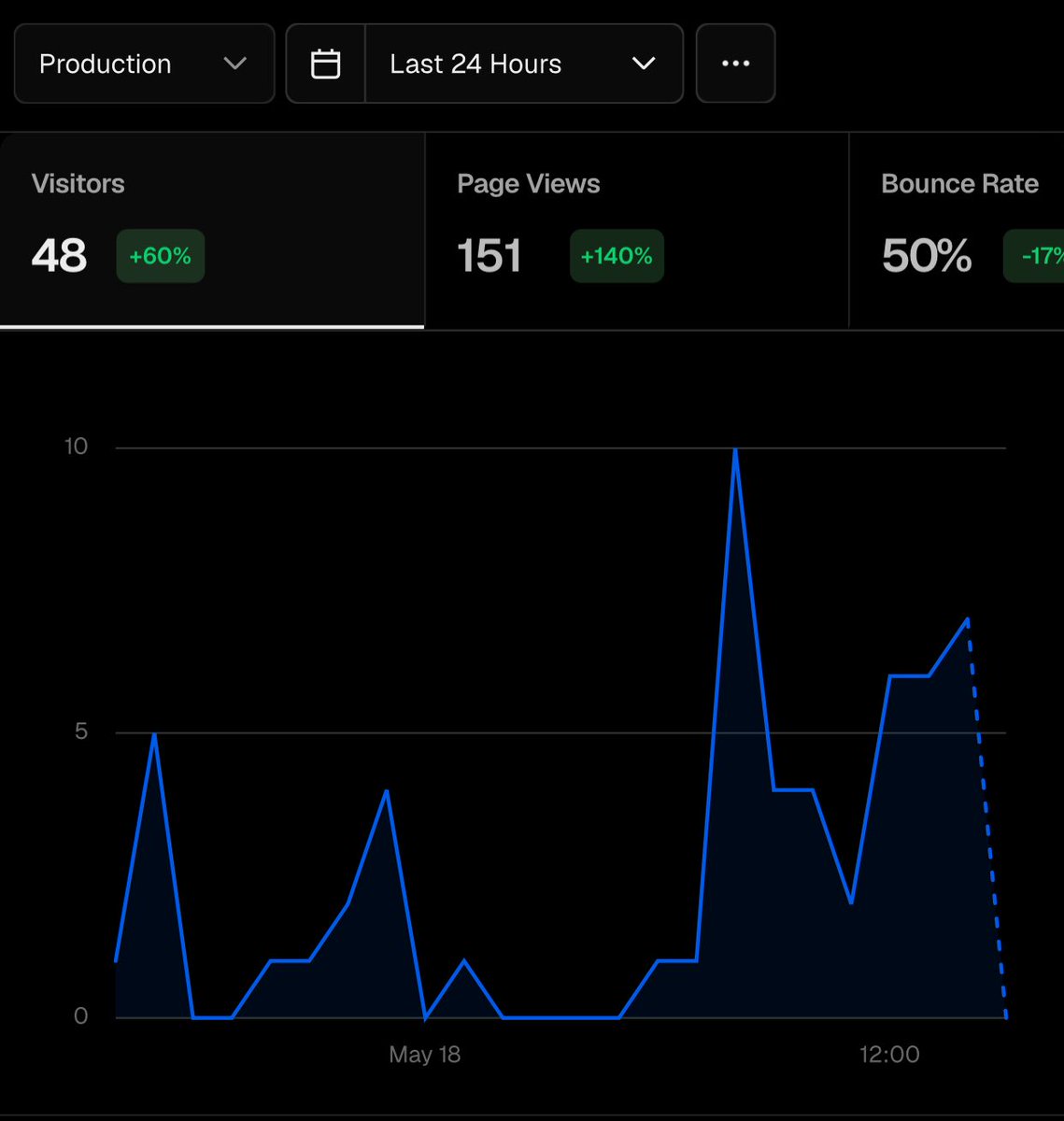
🌑 +47% visitors.
+120% page views.
-22% bounce rate.
All in 24 hours. No paid ads. No big announcement. Just organic.
CrossClip is growing on its own and I’m locked in to make sure it’s ready when it blows
if you’re someone who’s ever:
- copied something on your phone and needed it on your laptop
- emailed yourself a link just to open it somewhere else
- screenshot something just to retype it on another device
CrossClip was built for you. Open your browser, sync instantly.
https://t.co/woR9jz8XdI
Chrome extension is live!
CrossClip is now in your browser.
• Highlight any text on any page, right-click, save
• Open images directly into your clipboard
• Access your last clips from the toolbar without switching tabs
• Attach files and media straight from the popup
🌑 the @UseCrossClip chrome extension means your clipboard never leaves your browser
• highlight text on any page → right-click → saved
• see an image you need → open → right-click → saved
• want to paste a recent clip → click the icon → done
no new tab. no switching apps. no breaking your flow
🌑 before @UseCrossClip :
copy link → open whatsapp → message yourself → switch device → open whatsapp → copy → paste
With crossclip:
copy → open crossclip → paste
that’s it. that’s the whole flow
Try it out : https://t.co/MJgdp9Bkbk
🌑 built this because the tab switching was killing me
open crossclip → copy something → go back to what i was doing
that’s still 2 steps too many when you’re deep in work
the extension collapses it to zero. your clipboard lives in the toolbar now
shipped today.
go improve your workflow.
go pin it.
https://t.co/nHgS00DIew
🌑 the crossclip extension does one thing really well
it puts your clipboard where you already are
in your browser. in your toolbar. one click away
not another tab to manage. not another app to open
Move text and images directly from your browser page into your phone in sub seconds.
just your clipboard, always there, across all your devices
add it free → https://t.co/6uThpMYven