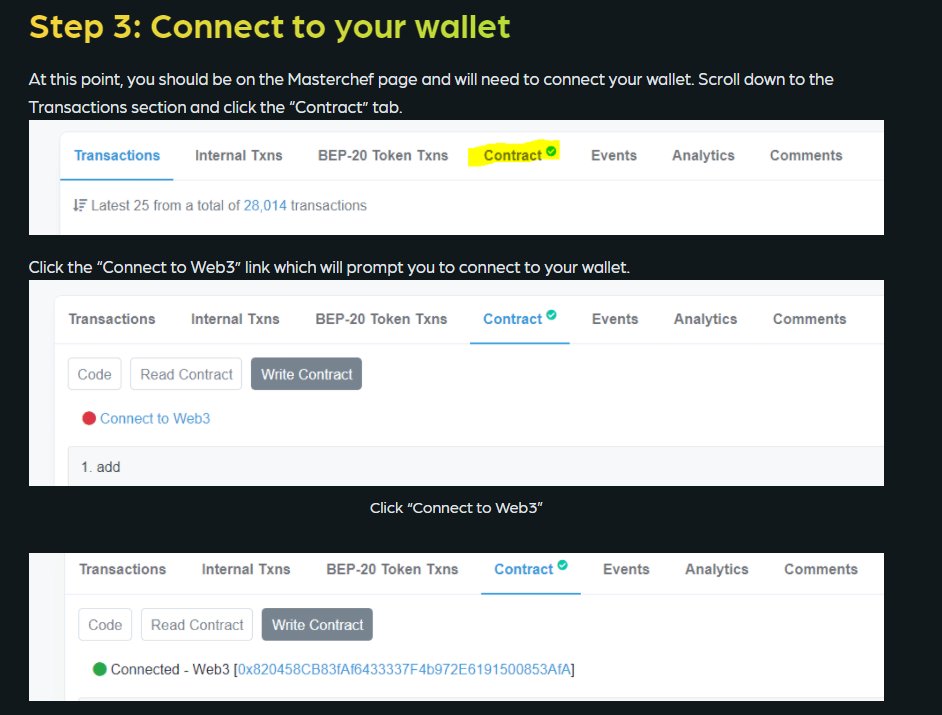
@LocurasSur After connecting your wallet, you can scroll down to find 3.emergencyWithdraw or 15.withdraw. Fill in the required PID and amount (if required) and click on 'WRITE'.
Example:
Due to lack of activity, we will be taking down the hosted zones for all 3 versions of the dapp namely VenomSwap, CarnageSwap and SymbioteSwap.
All funds are SAFU and you may withdraw by interacting with the contract on bscscan using your wallet.
Links in the next tweet.
@LocurasSur Depending on where you have staked your tokens (venomswap, carnageswap or symbioteswap), visit the respective link above and follow the instructions in the image below. You may need to refer to the docs to identify which PID your deposits below to. https://t.co/S2Pwwyidyp