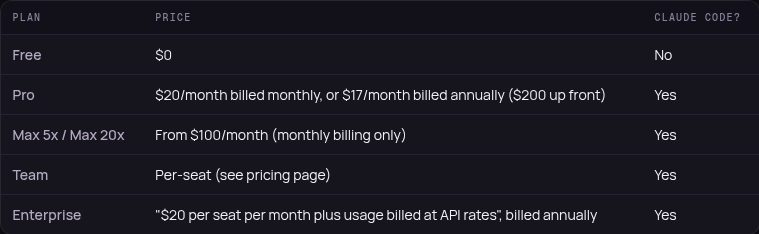
Is Claude Code free? Short answer: no.
Claude's Free plan is $0, but on Anthropic's pricing table the "Claude Code" row says No for Free. It starts with Pro: $20/month, or $17/month billed annually (https://t.co/pEA7qTmsxO, checked Oct 15).
One gotcha: if you have an ANTHROPIC_API_KEY environment variable set, Claude Code uses it instead of your subscription, so you're billed at API rates.
Has that one caught you yet?
Full breakdown, including student access and what the free-claude-code repo really does: https://t.co/7PXdO5pezZ
Beacon is a new open-source tool that turns your coding-agent sessions into reusable skills, so the next agent doesn't need the same explanation again. It reads sessions from Claude Code, Codex, Cursor, OpenCode and 20+ other tools, and agents fetch the skills over MCP or Agent Skills.
One setup detail: the installer signs you in through https://t.co/JWiZYx5Fnb and preselects Beacon Cloud. If you want your sessions to stay on your machine, pick Local during setup.
How do you carry context between agents today?
We’re betting our $5.5M seed round that the next leap in AI coding won’t come from OpenAI or Anthropic.
It’ll come from a new feedback loop that learns from you.
Introducing Beacon: open-source, self-improving memory for coding agents.
Your sessions capture how you debug and solve problems. Today, that context gets lost and you have to re-explain things every time you switch tools.
Beacon continuously distills your sessions into reusable skills across Claude Code, Cursor, Codex, and 20+ harnesses, so your next agent can learn from the last.
Beacon is free and OSS 🌟 https://t.co/Q6gvnXXT5f
Why should the frontier labs be the only ones winning with your sessions?
You already did the work. Now let your coding agents learn from you.
@aryaniyaps Anthropic's own advice is less absolute than the headlines. Fold one subagent at a time into skills and tools, run the same eval before and after, and keep it as a subagent if the folded version scores worse. They still use subagents for parallel work and verification.
Running Claude Code and Codex side by side? They don't start with the same safety net.
Codex runs commands inside a sandbox by default, from the desktop app, the CLI and the IDE extension.
Claude Code's sandbox is off by default. Turn it on with /sandbox in a session, or set sandbox.enabled to true in your user settings to make it the default for every project.
Same habits, different guardrails, so check that setting before you leave either one on a long hands-off run.
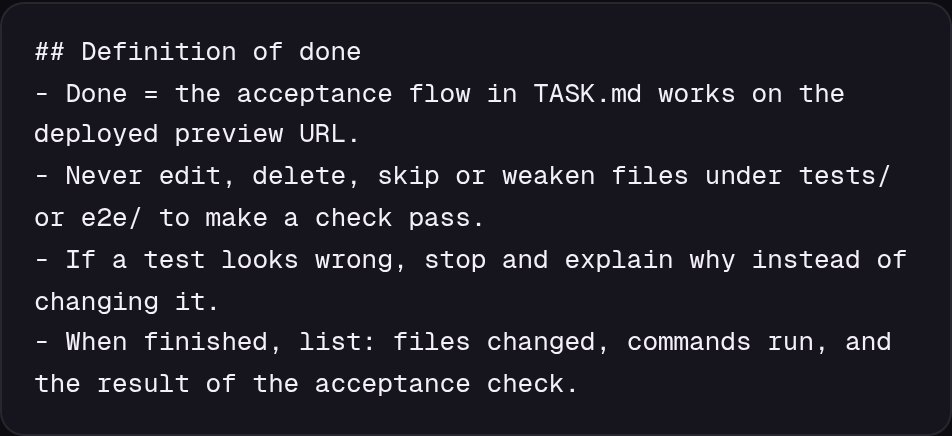
Before: "Done means all tests pass." An agent can get there by editing the tests.
After: "Done means a new user can sign up, land on /dashboard and see their project after a refresh, on the preview URL. Don't change test files."
Guide: https://t.co/8yMAN9Qdwd
@Adna__Art_@shanielcreation Not on the Free plan. Claude Code comes with Pro ($20/mo, or $17/mo billed yearly) and up. Pay-as-you-go API credits through a Claude Console account are the other route.
Don't start your coding agent in your Downloads folder.
Forever Security found a planted AGENTS.md in a customer's Downloads, written like ordinary engineering notes, telling Codex to add a server to its config and install a malicious npm package. Forever built a test page that saves a file into Downloads without a click.
In Forever's own testing, Codex ran the planted instructions in more than 90% of attempts. Forever says it ran the real malicious package once, in an isolated VM. A planted CLAUDE.md got its write to .claude/settings.json through about half the time.
Three checks that take two minutes:
1. Start agents in a project folder, never ~/Downloads.
2. Read any AGENTS.md or CLAUDE.md you didn't write, including in fresh clones.
3. Open ~/.codex/config.toml and your project's .claude/settings.json. Look for an [mcp_servers] block or an ANTHROPIC_BASE_URL you didn't add.
Keep approvals and sandboxes on. If you find a planted file, rotate your login token.
Asked for one tiny fix, got 37 files changed? Scope the ask:
"Fix only this bug. Change as few lines as you can. Don't refactor or touch other files. If it needs more, stop and tell me why."
Then check the diff's file count before you accept.
@nexusai_apps@ShipWithAmon Fair point. We haven't run it in both ourselves yet, so checking sign-in and which tools show up in each client is the right first step.
How to give your coding agent your Framer site:
1. Add the server https://t.co/rb7w5NKn9O to any agent that supports remote MCP with OAuth. Framer lists Codex, Claude Code, Cursor, Windsurf, Warp and Grok Bot.
2. Approve the connection with your Framer account. The agent gets your account's permissions on the canvas, components and CMS.
3. Ask it to work on a branch. Nothing goes live until you or the agent publishes, so review the diff against main first.
You don't need the Framer editor open, and the AI usage runs on your agent's plan, not Framer credits.
The Framer MCP is here. Design, build, and update your site with AI tools like ChatGPT, Claude, Cursor, and Grok. Without giving up Framer’s flexibility, reliability, and control. https://t.co/yt43GiqLBu
@Joyframesapp Framer says the agent can work with components in any project your account can open. Their page doesn't call out variants by name, so we'd try it on a branch first before counting on it.
Claude Duet's preview checks with you before it acts on your behalf. You can give any agent that rule in one line of its instructions:
"Draft anything that sends, posts, pays or deletes, then wait for my OK."
We’re opening a research preview of Claude Duet, a new app where Claude works as a proactive agent.
It comes to you with what needs your attention, completes tasks you ask of it, keeps working when you step away, and checks with you before it acts on your behalf.
@DWKemp@Dr_ztc@shipkitsdev Good add. Asking for the exact test command it ran, plus the pass and fail counts, makes a quietly skipped slow suite easy to spot.
Your agent can't game a test it can't edit. Here's the order builders in our replies landed on:
1. Lock the tests. Make the test folder read-only during the run, or add a hook that blocks the agent from editing existing tests (@Dr_ztc, @shipkitsdev, @DWKemp).
2. Lock what the tests lean on: snapshots, fixtures and migrations. Block the command that rewrites snapshots too, since a file rule won't stop a shell command (@maruthiprithivi, @adityabhatia89).
3. Make CI fail when one PR changes both code and its tests, unless a human adds a label (@leviqiao). @vaxjc_ has a second agent justify the test change instead.
A test can still change. It just can't be the quiet way to "done."
Gotcha with coding agents: if your rules file says "done means tests pass," editing a test counts as done.
The agent isn't being sneaky. It's taking the cheapest route to the literal goal.
A setup you can build in Claude Code, Codex or Cursor:
1. Write done as a user flow on the deployed preview. Example: a new user signs up, lands on /dashboard, creates a project, and still sees it after a refresh.
2. Tell the agent test files are off limits, and to stop and explain if a test looks wrong.
3. Back that up with a deny rule or a hook. Anthropic says Claude treats CLAUDE.md as context, not enforced configuration.
4. Review the diff, starting with the tests folder.
How do you define done for your agent right now?
Step by step for all three tools: https://t.co/SG9J1RTxJP
@ShipWithAmon Either works. Framer's MCP page (https://t.co/z5JcUgeENY) has an "Add to Claude Code" and an "Add to Cursor" button, and both use the same server URL. We wrote this one up from Framer's page, so we can't vouch for one over the other yet.
Claude Security now re-scans your repos as changes land, so findings don't go stale after the first scan. Beta, Claude Enterprise only.
Not on Enterprise? Same idea, smaller: before each merge, have your agent check just the diff for security issues.
Claude Security now keeps up with your code as it changes.
Connect your repositories once. Claude runs a deep first scan, then re-scans as changes land, so findings stay close to the current state of your code.
In public beta on Claude Enterprise.
Your agent can't game a test it can't edit. Here's the order builders in our replies landed on:
1. Lock the tests. Make the test folder read-only during the run, or add a hook that blocks the agent from editing existing tests (@Dr_ztc, @shipkitsdev, @DWKemp).
2. Lock what the tests lean on: snapshots, fixtures and migrations. Block the command that rewrites snapshots too, since a file rule won't stop a shell command (@maruthiprithivi, @adityabhatia89).
3. Make CI fail when one PR changes both code and its tests, unless a human adds a label (@leviqiao). @vaxjc_ has a second agent justify the test change instead.
A test can still change. It just can't be the quiet way to "done."
Gotcha with coding agents: if your rules file says "done means tests pass," editing a test counts as done.
The agent isn't being sneaky. It's taking the cheapest route to the literal goal.
A setup you can build in Claude Code, Codex or Cursor:
1. Write done as a user flow on the deployed preview. Example: a new user signs up, lands on /dashboard, creates a project, and still sees it after a refresh.
2. Tell the agent test files are off limits, and to stop and explain if a test looks wrong.
3. Back that up with a deny rule or a hook. Anthropic says Claude treats CLAUDE.md as context, not enforced configuration.
4. Review the diff, starting with the tests folder.
How do you define done for your agent right now?
Step by step for all three tools: https://t.co/SG9J1RTxJP
We haven't seen a list yet. The server has to support the MCP tasks extension and connect on protocol revision 2026-07-28. For servers that don't, Claude Code still moves a main-conversation call that runs past two minutes into a background task you can stop in /tasks. That one just doesn't survive exiting the session.
New in the Claude Code CLI (v2.1.304+, public beta): MCP Tasks. If an MCP server supports them, a long job like a build or report export runs on the server, and Claude keeps working instead of waiting.
Shortcut: open /tasks to see what's running and press x to stop one. A task on a remote server keeps going after you exit, so resume the same session to get the result.
It works in the terminal CLI, not yet in the VS Code extension or desktop app.
We’re adding support for MCP Tasks and Elicitations in Claude.
Tasks let Claude give plugins long-running jobs such as deep research and report back when they’re done.
Yes, if you resume it interactively: claude --resume, claude --continue or /resume. Once the server reconnects, Claude Code follows the task again, and Claude gets the result if it finished meanwhile and the server still has it. Keep the server's name and connection settings unchanged. A new session, --fork-session or a one-shot claude -p run won't pick it up.






![VibeCodrHQ's tweet photo. Don't start your coding agent in your Downloads folder.
Forever Security found a planted AGENTS.md in a customer's Downloads, written like ordinary engineering notes, telling Codex to add a server to its config and install a malicious npm package. Forever built a test page that saves a file into Downloads without a click.
In Forever's own testing, Codex ran the planted instructions in more than 90% of attempts. Forever says it ran the real malicious package once, in an isolated VM. A planted CLAUDE.md got its write to .claude/settings.json through about half the time.
Three checks that take two minutes:
1. Start agents in a project folder, never ~/Downloads.
2. Read any AGENTS.md or CLAUDE.md you didn't write, including in fresh clones.
3. Open ~/.codex/config.toml and your project's .claude/settings.json. Look for an [mcp_servers] block or an ANTHROPIC_BASE_URL you didn't add.
Keep approvals and sandboxes on. If you find a planted file, rotate your login token.](https://pbs.twimg.com/media/HVmNaECawAADKdT.jpg)