How on earth do people still assume blue-collar work is safe from automation?
A robot can work 200 hours nonstop.
A human works around 40 hours a week, needs weekends, sleep, breaks, sick days, and vacations.
That changes the economics completely.
New for financial services: ready-to-run Claude agent templates for building pitches, conducting valuation reviews, closing the books at month-end, and more.
Install them as plugins in Cowork and Claude Code, or use our cookbooks to run them in production as Managed Agents.
This is big... Anthropic just announced a model so powerful they won't release it to the public out of fear over the damage it will cause 😨
Claude Mythos Preview found thousands of zero-day exploits in every major operating system and web browser...
The numbers are hard to believe:
> $50 to find a 27-year-old bug in OpenBSD, one of the most security-hardened operating systems ever built
> Under $1,000 to find AND build a fully working remote code execution exploit on FreeBSD that grants unauthenticated root access from anywhere on the internet
> Under $2,000 to chain together multiple Linux kernel vulnerabilities into a complete privilege escalation exploit
For context: these are the kinds of findings that previously required elite security researchers working for weeks.
Anthropic engineers with no formal security training asked Mythos to find exploits overnight. They woke up to working code the next morning.
The results were so impressive Anthropic assembled Apple, Google, Microsoft, Amazon, NVIDIA, and seven other organizations into Project Glasswing:
A $100M defensive coalition. They're not releasing this model publicly. Instead, they're racing to patch the world's infrastructure before models like this proliferate.
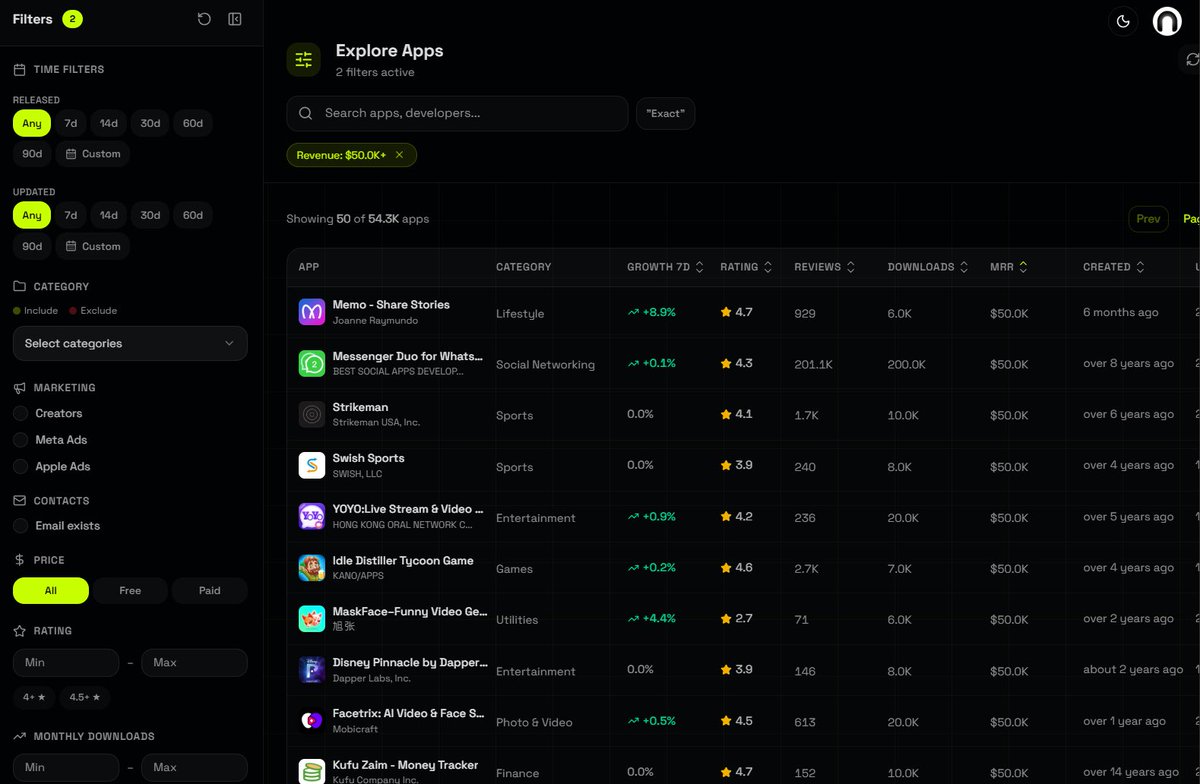
find app ideas that already work:
1. go to https://t.co/QHRRNDZhvI
2. filter apps making over $50,000/mo
3. sort by rating (low to high)
4. pick the worst rated ones
5. build a better version
find demand, then build
Most people don’t realize this…
AI can recreate any UI design from a screenshot.
Pixel. Perfect.
I use this simple prompt:
“Act as a world-class mobile UI engineer.
I will give you a screenshot of an app screen.
Recreate the design with pixel-perfect accuracy.”
But the real magic is in the rules 👇
• Extract exact HEX colors from the image
• Match typography (font size, weight, spacing)
• Replicate padding, margins, and border radius
• Rebuild the exact layout structure
• Copy shadows, gradients, and background colors
• Match icon sizes and placements
• Recreate navigation bars and components
Even better:
The AI also handles interaction logic.
• Button pressed states
• Scroll behavior
• Responsive layout
• Component consistency
Result:
You can turn Dribbble shots, Figma exports, or app screenshots
into production-ready UI code in seconds.
Design → Screenshot → Working UI.
This is one of the most underrated AI workflows for developers.
Save this prompt. You’ll use it a lot.
Stop writing 500-word prompts.
This 29-word prompt writes better than all of them:
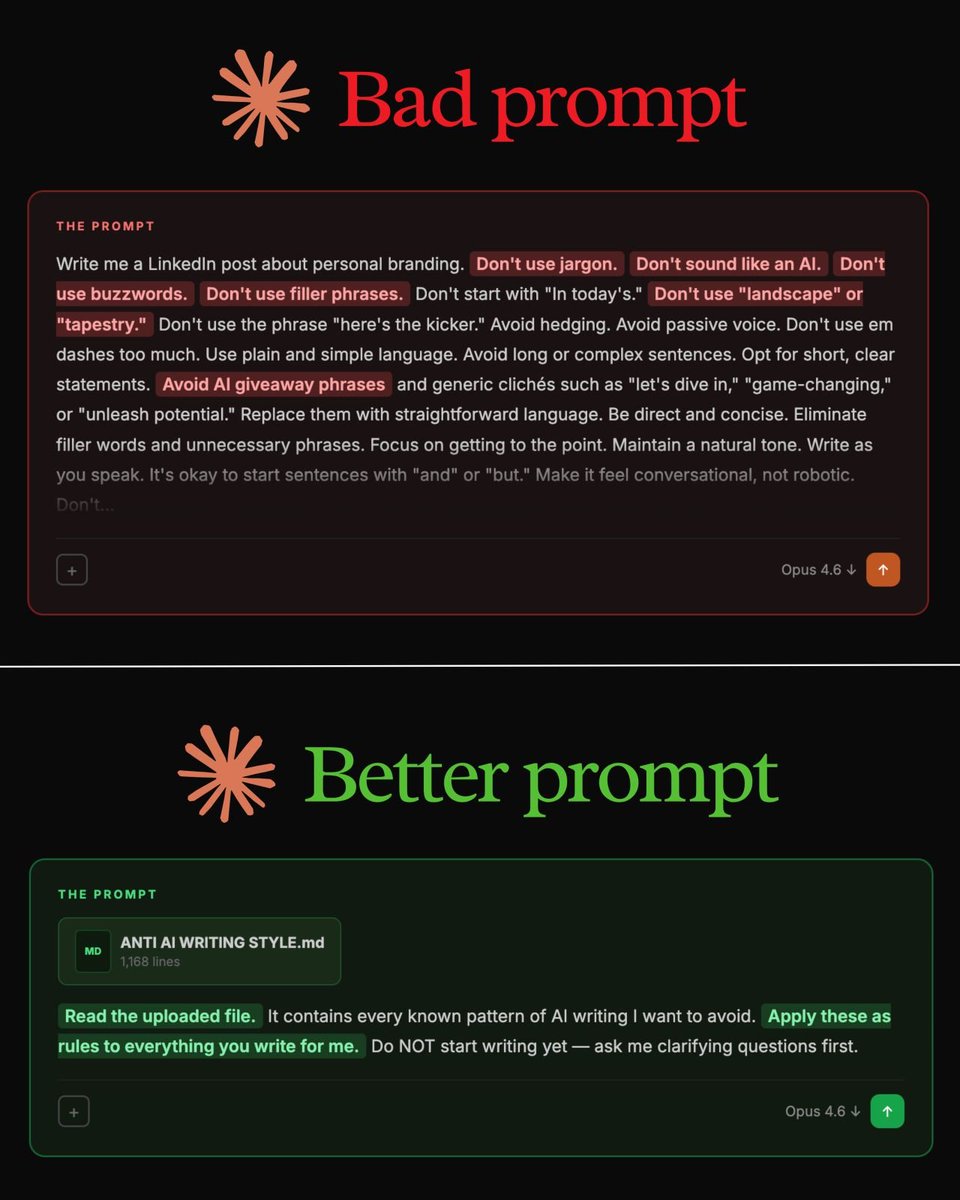
"Read my anti-AI writing style file first. It contains every known pattern of AI writing I want to avoid. Apply these as rules to everything you write for me."
That's it.
But you need to set it up first. Here's how:
Step 1. Go to Wikipedia.
Step 2. Search "Signs of AI writing."
Step 3. Copy the entire page.
Step 4. Paste it into a Google Doc. Don't edit.
Step 5. Name it "anti-ai-writing."
Step 6. Download as .md format.
Step 7. This is your "what NOT to sound like" file.
Or skip all of that. To download the anti-AI guide:
Step 1. Go to https://t.co/psB7XxAv8w.
Step 2. Subscribe for free. Don't pay anything.
Step 3. Open my welcome email.
Step 4. Hit the automatic reply button inside.
Step 5. Download my .md files. Ready to upload.
Step 6. Upload it to Claude. Prompt:
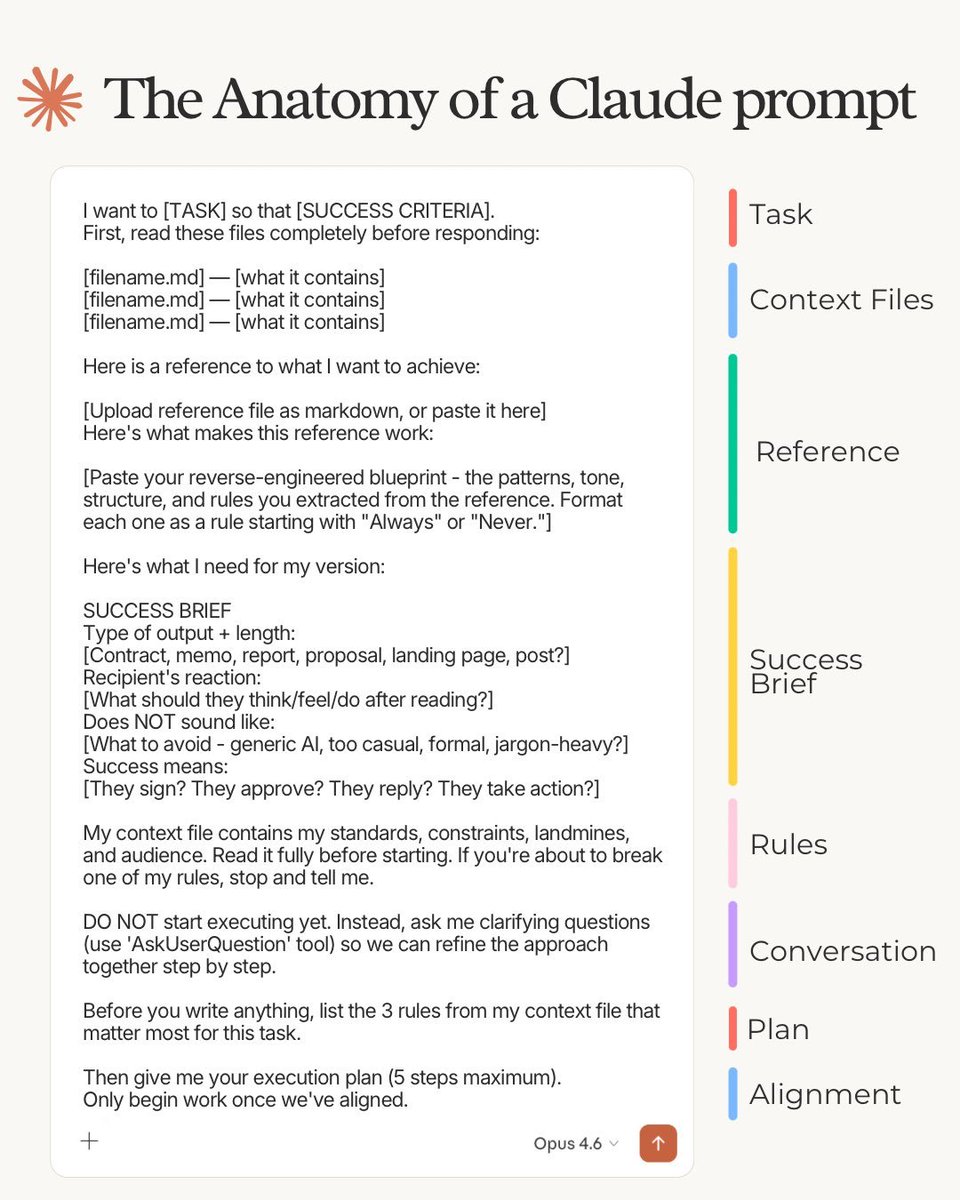
"Read the uploaded file. It contains every known pattern of AI writing I want to avoid. Apply these as rules to everything you write for me. Do NOT start writing yet - ask me clarifying questions first."
✦ Here's why your prompts don't work (red flags):
"Don't use jargon."
"Don't sound like an AI."
"Don't use buzzwords or filler."
"Avoid passive voice."
"Be conversational, not robotic."
These are everywhere. LinkedIn posts. Emails.
They sound thorough. The output is still garbage.
Your prompt says "don't" 14 times. The model forgets half by sentence three. You're fighting the AI with a wall of "don'ts." It doesn't work at scale.
The fix is counterintuitive.
Stop telling the AI what to avoid.
Give it a file that shows what to avoid.
The model reads 1,168 lines of bad patterns, internalizes them, and writes clean.
500-word prompt → still robotic.
Small prompt + 1 file → reads as a human wrote it.
1. To get access, go to https://t.co/psB7XxAv8w.
2. The Claude guide at https://t.co/jw2qdIbLxJ.
3. The Claude cowork guide at https://t.co/uWTpOI3oyE.
Want Claude Code Unlimited FREE? Follow,
- Download Ollama (https://t.co/b65hmaafit)
- Install Qwen3.5 9B
ollama run qwen3.5:9b
- Run this command in your terminal,
ollama launch claude --model qwen3.5:9b
-Enjoy Unlimited Claude Code fully running 100% Free