𝗧𝗵𝗲 𝟰 𝗟𝗮𝘆𝗲𝗿𝘀 𝗼𝗳 𝗮𝗻 𝗔𝗴𝗲𝗻𝘁 𝗦𝘆𝘀𝘁𝗲𝗺 𝗘𝘅𝗽𝗹𝗮𝗶𝗻𝗲𝗱
An agent burns tokens, declares the task complete, and then fails the tests. That is often an architecture problem, not a prompting problem.
When an agent underperforms, the usual reflex is to rewrite the prompt or switch to a stronger model. But many failures actually come from the system around the model, and different problems need to be solved at different layers.
𝟭. 𝗟𝗼𝗼𝗽: repeats until evidence says stop
The loop is the smallest unit of agency. The agent acts, checks the result, and either stops or tries again.
The important part is how completion is decided. A reliable agent should not stop simply because the model believes the work looks correct. It should stop when there is external evidence, such as a passing test, a successful build, a validated output or another measurable condition.
Without this verification loop, an agent can confidently declare success while the task is still incomplete.
𝟮. 𝗚𝗿𝗮𝗽𝗵: decides what runs next
A loop decides whether execution should continue. A graph decides where execution should go next.
It defines branches, retries, specialist-agent handoffs, fallback paths and shared state. Once a workflow has multiple possible routes, the graph makes those routes explicit, inspectable and controllable.
This is what turns repeated execution into a structured agent workflow.
𝟯. 𝗛𝗮𝗿𝗻𝗲𝘀𝘀: gives the model an operating environment
The model provides reasoning, but the harness determines what that reasoning can actually do.
It defines the tools, APIs, files, memory, permissions, context, logging and execution environment available to the model.
That distinction matters because model capability and agent capability are not the same thing. A model may understand exactly how to solve a task, but if the required tool, data source or permission is not exposed through the harness, the agent still cannot complete it.
A better prompt cannot compensate for a missing capability.
𝟰. 𝗠𝗲𝘁𝗮-𝗵𝗮𝗿𝗻𝗲𝘀𝘀: governs multiple agent harnesses
This layer becomes important when teams are using Claude Code, Codex, internal agents and specialised domain agents together.
Each may have its own tools, sessions, policies, permissions and execution environment. A meta-harness creates a common layer across them for orchestration, governance, isolation, shared policies and movement of context or workflows between different agents.
Omnigent is one open-source implementation of this layer, designed to provide a governed environment across different agent harnesses.
𝗧𝗵𝗲 𝗱𝗶𝘀𝘁𝗶𝗻𝗰𝘁𝗶𝗼𝗻 𝗶𝘀 𝘀𝗶𝗺𝗽𝗹𝗲:
Loop makes the work verifiable.
Graph makes the workflow structured.
Harness makes the model operational.
Meta-harness makes multiple agent environments governable.
A stronger model can improve reasoning, but reliable agents depend just as much on the architecture built around the model.
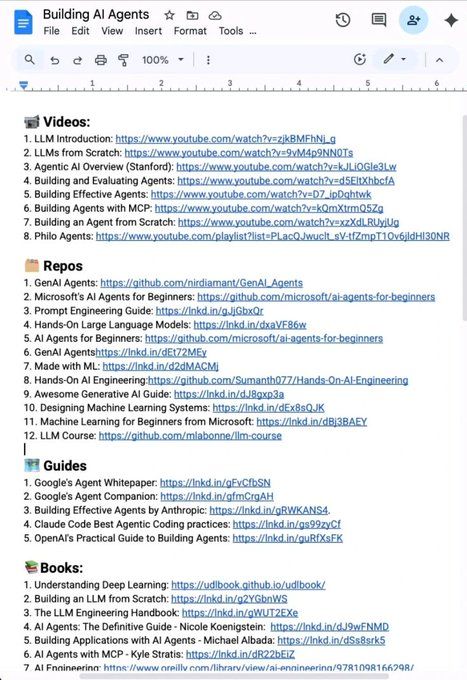
STOP WASTING HOURS TRYING TO FIGURE OUT WHAT TO LEARN IN AI.
I put together one practical roadmap with videos, GitHub repos, guides, books, research papers, and courses.
VIDEOS:
1. LLM Introduction — https://t.co/6UfUcjMnLz
2. LLMs from Scratch — https://t.co/uFE6V6qfDc
3. Agentic AI Overview (Stanford) — https://t.co/zCYeoZr80b
4. Building & Evaluating Agents — https://t.co/90Tsz6VXfs
5. Building Effective Agents — https://t.co/VNjQVwNbTF
6. Building Agents with MCP — https://t.co/EWQBZDaerU
7. Building an Agent from Scratch — https://t.co/IhsxsG4PLF
8. Philo Agents — https://t.co/Ni3EqflKXX
GITHUB REPOS:
1. GenAI Agents — https://t.co/8Rf5V00nc3
2. Microsoft AI Agents for Beginners — https://t.co/wykYg3uID1
3. Prompt Engineering Guide — https://t.co/LJ5I8kvjmH
4. Hands-On Large Language Models — https://t.co/cKYH5bYNpo
5. GenAI Agents — https://t.co/i8UvZEluvU
6. Made with ML — https://t.co/ItPjjmeX7a
7. Hands-On AI Engineering — https://t.co/rb4LyE2yiu
8. Awesome Generative AI Guide — https://t.co/sOvPOy4I4p
9. Designing Machine Learning Systems — https://t.co/NT2i32i1QT
10. Machine Learning for Beginners — https://t.co/1WsbMfbTFq
11. LLM Course — https://t.co/wfyLz8WClB
GUIDES:
1. Google's Agent Whitepaper — https://t.co/YvvSby2Fz1
2. Google's Agent Companion — https://t.co/7Re1Vj2DZ5
3. Building Effective Agents by Anthropic — https://t.co/hbklxrplI9
4. Claude Code Agentic Coding Practices — https://t.co/0JgQUEqJuh
5. OpenAI's Practical Guide to Building Agents — https://t.co/Z3skx6pez3
BOOKS:
1. Understanding Deep Learning — https://t.co/sxxFC5wH5H
2. Building an LLM from Scratch — https://t.co/UZZngciFnh
3. The LLM Engineering Handbook — https://t.co/mAUwbj3570
4. AI Agents: The Definitive Guide — https://t.co/tuLxujMNYt
5. Building Applications with AI Agents — https://t.co/BNpMacbGET
6. AI Agents with MCP — https://t.co/cdsng3fryS
7. AI Engineering — https://t.co/gOh0Xb0Y5X
RESEARCH PAPERS:
1. ReAct — https://t.co/XWig6i6KM9
2. Generative Agents — https://t.co/QjDYMDdTf5
3. Toolformer — https://t.co/A4x9Dt147X
4. Chain-of-Thought Prompting — https://t.co/AJqbHcRTXA
COURSES:
1. Hugging Face Agent Course — https://t.co/0mdR5axTEk
2. MCP with Anthropic — https://t.co/6kUWyZzDbl
3. Building Vector Databases with Pinecone — https://t.co/2yHOFCtdUF
4. Vector Databases: Embeddings to Apps — https://t.co/hTNOtJh0tl
5. Agent Memory — https://t.co/WyiOLyqKi7
No endless searching.
No information overload.
Just resources you can actually use. 🔖
Your future AI skillset will come from building, experimenting, and learning consistently.
Repost so someone else can find this roadmap, and pls consider following @amisha_explains for more content around AI, Beauty, and businesses.
Building a real AI system isn’t just about training a model - it’s about connecting dozens of components into one reliable, scalable pipeline.
From data infrastructure and algorithms to deployment, monitoring, memory, and feedback loops - every layer plays a critical role in making AI work in the real world.
Here’s a breakdown of all the essential building blocks you need to understand if you want to design, build, or scale production-grade AI systems.
Here’s the complete breakdown :
📌 Key Components of a Real AI System
🔹 Data
The foundation of every AI system - raw data from sensors, logs, or apps.
🔹 Algorithms
Mathematical logic that powers learning, optimization, and decision-making.
🔹 Models
AI models built from algorithms that learn patterns directly from data.
🔹 Compute
Hardware and cloud infrastructure powering model training and inference.
🔹 Inference
Running trained models to generate predictions, responses, decisions, or insights.
🔹 Feedback Loop
Collects real-world signals to improve accuracy, alignment, and model performance.
🔹 Storage
Stores datasets, embeddings, checkpoints, logs, and all intermediate artifacts.
🔹 Integration Layer
APIs and connectors that plug AI systems into real applications.
🔹 Memory (Long-Term + Short-Term)
Stores context, embeddings, and histories for agentic or conversational systems.
🔹 Orchestration Layer
Manages workflows, tool-calling, scheduling, and multi-agent coordination.
🔹 Monitoring & Observability
Tracks drift, latency, errors, and pipeline health to ensure reliability.
🔹 Security & Governance
Ensures access control, compliance, safety, and responsible AI usage.
🔹 Deployment Layer (Extra Component)
Serves the model to production with autoscaling, versioning, and CI/CD.
A real AI system is much more than a model - it’s an ecosystem.
Master these components, and you’ll be able to design AI systems that are reliable, scalable, and ready for real-world impact.
🚀 20 Powerful Use Cases of Microsoft 365 Copilot
AI is transforming how we work. With Microsoft 365 Copilot, professionals can save hours every week by automating writing, meetings, data analysis, and workflows directly inside Microsoft 365.
Here are 20 practical ways Microsoft Copilot can boost productivity:
1️⃣ Inbox Summaries – Quickly skim long email threads and highlight key points.
2️⃣ Draft & Rewrite – Generate email drafts and refine tone instantly.
3️⃣ Schedules / Agenda – Suggest meeting times and automatically draft agendas.
4️⃣ Inbox Prioritization – Identify urgent and important emails using AI context.
5️⃣ Meeting Recaps – Generate summaries, decisions, and action items from meetings.
6️⃣ Live Meeting Q&A – Ask questions during meetings and get real-time answers.
7️⃣ Project Updates – Convert meeting notes and chats into stakeholder updates.
8️⃣ Decision Log – Extract decisions from meetings and organize them with tasks.
9️⃣ Data Insights – Ask questions in natural language and get visual insights.
🔟 Formula Assistance – Describe the logic and Copilot writes spreadsheet formulas.
1️⃣1️⃣ Data Cleaning – Standardize, label, and fix messy data quickly.
1️⃣2️⃣ Scenario Modeling – Generate best-case, worst-case, and realistic scenarios.
1️⃣3️⃣ Page/Post Drafting – Create SharePoint pages from prompts or documents.
1️⃣4️⃣ File Summaries – Understand documents instantly before opening them.
1️⃣5️⃣ Audio Overview – Turn files into AI-generated audio summaries.
1️⃣6️⃣ FAQ Creation – Generate FAQs from existing documents in minutes.
1️⃣7️⃣ Org-Wide Q&A – Ask questions across emails, files, chats, and meetings.
1️⃣8️⃣ Task Extraction – Automatically pull tasks from meetings and conversations.
1️⃣9️⃣ App Builder – Create simple business apps using natural language prompts.
2️⃣0️⃣ Workflow Automation – Build automated workflows with AI-driven suggestions.
💡 The biggest advantage?
Copilot works inside tools you already use, making AI part of your daily workflow.
Which of these 20 Copilot use cases would help you the most in your work?
𝗕𝗲𝗰𝗼𝗺𝗲 𝗯𝗲𝘁𝘁𝗲𝗿 𝗮𝘁 𝗔𝗜 𝗶𝗻 𝗷𝘂𝘀𝘁 𝟭 𝗺𝗶𝗻𝘂𝘁𝗲 𝗮 𝗱𝗮𝘆. 𝗝𝗼𝗶𝗻 𝗺𝘆 𝘄𝗲𝗲𝗸𝗹𝘆 𝗻𝗲𝘄𝘀𝗹𝗲𝘁𝘁𝗲𝗿 𝘄𝗵𝗲𝗿𝗲 𝗜 𝗱𝗼𝗰𝘂𝗺𝗲𝗻𝘁 𝘁𝗵𝗲 𝗿𝗲𝗮𝗹-𝘄𝗼𝗿𝗹𝗱 𝗷𝗼𝘂𝗿𝗻𝗲𝘆 𝗼𝗳 𝗔𝗜 𝘁𝗿𝗮𝗻𝘀𝗳𝗼𝗿𝗺𝗮𝘁𝗶𝗼𝗻.
👉 𝗦𝗶𝗴𝗻 𝘂𝗽 𝗳𝗿𝗲𝗲 now → https://t.co/Kj8zW959kp
Follow @AiswaryaVenkit1 for more AI insights.
CPU vs GPU vs TPU vs NPU vs LPU, explained visually:
(bookmark this)
5 hardware architectures power AI today.
Each one makes a fundamentally different tradeoff between flexibility, parallelism, and memory access.
> CPU
It is built for general-purpose computing. A few powerful cores handle complex logic, branching, and system-level tasks.
It has deep cache hierarchies and off-chip main memory (DRAM). It's great for operating systems, databases, and decision-heavy code, but not that great for repetitive math like matrix multiplications.
> GPU
Instead of a few powerful cores, GPUs spread work across thousands of smaller cores that all execute the same instruction on different data.
This is why GPUs dominate AI training. The parallelism maps directly to the kind of math neural networks need.
> TPU
They go one step further with specialization.
The core compute unit is a grid of multiply-accumulate (MAC) units where data flows through in a wave pattern.
Weights enter from one side, activations from the other, and partial results propagate without going back to memory each time.
The entire execution is compiler-controlled, not hardware-scheduled. Google designed TPUs specifically for neural network workloads.
> NPU
This is an edge-optimized variant.
The architecture is built around a Neural Compute Engine packed with MAC arrays and on-chip SRAM, but instead of high-bandwidth memory (HBM), NPUs use low-power system memory.
The design goal is to run inference at single-digit watt power budgets, like smartphones, wearables, and IoT devices.
Apple Neural Engine and Intel's NPU follow this pattern.
> LPU (Language Processing Unit)
This is the newest entrant, by Groq.
The architecture removes off-chip memory from the critical path entirely. All weight storage lives in on-chip SRAM.
Execution is fully deterministic and compiler-scheduled, which means zero cache misses and zero runtime scheduling overhead.
The tradeoff is that it provides limited memory per chip, which means you need hundreds of chips linked together to serve a single large model. But the latency advantage is real.
AI compute has evolved from general-purpose flexibility (CPU) to extreme specialization (LPU). Each step trades some level of generality for efficiency.
The visual below maps the internal architecture of all five side by side.
To dive deeper into GPU specifically, Akshay wrote a detailed article on it.
It builds up from first principles why memory and compute compete, why that gap exists in the hardware, and what makes a workload memory-bound in the first place.
Read it below.
As AI systems move into production, the biggest threat isn’t model accuracy - it’s security.
MLSecOps is the discipline that protects machine learning systems from attacks, drift, tampering, data poisoning, and misuse.
It brings together ML engineering, cybersecurity, MLOps, and governance to make AI safe, trustworthy, and production-ready.
This framework covers every component you must secure in a real ML pipeline 👇
📌 Components of MLSecOps
🔹 Model Hardening
Strengthen models with adversarial training and reduce vulnerability to attacks.
🔹 Dataset Integrity & Validation
Detect poisoned data, validate distributions, and identify anomalies in input.
🔹 Data Security & Governance
Protect training data, enforce access control, and manage sensitive information securely.
🔹 MLOps Integration
Ensure continuous security testing, CI/CD protection, and safe ML deployments.
🔹 Supply Chain Security
Secure model files, dependencies, and detect malicious or tampered libraries.
🔹 Audit, Compliance & Logging
Track model changes, maintain audit trails, and meet regulatory requirements.
🔹 Model Explainability & Transparency
Understand model decisions, detect bias, and ensure responsible model behavior.
🔹 Secure Deployment & Serving
Enforce authentication, protect inference endpoints, and run encrypted model serving.
🔹 Model Monitoring & Drift Detection
Detect drift, anomalies, degradation, and emerging risks in real time.
🔹 Threat Detection & Attack Prevention
Identify extraction attempts, inversion attacks, prompt injection, and API abuse.
MLSecOps is no longer optional - it’s the foundation of safe, reliable, and trustworthy AI.
Teams that adopt these practices protect their models, their users, and their business from real-world threats.
Opus or Sonnet?
Maybe that’s the wrong question.
Claude is becoming more than a model—it’s becoming an AI operating layer.
The real edge in 2026?
Not the best model.
The best AI stack.
MCP vs Skills
𝗠𝗖𝗣 𝗶𝘀 𝘁𝗵𝗲 𝗰𝗼𝗻𝗻𝗲𝗰𝘁𝗶𝗼𝗻 𝗹𝗮𝘆𝗲𝗿. It gives AI systems a standard way to connect to external systems and capabilities. MCP servers expose tools that the model can discover and invoke, whether that’s querying a database, calling an API, or taking action in another system. Instead of building one-off integrations, MCP gives agents a consistent interface for accessing those capabilities.
𝗦𝗸𝗶𝗹𝗹𝘀 𝗮𝗿𝗲 𝗿𝗲𝘂𝘀𝗮𝗯𝗹𝗲 𝗽𝗹𝗮𝘆𝗯𝗼𝗼𝗸𝘀 for how an agent should perform a task. A Skill packages instructions in a SKILL. md file, alongside optional scripts, references, and other resources. Rather than adding another service or integration, Skills run within the agent’s existing environment and give it task-specific procedures, conventions, and know-how it can load when needed.
MCP gives agents reach. Skills give them know-how. Together, they’re part of a broader shift toward AI taking a more active role in engineering work.
But as teams spend more on AI, there’s another challenge: understanding what that spend is actually contributing to their work.
That’s what Tempo’s new Workforce Intelligence was built to solve. It’s the first Atlassian Marketplace app to automatically connect AI activity and cost directly to the Jira work it touched, with cost rolling up from issues into epics and initiatives.
So instead of only knowing what AI tools cost, teams can 𝘀𝗲𝗲 𝘄𝗵𝗮𝘁 𝘁𝗵𝗮𝘁 𝘀𝗽𝗲𝗻𝗱 𝗮𝗰𝘁𝘂𝗮𝗹𝗹𝘆 𝗵𝗲𝗹𝗽𝗲𝗱 𝗯𝘂𝗶𝗹𝗱.
Try it free → https://t.co/nfaE18AYok
What else would you add?
——
♻️ Repost to help others learn AI.
🙏 Thanks to @TempoHQ #Tempo for sponsoring this post.
➕ Follow me ( Nikki Siapno ) to improve at AI and system design.
🚨 Google’s AI ecosystem is becoming much bigger than Gemini.
Most people see Google AI and think “Gemini.”
But the bigger picture is far more interesting.
Google is building an entire ecosystem covering models, coding, video, image creation, research, assistants, enterprise AI, and autonomous agents.
Here’s how the pieces fit together 🧵👇
🚨 Google’s AI strategy is much bigger than Gemini.
Most people think Google’s AI ecosystem = Gemini.
But look closer.
Google is building an entire full-stack AI ecosystem that connects research, design, video, coding, search, and autonomous AI agents into one workflow.
And this is where things get interesting. 🧵👇
SFO AIRPORT 2025:
People working with luggage: 3,000+
Airport barista salary: $18/hr
Years to full automation: 3-5 years
Tesla Optimus:
• Salary: $0
• Days off: none
• Sick leave: 0%
• Productivity: 500+ transactions/day
Simple math: 3,000 people at SFO could lose their jobs
PHYSICAL AI IS LEARNING TO TOUCH, MOVE, THINK AND SOMETIMES MAKE VERY HUMAN MISTAKES
Physical AI is giving robots something previous generations of AI never truly had: the ability to interact with reality. Instead of simply generating an answer, a robot can look around, understand what it sees, decide what to do, reach for an object, move through a space, and actually change its environment.
And that changes everything.
A digital AI can make a wrong prediction and generate another response. A physical AI has to deal with gravity, friction, distance, weight, obstacles, fragile objects, moving people and the consequences of every decision it makes.
That’s why watching these robots learn is so fascinating. Every successful movement is progress. Every strange mistake reveals another limitation that engineers have to solve.
We’re moving from AI that knows things to AI that can do things.
And once robots can reliably understand the physical world, they won’t just be machines in factories. They could become workers, assistants, operators, and autonomous systems capable of performing real jobs alongside humans.
PHYSICAL AI IS THE MOMENT INTELLIGENCE LEAVES THE SCREEN AND ENTERS THE REAL WORLD.
The question is no longer “Can AI think?”
It’s “What happens when AI can think and physically act on its decisions?”