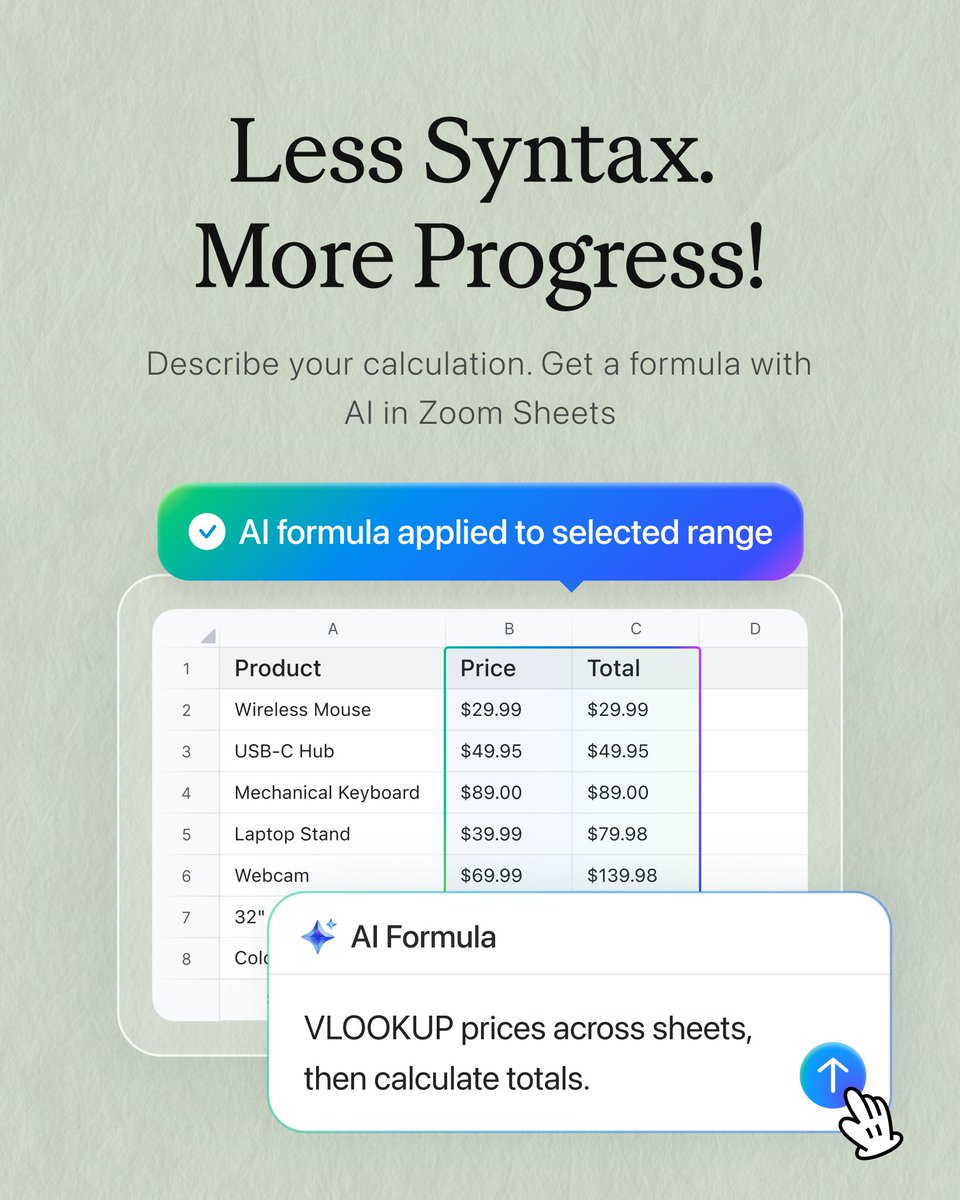
Still wrestling with VLOOKUP syntax? 🤔
Use AI in Zoom Sheets to describe what you want to calculate in plain language. Get a formula you can review and insert. Less time searching for syntax, more time working with your data.
And there’s more to explore: built-in skills for deeper analysis, plus the ability to connect your Jira and Salesforce accounts and pull that data right into your sheet.
👉 Try the ready-to-use demo sheet
Open on desktop. Demo AI features aren’t available on mobile yet.
#ZoomSheets
A little celebration from our team today: Zoom Slides, part of Zoom AI Productivity Suite, ranked # 1 Product of the Day on Product Hunt! 🎉
Thank you to everyone who took a look, tried it out, or left us a thoughtful comment. We’ve been looking forward to sharing this with you, and your feedback has made the launch especially rewarding.
If you haven’t had a chance to explore the suite yet, take a look. We’d love to hear what you think.
Explore the suite: https://t.co/kjDvdXfQBK
Zoom AI Productivity Suite has come to Product Hunt 🎉
It’s our first Product Hunt launch, and we’re excited to share it with you. Visit our Product Hunt launch page to learn more and join the conversation. We’d love to hear what you think.
See you there: https://t.co/rBr6KdNqIz
Your brand has a look. Your next presentation should feel like it. 🎨
Upload your brand template to Zoom Slides and describe what you want to create. Let AI build your slides using your template as a visual guide.
From QBRs to project updates, keep your brand consistent with less formatting work.
👉 Put your brand template to work: https://t.co/1uOBFGEhcD
Sharing your slides for someone to watch? Give them a front-row seat. 😉
With our dedicated sharing page, your audience opens the link straight into a presentation view. No editor, just your content.
A little less interface. A little more showtime.
Meeting → deck, without the blank page. 🙌
Attach a meeting to a prompt in Zoom Slides, and it builds a full first draft — structure, layout, charts. From there, you change anything you want. ✨
#ZoomSlides
https://t.co/zpBz4b4tvs
Most AI slide tools stop the moment the deck is generated. With Zoom Slides, that's when it becomes yours.
– Edit anything it made — text, charts, layout
– Present in Zoom, no screen share, hand off mid-deck
– Import/export .pptx, formatting intact
– Add AI voiceovers so the deck explains itself
– See who opened it, and where they stopped
AI gets you a great deck. Zoom Slides makes it yours.
Swipe through to see it in action 👉
Try Zoom Slides → https://t.co/1uOBFGEP2b
📄 One .docx goes in. A client-ready quote comes out.
Zoom Paper uses AI to rewrite, summarize, and restyle — then hands it back with the formatting intact.
→ Import a .docx.
→ Ask AI to update the terms from this week's meeting notes.
→ Co-edit with everyone on the call, live.
→ Save as Word, save as PDF, or send it to print.
Try Zoom Paper → https://t.co/xPrZFFn1bo
#ZoomPaper
Most AI slide tools stop the moment the deck is generated. With Zoom Slides, that's when it becomes yours.
– Edit anything it made — text, charts, layout
– Present in Zoom, no screen share, hand off mid-deck
– Import/export .pptx, formatting intact
– Add AI voiceovers so the deck explains itself
– See who opened it, and where they stopped
AI gets you a great deck. Zoom Slides makes it yours.
Swipe through to see it in action 👉
Lining up two spreadsheets usually means: copy, paste, VLOOKUP, repeat. 🥹😮💨
We didn't. We just told Zoom Sheets what we needed — even when something broke along the way.
Watch how it played out 👇
#ZoomSheets https://t.co/mlvk78YTIh
Saw a comment that stuck with me💭:
"The best AI presentation tools don't just generate slides — they create editable presentations that fit into your existing workflow."
Couldn't agree more. Generating a great deck is hard — and getting that right matters. But once it's generated, can you actually edit the text? Adjust the chart data? That's where many tools have limitations, and where a robust editor can make a difference.
That's the standard we aimed for with Zoom Slides.👇
https://t.co/6aEg4SeEqK
Zoom has been recognized in the 2026 Gartner® Magic Quadrant™ for Contact Center as a Service for the second consecutive year. 🎉
We believe this recognition reflects the evolution of Zoom Contact Center and our approach to bringing AI, customer experience, and communications together on one platform.
Some tools are approved. Some aren’t. Most don’t talk to each other.
When it all comes together, work doesn’t just feel better… it runs better. → Read the Operational Resilience Ebook: https://t.co/QRpZOXffHu
What a day at SF TechWeek. Thanks to everyone who came by, tried the demos, and shared how they would use the Productivity Suite.
We started with a question: how can a meeting create more value after everyone leaves? Your reactions gave us plenty to think about.
We came to share what we’ve been exploring and left with plenty of ideas from you. Thank you, TechWeek!
#SFTechWeek #ZoomAIProductivitySuite
This comment hit us💭:
"The best AI presentation tools don't just generate slides — they create editable presentations that fit into your existing workflow."
Couldn't agree more. Generating a great deck is hard — and getting that right matters. But once it's generated, can you actually edit the text? Adjust the chart data?
That's where many tools have limitations, and where a robust editor can make a difference.
That's the standard we aimed for with Zoom Slides, part of @ZoomAIProdSuite.👇
https://t.co/bSR4bVVdLd
Three years ago, when I joined Zoom, I wondered: could we build a document that attends meetings for you—even several at once?
Then AI took off, giving us a chance finding a better way to bring that idea to life.
I’m speaking at Zoom #TechWeek SF on Oct 7. Let’s explore how AI can kill tedious meetings and free teams to focus on real work.
Oct 7 | 6–9pm Register → https://t.co/8XcorctyXt
@ZoomAIProdSuite@Zoom
Meeting → deck, without the blank page. 🙌
Attach a meeting to a prompt in Zoom Slides, and it builds a full first draft — structure, layout, charts. From there, you change anything you want. ✨
Try it 👉 https://t.co/sJ9CbIYoRe
Zoom Canvas just changed the way you finish work.
No more staring at a blank page after a meeting. Canvas connects your conversations — meetings, chats, recaps, decisions — and turns them into real deliverables. Docs. Trackers. Wikis. Briefs. All in one live workspace inside Zoom Workplace.
Co-edit with your team before, during, and after. Export anywhere. Get things done.
Canvas is part of Zoom's AI Productivity Suite. One platform.
Less "wait, what did we decide?" More "look what we finished." ✅