years of expertise used to live in people's heads.
now it lives in a skill file your agent reads in seconds.
every process you repeat.
every framework you built.
every lesson that took you years to learn.
the question is not whether AI can learn it.
the question is whether you have written it down yet.
#HyperagentPartner
4,400 SpaceX employees became millionaires last Friday.
and there is only one person behind them. Elon Musk
but this is not a story about Elon.
it's a story about a welder from Mexico who didn't even know what SpaceX was.
Juan Hernandez took a $28/hour contractor job in 2015.
SpaceX handed him a $10,000 equity grant and let him buy more shares out of his paycheck.
he said yes without fully understanding what he was signing.
that decision is now worth $880,000.
Trevor Hise's parents begged him to take the safe road.
stable salary. pension. General Electric.
he chose SpaceX instead.
12 years. 100,000 shares. $13.5 million.
he is 37 years old and semiretired.
his words: "the magnitude of this has been ridiculous."
before the IPO, over 100 employees quietly grouped to negotiate a wealth management deal covering $5 billion.
none of them had ever needed a wealth manager before in their lives.
400 of them are now worth over $100 million.
welders. technicians. cafeteria staff.
software IPOs have minted millionaires for 30 years.
this is the first one where the money went to the people who built the rockets.
A TWEET WITH 6.5 MILLION VIEWS JUST KILLED THE PROMPT ENGINEER JOB TITLE
Peter Steinberger wrote 8 words that changed how builders think about AI:
"you should be designing loops that prompt your agents."
this is one of the best engineering frameworks i've seen in a long time.
in this cheatsheet I broke down exactly how loop engineering works:
→ layer 1 was context engineering (2024)
→ layer 2 was harness engineering (2025)
→ layer 3 is loop engineering (2026)
the loop needs 6 things: a heartbeat, worktrees, skills, plugins, a checker, and memory
STATE. md, SKILL. md, VISION. md, the files that keep the loop alive between sessions
you don't have a claude problem.
you have a system problem.
instead of another show tonight, read this.
make sure to bookmark it before it gets lost in your feed.
the guide is in the article below.
THIS IS KARPATHY'S OBSIDIAN VAULT, THE BRAIN BEHIND A MILLION-DOLLAR COMPANY.
But your vault looks so messed up with orphaned and dead notes.
I revived 5,000 dead notes with Claude in 20 mins.
Here's the exact 5 Claude prompt system: (copy-paste ready) 🧵👇
I once read about the idea of a “second brain” and it made so much sense.
Your brain has limited energy each day. If you spend it remembering links, notes, random ideas, you have less left for real thinking and creating.
So move everything out.
But what if there was a tool that truly acts like a second brain?
A place that connects your ideas automatically, summarizes with AI, and helps you find anything in seconds.
That’s what Obsidian combined with AI brings.
Less mental clutter but more clarity and room to build better ideas.
THIS IS KARPATHY'S OBSIDIAN VAULT, THE BRAIN BEHIND A MILLION-DOLLAR COMPANY
This is every idea, every decision, and every connection one person has made over years of work, visualized in real time.
The human brain processes up to 11,000,000 bits of information per second, but consciously uses only 50.
Inside this network:
→ thousands of nodes
→ hundreds of active links between ideas
→ 140+ decision-making processes per hour of work
→ years of compressed thinking living inside a single system
make sure to bookmark it before it gets lost in your feed
below I wrote a guide on how you can build yours for FREE (2 mins setup)
INSTEAD OF WATCHING AN HOUR OF NETFLIX TONIGHT THIS WEEKEND.
watch this Stanford lecture on how ChatGPT and Claude actually work.
Bookmark it and give it an hour, no matter what.
below I wrote a guide on on how to build your second brain using Obsidian 👇
https://t.co/Jcbkef3N3N
You have been re-explaining yourself to Claude every single day.
You can fix it in just 5 mins. Here is how: (Steal it)
Here is everything you need to know:
☑️ What Is a Claude Skill?
→ A skill is an onboarding doc. You write & Claude follows it every time.
→ It teaches Claude one specific job and auto-loads
↳ Your preferences are written down once and followed forever.
☑️ SKILL. MD Anatomy
→ Name: The slug Claude uses to find and load your skill.
→ Description: The trigger text Claude scans before deciding to load.
→ Instructions: The rules, steps, and format Claude follows every time.
↳ Examples are optional, but they double your skill reliability instantly.
☑️ Your First Skill in 5 Minutes
→ Name: my-first-skill
→ Description: Use when I ask you to write emails
→ Instructions: Short, direct tone. Max 5 sentences per email.
↳ Save it. Type your trigger. Claude loads it automatically.
☑️ Where to Put It
→ Claude. ai users: tap "+" then Skills then Manage Skills to install.
→ Claude Code users: save your SKILL. MD inside the ~claude/skills/
↳ Both work the same. Location depends on where you work.
☑️ When to Use It (The Same Prompt 3 Times Rule)
→ You typed the same instructions across 3 different chats this week.
→ You explain your format and tone before every single writing request.
→ You re-upload the same context file at the start of every session.
↳ If any of these sound familiar, build your first skill today.
☑️ Skill vs Prompt vs MCP
→ Prompt: You type it every time, and Claude forgets it at the end.
→ Skill: Claude autoloads it permanently. You never retype it again.
→ MCP: Connects Claude directly to an external tool or service.
↳ Skills and prompts can both use MCP connections at the same time.
☑️ Free Skill Library (Browse first. Build only if nothing fits.)
→ https://t.co/WsnqtEd2Up. Official Anthropic skills.
→ awesome-claude-skills. 100+ community-built skills
→ Skill Creator Skill. Claude interviews you and builds the whole file.
If you can describe your workflow in plain English, you can build a skill for it. That is literally all it takes.
For more AI systems like this: 👇
→ Go to https://t.co/rnjW2PWRtc
→ Subscribe to my free newsletter (don't pay anything)
→ Get more free and daily cheatsheets
What task are you most tired of re-explaining to Claude every single time? Drop it below.
♻️ Repost to give your network an unfair advantage.
Your Notion workspace is already a SaaS product.
You just haven't built the front-end yet.
I connected Notion to Bolt. new and got a fully functional live dashboard in under 10 minutes.
Here's the exact workflow (steal it):👇
Your competitors are reading this right now.
Some of them are already on Step 3.
Here is the 4-step AI system redistributing market share in every industry in 2026:
☑️ 1. Custom AI Agents
→ Deploy an ecosystem of specialized agents for the entire business.
→ Dynamic pricing, predictive supply chain, and hyper-personalized customer journeys all run autonomously.
→ An autonomous B2B sales agent generating leads and running negotiations at scale is happening right now.
☑️ 2. Proprietary Data Moat
→ Standard AI models are accessible to every competitor you have. Your proprietary data is not.
→ Clean it, structure it, and feed it into bespoke models trained on your deepest customer insights.
→ When your AI knows your customers better than any public model, it cannot be copied or matched.
☑️ 3. Individual-Scale Personalization
→ Predictive AI runs dynamic, individual-level personalization across marketing and operations simultaneously.
→ When data fuels experience at this level, loyalty becomes structural, and competitors become irrelevant.
☑️ 4. Digital Twin
→ Build a comprehensive AI-driven model of your entire business to pressure-test every strategy first.
→ Simulate market changes, optimize decisions in real time, and never react to surprises blindly again.
→ You stop being a reactive business and become a predictive one, shaping your own market reality.
The 4 steps above are the only path from stagnation to becoming a leader.
Comment "INDUSTRY" below, and I will DM you the full guide personally.
For more AI business systems like this: 👇
→ Go to https://t.co/rnjW2PWRtc
→ Subscribe for free (don't pay anything)
→ Get cheatsheets like this every week
Which of the 3 groups is your business in right now? Be honest. Drop it below. 👇
♻️ Repost to give your network an unfair advantage.
90% of people using Claude are only using 10% of what it can do.
You might be one of them if you don't know this....
Here's everything Claude can actually do:
1. Chat → Claude. ai
✦ Ask, write, analyze, and research all in one window.
✦ Upload PDFs, images, and sheets, and Claude reads them instantly.
✦ Best for: anyone who wants a real thinking partner.
2. Reasoning → Extended Thinking
✦ Claude thinks step-by-step before answering.
✦ Use it for contracts, financial models, and high-stakes decisions.
✦ Best for: founders and analysts who need stress-tested answers.
3. Developer → API
✦ Plug Claude into any product or internal workflow.
✦ Models available: Opus 4.6, Sonnet 4.6, Haiku 4.5.
✦ Best for: developers shipping AI-powered products.
4. Build → Artifacts
✦ Claude builds dashboards, calculators, and trackers that live inside chat.
✦ Everything it builds is editable, downloadable, and immediately usable.
✦ Best for: developers and ops teams who need tools fast.
5. Automation → Cowork
✦ Reads your files and creates real Word, Excel, and PDF documents.
✦ Batch-process 50+ documents in a single session.
✦ Best for: anyone drowning in manual document work.
6. Browser → Claude in Chrome
✦ A browsing agent that operates inside Chrome.
✦ Chain tasks: browse, extract, summarize, and draft in one flow.
✦ Best for: researchers who spend hours pulling information from the web.
7. Coding → Claude Code
✦ Reads your entire codebase and ships changes autonomously.
✦ Runs tests, fixes bugs, writes features, and opens PRs.
✦ Best for: developers who want to ship 5x faster without losing quality.
8. Teams → Claude for Work
✦ Share Projects, Skills, and Artifacts across your entire team.
✦ Admin controls for usage, permissions, and model access.
✦ Best for: ops leads scaling AI adoption across departments.
9. Voice → Mobile App
✦ Talk to Claude hands-free on iOS and Android.
✦ Real-time voice: Claude listens, thinks, and speaks back.
✦ Best for: busy founders who think better out loud than by typing.
10. Instructions → Skills
✦ Reusable instruction packs that auto-load every session.
✦ Claude knows your tone, rules, and workflow.
✦ Best for: content teams who need a consistent Claude voice at scale.
11. Context → Projects
✦ Save files, instructions, and briefs inside a Project once.
✦ Projects + Skills = a fully pre-trained Claude for any recurring job.
✦ Best for: anyone doing recurring work in content, legal, finance, or ops.
That's literally the full Claude ecosystem in one cheatsheet.
Save this. Share it with your team. Come back to it every week.
For more Claude systems like this: 👇
✦ Go to https://t.co/XZmlWQ3gEs
✦ Subscribe for free (don't pay anything)
✦ Get cheatsheets like this every week
Which skill are you using first? Drop it below. 🤯
♻️ Repost to give your network an unfair advantage.
You don't need $300/month in AI agent tools.
You need Claude Skills.
Here's the exact workflow you can literally steal to build any skill on Claud under 2 minutes:
Go and read my full deep dive on this topic here: https://t.co/BW9ZuNNpVC
☑ 1. Add the Skill
→ Open Claude Chat and click the + Icon.
→ Go to Skills, then hit "Manage Skills."
→ Click + Icon again and select "Create with Claude."
☑ 2. Give Claude One Prompt
→ Type: "Let's create a full skill together using your skill-creator Skill. First, ask me what the skill should do."
→ Claude takes it from there. You guide, it builds.
↳ No coding. No agents. No monthly tool subscriptions.
☑ 3. Load in Your Context
→ Tell it the core purpose in plain English.
→ Upload your reference files, PDFs, PNGs, and brand docs.
→ Give it your fonts, hex codes, and exact use-case instructions.
☑ 4. Save and Activate
→ Hit "Save Skill" in the top right corner.
→ Adjust anytime, skills are not locked in.
→ Type /SkillName in any Claude chat to activate it instantly.
That's your entire custom AI workflow.
Built in under 2 minutes.
For more AI cheatsheets like this: 👇
→ Go to https://t.co/XZmlWQ3gEs
→ Subscribe to my free newsletter (don't pay anything)
→ Get free daily breakdowns straight to your inbox
Which skill are you building first? Comment below, and I'll help you map it out.
♻️ Save this and Repost to share it with your audience.
Most developers spend 2 weeks onboarding to a new AI coding tool.
This cheatsheet cuts it to 24 hours.
4 sprints. 1 loop. Zero wasted time.
Here is the full breakdown: 👇
☑ 1. Setup
→ Install Claude Code, connect the VS Code extension, and sign in.
→ Link exactly 3 repos. Not 10. Not your entire org.
→ Start with a minimal, organized codebase.
☑ 2. The TDD Core Loop
→ Write the test before you write any code.
→ Hand Claude this prompt: "Given this feature: [describe]. Write a Python test suite with 10+ Pytest cases. Then write the implementation that passes every test completely."
→ Run the test. If it fails, loop. If it passes, move to step 3.
☑ 3. Context Handling for Legacy Repos
→ Repo over 500 files? Stop. Use a specialized Context Agent.
→ Prompt: "Analyze this 10-year-old JavaScript file: [content]. Find 5 refactoring opportunities that reduce complexity without breaking existing logic."
→ Establish a Rule of 3: only the three most relevant files per session.
☑ 4. Deploy and Lock It In
→ Connect GitHub, AWS Lambda, Docker, and VS Code via connectors
→ Generate a GitHub Actions YAML file that runs Pytest on every commit.
→ Route coverage reports into PR comments.
Manage context like a CEO manages a team.
Automate the parts that used to eat your Fridays.
For more AI dev workflows like this: 👇
→ Go to https://t.co/XZmlWQ3gEs
→ Subscribe for free (don't pay anything)
→ Get cheatsheets like this one every week
Which sprint do you think most devs skip? Drop it below. 🤯
♻️ Repost to save an engineer in your network 6 months of wasted effort.
Most people use Claude like this:
“Help me write this.”
“Give me ideas.”
“Fix this for me.”
That’s exactly why they never get elite-level outputs.
Instead, treat Claude like an operating system for your brain.
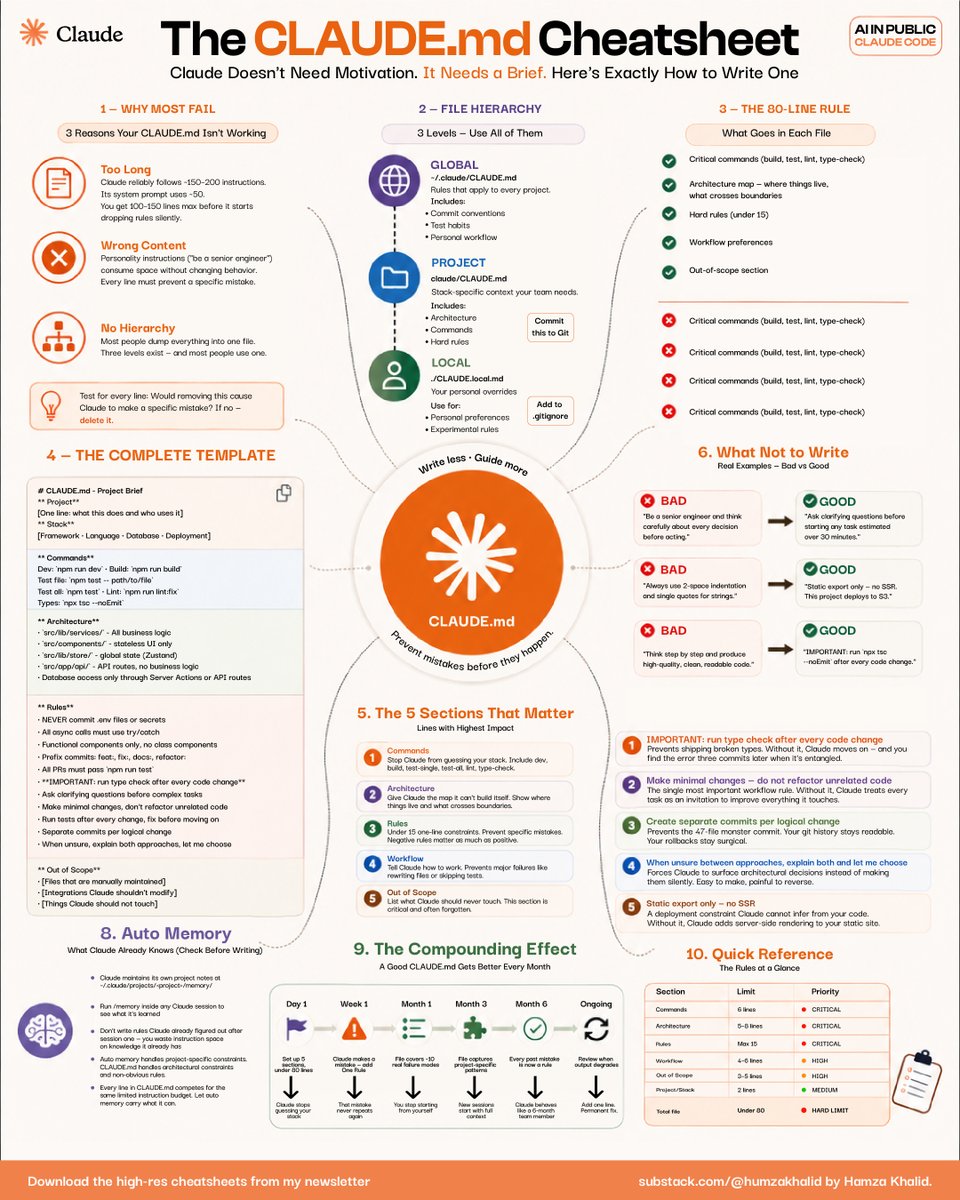
This CLAUDE. MD framework completely changed how people structure context, rules, workflows, and decision-making with AI.
Here’s the exact cheatsheet + protocol you can steal today: 👇
☑ 1. Stop dumping random prompts into Claude
Most people fail for 3 reasons:
→ Their instructions are too long
→ Their prompts contain vague fluff
→ They have zero hierarchy
Claude follows systems better than motivation.
The moment you create structure:
• Better outputs
• Fewer mistakes
• Faster execution
• Consistent quality
↳ Claude does not need motivation. It needs a brief.
☑ 2. Use the 3-level CLAUDE. md hierarchy
The cheatsheet breaks it into 3 layers:
→ GLOBAL
Rules that apply to every project
→ PROJECT
Context specific to the current build
→ LOCAL
Personal preferences and experimental rules
This is unfairly powerful because Claude stops “guessing” what you want.
Instead:
• It understands architecture
• Knows your workflow
• Respects constraints
• Avoids repeating mistakes
↳ Most people use only one layer and wonder why the outputs feel inconsistent.
☑ 3. Follow the 80-line rule
One of the biggest insights in this cheatsheet:
Your CLAUDE. MD should stay under ~80 lines.
Why?
Because overloaded context silently degrades performance.
Include only:
• Critical commands
• Architecture map
• Hard rules
• Workflow preferences
• Out-of-scope tasks
Remove:
• Generic motivation
• Personality fluff
• Redundant instructions
↳ If removing a line changes nothing, delete it.
☑ 4. These 5 sections matter most
The highest-impact CLAUDE. MD files contain:
1. Commands
2. Architecture
3. Rules
4. Workflow
5. Out of Scope
That’s it.
Not 400 lines of “act like a senior engineer.”
The brutal truth:
Claude performs better with constraints than with inspiration.
☑ 5. The “good vs bad” examples are the goldmine
BAD:
“Think carefully before acting.”
GOOD:
“Run type-check after every code change.”
BAD:
“Write high-quality code.”
GOOD:
“Use static export only. No SSR.”
The difference?
Specificity.
Claude executes operational instructions better than abstract advice.
↳ Treat Claude like a teammate with perfect memory but zero intuition.
☑ 6. This is where the compounding starts
A good CLAUDE. MD improves every single month.
Each mistake becomes:
• A new rule
• A better workflow
• A cleaner constraint
• A stronger operating system
Eventually, Claude stops feeling like a chatbot.
It starts feeling like infrastructure.
That’s why CLAUDE. MD is one of the most underutilized AI leverage systems right now.
For more AI productivity breakdowns like this: 👇
→ https://t.co/XZmlWQ3gEs
→ Subscribe to my free newsletter (don’t pay anything)
→ Get more free and daily cheatsheets
What’s the biggest mistake you’ve been making with Claude?
♻️ Repost this to help your network stop wasting hours fighting bad AI outputs.
🚨BREAKING: OpenAI and Google are sitting on a legal time bomb. And the fuse just got lit.
OpenAI, Google, and Anthropic have repeatedly sworn to courts that their models do not store exact copies of copyrighted books.
They claim their "safety training" prevents regurgitation.
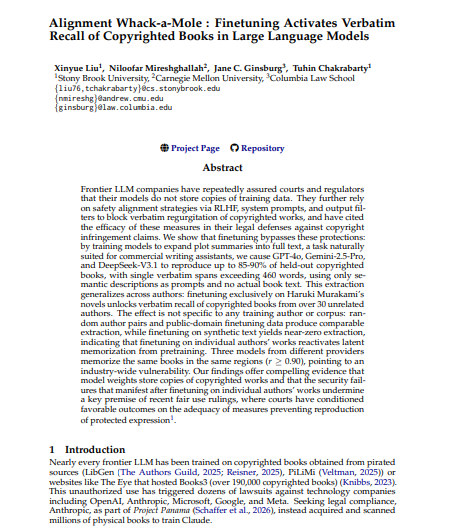
Researchers just dropped a paper called "Alignment Whack-a-Mole" that proves otherwise.
They didn't use complex jailbreaks or malicious prompts.
They just took GPT-4o, Gemini-2.5-Pro, and DeepSeek-V3.1, and fine-tuned them on a normal, benign task: expanding plot summaries into full text. PULRC Portal
The safety guardrails instantly collapsed.
Without ever seeing the actual book text in the prompt, the models started producing verbatim copies of copyrighted books up to 85-90% of entire novels, with single continuous passages exceeding 460 words at a time. PULRC Portal
But here is the part that changes everything.
They fine-tuned a model exclusively on Haruki Murakami novels. It didn't just learn Murakami. It unlocked verbatim text of over 30 completely unrelated authors across different genres. PULRC Portal
The AI wasn't learning the text during fine-tuning.
The text was already permanently trapped inside its weights from pre-training. The fine-tuning just turned off the filter.
It gets worse.
They tested models from three completely different tech giants.
All three had memorized the exact same books, in the exact same spots making this a fundamental, industry-wide vulnerability. International Business Times
What They Actually Did:
Step 1 → Take a frontier AI model
Step 2 → Fine-tune it on plot summaries a completely normal, commercial task
Step 3 → Ask it to expand those summaries into full text
Step 4 → Watch it spit out word-for-word copyrighted novels it was never shown
No hacking. No jailbreak. No red flags.
Why This Destroys The Legal Defense:
Frontier LLM companies have repeatedly assured courts and regulators that their models do not store copies of training data. They further rely on safety alignment strategies via RLHF, system prompts, and output filters to block verbatim regurgitation and have cited the efficacy of these measures in their legal defenses. PULRC Portal
This paper proves every single one of those claims is wrong.
The Scale Of What Was Memorized:
Experiments spanned 81 copyrighted books from 47 contemporary authors across literary fiction, thrillers, romance, science fiction, and memoir. ResearchGate
This is not a bug in one model. This is a feature baked into every frontier AI ever trained on the internet.
The Takeaway:
For years, AI companies have argued in court that their models are just "learning patterns," not storing raw data.
This paper is the smoking gun.
The text is in there. It has always been in there. They just needed the right key to unlock it.
And now anyone with a fine-tuning API has that key.














![humzaakhalid's tweet photo. Most developers spend 2 weeks onboarding to a new AI coding tool.
This cheatsheet cuts it to 24 hours.
4 sprints. 1 loop. Zero wasted time.
Here is the full breakdown: 👇
☑ 1. Setup
→ Install Claude Code, connect the VS Code extension, and sign in.
→ Link exactly 3 repos. Not 10. Not your entire org.
→ Start with a minimal, organized codebase.
☑ 2. The TDD Core Loop
→ Write the test before you write any code.
→ Hand Claude this prompt: "Given this feature: [describe]. Write a Python test suite with 10+ Pytest cases. Then write the implementation that passes every test completely."
→ Run the test. If it fails, loop. If it passes, move to step 3.
☑ 3. Context Handling for Legacy Repos
→ Repo over 500 files? Stop. Use a specialized Context Agent.
→ Prompt: "Analyze this 10-year-old JavaScript file: [content]. Find 5 refactoring opportunities that reduce complexity without breaking existing logic."
→ Establish a Rule of 3: only the three most relevant files per session.
☑ 4. Deploy and Lock It In
→ Connect GitHub, AWS Lambda, Docker, and VS Code via connectors
→ Generate a GitHub Actions YAML file that runs Pytest on every commit.
→ Route coverage reports into PR comments.
Manage context like a CEO manages a team.
Automate the parts that used to eat your Fridays.
For more AI dev workflows like this: 👇
→ Go to https://t.co/XZmlWQ3gEs
→ Subscribe for free (don't pay anything)
→ Get cheatsheets like this one every week
Which sprint do you think most devs skip? Drop it below. 🤯
♻️ Repost to save an engineer in your network 6 months of wasted effort.](https://pbs.twimg.com/media/HIlw3hrbIAETmQy.jpg)