Regression analysis is a fundamental tool in data science and statistics for understanding relationships between variables. With many different types of regression available, knowing when to use each type is crucial for obtaining accurate and reliable results. Let's explore three common types of regression: simple, multiple, and polynomial regression.
1️⃣ Simple Regression: This method analyzes the relationship between two variables - one independent and one target variable. It's perfect for finding a linear relationship when you have just one predictor.
2️⃣ Multiple Regression: When you're looking to understand the impact of two or more independent variables on a target variable, multiple regression is your go-to. This type of regression helps reveal more complex relationships.
3️⃣ Polynomial Regression: If your data isn't fitting a straight line, polynomial regression might be the solution. It captures non-linear relationships by adding polynomial terms to the model, making it great for more complex data patterns.
Important note: While polynomial regression can model curved relationships in data, it is still considered a type of linear regression. This is because the model remains linear in its coefficients, even though it incorporates polynomial terms. The key distinction lies in the linear estimation of the coefficients, which follows the principles of linear regression.
The visualization in this post focuses on the formulas of the three regression types: Simple Regression, which uses a formula to fit a straight line between two variables; Multiple Regression, which extends the formula to represent a plane or hyperplane across several dimensions; and Polynomial Regression, which modifies the formula to illustrate a curved line that fits non-linear data patterns.
To dive deeper into concepts like this, join my online course on Statistical Methods in R. See this link for additional information: https://t.co/7YQCRDKSPO
#coding #RStats #DataScience #R #database #DataAnalytics
✅ Data Scientists in Your 20s – Avoid This Trap 🚫🧠
🎯 The Trap? → Passive Learning
Feels like you’re learning but not truly growing.
🔍 Example:
⦁ Watching endless ML tutorial videos
⦁ Saving notebooks without running or understanding
⦁ Joining courses but not coding models
⦁ Reading research papers without experimenting
End result?
❌ No models built from scratch
❌ No real data cleaning done
❌ No insights or reports delivered
This is passive learning — absorbing without applying. It builds false confidence and slows progress.
🛠️ How to Fix It:
1️⃣ Learn by doing: Grab real datasets (Kaggle, UCI, public APIs)
2️⃣ Build projects: Classification, regression, clustering tasks
3️⃣ Document findings: Share explanations like you’re presenting to stakeholders
4️⃣ Get feedback: Post code & reports on GitHub, Kaggle, or LinkedIn
5️⃣ Fail fast: Debug models, tune hyperparameters, iterate frequently
📌 In your 20s, build practical data intuition — not just theory or certificates.
Stop passive watching.
Start real modeling.
Start storytelling with data.
That’s how data scientists grow fast in the real world! 🚀
💬 Tap ❤️ if this resonates with you!
📈 Upgrade Your Excel Dashboards with In-Cell Dynamic Charts!
Want to visualize your data cleanly without bulky graphs taking up all your space? It's time to use In-Cell Dynamic Charts in Excel!
This feature lets you build mini charts directly inside a single cell to track performance, trends, and progress instantly. Perfect for financial reports, dashboards, and KPI tracking to make your data look professional and easy to digest.
Give it a try on your next report! 👇
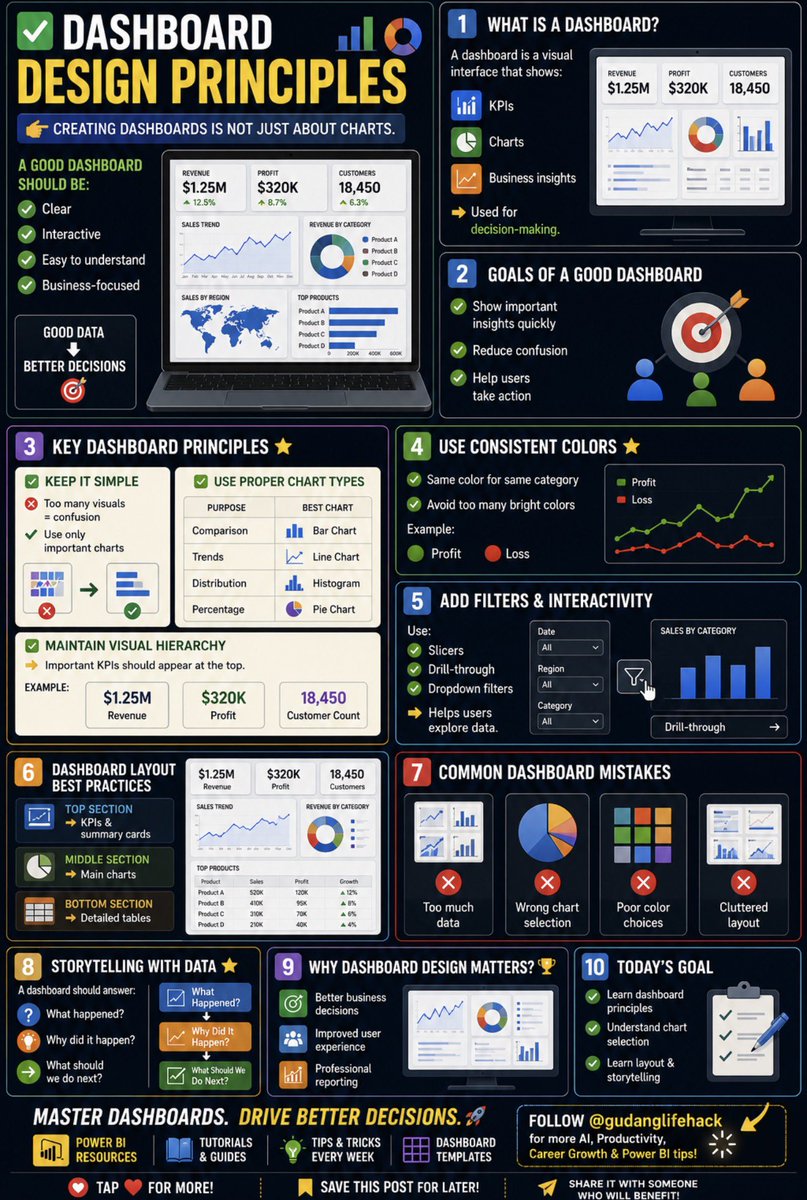
🚨 Most dashboards fail for one reason:
They show data.
But they don’t drive decisions.
Here are 10 Dashboard Design Principles every Data Analyst, Power BI, and Excel user should know 👇
(Save this thank me later).
Most people only use 10% of Excel’s power.
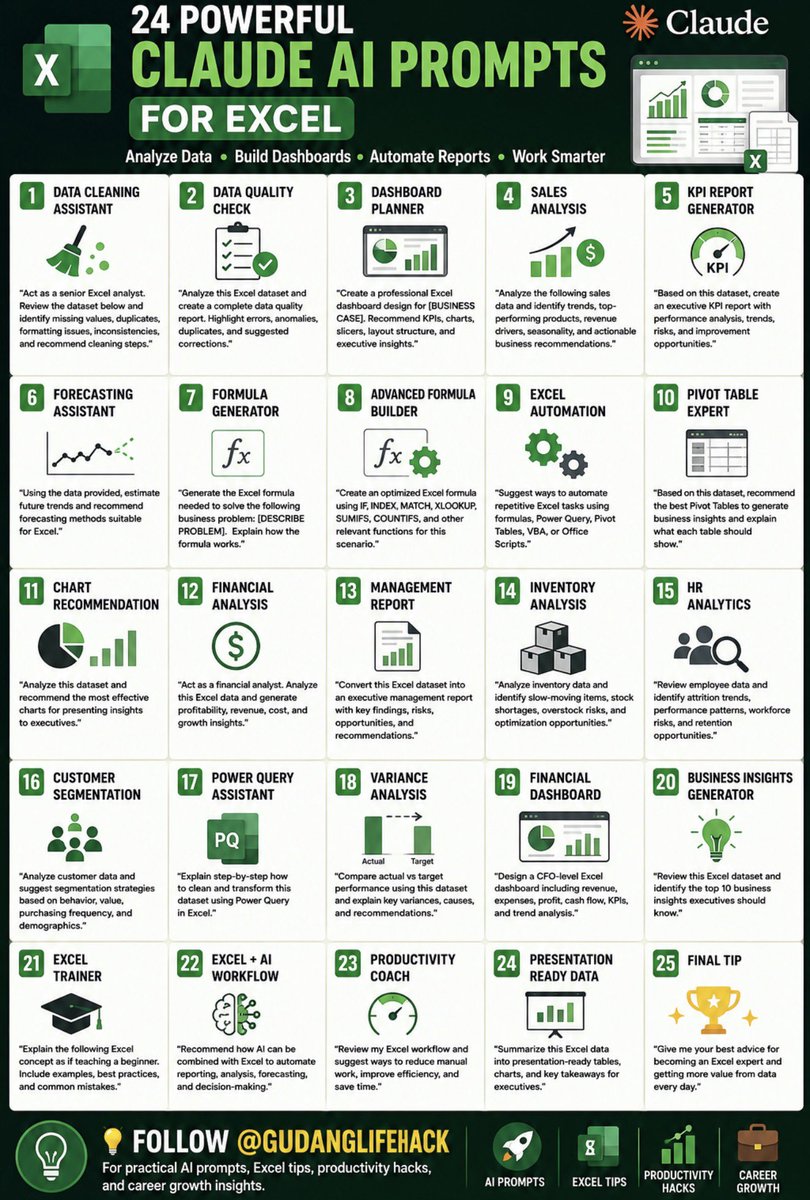
These 24 Claude AI prompts can help you analyze data, build dashboards, automate reports, and work faster than ever. 🧵👇
(Save this thank me later).
✅ SQL for Data Science 🗄️📊
If you’re learning Data Science, Data Analytics, or Business Intelligence, SQL is not optional.
It’s a core skill.
Almost every company stores data in databases, and SQL is the language used to access that data.
Let’s learn the fundamentals. 🧵
(Save this thank me later).
🔥 If you’re building a portfolio, prioritize:
1. Dashboard Project
2. Web App
3. Data Analysis Project
4. API Project
5. Machine Learning Project
These are the projects recruiters love to see.
Kindly repost this to reach all Ghanaian Students in South Africa 🇿🇦 .
If the algorithm brings this to you, don’t ignore, be a true patriotic citizen of Ghana by reposting or quoting🇬🇭 .
I accidentally discovered how to compress a semester of learning into 48 hours.
An MIT grad student showed me his NotebookLM setup. At first, I thought he was just super organized. Then I watched him pass a qualifying exam on a subject he had barely studied before.
Here’s exactly what he did:
First, he didn’t upload just one textbook.
He uploaded 6 textbooks, 15 research papers, and every lecture transcript he could find on the topic.
Then he asked NotebookLM one question:
“What are the 5 core mental models that every expert in this field shares?”
Not “summarize this.”
Not “explain this topic.”
Mental models — the frameworks experts spend years building.
But the next prompt completely changed the game.
He asked:
“Now show me the 3 biggest areas where experts in this field disagree, and the strongest argument from each side.”
In less than 20 minutes, he had a map of the entire field:
the debates, the consensus, and the unanswered questions.
Most students spend an entire semester just figuring out those debates exist.
Then he asked something even smarter:
“Generate 10 questions that would reveal whether someone truly understands this subject or just memorized facts.”
He spent the next 6 hours answering those questions using the source material. Every mistake triggered another prompt:
“Explain why this answer is wrong and what I’m missing.”
By hour 48, he could confidently discuss the topic with his thesis advisor.
The tool didn’t change.
The questions did.
Most people use NotebookLM like a smart highlighter.
The best students use it like a private tutor trained on every important source in the field.
The difference between a semester and 48 hours isn’t the amount of content.
It’s knowing the right questions to ask.
40 Tips to Improve Your Academic Writing - Best Tips
1️⃣ Read academic papers to understand structure
2️⃣ Write every day, even if it’s just a few sentences
3️⃣ Keep your sentences clear and concise
4️⃣ Avoid jargon unless necessary
5️⃣ Use active voice instead of passive voice
6️⃣ Outline your ideas before writing
7️⃣ Read your work aloud to spot awkward phrasing
8️⃣ Use transition words for better flow
9️⃣ Edit ruthlessly—cut unnecessary words
🔟 Always proofread before submitting
1️⃣1️⃣ Follow a logical structure (intro, body, conclusion)
1️⃣2️⃣ Use simple words instead of complex ones
1️⃣3️⃣ Avoid repetition—use synonyms strategically 🔄
1️⃣4️⃣ Support arguments with evidence
1️⃣5️⃣ Cite sources properly to avoid plagiarism
1️⃣6️⃣ Use Grammarly or ProWritingAid
1️⃣7️⃣ Break long paragraphs into shorter ones
1️⃣8️⃣ Vary sentence length to maintain interest
1️⃣9️⃣ Be mindful of tense consistency
2️⃣0️⃣ Use bullet points or lists for clarity
2️⃣1️⃣ Avoid contractions in formal writing (e.g., "do not" instead of "don’t")
2️⃣2️⃣ Use parallel structure for readability
2️⃣3️⃣ Keep your thesis statement clear and specific
2️⃣4️⃣ Start with an engaging hook in the introduction
2️⃣5️⃣ End with a strong conclusion, not just a summary
2️⃣6️⃣ Use examples to illustrate key points
2️⃣7️⃣ Avoid vague words like “thing” or “stuff”
2️⃣8️⃣ Be precise with word choice
2️⃣9️⃣ Take breaks before editing for fresh perspective
3️⃣0️⃣ Read widely to improve vocabulary
3️⃣1️⃣ Don’t overuse quotes—paraphrase when possible
3️⃣2️⃣ Write in a way that even a non-expert can understand
3️⃣3️⃣ Avoid filler words (e.g., "very," "really")
3️⃣4️⃣ Use citation managers like Zotero or Mendeley
3️⃣5️⃣ Be consistent with formatting (APA, MLA, Chicago)
3️⃣6️⃣ Join a writing group for feedback
3️⃣7️⃣ Keep a personal style guide for frequent mistakes
3️⃣8️⃣ Learn from peer-reviewed articles and their writing style
3️⃣9️⃣ Develop a habit of rewriting and refining your work
4️⃣0️⃣ Believe in your voice—your research matters!
Subscribe @scholarshipfphd for more Premium Tips/Content
📌 Save & Share with fellow researchers!
Final Interview:
"We’d like to offer you the position at $85,000."
Most people say: "That sounds great, thank you!"
Stop. You just left $10,000+ on the table in 5 seconds.
Say this instead:
(Save this later).
BYE-BYE POWERPOINT.
Claude 4.7 just made presentations obsolete.
In 60 seconds, it builds slides better than most professionals.
Here are 6 prompts that do everything for you 👇
📌 Save this before everyone starts using it.
📚 Simple Guide to Study Abroad 🌍
Thinking about studying abroad but don’t know where to start? Here’s a simple checklist for you 👇
1. Choose Your Dream Country & Major
Research universities, tuition fees, culture, and career opportunities.
2. Prepare Your Documents
Usually you’ll need:
• Passport
• Academic transcripts
• English test scores (IELTS/TOEFL)
• Motivation letter & recommendation letters
3. Plan Your Budget
Calculate tuition fees, living costs, and look for scholarships.
4. Apply to Universities
Make sure you check the application deadlines carefully!
5. Apply for Student Visa
Prepare important documents and follow embassy requirements.
6. Prepare Before Departure
Book accommodation, buy insurance, and learn basic local language/culture.
Save this for later, or drop a 👍 to manifest studying abroad!
🚨 Claude just replaced Udemy, Coursera and Skillshare for free.
I canceled all 3 subscriptions and learned faster than ever using nothing but prompts.
Here are 9 prompts to turn Claude into your personal learning engine.
Save this before you buy another course you will never finish. 🔖
50 WEBSITES THAT FEEL ILLEGAL TO KNOW ABOUT
1. cobalt. tools — download any video from socials
2. photopea. com — Photoshop but completely free
3. temp-mail. org — disposable email in one click
4. tinywow. com — 100+ free tools in one site
5. archive. org — access any old webpage ever
6. libgen. li — millions of free textbooks
7. sci-hub. al — free research papers
8. alternativeto. net — find free app alternatives
9. justwatch. com — find where to stream anything
10. gutenberg. org — 70K free classic books
11. pdfdrive. com — free PDF downloads
12. openculture. com — free courses from top unis
13. wolframalpha. com — solve any math instantly
14. remove. bg — remove backgrounds in one click
15. cleanup. pictures — erase objects from photos
16. unscreen. com — remove video backgrounds free
17. squoosh. app — compress any image free
18. excalidraw. com — hand drawn diagrams free
19. carbon. now. sh — turn code into beautiful art
20. ray. so — stunning code screenshots
21. flightradar24. com — track any flight in real time
22. camelcamelcamel. com — track Amazon price history
23. haveibeenpwned. com — check if you were hacked
24. virustotal. com — scan any file for malware
25. privnote. com — send self destructing messages
26. file. io — share files that auto delete
27. archive. ph — save any webpage forever
28. accountkiller. com — delete yourself from any site
29. radio. garden — listen to any radio worldwide
30. tunefind. com — find songs from any show
31. musicforprogramming. net — music to focus with
32. mynoise. net — custom focus soundscapes
33. annasarchive. org — search every book ever written
34. elicit. com — AI research paper assistant
35. consensus. app — search what science agrees on
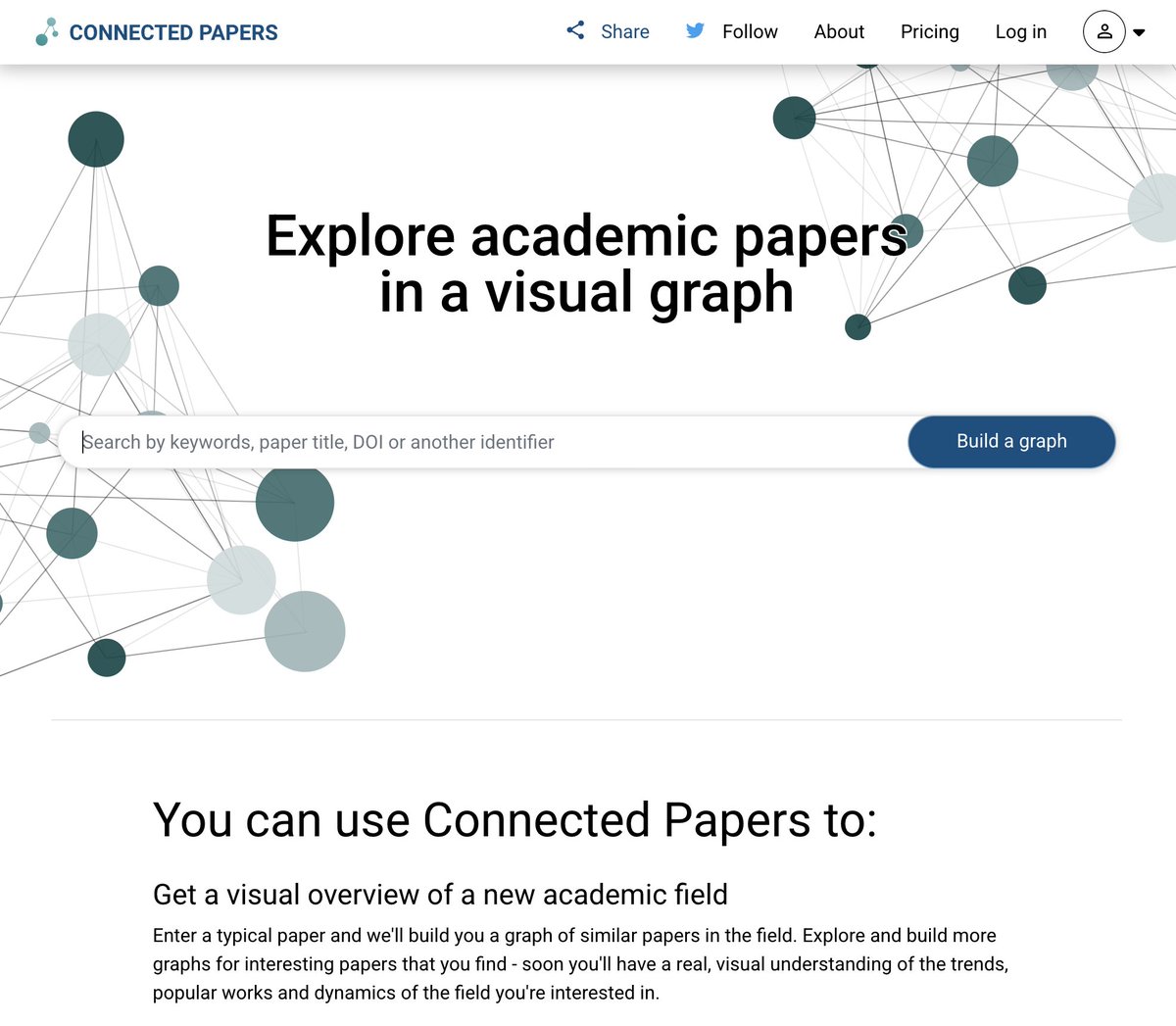
36. connectedpapers. com — map research visually
37. semanticscholar. org — free academic search
38. scispace. com — understand any research paper
39. summarize. tech — summarize any YouTube video
40. phind. com — AI search for developers
41. regex101. com — test any regex instantly
42. codebeautify. org — format any code cleanly
43. explainshell. com — understand terminal commands
44. tldraw. com — infinite whiteboard in browser
45. downdetector. com — check if any site is down
46. tineye. com — reverse image search
47. fast. com — check your internet speed
48. smallpdf. com — edit PDFs free
49. ilovepdf. com — merge and split PDFs
50. 10minutemail. com — temp email in seconds
All legal. All free. All hidden from you.
Bookmark this before it disappears.
🚀 24 Excel Secrets That Will Make Your Office Work 10x Faster & Save You 5 Hours Every Day!
Most people still do everything manually. These pro tips can boost your productivity, get you noticed, or even grow your Excel side hustle.
Save & RT if you want to level up! 👇
I use Claude all day without hitting my usage limit.
Claude doesn't count messages — it counts tokens. That means some chats consume your limit 10× faster than others.
If you want to use Claude all day without running out of access, use these 9 smart tricks:
Being "Good at Excel" isn't about knowing 500 formulas. It’s about never touching your mouse.
The most productive people in the office use keyboard shortcuts to fly through data while others are still clicking "File > Save."
Here are 20 powerful Excel shortcuts to finish your work before lunch: 🧵
Claude can now help you build entire presentations.
You can use it to create any deck like a $5,000 presentation consultant.
Here are 7 prompts you should try:
(Save this before it disappears).