little #flutter ai finding. I changed my run command to:
flutter run -t lib/main.dart 2>&1 | tee flutter.log
which always writes the log to a flutter.log file.
Claude then takes the file and can fix all exceptions.
Though I assume there is an even better way. 👀
Another experiment from the laboratory, a deck of cards you can infinitely swipe through and pull down to fan out. The "Spring Duration Animation" patch is a little helper for handoff to UIKit engineers
Swift Concurrency is a crucial part of my development stack. I use async/await and task groups extensively. SwiftUI Button doesn’t provide Swift Concurrency out of the box, but it’s flexible enough to support it.
https://t.co/YwZLjfJgyY
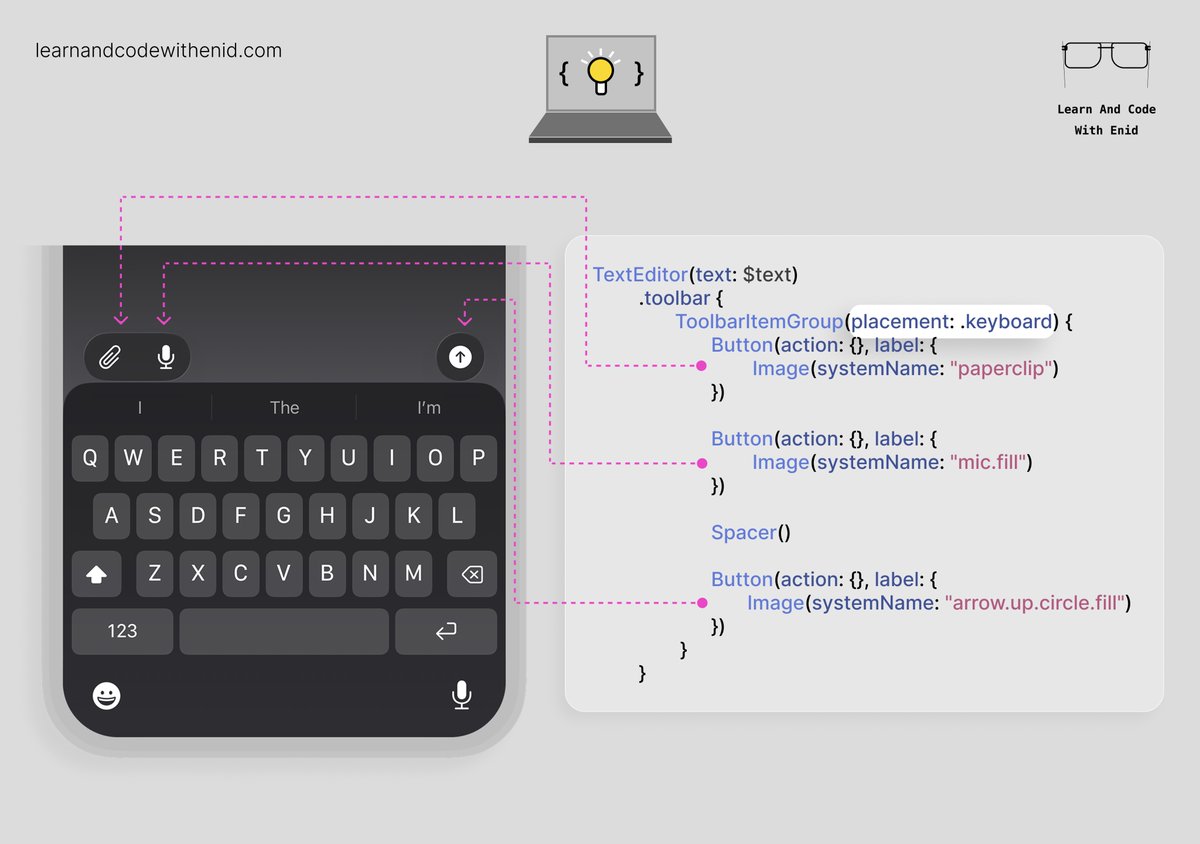
SwiftUI Tip 💡
You can place a toolbar with items above the keyboard by using the .keyboard placement.
Perfect for AI chat apps, note-taking apps, and any interface with quick actions while typing.
→ https://t.co/2EYlDNdQjq
Advanced Swift Concurrency: The “executor stealing” optimisation
One of the interesting optimisations in Swift Concurrency (that I discovered while writing this article) is executor stealing. If an asynchronous task completes quickly, it will attempt to reuse the exact same pthread it was running on previously.
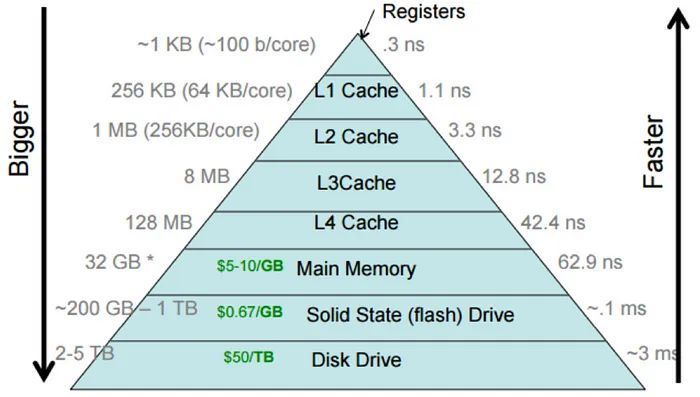
This is great for cache locality—the data required by the active thread will likely sit close to the CPU in the L1, L2, or L3 cache and can avoid being fetched via round-trip to main memory. This differs from GCD, which has less control over which specific pthread will run each workload.
Play with real working concurrency APIs each era of Apple computing in the full article: https://t.co/2DTNlrGAOK
Depth Card created using SwiftUI 😁
Couldn't make it as perfect as @SebCornelius 's work, but I still enjoyed the process of playing around with canvas. ✨
#swiftui
It's over.
Google absolutely cooked with Gemini 3🤯
Gemini 3 quietly landed in the iOS Gemini app with Canvas and people were getting insane results.
10 wild examples:👇
1. Minecraft/tower defense game in one shot
Yesterday at Office Hours Justin Leger showed us something incredible.
✨ Vision Pro Blender Live Streamer ✨
A Blender Add-on streams data to a companion app on Apple Vision Pro. This can vastly speed up iteration time when making changes to a model or scene.
SwiftUI has been released more than 6 years ago but you still have to use UIDatePicker.appearance() to set a minuteInterval other than the default 1 minute to a date picker 🤦🏻♂️
Maybe mesh gradients are more used 🤷🏻♂️ https://t.co/WyarwImc77
OPERATOR is our first application for Apple Vision Pro that turns the process of music production into a spatial modular experience.
Make spatial sound sculptures with intuitive interactions everywhere.
Read more on our website and explore design research behind the software — the link is in the reply.
SwiftUI Performance: Pagination
When you implement pagination, instead of allocating every item at the start, we only load the first few (often 20, 50, or 100) into our screen. When you scroll close to the bottom, more data is fetched and displayed.
This is a very common pattern, especially with infinite scrolling feeds—you aren’t exactly loading infinite amounts of data, that’d be impossible. And expensive.
With LazyVStack and List, this will make your initial memory allocations and network I/O far more efficient. A smaller data source may also improve the speed of diffing if your data changes.
Link in first reply.
SwiftUI Tip 💡
Use contextMenu() to attach extra actions to any view and reveal them on long-press.
Perfect for features that don’t need to stay visible on screen.
→ https://t.co/2EYlDNdQjq