In 2006, I was 1 of 4 designers on Google Search.
For 20 years, every search engine has copied Google.
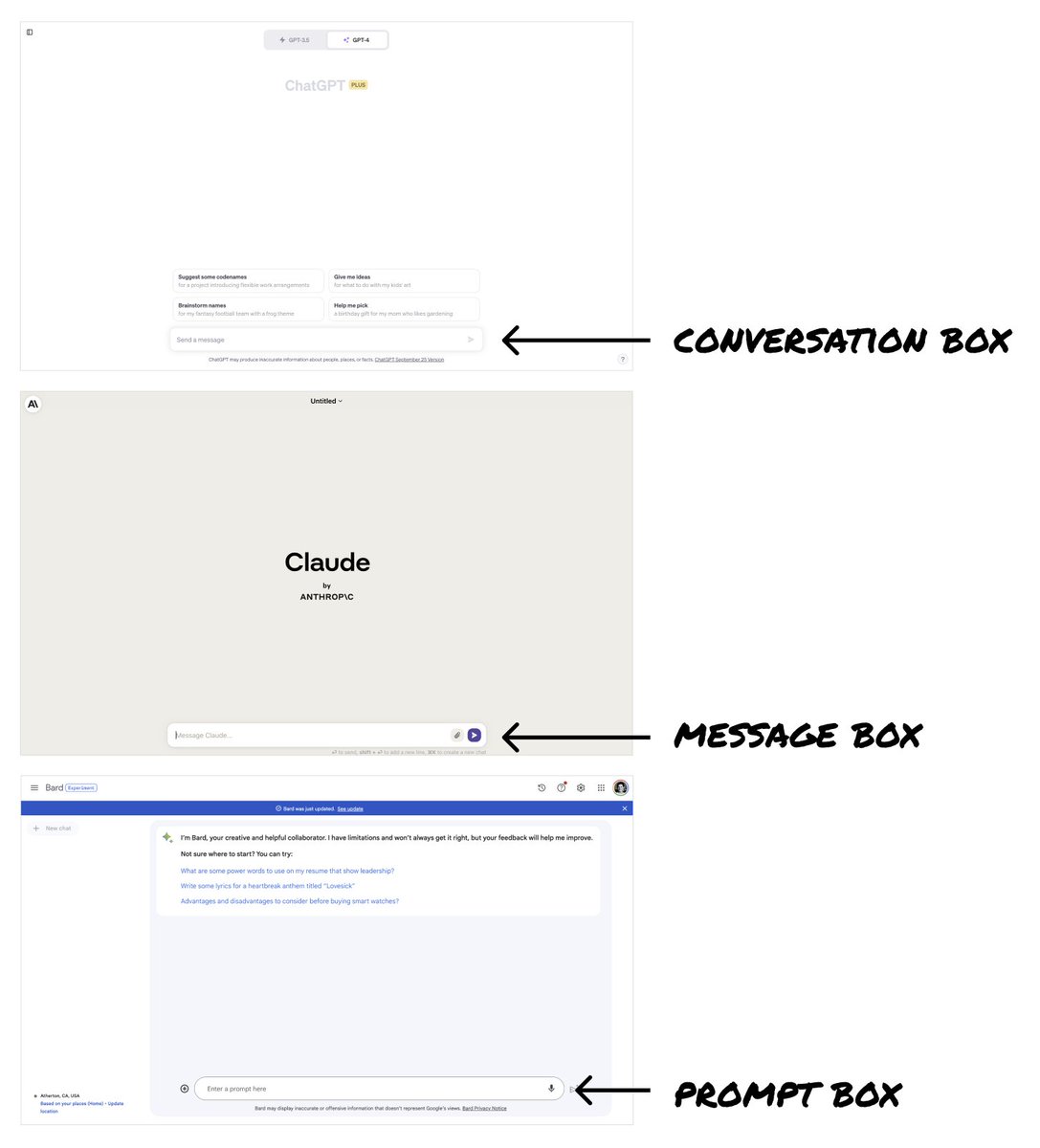
Now ChatGPT, Bard + Claude look like Google's offspring - "better” search engines.
But last week signaled we're on the brink of a design revolution.
ChatGPT unveiled incredible new features.
These could give us the opportunity to completely shift how we interface with AI.
Here's the full story:
–––
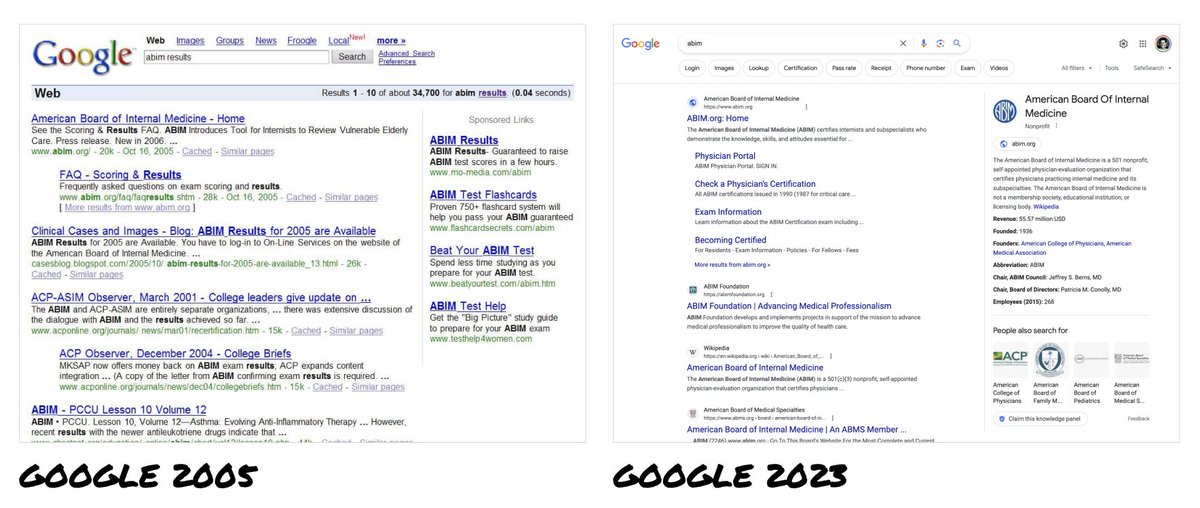
When I was a designer on Google Search, all major search engines looked the same – Google, Yahoo, MSN Bing.
Google was the market leader with a heavily optimized UI that supported billions of dollars in ad revenue.
Naturally, it became THE way to show search results.
Its success made it illogical for Google to consider big UI changes.
And any changes they did make were just mirrored by everyone else.
So 20 years later, we’ve only seen incremental changes to search engine UIs.
–––
Today, we have consumer-ready LLMs (Large Language Models) freshly in our hands.
As consumer products, these are in their infancy.
We’re very early in understanding their capabilities and defining how people interact with them.
These are uncharted waters.
And yet ChatGPT, Bard, Claude etc. all chose a text-based input box — just like Google’s search box — as the core interface.
Why?
The input box is simple, versatile, and familiar.
- It’s simple to understand → you type your questions into the box.
- It’s versatile → the box can handle all sorts of questions/queries.
- The paradigm is super familiar → people immediately know how to use it.
Because of this, LLMs have essentially become “a better Google.”
–––
But last week’s ChatGPT announcements thrust open the doors to new possibilities.
ChatGPT is now multi-modal — it can see, hear, and speak.
These are the recent announcements from @OpenAI :
Voice: https://t.co/hAeXxBTH9l
Photos: https://t.co/X3QbLnwT1V
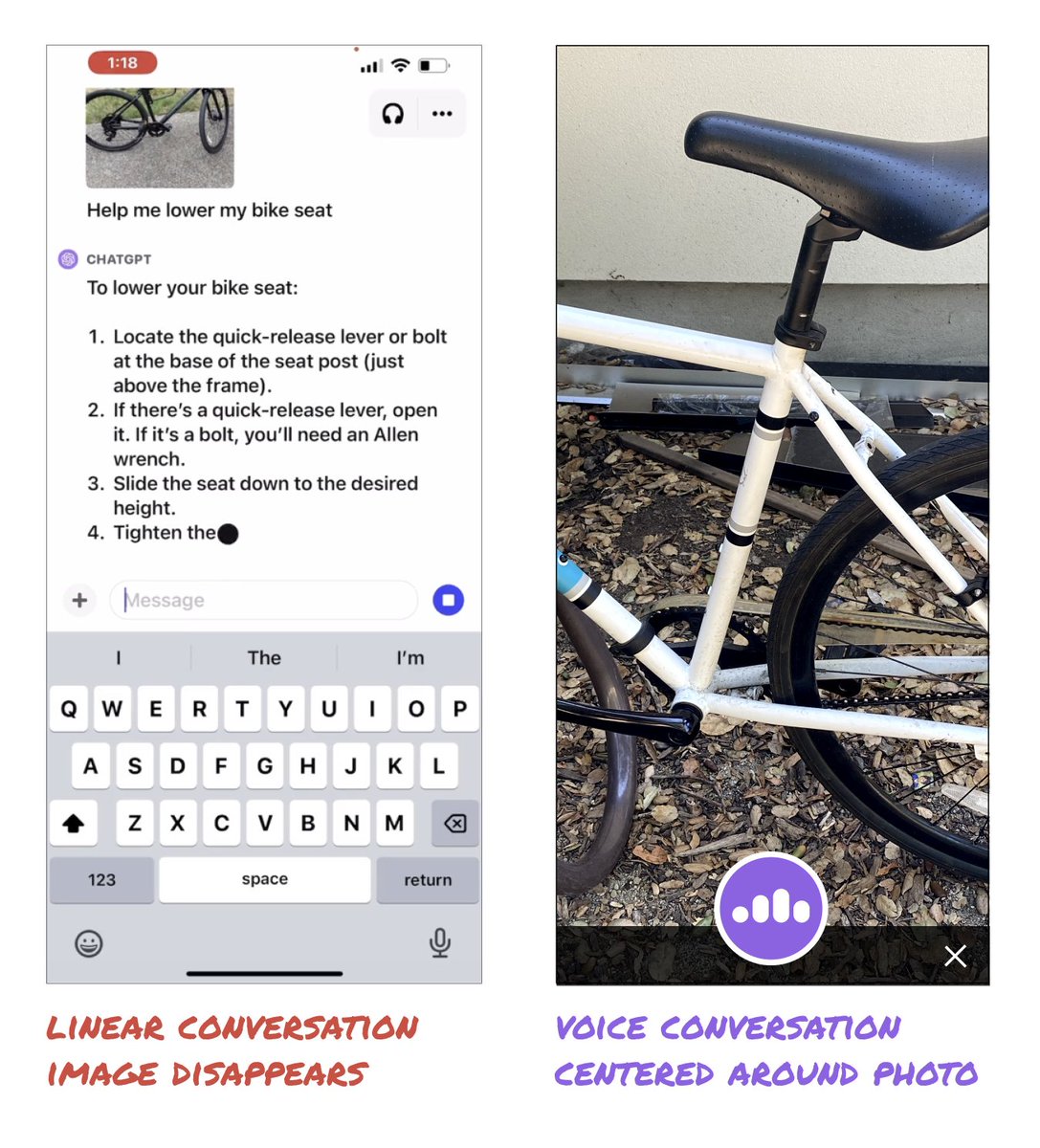
The example of ChatGPT explaining how to lower a bike seat was incredible.
But, it could be so much better!
The video showed you'll have to post multiple new photos to keep adding new information and to progress the conversation.
It was still a linear conversation centered around the text box.
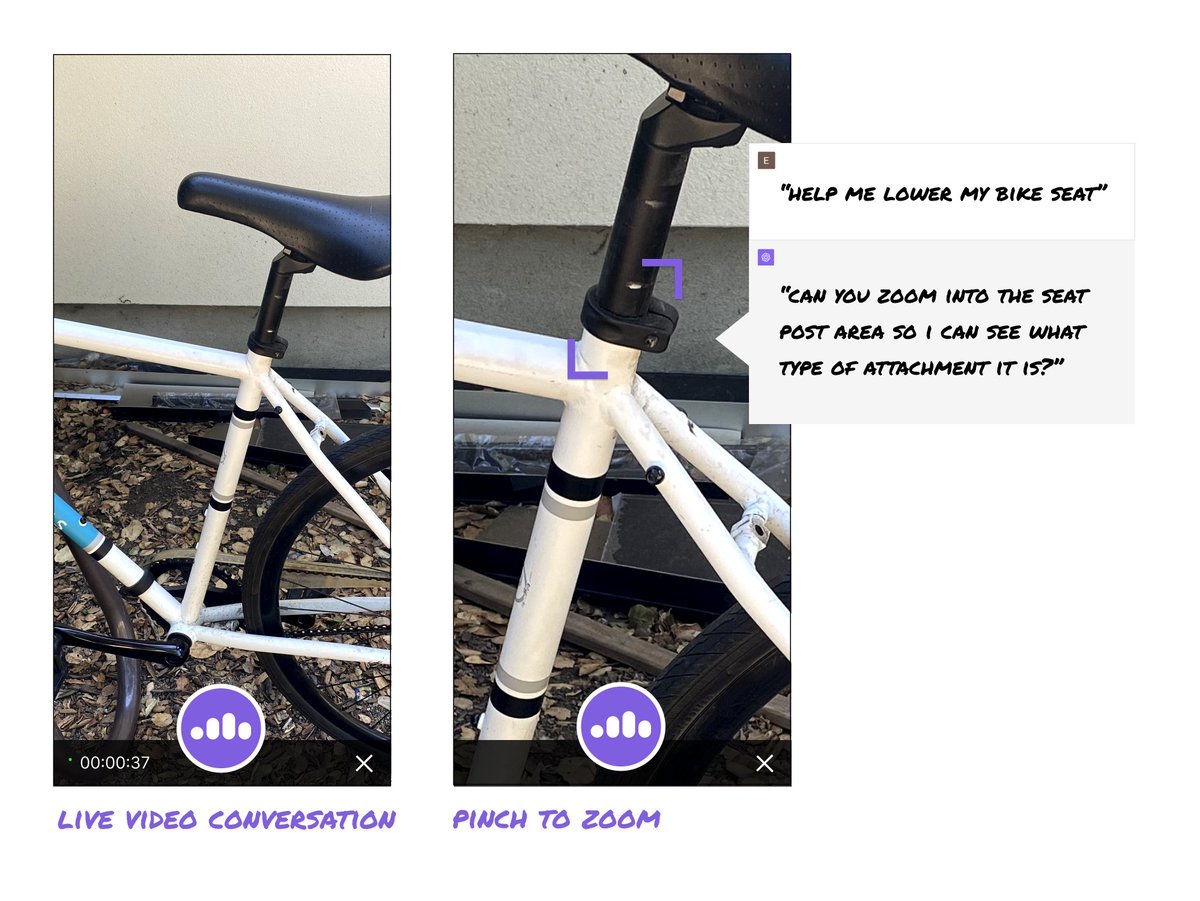
But what if we rethought the interface to center around the image?
What if ChatGPT supported both images AND voice simultaneously?
Could we end up with a more immersive experience?
–––
How else could interacting with LLMs mimic IRL conversations?
Could we (or the AI) pinch to zoom or rotate the image?
Could we interact in real time with video?
What new possibilities open up with context being preserved over time?
–––
There is so much energy and excitement around what AI can do.
But we are limiting the potential by assuming the conversation box is the best interface.
Right now, designers have the chance to create truly novel interactions and bust through the 20+ year old search UI paradigm.
The ideas above are just to illustrate some potential options.
But they are also intended to spark a flame.
Now is the opportunity to be creative and explore divergent UIs.
What are the craziest, coolest, most creative UI ideas we can unleash?
LFG 🚀
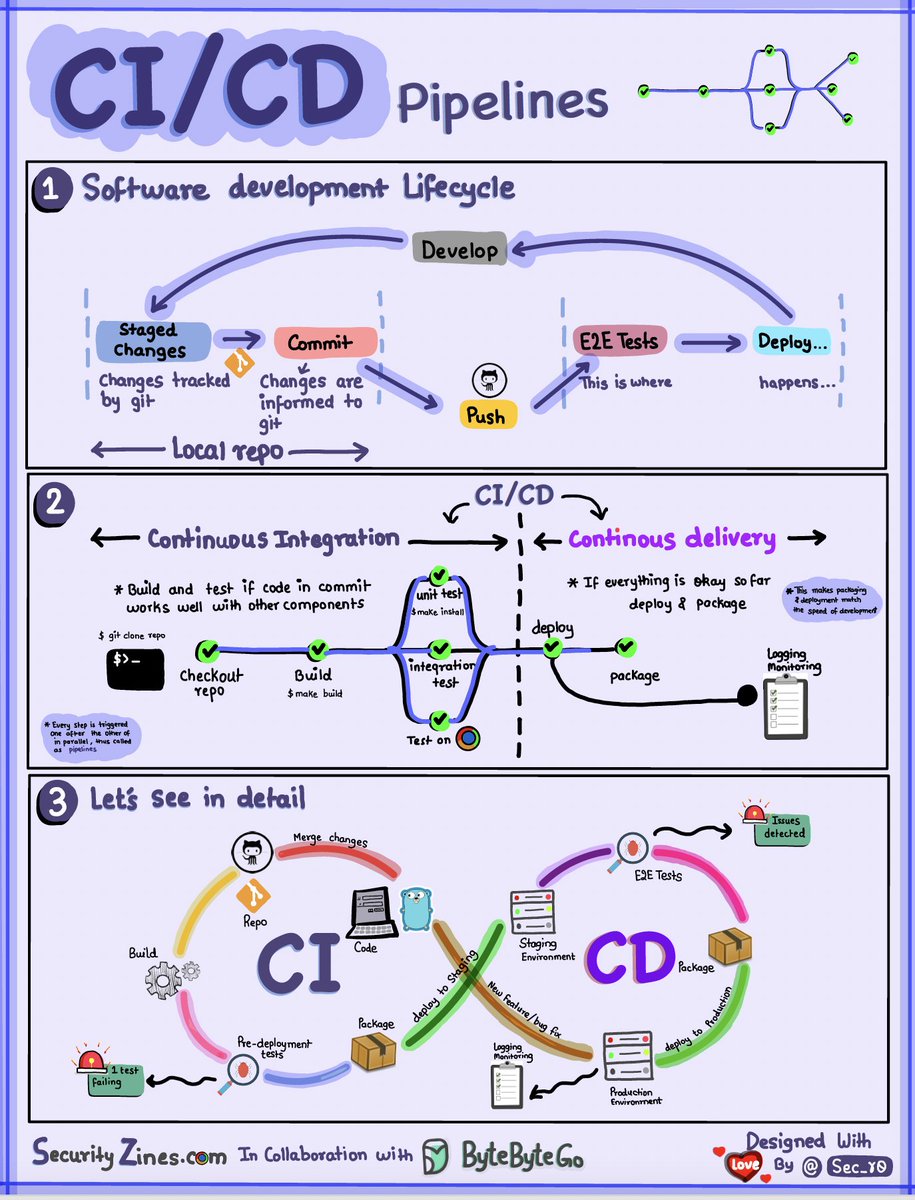
CI/CD Pipeline Explained to Kids
Section 1 - SDLC with CI/CD
The software development life cycle (SDLC) consists of several key stages: development, testing, deployment, and maintenance. CI/CD automates and integrates these stages to enable faster, more reliable releases.
When code is pushed to a git repository, it triggers an automated build and test process. End-to-end (e2e) test cases are run to validate the code. If tests pass, the code can be automatically deployed to staging/production. If issues are found, the code is sent back to development for bug fixing. This automation provides fast feedback to developers and reduces risk of bugs in production.
Section 2 - Difference between CI and CD
Continuous Integration (CI) automates the build, test, and merge process. It runs tests whenever code is committed to detect integration issues early. This encourages frequent code commits and rapid feedback.
Continuous Delivery (CD) automates release processes like infrastructure changes and deployment. It ensures software can be released reliably at any time through automated workflows. CD may also automate the manual testing and approval steps required before production deployment.
Section 3 - CI/CD Pipeline
A typical CI/CD pipeline has several connected stages:
- Developer commits code changes to source control
- CI server detects changes and triggers build
- Code is compiled, tested (unit, integration tests)
- Test results reported to developer
- On success, artifacts are deployed to staging environments
- Further testing may be done on staging before release
- CD system deploys approved changes to production
–
Subscribe to our weekly newsletter to get a Free System Design PDF (158 pages): https://t.co/4QcX8btXGL
Here is a completely free Computer Science curriculum for those with the discipline to go through it independently.
The curriculum follows the same degree requirements as an undergraduate computer science major and consists of courses from Harvard, MIT, and Princeton, among other colleges.
The curriculum has four major sections:
1. Introduction: Students can review this section and decide whether this fits them.
2. Core: This section corresponds to the first three college years.
3. Advanced: This section corresponds to the final year of a Computer Science curriculum in college.
4. Final Project: Students can validate, consolidate, and display their knowledge by completing this project.
Assuming you spend around 20 hours per week, you can finish in two years.
I won't lie: completing a curriculum like this alone will be hard. Having the support of professors and other students is very important, but if you have the discipline and the will, this material is amazing.
The link to the repository is on the screenshot and its ALT description.
More features, active users, and data are collected daily. Your database is slowing your application. Many people don't understand database sharding, which could solve their difficulties.
https://t.co/TPkdXNRGCV