I read the #book Principles of Neural Design recently.
It’s extremely dense, which you’d hate or love depending on how much you’re in awe with how our brain works. I totally loved it! The book is unique in trying to explain the wondrous complexity of brain using few unifying principles, all of which can be traced to constraints evolution faces, especially with energy efficiency.
The central insight from the book is this:
👉 Brains maximize information (bits) per ATP
Consuming energy and producing ATP is hard. The organism has to work to get energy. During evolution, inefficient designs get outcompeted by efficient designs so we should expect to see efficient designs. For brain, this means squeezing max information and computing using least amount of energy.
From this insight, we could derive the following principles:
1. Send only what’s surprising. Why waste energy in sending what can be predicted/estimated efficiently. This explains why predictive coding makes sense for the brain.
2. Minimize wire / compute locally. Since wiring is expensive and sending signals across length requires energy, brain does as much computation locally as possible (and sends only sparse computed results/commands at greater lengths). This explains why brain has “regions” (such as for language) since local computation minimizes wire.
3. Send information at the lowest acceptable spike rate. Because faster spike rate requires thicker axons and more ATP, brain sends sparse, low-mean firing rate signals. The lower bound to how slow signals you can send is determined by requirements for fast reaction (this is why we do get few fat axons from the eye into the brain, but most axons or then). It also explains how brain simply sends a simple sparse signal to local pattern generators near legs than then send precise signals to leg muscle for movement. Similarly, retina/eye does a lot of local computation and sends summaries only to the brain. There are two kinds of sparsity: lifetime sparsity (how often each neuron fires, across stimuli - averages to be 1Hz in V1) and population sparsity (how often each stimulus activates neurons - averages to be few percentage at a time in V1)
4. Firing codes match the distribution of natural data. Spike rates encode equal probability bins of natural data (often log scale), as that’s most optimal (maximizes Shannon entropy; it’s crazy how nature discovers mathematically elegant solutions way before humans did. Another example of it is how our inner-ear cells do Fourier decomposition of incoming waves)
5. Do analogue and chemical computation (wherever you can): much cheaper than digital spikes as they cost a lot more energy (but digital spikes can communicate far, so they have to be used). This means a lot of computation happens within dendrites. Some researchers believe because dendrites are so complex, each biological neuron is better approximated by a full multi-layer perceptron.
6. Make components irreducibly small: shrink to save materials/energy as much as physics allows (after a point, noise dominates, so you can’t shrink them lower)
7. Complicate to optimize: retina alone has 100 types of cells, specialist cells allow both efficient computation (because of their morphology) but also sparse, low-rate communication (when it spikes, downstream knows who sent the signal). A generalist neuron must use higher spike rate and downstream neurons must wait longer to integrate. This principle was most surprising to me because as an engineer, I’ve been feed simplify and generalize as principles throughout my life. But nature likes to complicate things.
8. Adapt, learn, forget: firing rate gets continuously re-adjusted (e.g. when you move to brighter room or a loud concert), without this, brain would be far more inefficient.
Most devs never think about WHERE they place their script tag.
But it directly affects how fast your page loads.
async vs defer vs head vs body: I broke it all down in a beginner-friendly blog
https://t.co/P7v8k1tgA3
You use websites every day. But do you know what actually happens when you hit enter?
Your browser sends an HTTP request. The server responds with files. Your browser renders them. That's the entire web in one sentence.
Wrote a detailed blog on this:
https://t.co/uUiXWmARZQ
Spread the love for open source with #Hacktoberfest, a month-long celebration of open-source projects, their maintainers, and the entire community of contributors. https://t.co/OBHv5Fodol
🚀 Just published a small blog on how to create a responsive Carousel using ReactJS and Tailwind CSS—from scratch. I built this as a learning exercise to better understand React state, rendering, and transitions.
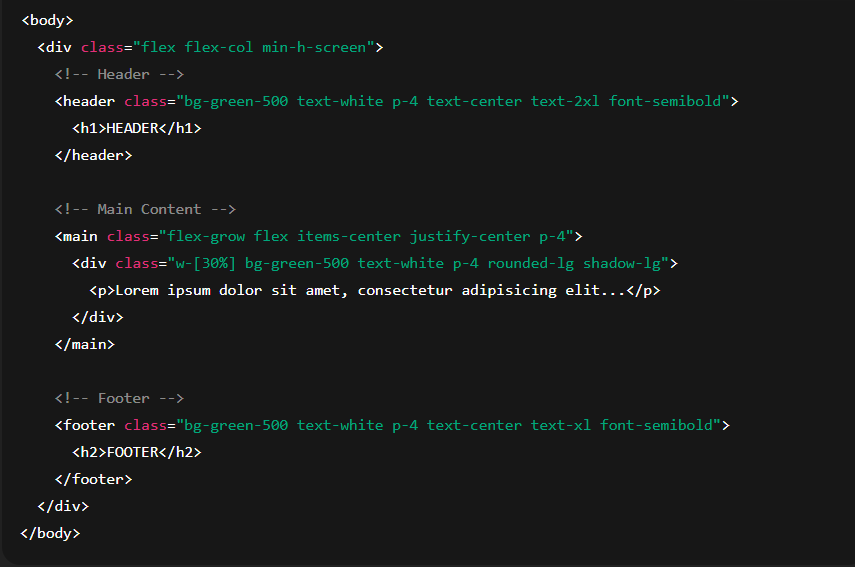
Here's the full source code using HTML + Tailwind CSS.
Refer to the image attached 👇
✅ Key Tailwind classes used:
- `flex flex-col min-h-screen` → Page is a vertical flex layout
- `flex-grow` on main → Expands to fill space
- No need for position: absolute or JS hacks
🧵 Ever built a webpage where the footer randomly floats mid-screen when there's less content?
Here’s a super clean way to lock it to the bottom using Tailwind CSS + Flexbox, without absolute positioning.
Let’s break it down 👇
⚙️ Here's the layout structure:
<div class="flex flex-col min-h-screen">
Header (top)
main with flex-grow
Footer (bottom)
This makes sure that:
✅ Footer sticks to the bottom
✅ Works with short/long content
Anyone who still has doubts about learning React should read this blog.
React Under Attack: Why It's Still Worth Your Time
{ by Andrew Johnson } from @hashnode https://t.co/wWchvnwvCc
✅ All code is structured, commented, and deployed via Vercel for review.
🔗 GitHub Repo: https://t.co/MBclIavbHn
🔗 Deployed Link: https://t.co/x8Ln2nxt32
Recognising that side projects are invaluable for improving software engineering skills and maintaining good practice, I decided to build a front-end development project.
💡 This project helped me strengthen my fundamentals in:
- Building reusable components
- Managing global state
- Working with real-world APIs
- Debugging async data flow in React