¿Usas Skype o Microsoft Teams para tus reuniones?
Presta atención.
Hay un nuevo malware llamado DarkGate que se está esparciendo como pólvora.
Podría poner en riesgo tu empresa.
🧵🖱️
Ha ocurrido algo muy chungo y que afecta a millones de personas.
Han robado los datos de 23andMe, una de las mayores empresas de análisis genético.
La empresa ha confirmado que los datos están a la venta en la darkweb, y esto es una noticia horrible, me explico: 🧵👇
Te voy a decir algo: NADIE debería usar "SSL FLEXIBLE" en @Cloudflare. ¡NADIE!
Es más, si por mí fuera ELIMINARÍA esa opción de cualquier tipo de CDN.
¿Quieres que te explique por qué?
¡Venga, que abro 🧵!
Bjarne Stroustrup es el creador de C++.
Estos son sus 5 CONSEJOS para Programadores Junior:
1. No te especialices demasiado. Sé flexible
2. Construye una vida fuera del ordenador
3. Aprende a comunicar tus ideas y saber escuchar
4. Piensa en tu carrera a largo plazo. No te quemes
5. Todas las habilidades suman en programación
Los he extraído de esta entrevista:
https://t.co/rOgiJfPxuY
Me encanta porque empieza diciendo:
"Es difícil dar consejos. Tanto como recibirlos"
Y no le falta razón. Al final los consejos son muy personales y cada persona es un mundo.
Pero es un regalo poder tener referentes del mundo de la programación como Bjarne, explicar lo que él le ha servido.
Te recomiendo mucho el vídeo, son apenas 3 minutos, y es muy inspirador.
¡Nuevo TRUCAZO para Visual Studio Code!
Comparte tus proyectos en local con cualquiera.
Te genera una URL pública, para enseñar tu trabajo.
Sin instalaciones extra, es una alternativa a ngrok. ↓
How to design secure web API access for your website?
When we open web API access to users, we need to make sure each API call is authenticated. This means the user must be who they claim to be.
In this post, we explore two common ways:
1. Token based authentication
2. HMAC (Hash-based Message Authentication Code) authentication
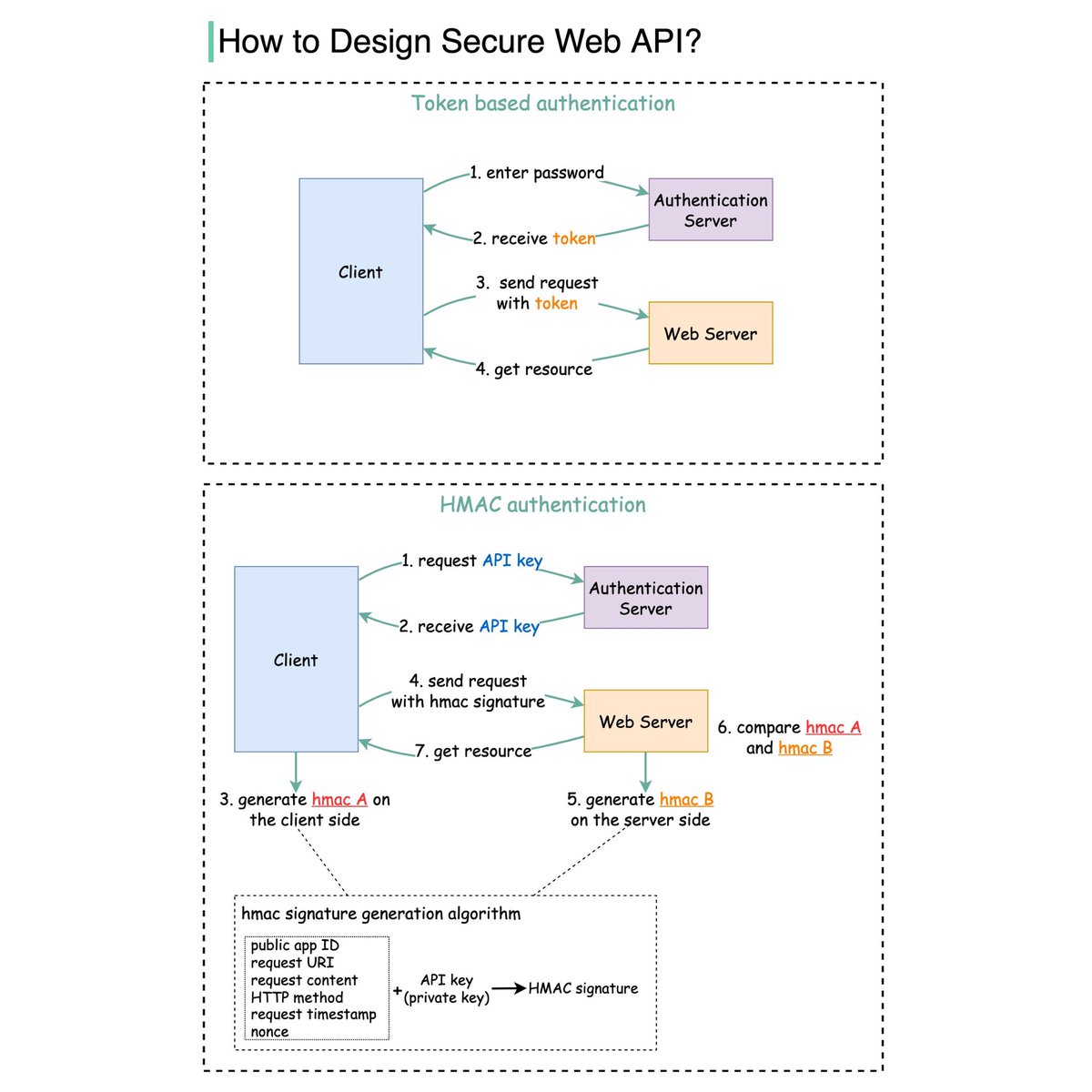
The diagram below illustrates how they work.
Token based
Step 1 - the user enters their password into the client, and the client sends the password to the Authentication Server.
Step 2 - the Authentication Server authenticates the credentials and generates a token with an expiry time.
Steps 3 and 4 - now the client can send requests to access server resources with the token in the HTTP header. This access is valid until the token expires.
HMAC based
This mechanism generates a Message Authentication Code (signature) by using a hash function (SHA256 or MD5).
Steps 1 and 2 - the server generates two keys, one is Public APP ID (public key) and the other one is API Key (private key).
Step 3 - we now generate a HMAC signature on the client side (hmac A). This signature is generated with a set of attributes listed in the diagram.
Step 4 - the client sends requests to access server resources with hmac A in the HTTP header.
Step 5 - the server receives the request which contains the request data and the authentication header. It extracts the necessary attributes from the request and uses the API key that’s stored on the server side to generate a signature (hmac B.)
Steps 6 and 7 - the server compares hmac A (generated on the client side) and hmac B (generated on the server side). If they are matched, the requested resource will be returned to the client.
–
Subscribe to our weekly newsletter to get a Free System Design PDF (158 pages): https://t.co/uc5M7CdXXC
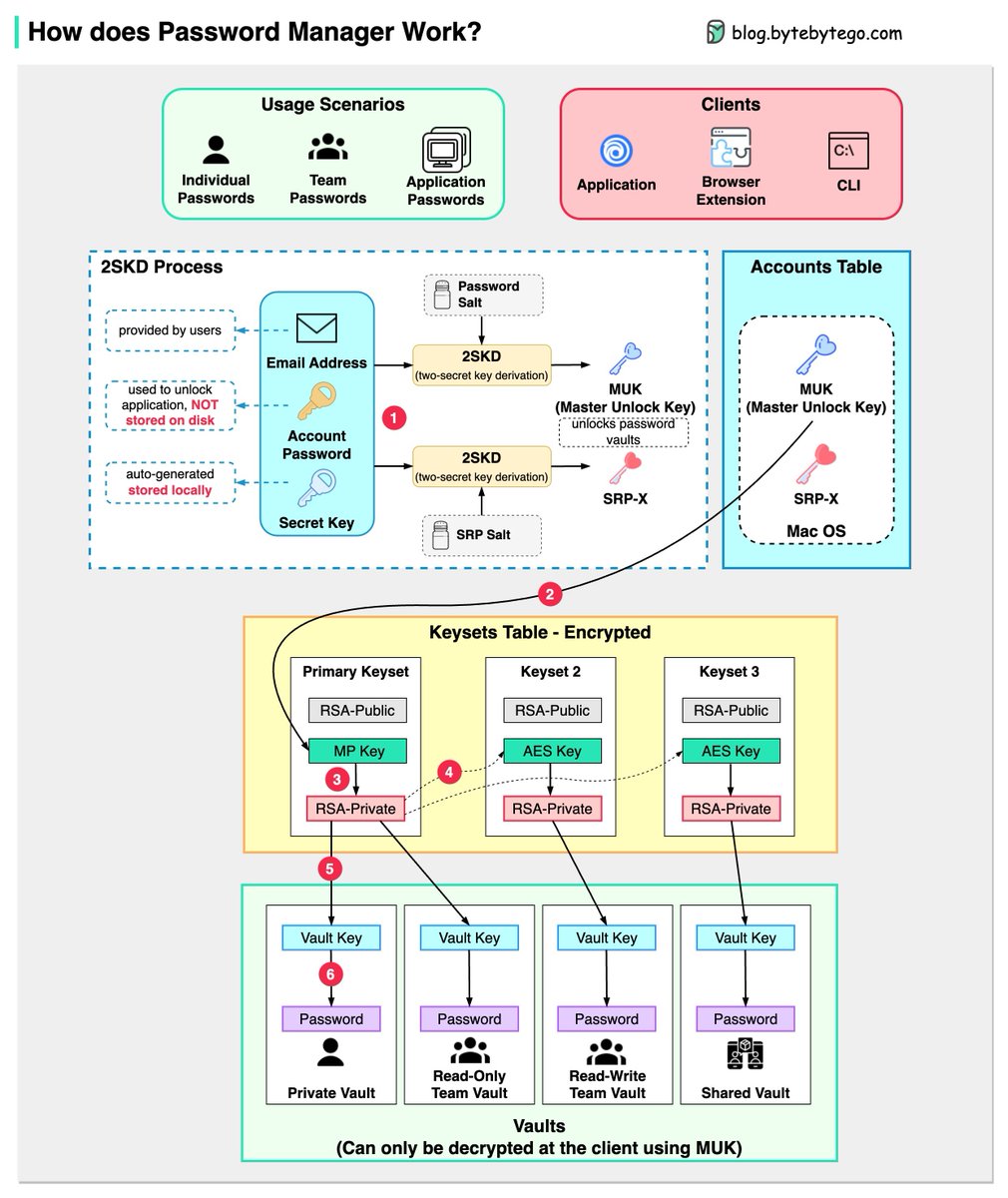
How does a Password Manager such as 1Password or Lastpass work? How does it keep our passwords safe?
The diagram below shows how a typical password manager works.
A password manager generates and stores passwords for us. We can use it via application, browser extension, or command line.
Not only does a password manager store passwords for individuals but also it supports password management for teams in small businesses and big enterprises.
Let’s go through the steps.
Step 1: When we sign up for a password manager, we enter our email address and set up an account password. The password manager generates a secret key for us. The 3 fields are used to generate MUK (Master Unlock Key) and SRP-X using the 2SKD algorithm. MUK is used to decrypt vaults that store our passwords. Note that the secret key is stored locally, and will not be sent to the password manager’s server side.
Step 2: The MUK generated in Step 1 is used to generate the encrypted MP key of the primary keyset.
Steps 3-5: The MP key is then used to generate a private key, which can be used to generate AES keys in other keysets. The private key is also used to generate the vault key. Vault stores a collection of items for us on the server side. The items can be passwords notes etc.
Step 6: The vault key is used to encrypt the items in the vault.
Because of the complex process, the password manager has no way to know the encrypted passwords. We only need to remember one account password, and the password manager will remember the rest.
Over to you: Which password manager have you used?
–
Subscribe to our weekly newsletter to get a Free System Design PDF (158 pages): https://t.co/uc5M7CdXXC
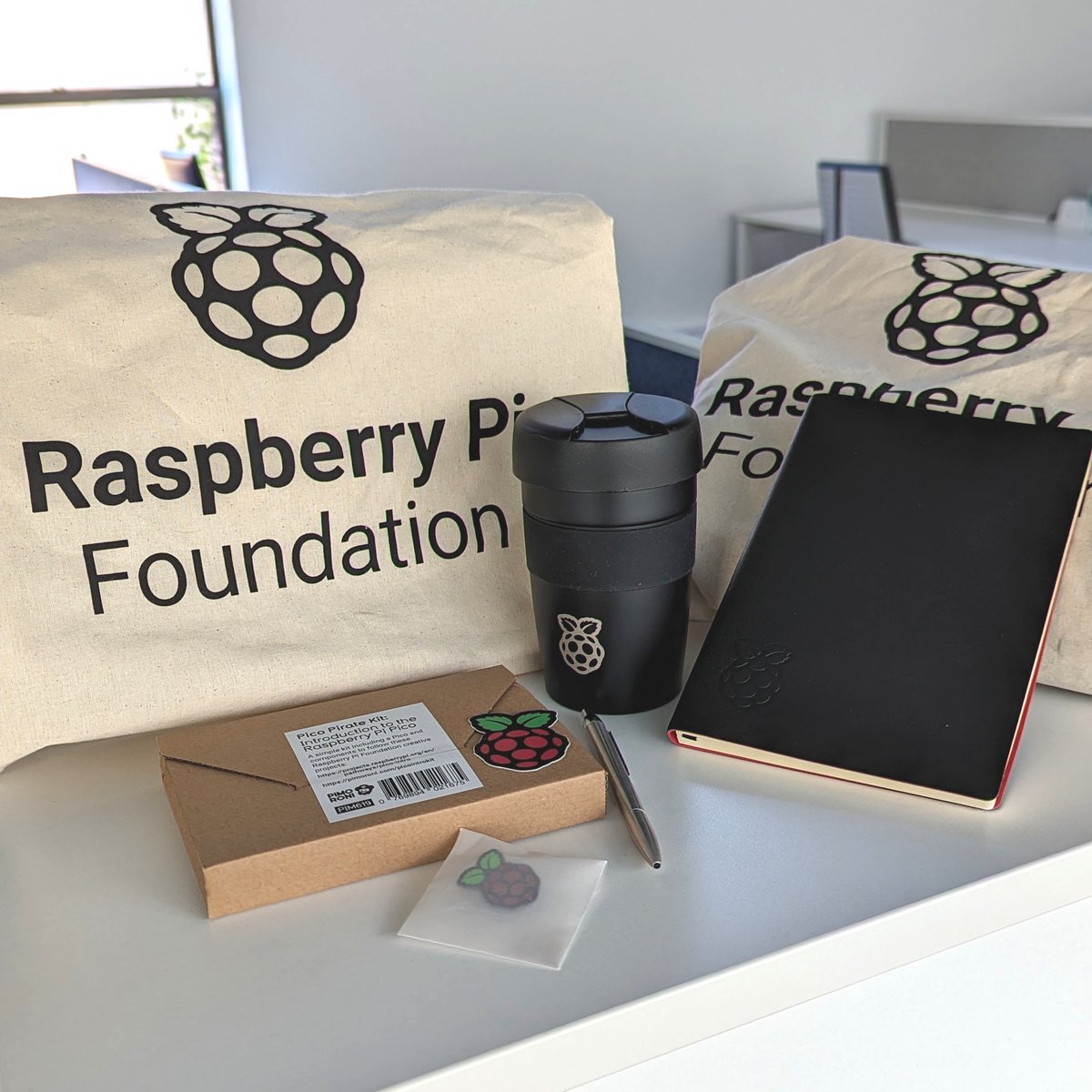
10K FOLLOWER GIVEAWAY 🎉🎈🎁
To celebrate 10K followers on Twitter, we're giving away 3x Raspberry Pi Foundation tote bags containing Raspberry Pi branded goodies 😍 Winners will be randomly selected on Friday, 19 May 2023.
To enter: Follow us, like & RT this tweet.
Good luck!
Google has just updated its 2FA Authenticator app and added a much-needed feature: the ability to sync secrets across devices.
TL;DR: Don't turn it on.
The new update allows users to sign in with their Google Account and sync 2FA secrets across their iOS and Android devices.
We analyzed the network traffic when the app syncs the secrets, and it turns out the traffic is not end-to-end encrypted. As shown in the screenshots, this means that Google can see the secrets, likely even while they’re stored on their servers. There is no option to add a passphrase to protect the secrets, to make them accessible only by the user.
Why is this bad?
Every 2FA QR code contains a secret, or a seed, that’s used to generate the one-time codes. If someone else knows the secret, they can generate the same one-time codes and defeat 2FA protections. So, if there’s ever a data breach or if someone obtains access to your Google Account, all of your 2FA secrets would be compromised.
Also, 2FA QR codes typically contain other information such as account name and the name of the service (e.g. Twitter, Amazon, etc). Since Google can see all this data, it knows which online services you use, and could potentially use this information for personalized ads.
Surprisingly, Google data exports do not include the 2FA secrets that are stored in the user's Google Account. We downloaded all the data associated with the Google account we used, and we found no traces of the 2FA secrets.
The bottom line: although syncing 2FA secrets across devices is convenient, it comes at the expense of your privacy. Fortunately, Google Authenticator still offers the option to use the app without signing in or syncing secrets. We recommend using the app without the new syncing feature for now.
#Privacy #Cybersecurity #InfoSec #2FA #Google #Security