🖼️ Google Ads Tests Multiple Image Assets Alongside Sitelinks
Google Ads appears to be testing a new visual enhancement for Search ads: displaying multiple image assets together with sitelink assets.
This update could make ads more visually engaging by combining:
🔹 Multiple product or brand images
🔹 Sitelink extensions
🔹 More prominent ad real estate on the results page
Why this matters
Adding multiple images next to sitelinks may help advertisers:
✔ Increase ad visibility
✔ Showcase more products or categories
✔ Improve engagement from search results
While this appears to be a test for now, it’s another sign that Google is continuing to make Search ads more visual and interactive.
#GoogleAds #SearchAds #PPC #DigitalMarketing
📢 Meta Is Phasing Out Facebook Page Likes Campaigns
Meta is removing the ability to run campaigns optimized specifically for Page Likes, marking another shift in how follower growth is approached across Facebook and Instagram.
Previously, advertisers could promote a Page using ads that featured a built-in Follow button, allowing users to become followers with a single click. This often resulted in large volumes of followers at a relatively low cost.
What’s changing?
When creating a new Engagement campaign, advertisers can now select only:
👉 Maximize Instagram Profile and Facebook Page Visits
Instead of encouraging immediate follows, ads will now direct users to your profile or Page through a Visit Profile/Page call-to-action.
Why this matters
Meta is moving away from optimizing for follower volume and focusing more on user intent.
The new setup encourages users to:
🔹 Visit your profile first
🔹 Explore your content
🔹 Make a more deliberate decision to follow
What to expect
If you're used to Page Likes campaigns, you may notice:
📉 Fewer followers generated
📈 Higher cost per follow
However, the followers you do gain may be more engaged and genuinely interested in your content.
The update reflects a broader trend across advertising platforms: shifting focus from low-friction actions to higher-intent engagement.
📌 In the long run, follower quality is likely to matter more than follower quantity.
#MetaAds #FacebookMarketing #InstagramMarketing #PaidSocial #DigitalMarketing
🎯 Google Ads Introduces “Only Bid for New Prospects” Mode
Google Ads has launched a new feature called “Only bid for new prospects,” designed to help advertisers focus their budgets on reaching entirely new potential customers.
With this mode enabled, campaigns prioritize users who have not previously interacted with the brand, based on the advertiser’s own definition of a prospect.
What does it do?
🔹 Focuses bidding on net-new audiences
🔹 Reduces spend on existing customers or known users
🔹 Helps advertisers prioritize customer acquisition efforts
Why this matters
Acquiring new customers is often one of the most important — and most expensive — objectives in digital advertising.
By giving advertisers more control over who is considered a prospect, Google is making it easier to align campaign optimization with acquisition goals.
Bigger picture
This update reflects a broader trend across advertising platforms:
✔ More emphasis on new customer acquisition
✔ Smarter audience qualification
✔ Greater control over AI-driven bidding strategies
As automation continues to evolve, advertisers are gaining more ways to guide algorithms toward business outcomes that matter most.
#GoogleAds #PPC #CustomerAcquisition #PerformanceMarketing #DigitalMarketing
⚙️ Google Tag Manager Introduces a New Container Optimization Experience
Google Tag Manager is rolling out an updated container management experience designed to simplify setup workflows and improve tag administration.
One of the most noticeable changes is the introduction of a dedicated Settings tab, giving advertisers and teams a more centralized way to manage container configurations.
What’s changing?
The new experience focuses on:
🔹 Faster setup workflows
🔹 Simpler tag and destination management
🔹 Easier collaboration across teams and accounts
Google also highlights a more streamlined connection process for Google destinations, including the ability to send data directly without relying on manually loaded gtag.js implementations.
Another important update
Advertisers can now view and manage multiple destinations, such as:
🔹 Google Ads
🔹 Google Analytics
…from a single container interface.
Why this matters
As tracking setups become more complex, Google appears to be moving toward:
✔ More centralized measurement management
✔ Reduced implementation friction
✔ Better scalability across teams and platforms
This update continues the broader trend of making tracking infrastructure more automated, connected, and easier to maintain.
#GoogleTagManager #GTM #GoogleAds #Analytics #DigitalMarketing
📍 Google Ads Adds a New Map View to Data Manager
Google Ads is introducing a new Map view inside the Data Manager section, giving advertisers a more visual way to understand their measurement setup.
Alongside the traditional List view, the new interface displays how data sources, tags, and conversion actions are connected across the account.
What’s new?
Instead of reviewing setups line by line, advertisers can now:
🔹 Visualize relationships between data sources
🔹 See how conversion actions are linked
🔹 Better understand tagging structures and dependencies
Why this matters
This update can be especially valuable for more advanced setups involving:
🔹 Multiple conversion actions
🔹 Different platforms and integrations
🔹 Complex tracking infrastructures
By turning measurement setups into a visual map, Google is making it easier to identify gaps, troubleshoot tracking issues, and manage attribution structures more efficiently.
As tracking ecosystems become more sophisticated, visibility into how data flows across platforms is becoming increasingly important.
#GoogleAds #DataManager #PPC #MarketingAnalytics #DigitalMarketing
📢 Meta Ads Interface Update: Watch Your Placement Setup
Meta’s updated ad creation interface introduces more flexibility for advertisers uploading multiple images and videos within a single ad.
But there’s an important workflow detail to be aware of.
What changed?
With the new setup, advertisers can now assign placements directly at the ad level for individual media assets, instead of relying only on ad set level placements.
The catch
If you initially select all placements at the ad set level and later begin customizing placements at the ad level:
⚠️ You may be required to provide assets for every selected placement
⚠️ Your placement settings at the ad set level can become locked
⚠️ Further editing at the ad set level may no longer be supported
Why this matters
This update gives advertisers more creative control, but also introduces additional complexity into the workflow.
To avoid setup issues:
✔ Finalize placement selections at the ad set level first
✔ Then move into asset-level placement customization if needed
As Meta continues making ad formats more dynamic and modular, campaign setup workflows are becoming more interconnected and easier to misconfigure if not planned carefully.
#MetaAds #PaidSocial #DigitalMarketing #PerformanceMarketing
🎬 Google Adds AI Video Creation to Demand Gen Campaigns
Google is testing a new “Create video” option directly inside the Demand Gen campaign setup flow.
Currently in beta, this feature allows advertisers to generate video creatives using Google’s AI technology, likely powered by VEO 3.
What this means
Instead of relying entirely on external production tools, advertisers may soon be able to:
🔹 Generate video assets directly in Google Ads
🔹 Create creatives faster with AI assistance
🔹 Reduce production barriers for video campaigns
Why this matters
Video continues to become a bigger part of campaign performance across Google surfaces.
By integrating AI video generation directly into Demand Gen workflows, Google is moving toward:
✔ Faster creative production
✔ More accessible video advertising
✔ Increased automation inside campaign setup
This update is another signal that AI-generated creatives are becoming a core part of the advertising workflow, not just an add-on feature.
#GoogleAds #DemandGen #AI #VideoMarketing #DigitalMarketing
🤖 Google Ads Expands AI-Driven Bidding & Budgeting
Google is introducing new AI-powered capabilities for Search and Shopping campaigns, with a stronger focus on automated bidding and smarter budget allocation.
One of the key updates is the expansion of journey-aware bidding, helping advertisers better optimize for:
🔹 Lead quality
🔹 New customer acquisition
🔹 Higher-value conversions
This builds on Smart Bidding Exploration, which fully rolled out in 2025.
Another major addition:
📊 Demand-led pacing
This feature dynamically adjusts daily budgets based on real-time consumer demand and interest levels.
Instead of spending budgets evenly, campaigns can now respond more flexibly to shifts in user intent and activity.
Why this matters
These updates continue Google’s broader direction toward:
✔ More automation
✔ Smarter optimization signals
✔ Less manual campaign management
As AI becomes more embedded into bidding and budgeting systems, advertisers are increasingly moving from manual optimization toward goal-based campaign management.
#GoogleAds #PPC #PerformanceMarketing #DigitalMarketing
💥 Meta Is Expanding Value Rules Across Ads Manager
Meta is giving Value Rules more visibility throughout Ads Manager, signaling a stronger push toward advertiser-controlled value optimization.
A new example of this is the appearance of a dedicated “Placement value rules” section directly within the Placements setup area.
This update makes the workflow more intuitive, allowing advertisers to create and apply rules exactly where placement decisions are made.
What’s changing?
Meta now organizes Value Rules into three main categories:
🔹 Conversion location
🔹 Audience
🔹 Placement
These rule types are beginning to appear directly inside their related campaign setup sections, instead of being limited to Advertising Settings.
Why this matters
Value Rules give advertisers more control over how Meta prioritizes different users, placements, or conversion scenarios.
The increased visibility of these tools suggests Meta is moving toward:
✔ More granular bidding control
✔ More advertiser-defined value signals
✔ Smarter optimization based on business priorities
Meta has been steadily expanding Value Rules recently, and this may indicate they will become a much more important part of campaign optimization moving forward.
📌 If you’re not already testing custom value rules, now may be a good time to start exploring them.
#MetaAds #PaidSocial #PerformanceMarketing #DigitalMarketing
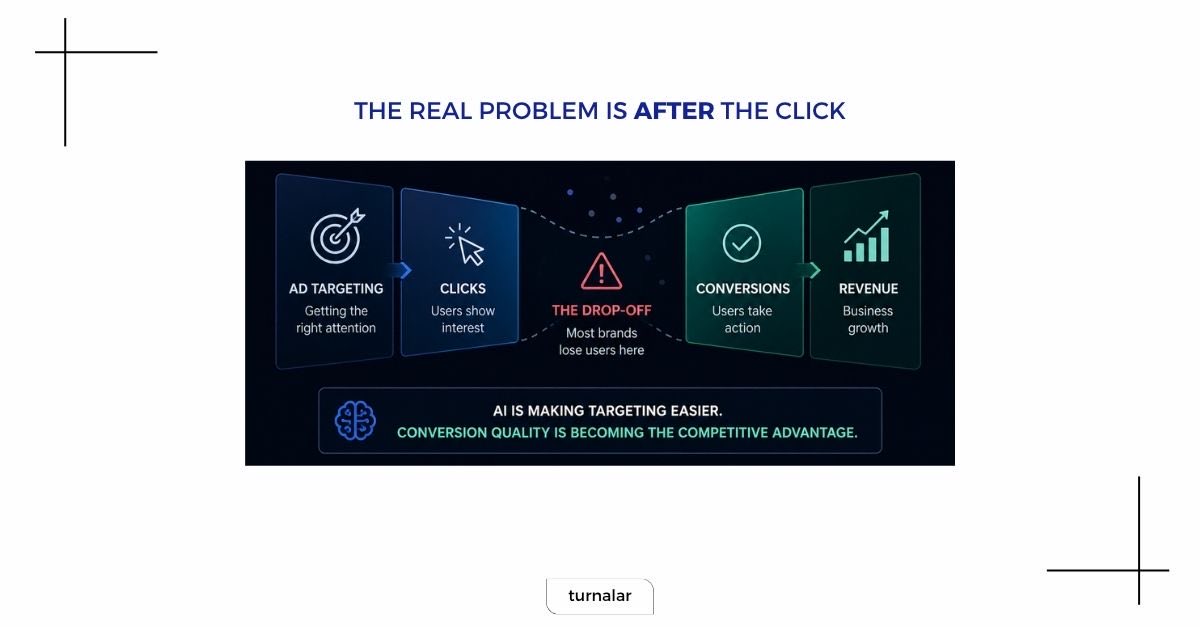
🚨 AI is quietly changing what “conversion” actually means
We often focus on targeting.
But the bigger shift is happening elsewhere:
👉 How conversions are defined, measured, and generated
Across platforms, a clear pattern is emerging:
🔹 OpenAI is testing CPC ads inside ChatGPT
🔹 Google is redefining conversions with AI-qualified signals
🔹 Meta is removing friction from tracking with simplified Pixel + CAPI setup
Where the real gap is
Most brands are still optimizing for:
➡️ Getting the click
But not for:
➡️ What happens after the click
Why this matters
AI is making targeting easier and more automated.
But conversion quality is becoming the real competitive advantage.
Especially in more complex funnels:
🔹 Leads don’t equal revenue
🔹 Traffic doesn’t equal growth
The platforms are evolving toward better inputs.
But performance will increasingly depend on what happens after the ad interaction.
The next edge in performance marketing won’t be targeting. It will be conversion execution.
#AI #DigitalMarketing #PerformanceMarketing #ConversionOptimization
🚨 Meta Catalog Ads Update: Automatic Product Sync
Meta is rolling out a new update that may impact advertisers running catalog-based campaigns.
You may start seeing a notification indicating that Meta will automatically add products from your website that are not currently included in your catalog.
What’s changing?
Meta can now:
🔹 Detect missing products on your website
🔹 Automatically sync them into your catalog
🔹 Use them in your ad delivery
The goal is to expand product coverage and potentially improve performance.
Why this matters
While this may help increase sales opportunities, it also introduces a risk:
🔹 Irrelevant or unintended products may appear in your ads
🔹 Less control over catalog structure
What you should do
If you prefer to keep full control over your catalog:
🔹 Review the notification in Commerce Manager (Overview tab)
🔹 Opt out of automatic syncing
🔹 Or manually select which products should be included
As automation expands, regularly reviewing catalog settings becomes increasingly important to maintain control over your campaigns.
#MetaAds #Ecommerce #PaidSocial #DigitalMarketing
🔐 Google Ads Advisor Gets New Safety & Automation Features
Google Ads is expanding the capabilities of Ads Advisor with a set of new features focused on account security, compliance, and automation.
These updates are designed to help advertisers identify issues earlier, reduce manual work, and keep campaigns running smoothly.
What’s new?
🔹 Proactive troubleshooting
Flags potential policy violations in advance and provides guidance on how to resolve them
🔹 24/7 security monitoring
Delivers continuous insights and recommendations to improve account security
🔹 Instant certifications
Automates certification approvals, reducing manual processes and delays
Why this matters
These updates move Ads Advisor closer to a more proactive and automated support layer, helping advertisers:
✔ Prevent issues before they impact performance
✔ Improve account safety and compliance
✔ Spend less time on operational tasks
As Google continues to build smarter tools inside the platform, campaign management is becoming increasingly predictive and automated.
#GoogleAds #PPC #DigitalMarketing #PerformanceMarketing
🚀 Meta Pixel & Conversions API Updates: Simpler, Smarter Setup
Meta has announced upcoming updates to Meta Pixel and Conversions API (CAPI) aimed at reducing technical complexity and making advanced tracking more accessible.
A key highlight is a new “one-click” CAPI setup, designed to remove many of the common barriers advertisers face today.
What’s changing?
Meta plans to introduce a simplified CAPI implementation that:
🔹 Requires little to no technical expertise
🔹 Eliminates the need for server-side maintenance
🔹 Reduces setup time significantly
This is particularly relevant, as many advertisers still operate without a fully implemented CAPI due to complexity and cost.
Meta Pixel is also getting smarter
A new AI-driven feature will automatically enrich events with additional data, such as:
🔹 Product names
🔹 Pricing
🔹 Availability
🔹 Business-related details
Why this matters
More complete event data can help Meta:
✔ Improve ad delivery
✔ Better match ads with user intent
✔ Potentially increase campaign performance
Advertisers will be notified when these features become available and will have the option to review or disable them within Events Manager.
Overall, this update signals Meta’s continued push toward simpler setup and more intelligent data usage in advertising.
#MetaAds #ConversionsAPI #MetaPixel #DigitalMarketing #PerformanceMarketing
🔧 Google Ads Tests Direct GTM Integration for Conversion Setup
Google Ads is testing a new option that could simplify how conversion tracking is implemented.
A “Set up in Google Tag Manager” button is now appearing directly within the conversion setup flow, alongside existing installation methods.
What’s new?
Instead of manually copying conversion IDs and labels, advertisers can now:
🔹 Push conversion setups directly into GTM
🔹 Access a pre-filled tag configuration
🔹 Reduce manual implementation steps
Why this matters
This update can significantly streamline workflows, especially for teams:
🔹 Managing multiple tags
🔹 Working across different accounts
🔹 Looking to reduce setup errors
By connecting Google Ads and GTM more tightly, Google continues to move toward a more integrated and automated tracking setup experience.
#GoogleAds #GTM #PPC #DigitalMarketing
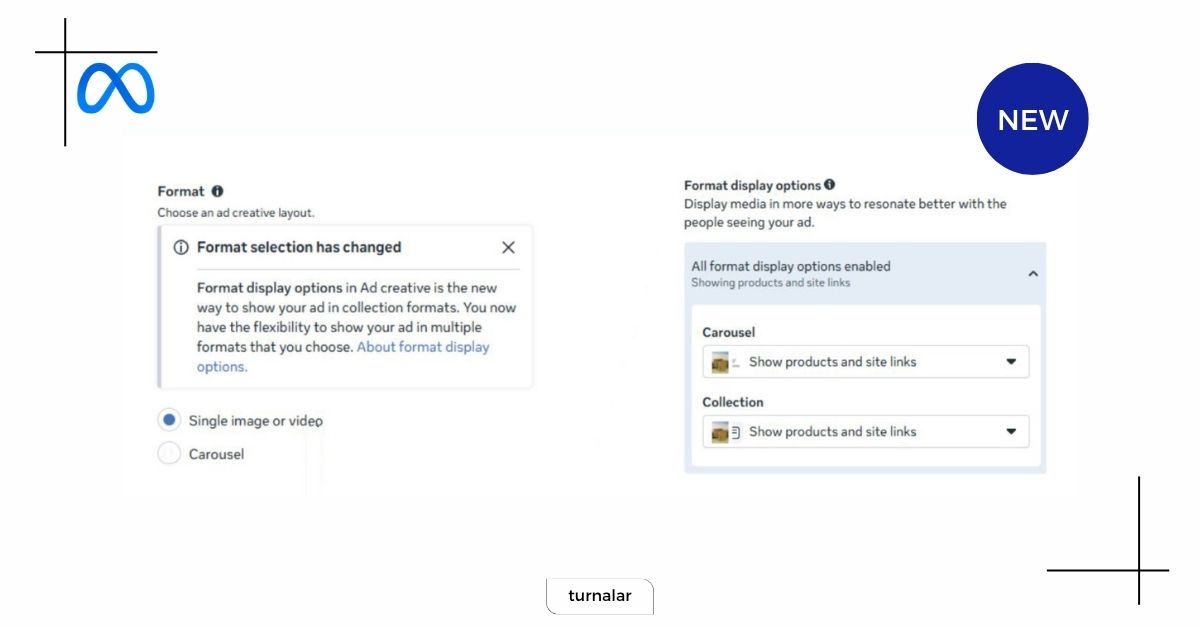
📢 Meta Updates Ad Formats: “Format Display Options” Replace Flexible & Collection
Meta is rolling out a significant change in ad setup by replacing the Flexible and Collection formats with a new structure called “Format Display Options.”
This update changes how advertisers build and customize ad formats and can be a bit confusing at first.
What’s changing?
When selecting Manual Upload, advertisers now only see two base formats:
🖼️ Single image or video
🗂️ Carousel
How it works now
🖼️ Single image or video
* You can upload up to 10 images or videos
* This setup effectively replaces the old Flexible format
* “Format Display Options” may be enabled by default
From there, you can choose to display:
👉 Products
👉 Site links
(These options appear once assets are added during creative setup.)
🗂️ Carousel
* Option to display cards as:
→ Single image/video
→ Collection-style tiles
* Only the first selected asset is used as the primary media
Why this matters
🔹 Simplifies format selection at a base level
🔹 Moves flexibility into display customization
🔹 Changes how creatives are structured and shown
This update reflects Meta’s shift toward a more modular and dynamic ad format system, where formats are no longer fixed but built through combinations.
#MetaAds #PaidSocial #DigitalMarketing #PerformanceMarketing
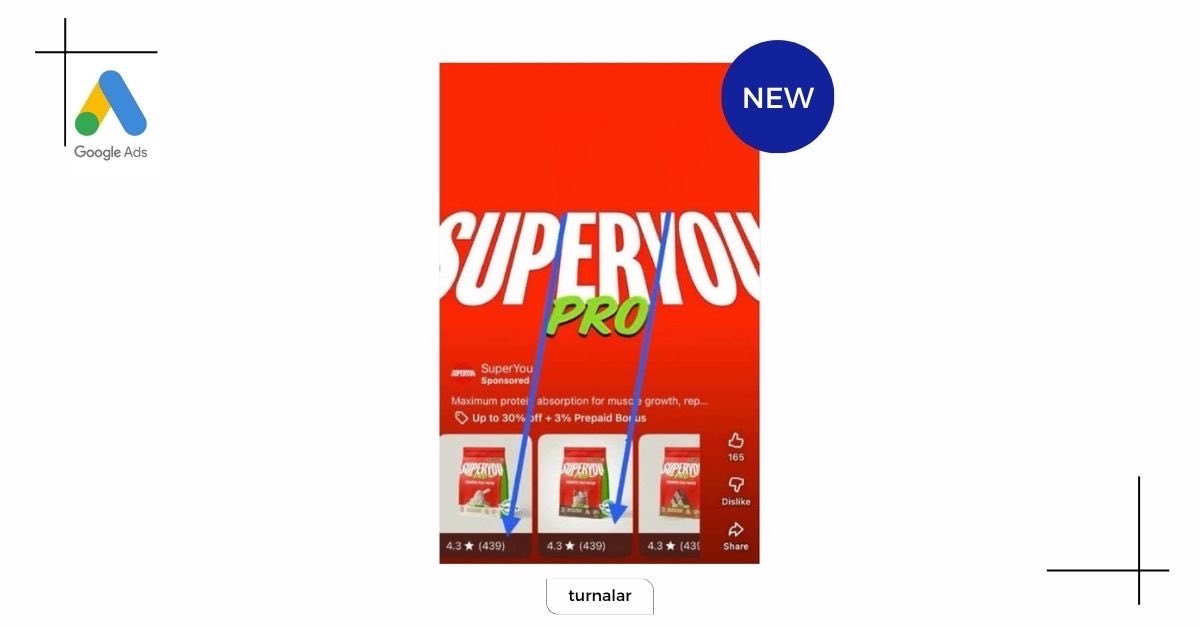
⭐ Google Brings Product Ratings to YouTube Shorts Ads
Google is introducing product ratings directly within YouTube Shorts ads, adding a new layer of social proof to short-form video placements.
Users can now see product ratings alongside listings, similar to the experience in Shopping ads, without leaving the Shorts feed.
Why this matters
🔹 Faster access to product quality signals
🔹 Increased trust within short-form content
🔹 Potential uplift in click-through rates
This update highlights a growing trend:
📱 YouTube is becoming more shoppable
By combining video content with commerce signals, Google continues to blur the line between entertainment and shopping experiences.
For advertisers, especially those with strong product reviews, this could be an opportunity to drive more engagement and conversions directly from Shorts.
#GoogleAds #YouTubeShorts #Ecommerce #DigitalMarketing #VideoMarketing
🎯 Meta Introduces “New Customer Only” Targeting (Beta)
Meta is testing a new feature that allows advertisers to focus campaigns exclusively on acquiring new customers, directly at the ad set level.
This is no longer a workaround or manual exclusion setup.
It’s a dedicated setting designed to improve exclusion accuracy and prioritize reaching net-new audiences.
Why this matters
Until now, prospecting and retargeting often shared:
🔹 The same budgets
🔹 The same optimization signals
With this update, advertisers can separate these strategies more clearly and let Meta optimize specifically for first-time customer acquisition.
How to use it effectively
To maximize impact:
🔹 Exclude existing customers via customer lists
🔹 Use website custom audience exclusions
🔹 Leverage “exclusion-only” audiences where relevant
Bigger picture
Customer acquisition at scale has always been one of the most challenging and costly aspects of Meta advertising.
This update introduces a more structured way to approach it, making new customer targeting more precise and controllable.
#MetaAds #PaidSocial #CustomerAcquisition #DigitalMarketing #PerformanceMarketing
🤖 AI Editing Comes to Performance Max Asset Groups
Google Ads is rolling out a new “Copy and edit with AI” option within Performance Max asset groups.
This feature allows advertisers to duplicate an entire asset group and immediately enhance it using AI-powered creative tools.
What does it enable?
🔹 One-click duplication of asset groups
🔹 AI-assisted editing and variation of existing assets
🔹 Integration with tools like Nano Banana (image) and Veo (video)
All directly within the Google Ads interface.
Why this matters
Google is gradually building a fully integrated AI creative workflow inside Performance Max:
➡️ Duplicate asset group
➡️ Generate new creative variations
➡️ Adapt visuals and formats automatically
No external tools, no manual production process.
Bigger picture
Creative production in Google Ads is shifting from:
Manual uploads → AI-assisted generation
What previously required multiple steps and resources can now be done in just a few clicks.
This significantly reduces production time — while increasing the volume of creative variations.
Another step toward end-to-end AI-driven campaign execution inside Google Ads.
#GoogleAds #PerformanceMax #PPC #AIinMarketing
🛍️ Meta Expands Custom Audiences with Shop Signals
Meta is introducing a subtle but important update to Custom Audience creation for advertisers using Facebook or Instagram Shops.
When building a website-based custom audience, Meta may now automatically include users who have interacted with your products directly on its platforms.
What’s changing?
If you:
🔹 Select “All website visitors”
🔹 Or use events like PageView, ViewContent, AddToCart, InitiateCheckout, Purchase
Meta can now enrich your audience by adding:
People who viewed or engaged with your products on Facebook or Instagram
Why this matters
This effectively merges:
🌐 Website behavior
+
📱 On-platform shopping interactions
Resulting in:
🔹 Broader retargeting audiences
🔹 More complete user signals
🔹 Potential uplift in campaign performance
This update reflects Meta’s continued push to unify on-platform and off-platform data, making audience targeting more comprehensive and less dependent on a single source.
#MetaAds #PaidSocial #DigitalMarketing #PerformanceMarketing #EcommerceMarketing
⚠️ Google Ads Editor Bug You Should Be Aware Of
A recent issue in Google Ads Editor may affect advertisers working with structured snippet extensions, especially across multiple accounts.
When a structured snippet is copied and its language is changed, the extensions may remain unintentionally linked.
As a result, updating the language in one account can also change it in another, even though they appear separate.
This can lead to unexpected inconsistencies, particularly in multi-language setups.
The same issue has also been observed within a single account.
Duplicated structured snippets may save updated values correctly, but the language setting can still apply incorrectly.
What to watch out for:
🔹 Changes syncing across accounts
🔹 Incorrect language settings
🔹 Hidden inconsistencies in extensions
Until a fix is released, it’s worth double-checking language settings after making updates in Google Ads Editor.
#GoogleAds #PPC #DigitalMarketing #PerformanceMarketing