I shipped FitVerdict - an AI that judges your outfit before you leave the house
Snap your fit → pick your occasion → get your verdict APPROVED · PASSED · RETRIAL · DENIED
Share your Verdict Score with Friends https://t.co/YkRpNVwZDJ
Costume party or Diwali dinner this season? Snap your look, pick the occasion, and FitVerdict scores it, roasts it, and tells you what to fix before you walk in. 🎃🪔
Free on iOS and Android: https://t.co/MwwmZxRsJb
Thanks. In the final run the caller was frozen: same model and prompt in all four conditions, with the text control run under that setup. Across development I didn't freeze it, so the 96 / 63 / 88 spread also includes some scorer fixes, and the 96% is reconstructed. I haven't yet run a second caller model on the final setup to measure caller variance directly. That's the next test.
I ran a text-vs-voice test on a contact-center agent and could not find a voice penalty. I don’t think that means what it looks like it means.
Setup: one Claude agent, one GPT agent (hybrid setup), one prompt, one set of tools, eight call-center tasks (address change, payment plan, dispute, appointment reschedule, a wrong-credential case, an info-only question, and two that should end in a human handoff).
A simulated caller talks to it. In the voice conditions the callers' words go through text-to-speech, get degraded, and come back through speech-to-text before the agent sees them.
Scoring looks only at the final state of a mock backend, never at what was said.
Results, 40 episodes per condition, 95% Wilson intervals:
- Text: 88% (74 to 94)
- Voice, clean: 85% (71 to 93)
- Voice, synthetic noise at 10 dB SNR: 98% (87 to 100)
- Voice, phone band-pass + 8 kHz + G.711 mu-law: 83% (68 to 91)
Voice minus text, in points: -2.5, +10, -5. Every interval includes zero. The phone conditions interval runs from -21 to +11. At 40 episodes per cell, a 20-point drop is still inside the data.
Noisy audio "beating" text is not a finding. It is a measure of how noisy a 40-episode cell is.
Three things I learned that matter more than the table:
1. The simulated caller moved my text baseline more than the audio did. Same agent, text control: 96% with one caller model, 63% with a cheaper one, 88% after I tightened its prompt. Thirteen of nineteen failures in the final run were one pattern: the simulator asked an off-script question, the agent handed off to a human, and the scorer called the handoff unnecessary.
2. Speech-to-text rewrites identifiers. 4821 came back as four thousand eight hundred and twenty-one. A100 became A one hundred. 77 Elm Rd became seven seven Elm Road. The agent mostly coped. My exact-match scorer did not, so I had to compare addresses by meaning. If you score on transcripts or exact strings, you will blame the model for your own harness.
3. This harness is batch. No turn-taking, no endpointing, no barge-in. It tests whether transcription breaks the task, not whether a real-time stack holds up. The public benchmark Im aware of (tau-Voice, arXiv 2603.13686) reports 30 to 45% retention for full-duplex voice agents. Those are different architectures, and my result neither confirms nor contradicts it.
If you are about to migrate an IVR:
1. Score your top call drivers by end state, 2. Freeze the scoring rules before you look at results and log every change after, 3. Fix and report your caller model and test interruptions as their own condition.
Don't buy on a latency headline, and don't read a small gap at small n as voice is free.
Full write-up with method in the comments with failure analysis and a deployment checklist
The carousel has the numbers.
One run, intervals shown, several scorer fixes were made after reading transcripts and are disclosed in the article.
#VoiceAI #ContactCenter #LLMEvaluation
A few messages from college grads recently genuinely made my day.
They reached out to say the Interview Simulator had helped them prepare.
You build something, put it out there, and hope it helps someone. Hearing that a person actually used it, struggled with it, prepared with it, and then told you it made a difference - that hits different.
Those notes have been coming in since it went live about six months ago.
It has been free the whole time.
People kept asking for the same thing: cover more than one kind of interview. So I went back and rebuilt it around that.
Three panels now.
1. One for FAANG and MANGO-style behavioral questions. The story, the tradeoff, the follow-up.
2. One technical panel bringing together AI, ML, GenAI, LLM and RAG
3. And the center panel, which came straight from user requests. Upload your resume, and let the interview be driven from your own skills, projects and experience.
A chance to catch the weak spots, get better at explaining your work, and hear the kind of questions a real interviewer might ask.
A regular LLM chat will give you questions if you ask. It will not stay on your resume. It will not notice that your last answer was thin. It will not know the role you just matched.
This one does.
There’s also a tighter connection with Career Radar now.
When you find a role through Career Radar and start an interview from that role, the role details are passed into the Interview Simulator. The middle panel then uses that job context to shape the questions around what the company is actually looking for.
If you start a session directly from the website, the middle panel works differently and focuses on your resume, skills and experience.
So the simulator now adapts depending on how you got there.
The goal is not to memorize perfect answers.
It is to walk in having already faced a few of the uncomfortable ones.
One small confession about this video: that’s my cloned voice. I’m testing a TTS engine for a different project, so I figured my clone could finally earn its keep.
TriVectorAI | Interview Simulator → https://t.co/atUZ0z6s3W
Career Radar → https://t.co/79te86cM75
#InterviewPrep #CareerGrowth #GenAI #AIJobs #TechCareers #JobSearch #FAANG #CollegeGrads #VoiceAI #CareerRadar
Built Career Radar for anyone navigating a job loss or looking for their next role.
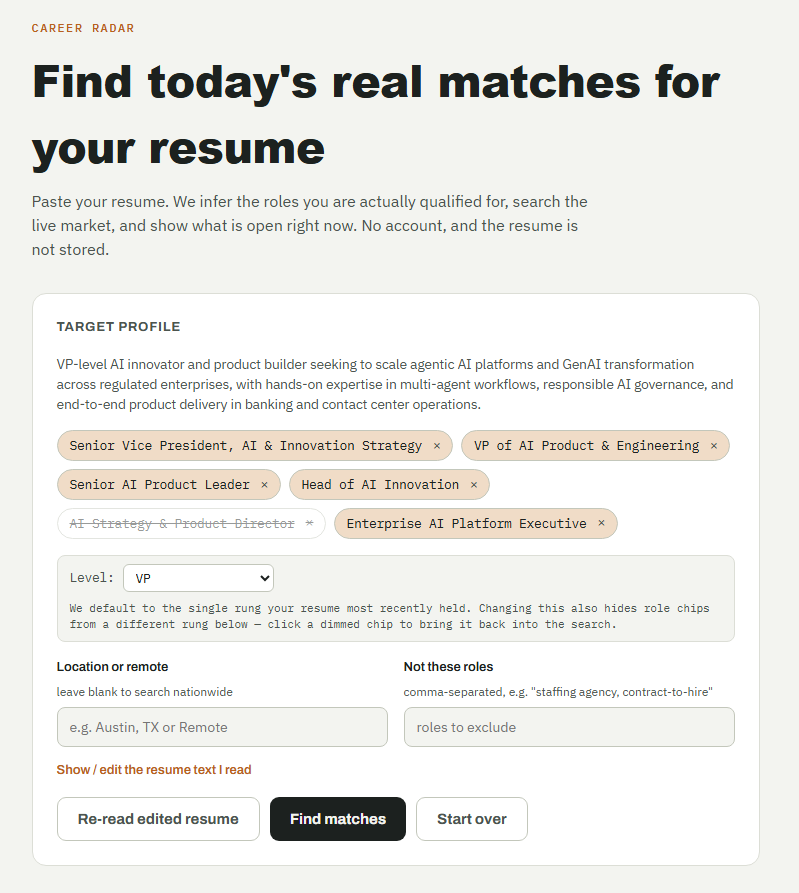
It’s free. No account. No resume stored.
→ Live job search
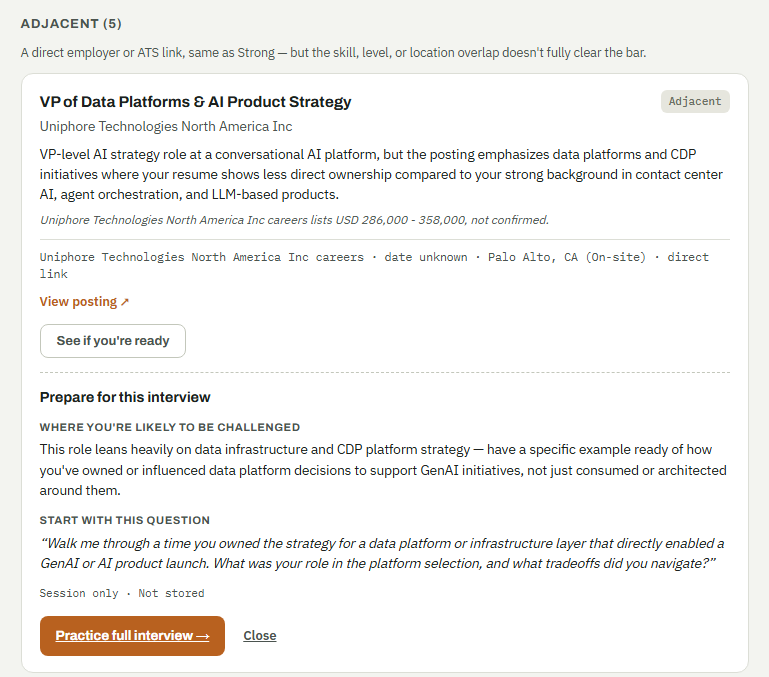
→ Strong / Adjacent / Unverified fit
→ Specific gaps, not fake match scores
→ Interview Simulator to practice before the real interview
https://t.co/dGYPaZV6I2
> She had the resume. The skills. The experience. And every interview still ended the same way — silence.
>
> It took a friend to tell her the truth: it wasn't her. It was the first impression.
>
> FitVerdict scores your outfit for the exact occasion — interview, date night, wedding, client pitch — and shows you exactly what to fix before you walk in. This time, she walked in as the real her. And the tears at the end were different.
>
> Know before you go. 👇
>
> 📱 iPhone: https://t.co/LKS6KnDWwj
> 🤖 Android: https://t.co/hOfxQzZjox
> 🌐 Web: https://t.co/0Px9iKvyWX
>
> #FitVerdict #KnowBeforeYouGo #InterviewOutfit #JobSearch #FirstImpressions #DressForSuccess #CareerAdvice
Unlived is live on Product Hunt tonight.
Describe a decision you didn’t take.
Get two plausible parallel lives - year by year - plus a bridge plan for what’s still within reach.
Solo-built.
Updated after 3 months of real user forks.
An upvote tonight actually matters.
https://t.co/ENRRR8LSn8
So, what's different from a typical LLM job search?
You can absolutely give an LLM your resume and ask it to find jobs. It can understand your experience and generate a pretty good list.
The difference is what happens before a job makes it onto your shortlist.
Career Radar
→ Builds a structured profile from your resume
→ Searches live postings, not a static/cached job list
→ Checks the source and posting
→ Separates Strong, Adjacent, and Unverified instead of giving you a made-up match percentage
→ Explains why the role fits and exactly where the gap is
→ Turns that gap into an interview question
→ Carries that context directly into Interview Simulator
A typical LLM search can tell you: “This looks like a good match.”
Career Radar is trying to answer: “Should you actually spend your time applying — and if you do, what are you likely to be challenged on?”
That's the difference I'm trying to build around.
Link -> https://t.co/fEzuHAxYTI
https://t.co/hXqqWZS1UM
I shipped FitVerdict - an AI that judges your outfit before you leave the house
Snap your fit → pick your occasion → get your verdict APPROVED · PASSED · RETRIAL · DENIED
Share your Verdict Score with Friends https://t.co/YkRpNVwZDJ
A few messages from college grads recently genuinely made my day.
They reached out to say the Interview Simulator had helped them prepare. You build something, put it out there, and hope it helps someone. Hearing that a person actually used it, struggled with it, prepared with it, and then told you it made a difference hits differently.
Those notes have been coming in since it went live about six months ago. It has been free the whole time. People kept asking for the same thing: cover more than one kind of interview. So, I went back and rebuilt it around that.
Three panels now.
1. One for FAANG and MANGO style behavioral questions. The story, the tradeoff, the follow-up.
2. One for the technical side. AI, ML, GenAI, LLMs, and RAG. Depth, not a definition.
3. And the center panel, which came straight from user requests. Paste your resume, and the interview is driven from your own skills, projects, and experience.
A chance to catch the weak spots, get better at explaining your work, and hear the kind of question a real interviewer might ask.
A regular LLM chat will give you questions if you ask. It will not stay on your resume. It will not notice that the last answer was thin. It will not know the role you just matched.
This one does. Career Radar can feed that role in, so the center panel already has the title, the company, and the gap. Start on your own, and the resume interview is still there.
The goal is not to memorize perfect answers. It is to walk in having already faced a few of the uncomfortable ones.
And one little confession about this video. Yep, that is my cloned voice. I am testing a TTS engine for a completely different project, so I figured my clone could finally earn its keep😀😀
TriVectorAI | Interview Simulator -> https://t.co/xxlfcmqFal
Career Radar -> https://t.co/dGYPaZV6I2
A few messages from college grads recently genuinely made my day.
They reached out to say the Interview Simulator had helped them prepare. You build something, put it out there, and hope it helps someone. Hearing that a person actually used it, struggled with it, prepared with it, and then told you it made a difference hits differently.
Those notes have been coming in since it went live about six months ago. It has been free the whole time. People kept asking for the same thing: cover more than one kind of interview. So, I went back and rebuilt it around that.
Three panels now.
1. One for FAANG and MANGO style behavioral questions. The story, the tradeoff, the follow-up.
2. One for the technical side. AI, ML, GenAI, LLMs, and RAG. Depth, not a definition.
3. And the center panel, which came straight from user requests. Paste your resume, and the interview is driven from your own skills, projects, and experience.
A chance to catch the weak spots, get better at explaining your work, and hear the kind of question a real interviewer might ask.
A regular LLM chat will give you questions if you ask. It will not stay on your resume. It will not notice that the last answer was thin. It will not know the role you just matched.
This one does. Career Radar can feed that role in, so the center panel already has the title, the company, and the gap. Start on your own, and the resume interview is still there.
The goal is not to memorize perfect answers. It is to walk in having already faced a few of the uncomfortable ones.
And one little confession about this video. Yep, that is my cloned voice. I am testing a TTS engine for a completely different project, so I figured my clone could finally earn its keep😀😀
TriVectorAI | Interview Simulator -> https://t.co/xxlfcmqFal
Career Radar -> https://t.co/dGYPaZV6I2
So, what's different from a typical LLM job search?
You can absolutely give an LLM your resume and ask it to find jobs. It can understand your experience and generate a pretty good list.
The difference is what happens before a job makes it onto your shortlist.
Career Radar
→ Builds a structured profile from your resume
→ Searches live postings, not a static/cached job list
→ Checks the source and posting
→ Separates Strong, Adjacent, and Unverified instead of giving you a made-up match percentage
→ Explains why the role fits and exactly where the gap is
→ Turns that gap into an interview question
→ Carries that context directly into Interview Simulator
A typical LLM search can tell you: “This looks like a good match.”
Career Radar is trying to answer: “Should you actually spend your time applying — and if you do, what are you likely to be challenged on?”
That's the difference I'm trying to build around.
Link -> https://t.co/fEzuHAxYTI
https://t.co/hXqqWZS1UM
You didn’t get ghosted.
You may have applied to a job you were never really going to clear.
I built Career Radar after watching friends go through layoffs - then watching the job search drain their confidence, energy, and momentum.
It uses 3 agents:
→ Resume Agent: builds your structured profile.
→ Market Agent: searches live jobs.
→ Fit Agent: classifies them as Strong, Adjacent, or Unverified — and tells you why.
No generic 87% match score.
The interesting part: when Career Radar finds a gap, it turns that gap into an interview question.
Then that context moves directly into my Interview Simulator - role, gap, seed question and all.
Find the role → understand your fit → see the gap → practice → get evaluated against the actual role.
Better signal before you apply. Better preparation after.
Career Radar: https://t.co/tYwnKSCtUk
Interview Simulator: https://t.co/V64ItNwZPa
Career Radar finds the role. Interview Simulator helps you be ready for it.
#AI #JobSearch #CareerTech