طلاب الدكتوراه - أي مجلة ستقبل ورقتك البحثية؟ اكتشف ذلك باستخدام 3 خطوات بسيطة.
1. اذهب إلى https://t.co/GfAoxFPGkJ
2. قم بتحميل ورقتك البحثية
3.
@thesify_ai
سيقترح 10 مجلات الأكثر صلة.
هذه المجلات من المحتمل أن تقبل ورقتك البحثية.
How to write email to professor for PhD position?
Use this template and follow these 20 tips.
1. Email as soon as you see the position advertised.
2. Use the same font style/size throughout your email.
3. Attach your CV and transcripts.
4. Ensure there are no spelling or name errors.
5. Professors are busy; keep your email brief and focused.
6. Address the professor by name.
7. Start with your most impressive achievement.
8. Tailor your email to align with the professor's research.
9. Do not send the same email to 10 professors.
10. Explain how your experience matches the position.
11. Use a professional tone throughout
12. Mention the specific scholarship you are applying for.
13. Use key terms aligned with the professor's research.
14. Express genuine enthusiasm for research
15. Use an informative subject line
16. Do not mention any personal disadvantage.
17. Follow-up after a week with a reminder.
18. Don’t overdo the jargon, make it easy to read.
19. First identify PhD position and then email.
20. Hyper link your relevant publications.
طلاب الماجستير والدكتوراه – كيف تحوّلون أبحاثكم إلى محتوى بصري خلال ثوانٍ؟
تعرّفوا على ResearchViz، أداة متخصصة في تحويل الأبحاث العلمية إلى تصورات مرئية بسهولة.
كيف يعمل ResearchViz؟
ادخل إلى موقع ResearchViz.
ألصق ملخص البحث (Abstract) أو ارفع الورقة البحثية كاملة.
سيقوم ResearchViz تلقائيًا بإنشاء مجموعة من المخرجات البصرية، منها:
الملخص الرسومي (Graphical Abstract)
الملصق العلمي (Poster)
الخريطة الذهنية (Mind Map)
شرائح العرض التقديمي (Presentation Slides)
مخططات Mermaid
الإنفوجرافيك (Infographic)
البودكاست (Podcast)
جميع هذه المزايا متاحة مجانًا.
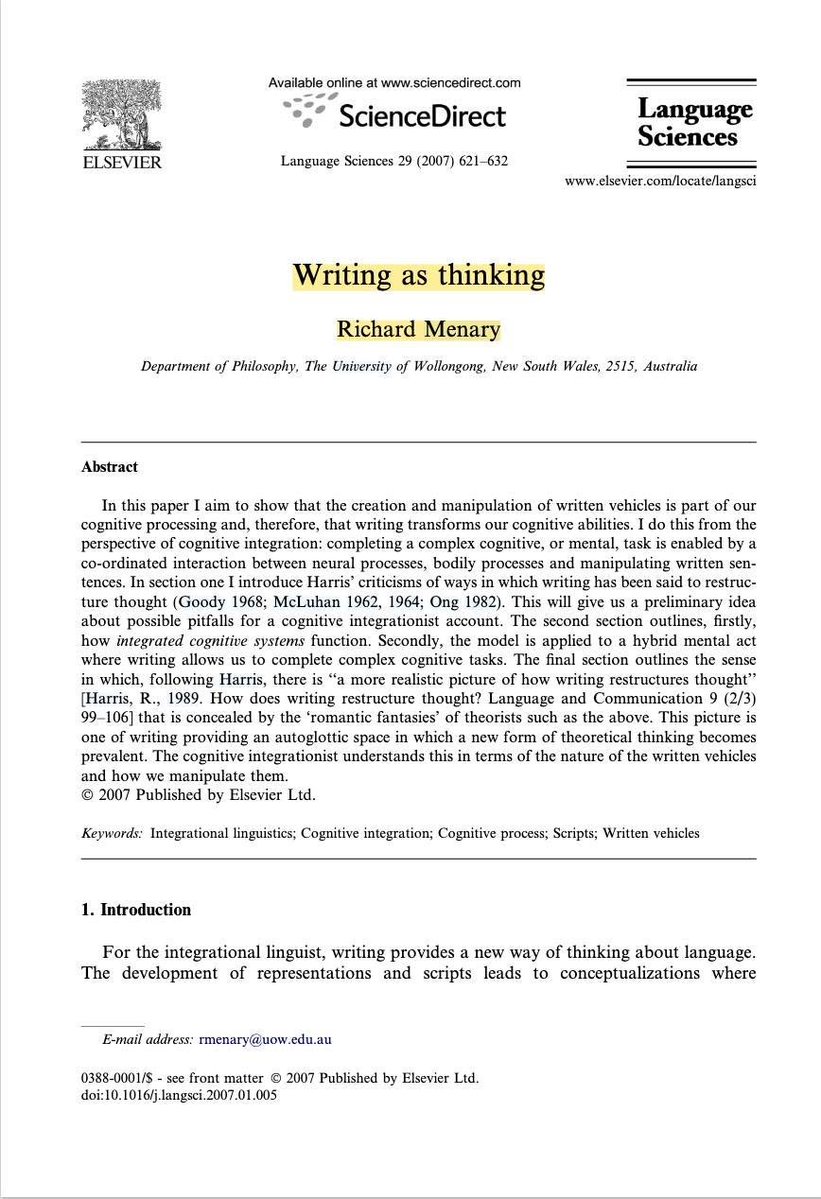
Does “writing is thinking” still hold when AI can do most of the writing?
If writing has long been one of the main vehicles of thought, what happens when AI starts carrying much of that cognitive labour?
I have been thinking about this after reading Richard Menary’s paper Writing as thinking.
His argument is powerful. Writing is part of thinking. We do not simply think first and write later. We think through the act of writing itself.
Drafting, revising, deleting, moving sentences around, rereading a paragraph, seeing a gap in an argument, finding a clearer way to say something. All of that is cognitive labour.
But generative AI changes the conditions around this argument.
Before AI, writing carried much of the heavy lifting. It was one of the main ways students externalized thought, struggled with ideas, organized meaning, and developed judgement.
Now AI can produce the paragraph, polish the sentence, restructure the argument, summarize the reading, and generate the reflection.
So the question becomes serious: what happens to the thinking that used to happen through writing?
I still believe writing matters deeply. But I also know people, including people close to me, for whom writing creates anxiety. They think better through sketching, diagramming, drawing, speaking, mapping, or building.
So maybe the old mantra “writing is thinking” belonged to an age when writing carried far too much of the burden.
This also explains part of our current assessment problem. For years, education has leaned heavily on the written product as the main evidence of learning.
Generative AI has disrupted that assumption.
A polished text can still tell us something, but it can no longer carry learning assurance by itself. We need process evidence, oral explanation, drafts, diagrams, annotations, design choices, and moments where students show how their thinking developed.
Literacy is a situated practice. Pre-AI literacy and post-AI literacy belong to different conditions. Now what we need to think about is whether our students can think across tools, modes, contexts, and constraints?
PhD Students – How to write a literature review 10x faster?
Meet 𝐀𝐧𝐬𝐰𝐞𝐫𝐓𝐡𝐢𝐬 - a tool for quick literature reviews.
𝐇𝐨𝐰 𝐀𝐧𝐬𝐰𝐞𝐫𝐓𝐡𝐢𝐬 𝐰𝐨𝐫𝐤𝐬?
1. Go to https://t.co/o9t2XLLXVb
2. Click on 𝐴𝐼 𝑊𝑟𝑖𝑡𝑒𝑟 and enter your review topic
3. Now click on 𝐶𝑟𝑒𝑎𝑡𝑒 𝑂𝑢𝑡𝑙𝑖𝑛𝑒
4. Once outline is created, use 𝐴𝑔𝑒𝑛𝑡𝑖𝑐 𝐴𝐼 to write
5. Start with writing the abstract
6. Once it writes abstract, review & accept/reject it
7. After abstract, write Introduction section
8. While writing, you can do the following as well.
➝ Paraphrase the text
➝ Highlight any text
➝ Check for (AI) plagiarism
➝ Refine and contextualize the writing
➝ Insert references in any style you want
9. Once done, download the paper in WORD/PDF/Latex
This way you have more control over what you write.
It is not blind use of AI to write for you.
After examining 45+ theses, I can tell you how examiners actually read your findings chapter.
And it is not the way you wrote it.
We read it for three things. Most candidates only build the chapter around one of them.
Most academic researchers are still living in 2023.
They use AI in their web browsers through a chat window. They open a browser tab, ask a question, and the AI gives them an answer to their question.
If they are smart, they use AI to brainstorm ideas or elicit critique on their work. If they are not smart, they copy the text AI gives them and paste it in their manuscripts.
Either way, this is NOT a smart use of AI for research purposes. Here’s why: our research processes are complex and involve various kinds of documents.
We have our primary and secondary sources in a folder on our computer. Then we have another folder for our drafts, which are mostly in MS Word. Datasets are in yet another format.
When we use AI in a web browser, it can only see one isolated part of our project at a time. For example, it can only look at your draft to give critical feedback, or it can only look at a given paper to summarize it for you.
Another problem with this kind of workflow is that every time you have to repeat your instructions and give the AI context about your project. If you use AI frequently, you will write a set of instructions and copy-paste them often.
The browser-based chat window has a huge limitation when it comes to serious academic research. If you add an article to chat to ask question, it can’t see any other related articles or your notes to give you a well-informed answer. In other words, the browser-based AI is blind to your project as a whole. It can only process an isolated part of your project at any given time.
Claude Code has completely changed the way we do academic research.
Instead of you bringing isolated pieces of your project to the AI, Claude Code puts the AI inside your project folder. You can ask Claude Code to read every single document, Excel sheet, interview transcripts, and dataset inside your project folder before it answers your questions.
Claude Code can also create new files in your folder and edit the existing ones. Furthermore, if you pause a conversation, it remembers the whole context, and you can pick up it later.
Let’s say, you have forty articles on a given topic (e.g. impact of social media on mental health) sitting in folder on your computer, and you want to find out which articles present evidence contrasting to a claim that posting actively on social media leads to a sense of better wellbeing.
You can, of course, do it manually. You read every single article and extract the relevant information and put in an Excel sheet or a Word file.
Or you can run all forty articles one-by-one in an app like ChatGPT and ask it to extract relevant information for you. Using ChatGPT is efficient than extracting information manually, but it’s still cumbersome.
Instead of ChatGPT, open the folder containing all your papers in Claude Code and ask it to extract relevant information. Claude Code will access all the papers in the folder.
It will then read the papers and extract required information and put it in a neatly organized table. You don’t need to run papers one by one in Claude Code. And if you need it to revise the table in any way, you can simply ask it to do so. Browser-based apps like ChatGPT were not built to do so.
The tricky part here is that you can’t really appreciate the kind of value Claude Code brings to your work unless you have tried it yourself.
But once you set it up with respect to your own research and the kind of standards you want it to meet, Claude Code become an incredibly powerful research assistant for you.
You must keep in mind that while Claude Code is an incredibly powerful tool, it can’t replace your expert judgement. It may overdo some aspects of a task while underperform on certain others.
You can delegate certain tasks to Claude Code, but you must keep in mind that it is your research assistant, and you must check its output just like you would check your human research assistant’s work.
You can outsource enormous amounts of academic labor to Claude Code while keeping the thinking process to yourself.
And now that you don’t have to spend your time and energies on laborious and cumbersome aspects of research, you will have much more time to do the actual thinking.
AI agents like Claude Code are on the verge of revolutionizing almost all aspects of knowledge work.
But many academics still feel intimidated to get started on a tool like Claude Code. They assume that they need advanced coding skill or computer programming knowledge to use Claude Code. That is simply not true.
You don’t any coding skills of programming knowledge to get started on Claude Code. If you can write sentences in English, you can use Claude Code.
That’s why I am running a webinar on 6 June to help academic colleagues get started on Claude Code.
I have designed it specifically for non-technical colleagues. You can find the registration details in the post below:
AI Tools Every Researcher Should Try in 2026
𝟏. 𝐀𝐧𝐬𝐰𝐞𝐫𝐓𝐡𝐢𝐬
➝ Helps you to identify research gaps in literature
↳ Link: https://t.co/wH2DSQWXis
𝟐. 𝐒𝐜𝐢𝐒𝐩𝐚𝐜𝐞
➝ Extract data from papers for your literature review
↳ Link: https://t.co/Xn7lEskEG2
𝟑. 𝐖𝐢𝐬𝐏𝐚𝐩𝐞𝐫
➝ Helps you in searching papers for your literature review
↳ Link: https://t.co/ztyiwEYvG1
𝟒. 𝐋𝐢𝐭𝐦𝐚𝐩𝐬
➝ Identify and analyze papers for your literature review
↳ Link: https://t.co/d8jKsHOd0I
𝟓. 𝐏𝐚𝐭𝐒𝐧𝐚𝐩 𝐄𝐮𝐫𝐞𝐤𝐚
➝ Helps you in identifying trends in your research field
↳ Link: https://t.co/bknskud3FP
𝟔. 𝐏𝐚𝐩𝐞𝐫𝐩𝐚𝐥
➝ Proofread your papers to fix grammar and typo issues
↳ Link: https://t.co/jLDR3VvU3d
𝟕. 𝐑𝐞𝐬𝐞𝐚𝐫𝐜𝐡𝐂𝐨𝐥𝐥𝐚𝐛
➝ Identify different types of research gaps
↳ Link: https://t.co/1M9u4q6VMb
𝟖. 𝐍𝐎𝐀𝐇 𝐀𝐈
➝ Helps you prepare the first draft of your literature review
↳ Link: https://t.co/JwYCN9GnXL
𝟗. 𝐆𝐚𝐭𝐬𝐛𝐢
➝ Helps you in writing a systematic literature review
↳ Link: https://t.co/TVVf9kemSz
𝟏𝟎. 𝐓𝐡𝐞𝐬𝐢𝐟𝐲
➝ Evaluates the quality of your thesis
↳ Link: https://t.co/MzhV4GjF6l
𝟏𝟏. 𝐦𝐨𝐚𝐫𝐚
➝ An AI-powered reference mangaer to insert references
↳ Link: https://t.co/eMotK5FSoT
𝟏𝟐. 𝐌𝐨𝐂𝐥𝐚𝐰
➝ Automate various research taks to 10x your productivity
↳ Link: https://t.co/09Ca09Bb9h
𝟏𝟑. 𝐋𝐢𝐧𝐞𝐫
➝ Insert citations in your text.
↳ Link: https://t.co/vdB6pTL1BU
𝟏𝟒. 𝐑𝐞𝐯𝐢𝐞𝐰-𝐢𝐭
➝ Provides feedback on your papers like a human
↳ Link: https://t.co/PMrNAhmMUe
Any other tool you'd like to add?
🚨 تم إنشاء ورقة بحثية كاملة باستخدام Claude Code من خلال Prompt واحد فقط.
تضمنت الورقة حجة علمية قوية، وتمكنت من تجاوز أداة كشف النصوص المولدة بالذكاء الاصطناعي Pangram.
ومع بعض التعديلات البسيطة، يمكن أن تبدو وكأنها مكتوبة بالكامل بواسطة إنسان، وأن تُصبح جاهزة للتقديم إلى المجلات العلمية للتحكيم والمراجعة.
وفيما يلي سير العمل (Workflow) المستخدم: 👇🏻
#البحث_العلمي
صممت أداة https://t.co/HHloQRX0Jm الذكية من جامعة ستانفورد خصيصًا للباحثين في العلوم الاجتماعية والسياسية والاقتصاد وعلم النفس.
ارفع بياناتك، وحدد اتجاه بحثك، ودع #الذكاء_الاصطناعي يكتب لك ورقةً بحثية متكاملة وقابلة للتكرار في وقت قياسي.
https://t.co/cuse6hXC9X
https://t.co/tqdFt2E4us
هي منصة ذكاء اصطناعي للمساعدة في كتابة الأبحاث العلمية، طُوِّرت ضمن برنامج في Stanford University. تتيح لك رفع البيانات، وتحديد مسار بحثك، والتعاون بشكل عميق مع الذكاء الاصطناعي في كل مرحلة من مراحل البحث لإنتاج أوراق أكاديمية قابلة لإعادة التحقق والتكرار
طلاب وطالبات الدكتوراه ||
ملخص رسومي احترافي في أقل من ٣٠ ثانية ‼️
نسيت تخيل بحثك في شكل بصري جذاب ‼️
↴✿ الحل بسيط جدًا:
❶ روح على https://t.co/JztX19Seoj
❷ انسخ ملخص بحثك (Abstract) ولصقه
❸ اترك ResearchViz يشتغل سحره ✨
❹ خلال ثواني بيطلع لك ملخص رسومي (Graphical Abstract) احترافي، جاهز للنشر أو العروض.
↴✿ والأجمل ..
تقدر تنزله كملف PowerPoint وتعدل فيه براحتك حسب ذوقك أو متطلبات الجورنال.
جربوه الآن وشاركونا النتيجة 👇
#دكتوراه #بحث_علمي #GraphicalAbstract #ResearchViz #PhDLife
↴✿ فيديو توضيحي 🎥 :
🔎 كيف تجعل #بحثك العلمي أكثر دقة واحترافية؟ تعرّف على الروابط المنطقية (Boolean Operators)
تُعد الروابط المنطقية من أهم الأدوات التي تساعد #الباحثين على الوصول إلى نتائج بحث أكثر دقة وملاءمة.
و هي كلمات بسيطة تُستخدم بين #الكلمات_المفتاحية
ثريد يتبع...