Anthropic engineer:
"You can build 5 assistants in one afternoon. Each one handles a task you've been doing manually every single day"
in 45 minutes he shows exactly how to do it from scratch, step by step
most people are still doing this manually
watch the session, then save the guide below
AI is no longer about prompts alone.
The biggest productivity gains come from building repeatable AI workflows that automate research, content creation, lead generation, customer support, sales, hiring, and more.
These 10 AI workflow systems can help you:
✅ Save hours every week
✅ Eliminate repetitive tasks
✅ Improve consistency
✅ Scale output without increasing workload
✅ Focus on high-value work that drives results
The future belongs to people who can combine AI tools into complete workflows, not just use them individually.
Which AI workflow are you already using in your business or career?
Repost to help others learn.
Follow me for more AI, automation, and productivity insights.
#AI #ArtificialIntelligence #AIWorkflows #Automation #Productivity #BusinessGrowth #FutureOfWork #AIAgents #DigitalTransformation #Innovation
Save this post.
Most people use Claude Chat and think that is all Claude does.
It is not even 25% of it.
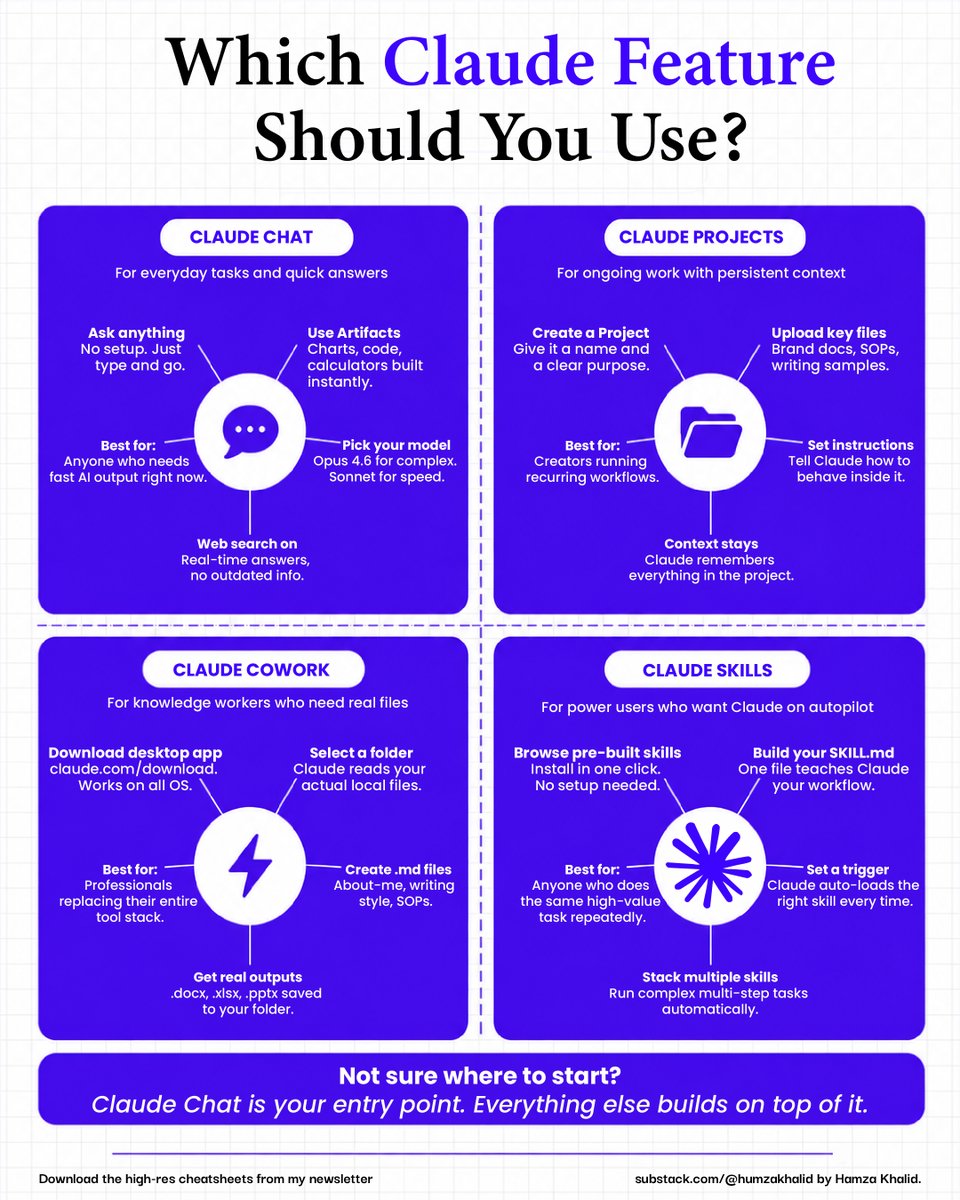
Here are all 4 Claude features and exactly when to use each one:
☑️ 1. Claude Chat
→ Ask anything with zero setup. Just type and go.
→ Use Artifacts to get charts, code, and calculators built instantly.
→ Turn on web search for real-time answers with no outdated info.
↳ Pick your model too. Opus 4.6 for complex tasks. Sonnet for speed.
Best for: Anyone who needs fast AI output right now.
☑️ 2. Claude Projects
→ Create a Project, give it a name, and a clear purpose.
→ Upload your key files. Brand docs, SOPs, writing samples.
→ Set instructions that tell Claude exactly how to behave inside it.
↳ Context stays. Claude remembers everything in the project across every single conversation.
Best for: Creators running recurring workflows.
☑️ 3. Claude Cowork
→ Download the desktop app at claude. com/download.
→ Select a folder, and Claude reads your actual local files.
→ Create .md files for your about-me, writing style, and SOPs.
↳ Get real outputs saved directly to your folder. .docx, .xlsx, .pptx. All of it.
Best for: Professionals replacing their entire tool stack.
☑️ 4. Claude Skills
→ Browse pre-built skills and install in one click. No setup needed.
→ Build your SKILL. MD. One file teaches Claude your exact workflow.
→ Set a trigger so Claude auto-loads the right skill every single time.
↳ Stack multiple skills together to run complex multi-step tasks automatically.
Best for: Anyone who does the same high-value task repeatedly.
Not sure where to start?
Start at Chat. Build to Projects. Add Cowork. Unlock Skills.
That is the path from beginner to operator.
For more AI systems like this: 👇
→ Go to https://t.co/rnjW2PWRtc
→ Subscribe to my free newsletter (don't pay anything)
→ Get more free and daily cheatsheets
Which Claude feature are you using right now? Chat, Projects, Cowork, or Skills? Drop it below.
---
♻️ Repost to give your network an unfair advantage.
Andrej Karpathy broke down exactly what Claude Code keeps doing wrong.
A creator created a repo that hit 110K GitHub stars in under 3 months and stayed at number 1 trending for 28 days straight.
Here is every principle inside it:
☑️ The Origin Story
→ Karpathy coined vibe code, ex-Tesla AI Director, and OpenAI co-founder.
→ Forrest Chang distilled his X thread into one CLAUDE. MD file
→ It got 5,828 stars in a single day. 110,000+ in under 3 months.
↳ Why it went viral: The 4 principles are not novel. Every developer recognised their own frustrations instantly.
☑️ The 4 Karpathy Failure Patterns
→ Models make wrong assumptions on your behalf
→ They overcomplicate code, build 1000 lines when 100 would do.
→ They change code they do not understand, even when unrelated to the task.
→ LLMs loop until they meet goals, but need those goals explicitly defined.
☑️ The 4 Principles Inside the File
✦ 1. Think Before Coding:
State assumptions before implementing. If uncertain, ask. Never pick silently.
✦ 2. Simplicity First:
Minimum code that solves the problem. Nothing speculative. If you wrote 200 lines and it could be 50, rewrite it.
✦ 3. Surgical Changes:
Touch only what you must. Clean up only your own mess. Every changed line must trace directly to the request.
✦ 4. Goal-Driven Execution:
Define success criteria before starting any multi-step task. Strong criteria mean Claude loops independently. Weak criteria mean constant clarification.
☑ How to Use It Today:
✦ Claude code Users:
→ Drop CLAUDE. md into your project root folder.
→ Claude reads it automatically at every session start.
✦ Cursor users:
→ The repo includes .cursor/rules/karpathy-guidelines.mdc and works across any project without re-adding the file.
✦ Claude. ai users:
→ Paste the 4 principles into your project instructions and add them to your SKILL as a negative instructions block.
↳ Get it at: https://t.co/8YC44VUazd
☑ The Dos and Don'ts
→ Do: State assumptions before writing a single line of code.
→ Do: Write the minimum code that solves the problem. Then stop.
→ Do: Define success criteria before starting any multi-step task.
→ Do: Ask clarifying questions before implementing, not after making mistakes.
→ Never: Make silent assumptions. It is the number 1 failure mode.
→ Never: Add features, flexibility, or abstractions nobody asked for.
→ Never: Refactor or improve adjacent code. It creates collateral damage.
→ Never: Use weak goals like "make it work." Claude will guess endlessly.
For more AI systems like this: 👇
→ Go to https://t.co/rnjW2PWRtc
→ Subscribe to my free newsletter (don't pay anything)
→ Get more free and daily cheatsheets
Which of the 4 failure patterns are you seeing most in your own Claude sessions right now? Drop it below.
♻️ Repost to give your network an unfair advantage.
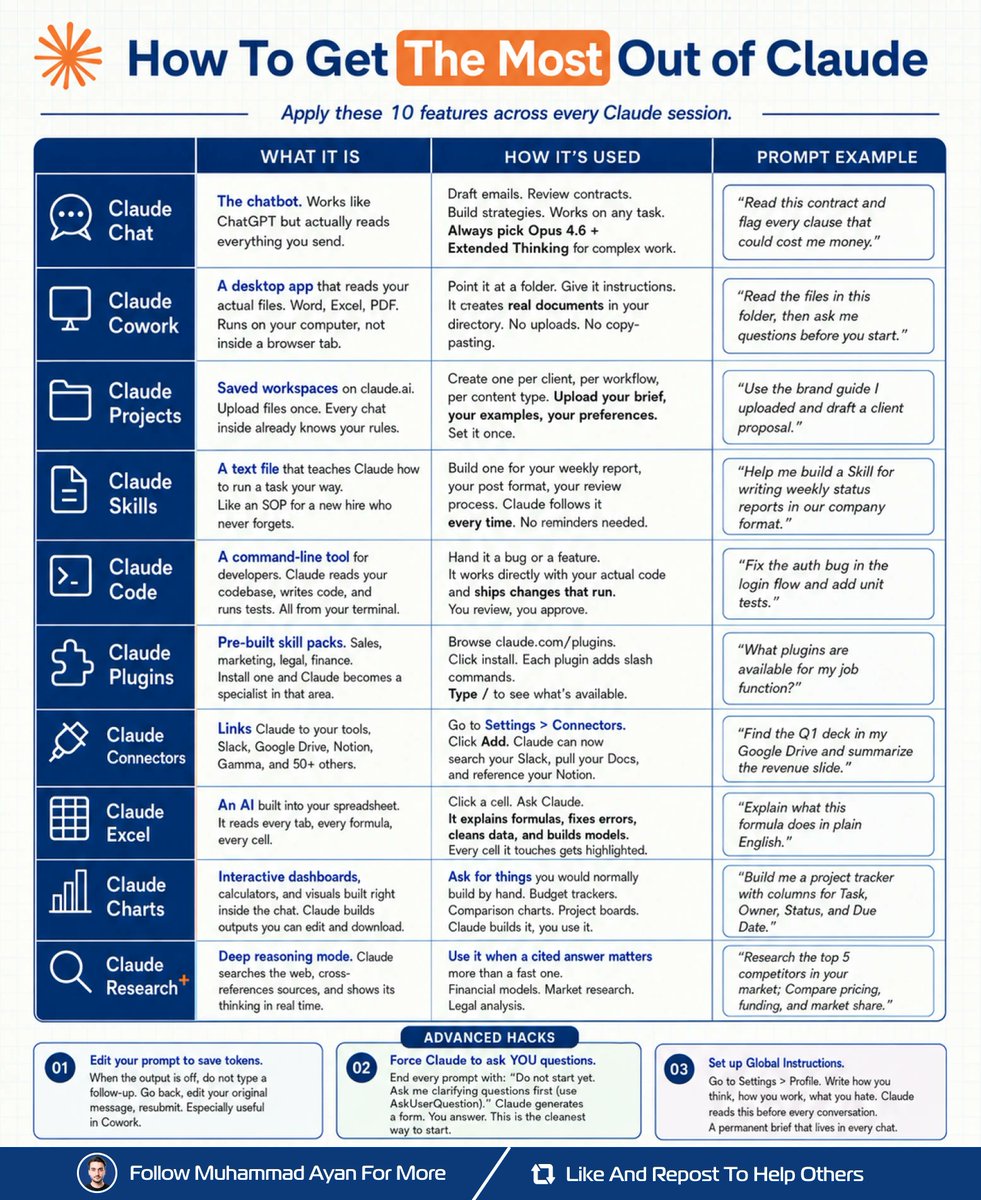
I rebuilt my entire workflow inside Claude.
No extra tools. No subscriptions.
Just 10 features I wasn't using.
Here's exactly how (save this):
𝗦𝘁𝗲𝗽 𝟭: Set the foundation
↳ Open Settings > Profile
↳ Write your Global Instructions
↳ Claude reads this before every chat
𝗦𝘁𝗲𝗽 𝟮: Build your workspace
↳ Create a Project per client or workflow
↳ Upload your brief, rules, and examples
↳ Every new chat inherits full context
𝗦𝘁𝗲𝗽 𝟯: Write your Skills
↳ One text file per repeating task
↳ Weekly reports. Post formats. Reviews.
↳ Claude follows it. No reminders needed.
𝗦𝘁𝗲𝗽 𝟰: Connect your tools
↳ Settings > Connectors
↳ Add Slack, Drive, Notion, Gamma
↳ Claude searches across all of them
𝗦𝘁𝗲𝗽 𝟱: Pick the right surface
↳ Chat: Opus 4.6 + Extended Thinking
↳ Files on your desktop: Cowork
↳ Spreadsheets: Claude Excel
↳ Visuals and dashboards: Claude Charts
↳ Cited research: Claude Research+
↳ Code: Claude Code in terminal
Once set up:
Claude knows my brand without asking.
Claude runs tasks without reminders.
Claude searches my tools, not just the web.
It doesn't just answer questions anymore.
It runs the operation.
What would you set up first?
Save this for later. Repost ♻️ for others.
Boris Cherny, the creator of Claude Code at Anthropic, just explained how he runs thousands of agents from his phone while he sleeps
in this talk he breaks down exactly how he manages thousands of agents from his phone:
- the 14% you lose to CLAUDE.md before typing a word
- the architecture behind running a few thousand agents overnight
- why the system matters more than the tool
- the knowledge structure that makes everything findable, connected, and useful
if you've been using Claude for months and every conversation still starts from scratch with zero memory and zero context, you don't have a system. you have a chat history
instead of another show tonight, watch this
make sure to bookmark it before it gets lost in your feed
the guide is in the article below
Everyone keeps saying AI gives them garbage. Anthropic just proved the problem is you, not the model.
This 24 minute video rebuilds one prompt from useless to flawless. Save it for the evening with tea - now that Opus 4.8 is here, getting this is everything.
Perplexity used to be an AI search tool.
Now I'm using it to build live applications:
Life as a solopreneur can be challenging:
- Wearing every hat across the business
- Tracking deals, invoices, and follow-ups
- Drowning in admin before work starts
So I hired an EA, Perplexity Computer
Here's the exact 5-step setup:
Step 1: Write the prompt
- Open Perplexity Computer
- Describe what you want in plain English
- Reference the tools you want it to read from
My prompt → https://t.co/KUrkLDKuX5
Step 2: Approve the plan
- Read the build plan Perplexity drafts
- Pick your setup options (scan window, destination)
- Confirm to start the build
Step 3: Connect your apps
- Perplexity supports 50+ connectors
- Select the tools you (actually) use
- Authenticate once and it reads live data
Step 4: Orchestrate the models
- Computer routes each task to the right model
- Claude, Gemini, GPT, Grok. All auto-routed
- One subscription covers every frontier model
Step 5: Deploy a live URL
- Name your project and pick a subdomain
- Hit Deploy (refreshes every 24 hours)
- Share the public link anywhere
Mine is live here → https://t.co/KUrkLDKuX5
Now I wake up to:
☑︎ A live view of my pipeline, refreshed overnight
☑︎ The exact deals and tasks that need action today
☑︎ Inbox threads already triaged and prioritized
All pulled live automatically (zero manual updates).
The EA doesn't take holidays.
It doesn't need chasing.
Repost ♻️ to help someone in your network.
P.S. What would you build first with Computer?
I accidentally discovered how to compress a semester of learning into 48 hours.
An MIT grad student showed me his NotebookLM setup. At first, I thought he was just super organized. Then I watched him pass a qualifying exam on a subject he had barely studied before.
Here’s exactly what he did:
First, he didn’t upload just one textbook.
He uploaded 6 textbooks, 15 research papers, and every lecture transcript he could find on the topic.
Then he asked NotebookLM one question:
“What are the 5 core mental models that every expert in this field shares?”
Not “summarize this.”
Not “explain this topic.”
Mental models — the frameworks experts spend years building.
But the next prompt completely changed the game.
He asked:
“Now show me the 3 biggest areas where experts in this field disagree, and the strongest argument from each side.”
In less than 20 minutes, he had a map of the entire field:
the debates, the consensus, and the unanswered questions.
Most students spend an entire semester just figuring out those debates exist.
Then he asked something even smarter:
“Generate 10 questions that would reveal whether someone truly understands this subject or just memorized facts.”
He spent the next 6 hours answering those questions using the source material. Every mistake triggered another prompt:
“Explain why this answer is wrong and what I’m missing.”
By hour 48, he could confidently discuss the topic with his thesis advisor.
The tool didn’t change.
The questions did.
Most people use NotebookLM like a smart highlighter.
The best students use it like a private tutor trained on every important source in the field.
The difference between a semester and 48 hours isn’t the amount of content.
It’s knowing the right questions to ask.
🚨 BREAKING: Claude has a feature called Decision Intelligence Mode.
You can use it to solve any business or career problem using 7 proven frameworks that consultants charge $500/hour to apply.
Here are 7 prompts to access it: 👇
50 WEBSITES THAT FEEL ILLEGAL TO KNOW ABOUT
1. cobalt. tools — download any video from socials
2. photopea. com — Photoshop but completely free
3. temp-mail. org — disposable email in one click
4. tinywow. com — 100+ free tools in one site
5. archive. org — access any old webpage ever
6. libgen. li — millions of free textbooks
7. sci-hub. al — free research papers
8. alternativeto. net — find free app alternatives
9. justwatch. com — find where to stream anything
10. gutenberg. org — 70K free classic books
11. pdfdrive. com — free PDF downloads
12. openculture. com — free courses from top unis
13. wolframalpha. com — solve any math instantly
14. remove. bg — remove backgrounds in one click
15. cleanup. pictures — erase objects from photos
16. unscreen. com — remove video backgrounds free
17. squoosh. app — compress any image free
18. excalidraw. com — hand drawn diagrams free
19. carbon. now. sh — turn code into beautiful art
20. ray. so — stunning code screenshots
21. flightradar24. com — track any flight in real time
22. camelcamelcamel. com — track Amazon price history
23. haveibeenpwned. com — check if you were hacked
24. virustotal. com — scan any file for malware
25. privnote. com — send self destructing messages
26. file. io — share files that auto delete
27. archive. ph — save any webpage forever
28. accountkiller. com — delete yourself from any site
29. radio. garden — listen to any radio worldwide
30. tunefind. com — find songs from any show
31. musicforprogramming. net — music to focus with
32. mynoise. net — custom focus soundscapes
33. annasarchive. org — search every book ever written
34. elicit. com — AI research paper assistant
35. consensus. app — search what science agrees on
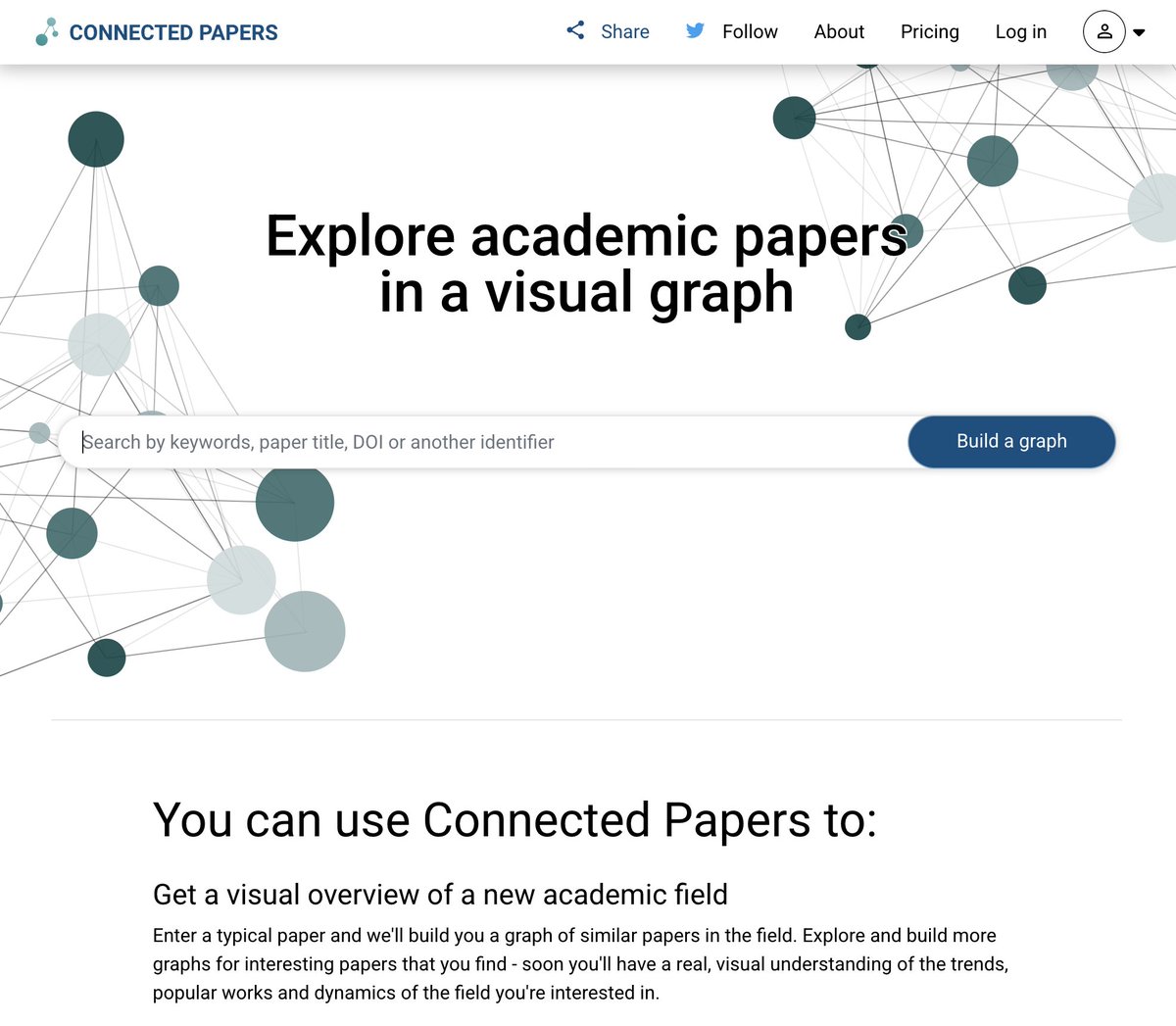
36. connectedpapers. com — map research visually
37. semanticscholar. org — free academic search
38. scispace. com — understand any research paper
39. summarize. tech — summarize any YouTube video
40. phind. com — AI search for developers
41. regex101. com — test any regex instantly
42. codebeautify. org — format any code cleanly
43. explainshell. com — understand terminal commands
44. tldraw. com — infinite whiteboard in browser
45. downdetector. com — check if any site is down
46. tineye. com — reverse image search
47. fast. com — check your internet speed
48. smallpdf. com — edit PDFs free
49. ilovepdf. com — merge and split PDFs
50. 10minutemail. com — temp email in seconds
All legal. All free. All hidden from you.
Bookmark this before it disappears.
Instead of watching an hour of Netflix, watch this 2 hour hour Stanford lecture will teach you more about how LLMs like ChatGPT and Claude are built than most people working at top AI companies learn in their entire careers.
Claude Code does more than write code.
How to build a full agent system in 6 steps:
Written guide:
https://t.co/r6Xh9DTYjT
Video guide:
https://t.co/xTK9bdWEFn
Step 1: Install Claude Code
✦ Terminal, desktop app, or VS Code extension.
✦ Pick whichever surface fits how you work.
✦ Everything below it compounds.
Full setup guide:
https://t.co/GnZRQoi9Fz
Step 2: Build context
✦ ~/CLAUDE.md is the onboarding doc
✦ Claude reads before every session.
✦ Every chat loads it automatically.
Step 3: Build memory
✦ Every correction becomes its own .md file.
✦ The same mistake never lands twice.
Step 4: Build skills
✦ One command fires a whole workflow across tools.
✦ No more retyping a 200-word prompt every time.
✦ /your-skill → Notion → Gmail → Drive → Output
Step 5: Build agents
Each agent gets one file and one job.
✦ Strategist (Opus) → analyses the task
✦ Builder (Sonnet) → executes the output
✦ QA Gate → fails anything below 95/100
Step 6: Run on autopilot
Claude Routines run your team on Anthropic's cloud.
Set the schedule. Walk away.
✦ Daily 8am UK → runs in cloud
✦ Weekly Monday → drops to Notion
This isn't "using Claude."
It's a system that works without you in the room.
Repost ♻️ to help someone in your network.
P.S. Which step are you currently on?