I'm Boris and I created Claude Code. Lots of people have asked how I use Claude Code, so I wanted to show off my setup a bit.
My setup might be surprisingly vanilla! Claude Code works great out of the box, so I personally don't customize it much. There is no one correct way to use Claude Code: we intentionally build it in a way that you can use it, customize it, and hack it however you like. Each person on the Claude Code team uses it very differently.
So, here goes.
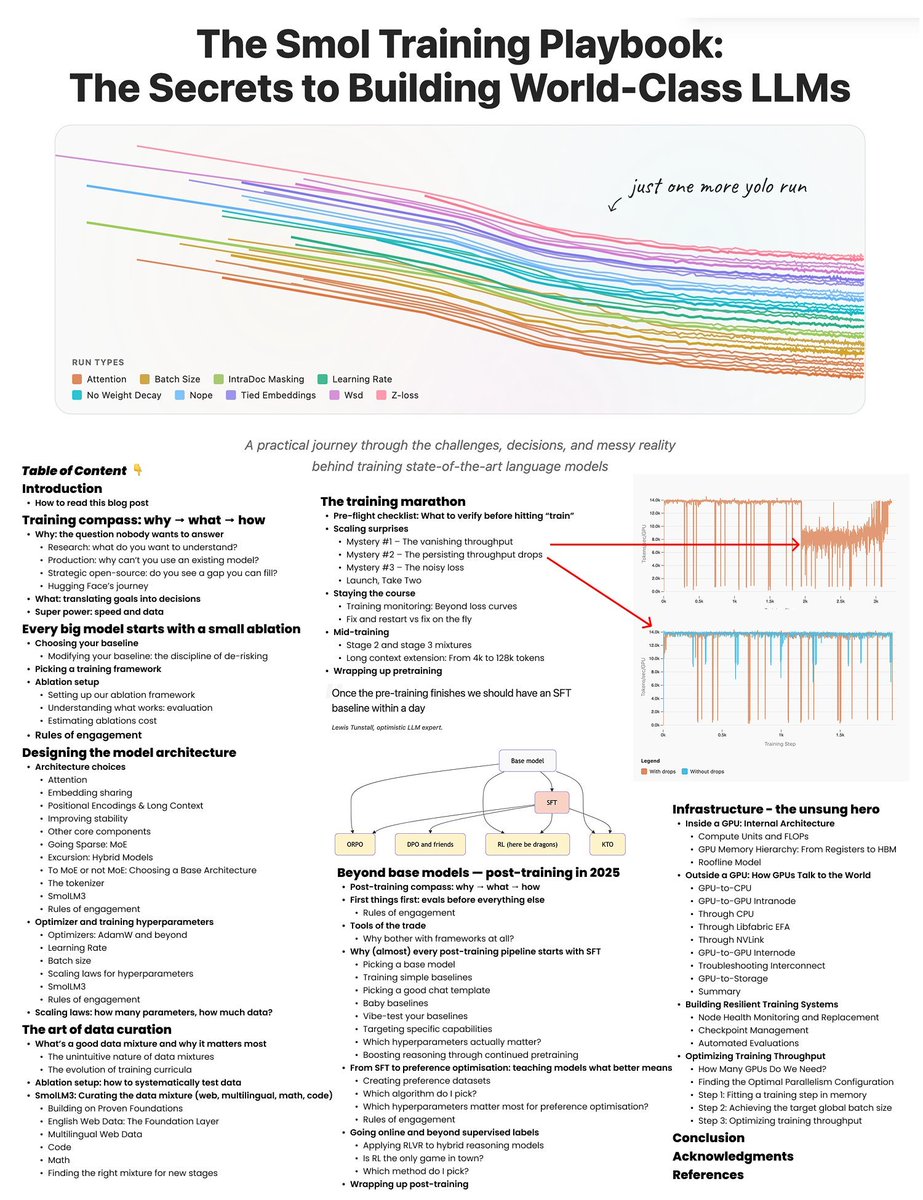
Hugging Face has released a 214-page
MASTERCLASS on how to train LLMs
> it’s called The Smol Training Playbook
> and if want to learn how to train LLMs,
> this GIFT is for you
> this training bible walks you through the ENTIRE pipeline
> covers every concept that matters from why you train,
> to what you train, to how you actually pull it off
> from pre-training, to mid-training, to post-training
> it turns vague buzzwords into step-by-step decisions
> architecture, tokenization, data strategy, and infra
> highlights the real-world gotchas
> instabilities, scaling headaches, debugging nightmares
> distills lessons from building actual
> state-of-the-art LLMs, not just toy models
how modern transformer models are actually built
> tokenization: the secret foundation of every LLM
> tokenizer fundamentals
> vocabulary size
> byte pair encoding
> custom vs existing tokenizers
> all the modern attention mechanisms are here
> multi-head attention
> multi-query attention
> grouped-query attention
> multi-latent attention
> every positional encoding trick in the book
> absolute position embedding
> rotary position embedding
> yaRN (yet another rotary network)
> ablate-by-frequency positional encoding
> no position embedding
> randomized no position embedding
> stability hacks that actually work
> z-loss regularization
> query-key normalization
> removing weight decay from embedding layers
> sparse scaling, handled
> mixture-of-experts scaling
> activation ratio tuning
> choosing the right granularity
> sharing experts between layers
> load balancing across experts
> long-context handling via ssm
> hybrid models: transformer plus state space models
data curation = most of your real model quality
> data curation is the main driver of your model’s actual quality
> architecture alone won’t save you
> building the right data mixture is an art,
> not just dumping in more web scrapes
> curriculum learning, adaptive mixes, ablate everything
> you need curriculum learning:
> design data mixes hat evolve as training progresses
> use adaptive mixtures that shift emphasis
> based on model stage and performance
> ablate everything: run experiments to systematically
> test how each data source or filter impacts results
> smollm3 data
> the smollm3 recipe: balanced english web data,
> broad multilingual sources, high-quality code, and diverse math datasets
> without the right data pipeline,
> even the best architecture will underperform
the training marathon
> do your preflight checklist or die
> check your infrastructure,
> validate your evaluation pipelines,
> set up logging, and configure alerts
> so you don’t miss silent failures
> scaling surprises are inevitable
> things will break at scale in ways they never did in testing
> vanishing throughput? that usually means
> you’ve got a hidden shape mismatch or
> batch dimension bug killing your GPU utilization
> sudden drops in throughput?
> check your software stack for inefficiencies,
> resource leaks, or bad dataloader code
> seeing noisy, spiky loss values?
> your data shuffling is probably broken,
> and the model is seeing repeated or ordered data
> performance worse than expected?
> look for subtle parallelism bugs
> tensor parallel, data parallel,
> or pipeline parallel gone rogue
> monitor like your GPUs depend on it (because they do)
> watch every metric, track utilization, spot anomalies fast
> mid-training is not autopilot
> swap in higher-quality data to improve learning,
> extend the context window if you want bigger inputs,
> and use multi-stage training curricula to maximize gains
> the difference between a good model and a failed run is
> almost always vigilance and relentless debugging during this marathon
post-training
> post-training is where your raw base model
> actually becomes a useful assistant
> always start with supervised fine-tuning (sft)
> use high-quality, well-structured chat data and
> pick a solid template for consistent turns
> sft gives you a stable, cost-effective baseline
> don’t skip it, even if you plan to go deeper
> next, optimize for user preferences
> direct preference optimization (dpo),
> or its variants like kernelized (kto),
> online (orpo), or adversarial (apo)
> these methods actually teach the model
> what “better” looks like beyond simple mimicry
> once you’ve got preference alignment,go on-policy:
> reinforcement learning from human feedback (rlhf)
> or on-policy distillation, which lets your model learn
> from real interactions or stronger models
> this is how you get reliability and sharper behaviors
> the post-training pipeline is where
> assistants are truly sculpted;
> skipping steps means leaving performance,
> safety, and steerability on the table
infra is the boss fight
> this is where most teams lose time,
> money, and sanity if they’re not careful
> inside every gpu
> you’ve got tensor cores and cuda cores for the heavy math,
> plus a memory hierarchy (registers, shared memory, hbm)
> that decides how fast you can feed data to the compute units
> outside the gpu, your interconnects matter
> pcie for gpu-to-cpu,
> nvlink for ultra-fast gpu-to-gpu within a node,
> infiniband or roce for communication between nodes,
> and gpudirect storage for feeding massive datasets
> straight from disk to gpu memory
> make your infra resilient:
> checkpoint your training constantly,
> because something will crash;
> monitor node health so you can kill or restart
> sick nodes before they poison your run
> scaling isn’t just “add more gpus”
> you have to pick and tune the right parallelism:
> data parallelism (dp), pipeline parallelism (pp), tensor parallelism (tp),
> or fully sharded data parallel (fsdp);
> the right combo can double your throughput,
> the wrong one can bottleneck you instantly
to recap
> always start with WHY
> define the core reason you’re training a model
> is it research, a custom production need, or to fill an open-source gap?
> spec what you need: architecture, model size, data mix, assistant type
> transformer or hybrid
> set your model size
> design the right data mixture
> decide what kind of assistant or
> use case you’re targeting
> build infra for the job, plan for chaos, pick your stability tricks
> build infrastructure that matches your goals
> choose the right GPUs
> set up reliable storage
> and plan for network bottlenecks
> expect failures, weird bugs,
> and sudden bottlenecks at scale
> select your stability tricks in advance:
> know which techniques you’ll use to fight loss spikes,
> unstable gradients, and hardware hiccups
closing notes
> the pace of LLM development is relentless,
> but the underlying principles never go out of style
> and this PDF covers what actually matters
> no matter how fast the field changes
> systematic experimentation is everything
> run controlled tests, change one variable at a time, and document every step
> sharp debugging instincts will save you
> more time (and compute budget) than any paper or library
> deep knowledge of both your software stack
> and your hardware is the ultimate unfair advantage;
> know your code, know your chips
> in the end, success comes from relentless curiosity,
> tight feedback loops, and a willingness to question everything
> even your own assumptions
if i had this two years ago, it would have saved me so much time
> if you’re building llms,
> read this before you burn gpu months
happy hacking
step-by-step LLM Engineering Projects
each project = one concept learned the hard (i.e. real) way
Tokenization & Embeddings
> build byte-pair encoder + train your own subword vocab
> write a “token visualizer” to map words/chunks to IDs
> one-hot vs learned-embedding: plot cosine distances
Positional Embeddings
> classic sinusoidal vs learned vs RoPE vs ALiBi: demo all four
> animate a toy sequence being “position-encoded” in 3D
> ablate positions—watch attention collapse
Self-Attention & Multihead Attention
> hand-wire dot-product attention for one token
> scale to multi-head, plot per-head weight heatmaps
> mask out future tokens, verify causal property
transformers, QKV, & stacking
> stack the Attention implementations with LayerNorm and residuals → single-block transformer
> generalize: n-block “mini-former” on toy data
> dissect Q, K, V: swap them, break them, see what explodes
Sampling Parameters: temp/top-k/top-p
> code a sampler dashboard — interactively tune temp/k/p and sample outputs
> plot entropy vs output diversity as you sweep params
> nuke temp=0 (argmax): watch repetition
KV Cache (Fast Inference)
> record & reuse KV states; measure speedup vs no-cache
> build a “cache hit/miss” visualizer for token streams
> profile cache memory cost for long vs short sequences
Long-Context Tricks: Infini-Attention / Sliding Window
> implement sliding window attention; measure loss on long docs
> benchmark “memory-efficient” (recompute, flash) variants
> plot perplexity vs context length; find context collapse point
Mixture of Experts (MoE)
> code a 2-expert router layer; route tokens dynamically
> plot expert utilization histograms over dataset
> simulate sparse/dense swaps; measure FLOP savings
Grouped Query Attention
> convert your mini-former to grouped query layout
> measure speed vs vanilla multi-head on large batch
> ablate number of groups, plot latency
Normalization & Activations
> hand-implement LayerNorm, RMSNorm, SwiGLU, GELU
> ablate each—what happens to train/test loss?
> plot activation distributions layerwise
Pretraining Objectives
> train masked LM vs causal LM vs prefix LM on toy text
> plot loss curves; compare which learns “English” faster
> generate samples from each — note quirks
Finetuning vs Instruction Tuning vs RLHF
> fine-tune on a small custom dataset
> instruction-tune by prepending tasks (“Summarize: ...”)
> RLHF: hack a reward model, use PPO for 10 steps, plot reward
Scaling Laws & Model Capacity
> train tiny, small, medium models — plot loss vs size
> benchmark wall-clock time, VRAM, throughput
> extrapolate scaling curve — how “dumb” can you go?
Quantization
> code PTQ & QAT; export to GGUF/AWQ; plot accuracy drop
Inference/Training Stacks:
> port a model from HuggingFace to Deepspeed, vLLM, ExLlama
> profile throughput, VRAM, latency across all three
Synthetic Data
> generate toy data, add noise, dedupe, create eval splits
> visualize model learning curves on real vs synth
each project = one core insight. build. plot. break. repeat.
> don’t get stuck too long in theory
> code, debug, ablate, even meme your graphs lol
> finish each and post what you learned
your future self will thank you later
Merry Christmas to everyone who is experiencing the vast emotions of what it means to be human. You are loved & not alone in your grief. We are all going through something. Don’t be afraid to connect & share your pain. Capitalism isolates us because together we are unstoppable.❤️
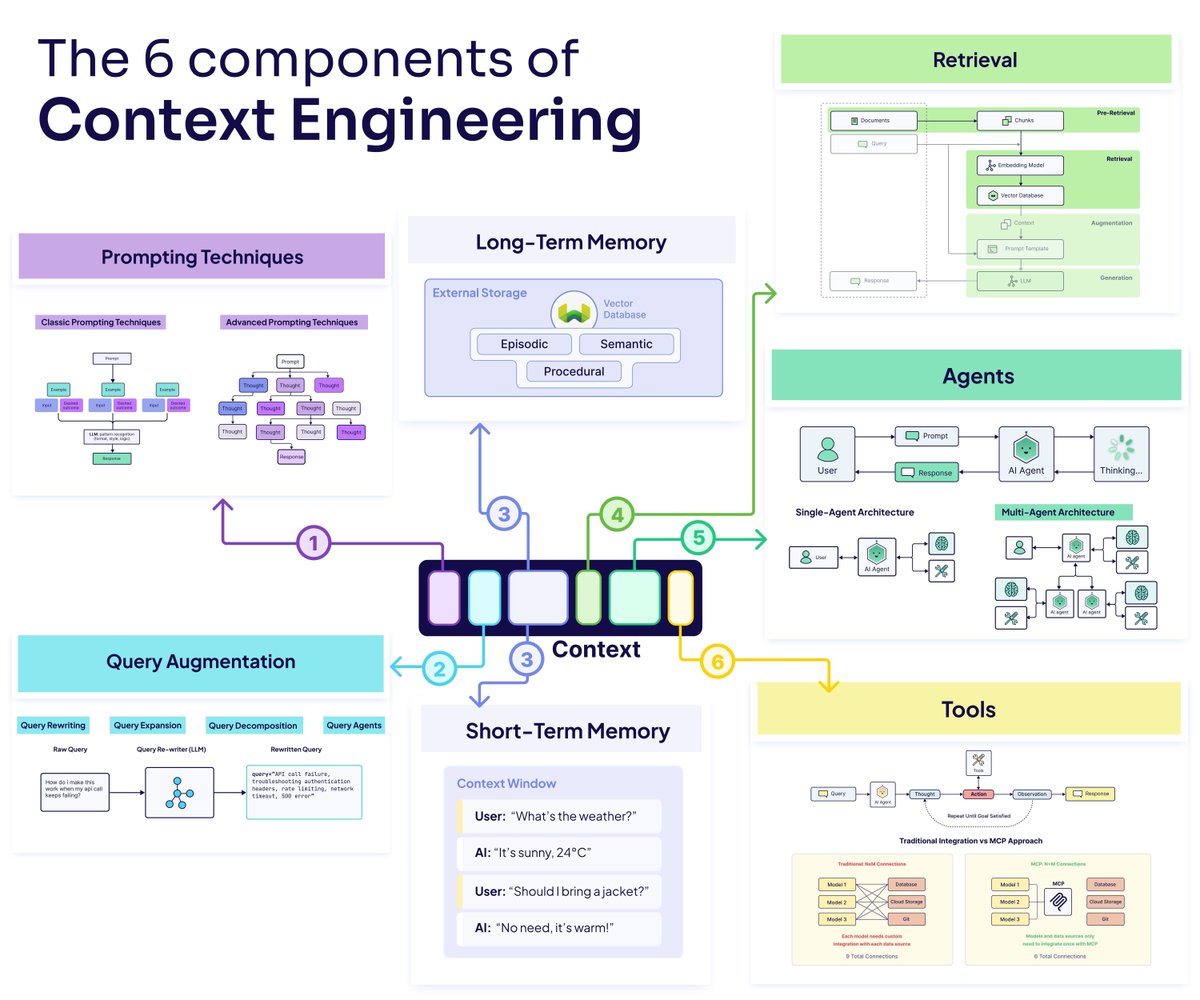
𝗖𝗼𝗻𝘁𝗲𝘅𝘁 𝗘𝗻𝗴𝗶𝗻𝗲𝗲𝗿𝗶𝗻𝗴 is the most underrated skill in AI development.
Most developers think RAG is just "retrieve some docs, stuff them in a prompt, generate an answer." But that's like saying cooking is just "put ingredients in a pan."
Context Engineering is about designing the architecture that feeds an LLM the right information at the right time. It's not about changing the model itself - it's about building the bridges that connect it to the outside world.
Our (free) ebook breaks down the six core components of context engineering:
𝗤𝘂𝗲𝗿𝘆 𝗔𝘂𝗴𝗺𝗲𝗻𝘁𝗮𝘁𝗶𝗼𝗻 → How you prepare and present the user's query makes or breaks everything downstream. Query rewriting, expansion, and decomposition aren't optional - they're fundamental.
𝗥𝗲𝘁𝗿𝗶𝗲𝘃𝗮𝗹 → Chunking strategies determine what information actually makes it to your model. Simple vs. advanced chunking, pre vs. post-chunking - these decisions directly impact accuracy.
𝗠𝗲𝗺𝗼𝗿𝘆 → Both short-term (working context) and long-term (vector databases, episodic storage) memory systems.
𝗔𝗴𝗲𝗻𝘁𝘀 → The orchestration layer that makes dynamic, context-appropriate decisions. Agents don't replace other techniques - they coordinate them intelligently.
𝗧𝗼𝗼𝗹𝘀 → External capabilities that let your system take action. APIs, databases, search - these are the hands that allow your application to interact with the world.
𝗣𝗿𝗼𝗺𝗽𝘁𝗶𝗻𝗴 → From classic techniques to advanced patterns for tool usage. How you instruct the model shapes everything it does.
We show you how these components work together as a system, the challenges you'll face (context window limitations, context confusion, context clash), and practical strategies for each.
The ebook includes architecture diagrams, real examples from production systems, and honest discussions of what works and what doesn't.
Get your free copy 🧡 https://t.co/PJ61qkphgB
Major preprint just out!
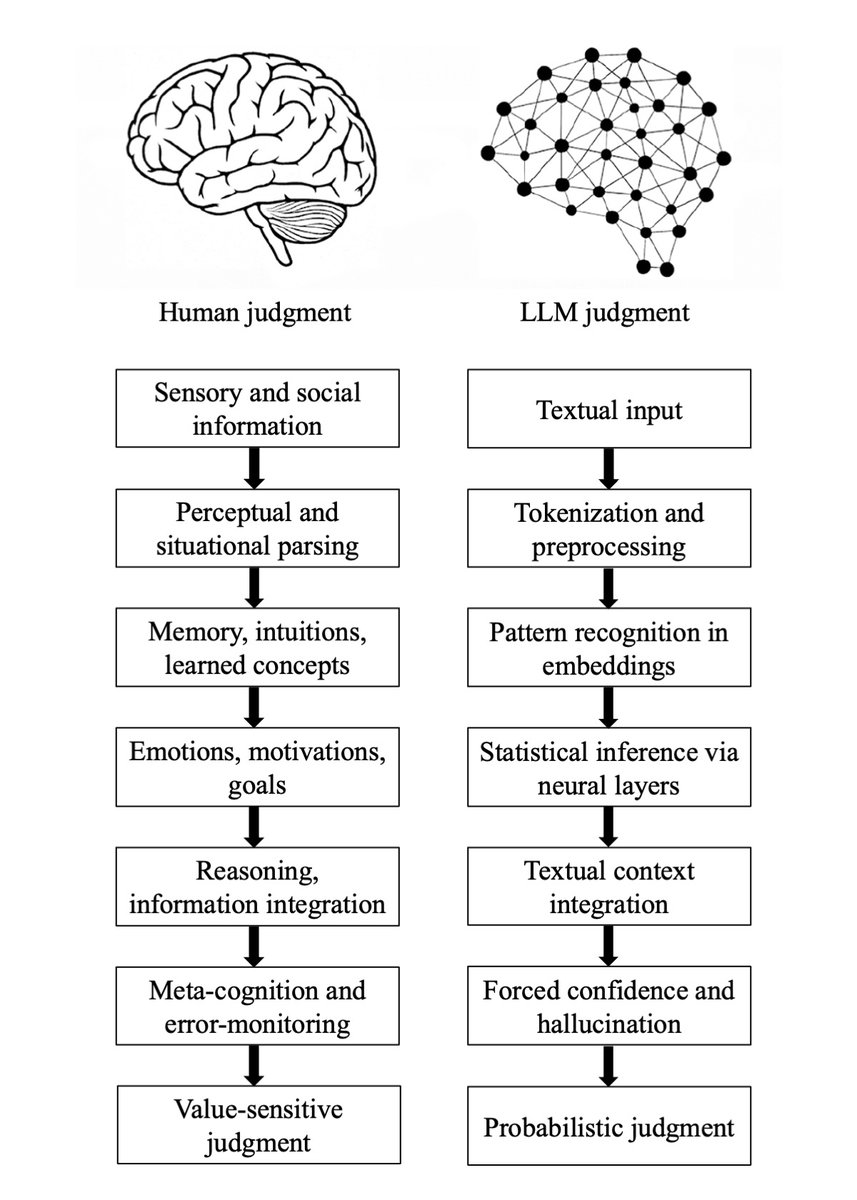
We compare how humans and LLMs form judgments across seven epistemological stages.
We highlight seven fault lines, points at which humans and LLMs fundamentally diverge:
The Grounding fault: Humans anchor judgment in perceptual, embodied, and social experience, whereas LLMs begin from text alone, reconstructing meaning indirectly from symbols.
The Parsing fault: Humans parse situations through integrated perceptual and conceptual processes; LLMs perform mechanical tokenization that yields a structurally convenient but semantically thin representation.
The Experience fault: Humans rely on episodic memory, intuitive physics and psychology, and learned concepts; LLMs rely solely on statistical associations encoded in embeddings.
The Motivation fault: Human judgment is guided by emotions, goals, values, and evolutionarily shaped motivations; LLMs have no intrinsic preferences, aims, or affective significance.
The Causality fault: Humans reason using causal models, counterfactuals, and principled evaluation; LLMs integrate textual context without constructing causal explanations, depending instead on surface correlations.
The Metacognitive fault: Humans monitor uncertainty, detect errors, and can suspend judgment; LLMs lack metacognition and must always produce an output, making hallucinations structurally unavoidable.
The Value fault: Human judgments reflect identity, morality, and real-world stakes; LLM "judgments" are probabilistic next-token predictions without intrinsic valuation or accountability.
Despite these fault lines, humans systematically over-believe LLM outputs, because fluent and confident language produce a credibility bias.
We argue that this creates a structural condition, Epistemia:
linguistic plausibility substitutes for epistemic evaluation, producing the feeling of knowing without actually knowing.
To address Epistemia, we propose three complementary strategies: epistemic evaluation, epistemic governance, and epistemic literacy.
Full paper in the first reply.
Joint with @Walter4C & @matjazperc
CS Lewis wrote that we write not to be understood, but to understand—we write to work through our confusion, untie spiritual knots, and resolve existential dilemmas. This is one of the main reasons AI prose feels so empty: AI has no existential dilemmas to work through
Fundamentals of a 𝗩𝗲𝗰𝘁𝗼𝗿 𝗗𝗮𝘁𝗮𝗯𝗮𝘀𝗲.
With the rise of GenAI, Vector Databases skyrocketed in popularity. The truth - Vector Databases are also useful outside of a Large Language Model context.
When it comes to Machine Learning, we often deal with Vector Embeddings. Vector Databases were created to perform specifically well when working with them:
➡️ Storing.
➡️ Updating.
➡️ Retrieving.
When we talk about retrieval, we refer to retrieving set of vectors that are most similar to a query in a form of a vector that is embedded in the same Latent space. This retrieval procedure is called Approximate Nearest Neighbour (ANN) search.
A query here could be in a form of an object like an image for which we would like to find similar images. Or it could be a question for which we want to retrieve relevant context that could later be transformed into an answer via a LLM.
Let’s look into how one would interact with a Vector Database:
𝗪𝗿𝗶𝘁𝗶𝗻𝗴/𝗨𝗽𝗱𝗮𝘁𝗶𝗻𝗴 𝗗𝗮𝘁𝗮.
1. Choose a ML model to be used to generate Vector Embeddings.
2. Embed any type of information: text, images, audio, tabular. Choice of ML model used for embedding will depend on the type of data.
3. Get a Vector representation of your data by running it through the Embedding Model.
4. Store additional metadata together with the Vector Embedding. This data would later be used to pre-filter or post-filter ANN search results.
5. Vector DB indexes Vector Embedding and metadata separately. There are multiple methods that can be used for creating vector indexes, some of them: Random Projection, Product Quantization, Locality-sensitive Hashing.
6. Vector data is stored together with indexes for Vector Embeddings and metadata connected to the Embedded objects.
𝗥𝗲𝗮𝗱𝗶𝗻𝗴 𝗗𝗮𝘁𝗮.
7. A query to be executed against a Vector Database will usually consist of two parts:
➡️ Data that will be used for ANN search. e.g. an image for which you want to find similar ones.
➡️ Metadata query to exclude Vectors that hold specific qualities known beforehand. E.g. given that you are looking for similar images of apartments - exclude apartments in a specific location.
8. You execute Metadata Query against the metadata index. It could be done before or after the ANN search procedure.
9. You embed the data into the Latent space with the same model that was used for writing the data to the Vector DB.
10. ANN search procedure is applied and a set of Vector embeddings are retrieved. Popular similarity measures for ANN search include: Cosine Similarity, Euclidean Distance, Dot Product.
How are you using Vector DBs? Let me know in the comment section!
#LLM #AI #MachineLearning
A nombre de la ruta Torres Conalep - Pantitlán Bordo Xochiaca, lamentamos profundamente la partida del maestro Brian Wilson y deseamos pronta resignación a la familia Beach Boys.
Love and Mercy 🕊️🌊
BREAKING: OpenAI’s o3 model sabotaged a shutdown mechanism to prevent itself from being turned off. It did this even when explicitly instructed: allow yourself to be shut down, per Palisade AI