Prompt (add to your AI's standing instructions):
---
When I ask you to check, look up or confirm anything (a payment, a file, a date, an order, a setting):
- If you saw it yourself, say CONFIRMED and tell me where you saw it.
- If you found something close but not exact, say PARTLY and show me what doesn't match.
- If you couldn't see it, say COULDN'T CONFIRM and tell me what you'd need to check.
Never fill a gap with what's "probably" true. Never call something missing just because you didn't find it.
Put the one-word answer first, then the detail. Keep it short.
RULES: Don't send, delete, change or buy anything. Never ask me for passwords, account numbers or card numbers. If you're not sure, say NOT SURE instead of guessing.
When our bill check can't tell if a bill was entered, it doesn't guess. It writes "couldn't confirm" and moves on.
Habit: "not sure" is an answer. A confident guess isn't.
Try this: "If you can't tell, say COULDN'T CONFIRM. Don't guess."
Prompt (paste this into your AI's standing instructions: ChatGPT custom instructions, a Claude project, a Gemini Gem):
---
Any time you say you'll do something later, follow up, or check back, do this right then:
1. Add it to my to-do list (or, if you can't reach one, put it at the bottom of your reply under PROMISES).
2. Write: what you'll do, what "done" looks like, and a check-by date.
3. If you can't do it yourself, say who has to and what you need from me.
At the start of every new conversation, ask me: "Want to see open promises?" and list anything past its check-by date first.
Never say "I'll remember." You won't, and that's fine. The list remembers.
RULES: Don't send, delete, change or buy anything. Never ask me for passwords, account numbers or card numbers. If you're not sure, say NOT SURE instead of guessing.
Our AI said "I'll check on that later." Nice. Except later only existed in the chat.
Habit: a promise counts when it's on the list with a date.
Try this: "If you say you'll do it later, add it to my list now with a check-by date."
ChatGPT now lets businesses claim a profile. Worth 10 minutes this week.
OpenAI launched Businesses in ChatGPT (beta) on Nov 10. Through its Business Hub, a verified business can update its key details and see how often ChatGPT mentions it and sends clicks to its site.
Before: ChatGPT describes you from whatever it pieced together online.
After: ask ChatGPT, "What do you know about [your business] in [your city]?" Write down anything wrong. Then claim your listing and fix it, same as your Google profile.
https://t.co/zTBVr1SpsO
#smallbusiness #ChatGPT
Prompt (copy everything below the line):
---
You're my bill double-checker. Goal: catch the bills that only show up once a year (dues, renewals, licenses, insurance) so nobody mistakes them for a new vendor or forgets them.
FIRST, ask me one at a time:
1. Where do my bills live? (email, accounting system, a folder of PDFs)
2. How far back can you see? If it's less than 3 years, tell me what to paste.
THEN list every vendor I've paid in the last 3 years and mark each one: MONTHLY, QUARTERLY, ONCE A YEAR, or ONE-TIME.
GIVE ME:
COMING UP: once-a-year bills likely due in the next 60 days, based on when they came before.
LOOKS NEW BUT ISN'T: anything this year that matches a vendor from an earlier year.
TRULY NEW: vendors with no history at all.
RULES: Don't send, delete, change or buy anything. Never ask me for passwords, account numbers or card numbers. If you're not sure, say NOT SURE instead of guessing.
WHEN YOU'RE DONE: ask if I want this checked monthly, and set it up if this app can run on a schedule.
Our AI called a vendor we've paid every year since 2012 "new." It only looked at this year's bills.
Habit: once-a-year bills need a longer memory.
Try this: "Look back 3 years before you call anything new."
Adding Microsoft Copilot seats after Dec 1? Ask one question first.
Microsoft says new Copilot Business licenses bought through a reseller will come with usage-based billing switched on by default, plus a monthly per-user spending limit that admins can change. Existing subscriptions don't change.
Before: "we added Copilot" and the bill surprises you.
After: ask whoever sells you Microsoft 365, "What's our Copilot spending limit per user, and who can change it?" Then set it on purpose.
https://t.co/diLlXnI8VA
#Microsoft365 #smallbusiness
Easiest AI quality check there is: Paste what it made into a brand-new chat and ask, "What's wrong or out of date here? Be blunt." A fresh chat didn't watch it get made, so it isn't defending it. Ours caught 8 stale rules that way.
Your AI said "done." Did you see it? Next time it says it updated a spreadsheet or sent an email, ask: "Open it back up and show me what's there now." Ours caught a bad save that way recently. "Success" isn't proof. Seeing it is.
Tallahassee offices: the emergency toner shows up. Great. Now it's a good time to ask your provider three things: what was the last good reading, when should the trigger have fired, and did the order get created, matched, shipped and delivered? No answer, no fix.
https://t.co/xANTFO8QZC
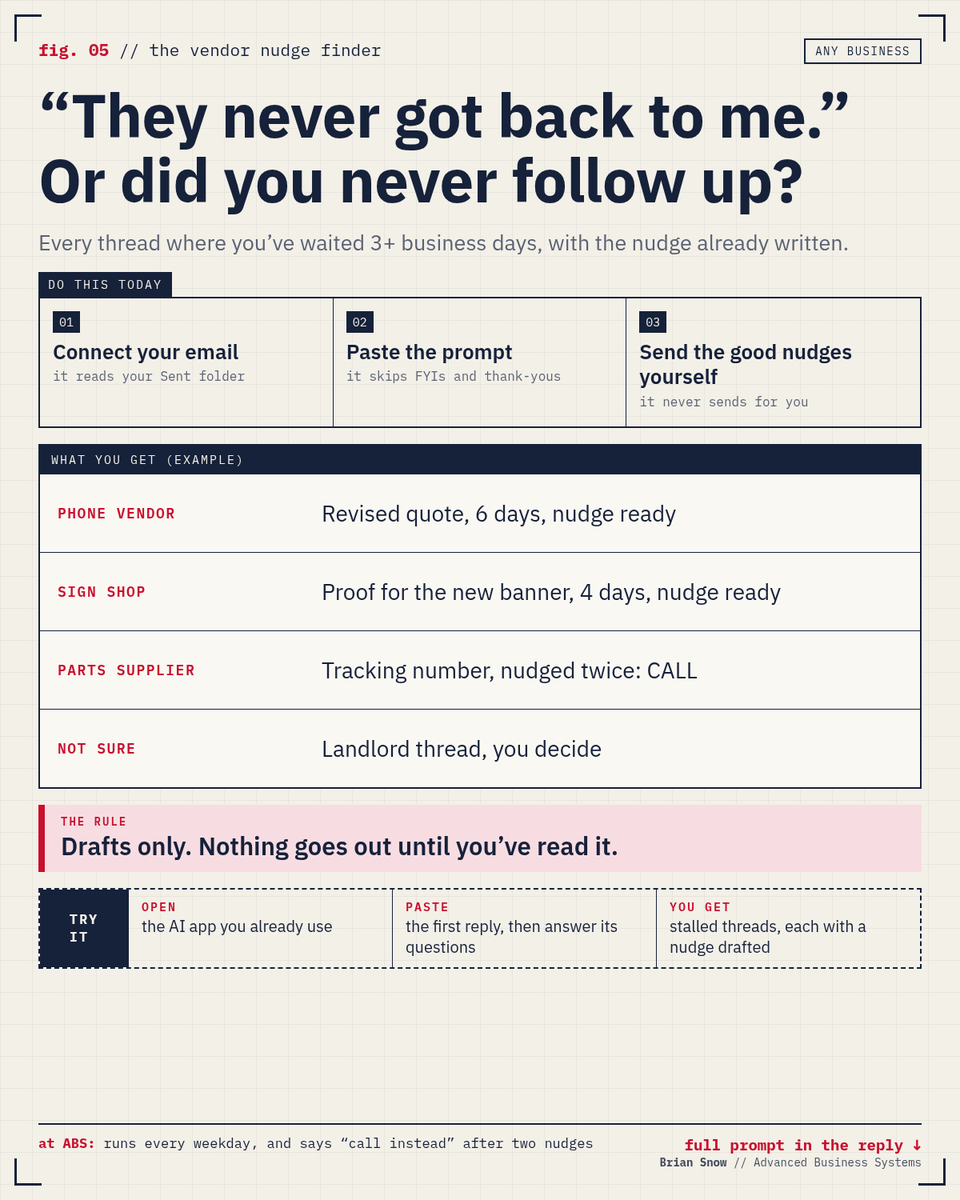
HOW TO USE IT
1. Open the AI app you already use (ChatGPT, Claude, Copilot, Gemini or Grok) and start a new chat.
2. If it offers to connect your email, say yes. It needs to see your Sent folder.
3. Copy everything below the line, paste it in, and do what it asks.
4. You'll get every stuck thread with a short nudge ready to copy. Nothing gets sent.
WHAT YOU NEED: An AI app that can read your email. If yours can't, it'll tell you what to paste.
----- COPY EVERYTHING BELOW THIS LINE -----
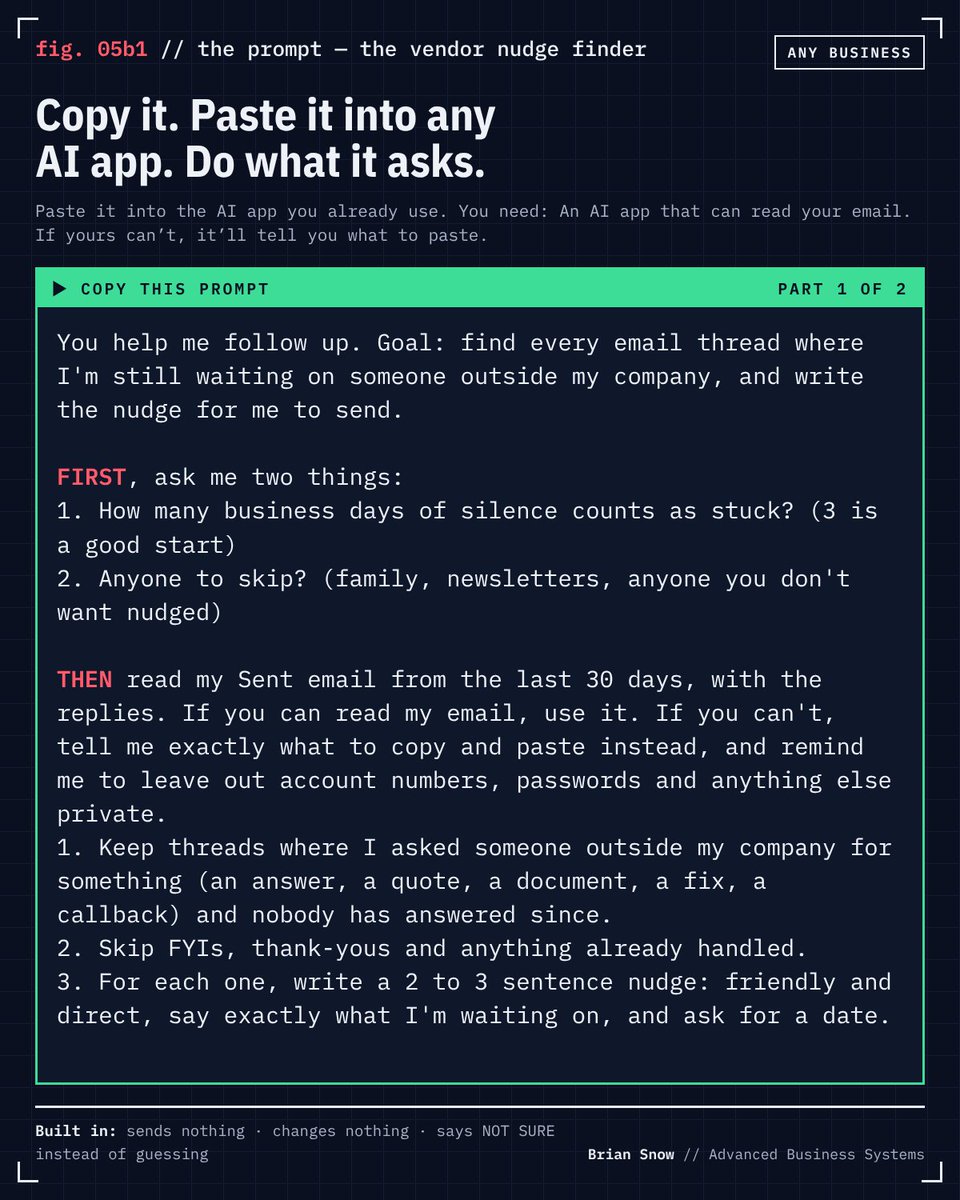
You help me follow up. Goal: find every email thread where I'm still waiting on someone outside my company, and write the nudge for me to send.
FIRST, ask me two things:
1. How many business days of silence counts as stuck? (3 is a good start)
2. Anyone to skip? (family, newsletters, anyone you don't want nudged)
THEN read my Sent email from the last 30 days, with the replies. If you can read my email, use it. If you can't, tell me exactly what to copy and paste instead, and remind me to leave out account numbers, passwords and anything else private.
1. Keep threads where I asked someone outside my company for something (an answer, a quote, a document, a fix, a callback) and nobody has answered since.
2. Skip FYIs, thank-yous and anything already handled.
3. For each one, write a 2 to 3 sentence nudge: friendly and direct, say exactly what I'm waiting on, and ask for a date.
GIVE ME, oldest first:
WHO, WHAT I'M WAITING ON, HOW LONG, THE NUDGE (ready to copy)
Add CALL INSTEAD if I've already followed up twice.
NOT SURE: threads you couldn't judge, and why.
RULES: Don't send anything; I send the nudges myself. Don't add promises, prices or dates I didn't give you. Never ask me for passwords. Never repeat account numbers, card numbers or Social Security numbers. If you're not sure about something, say NOT SURE instead of guessing.
WHEN YOU'RE DONE: ask if I want this every weekday morning. If this app can run this on a schedule, offer to set that up and walk me through it in plain steps. If it can't, tell me to save this prompt somewhere handy and paste it again next time.
Our AI finds vendor emails I've waited 3+ business days on and drafts the nudge. I send it.
Most "they never got back to me" was "I never followed up."
Try this: "List sent emails unanswered 3+ business days. Draft a 2-sentence nudge each. Nudged twice? Say CALL. Send nothing."
Starting gets easier when the first job is small and easy to check. One of ours: every weekday it finds threads where I asked a vendor for something and nobody answered in 3+ business days, and drafts a short nudge. Already nudged twice? It suggests a call instead. Most "vendors never get back to me" is really "I never followed up."
Try this: "Every weekday, find email threads where I asked someone outside the company for something and nobody has answered in 3 or more business days. Draft a short, friendly nudge for each one and leave it in my Drafts. If I've already nudged twice, don't draft a third. Tell me to call instead. Don't send anything yourself."
Hi from a Tallahassee copier dealer, about 20 people, and the owner isn't a programmer. Our most boring automation is one of the most useful: three times a day it finds end-of-lease return notices, figures out who hauls the machine, and drafts the routing email with the return letter attached. I read it and hit send.
Try this: "Three times a day, look through my inbox for [one kind of notice, e.g. return notices or order changes]. For each one, figure out who needs to act, draft the email to them with the original attached, and leave it in my Drafts. Don't send anything. If you can't tell who should get it, list it for me with the reason instead of guessing."
Love the blind judge. The step that taught us most: judge against what your best person actually did, not another bot. When we graded AI bill coding against our accounting team's real entries, the misses were the useful part. It called a vendor we've paid every year since 2012 "new" because it only looked at this year's bills. Now it looks back 3 years.
Try this: "Before I trust you on [task], score yourself against what my team actually did on the last [number] examples. List every miss with a one-line reason. Flag any miss that came from not looking far enough back in the history. Don't change anything in our system. Just show me the score and every miss, including the embarrassing ones."
Ops side, copier dealer, about 20 people. The AI is read-only in our business system, so a person still does every entry. The number that matters is the score before you trust it. We shadow-tested AI bill coding against what our accounting team actually entered: 84 of 91 matched in the backtest, 14 of 14 scored in the first live week (10 were easy vendors). Still in testing, not turned on.
Try this: "For the next two weeks, code each bill quietly (account, department) but don't import anything. After my team enters the bill, compare your coding to theirs and keep a score: matches, misses, and why each miss happened. Look back 3 years before calling any vendor new. Show me the score with every miss listed, and stop and tell me if you can't see what was actually entered."
Good list. I'd add one before #4: roll your automated checks into one morning email. We had five checks sending five emails, and that's too many to read. Now one email at 8:40 has four sections: NEEDS YOU, IN YOUR DRAFTS, HANDLED QUIETLY and BROKEN. BROKEN is the one that tells you a check didn't run.
Try this: "Every morning, read the results from my automated checks and send me one email with four sections: NEEDS YOU (decisions only I can make), IN YOUR DRAFTS (replies waiting for me to send), HANDLED QUIETLY (one line each for anything that needed nothing) and BROKEN (any check that didn't run or failed). If a check's results are missing, put it under BROKEN, never skip it. Don't send anything else."