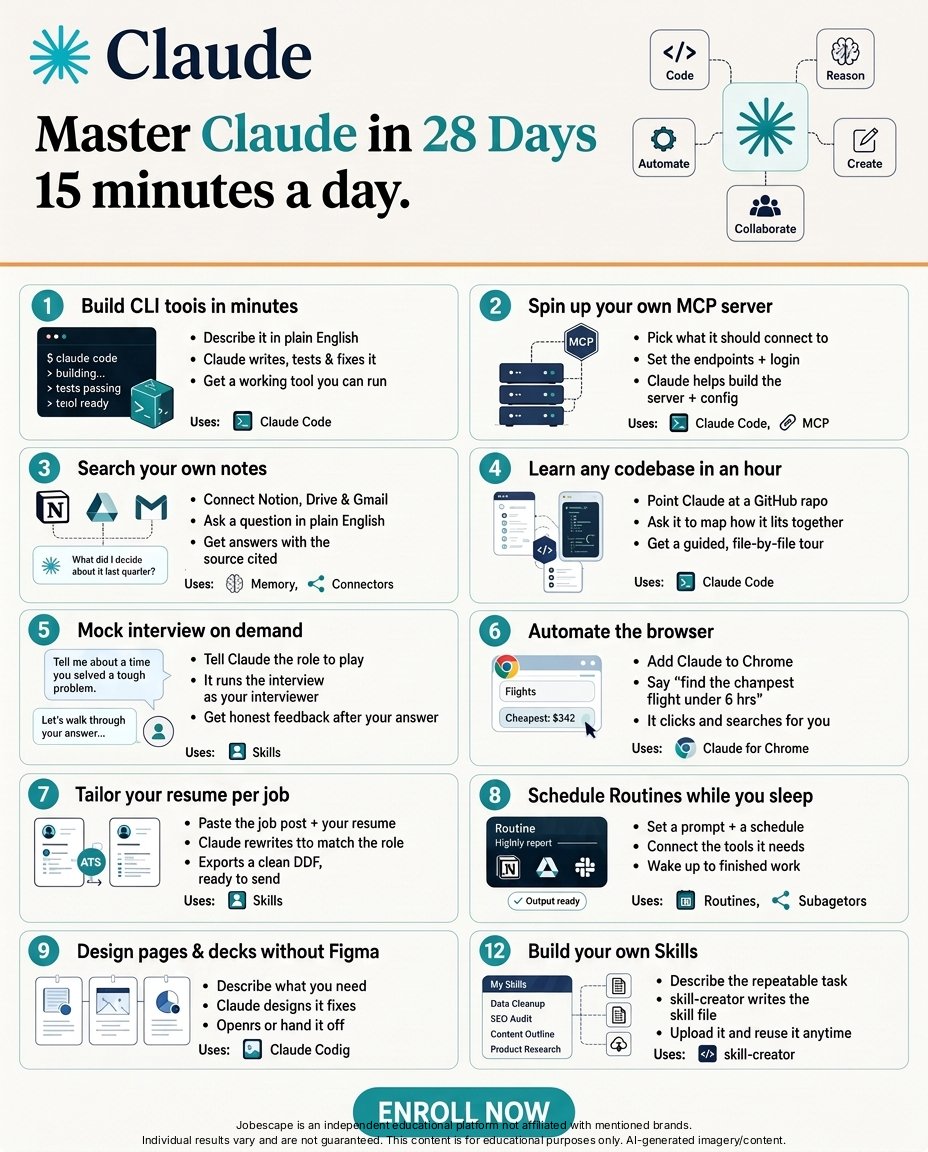
Before you open Netflix tonight:
• Create a Claude account
• Do not open a random YouTube tutorial
• Go through these guides one-by-one
You can learn Claude (entirely) over a weekend.
Here are the 15 guides to get you started:
1. Claude for Dummies (https://t.co/HNa5MrCLVU)
2. Prompt Engineering 101 (https://t.co/BhdLRaCgvy)
3. 27 Claude Tips (https://t.co/Uk66CN3rj5)
4. How to set up Cowork (https://t.co/AvO8fCLTrL)
5. Create infographics with AI (https://t.co/gj8asrU2Vl)
6. How to not write like Claude (https://t.co/FLZzLgwroE)
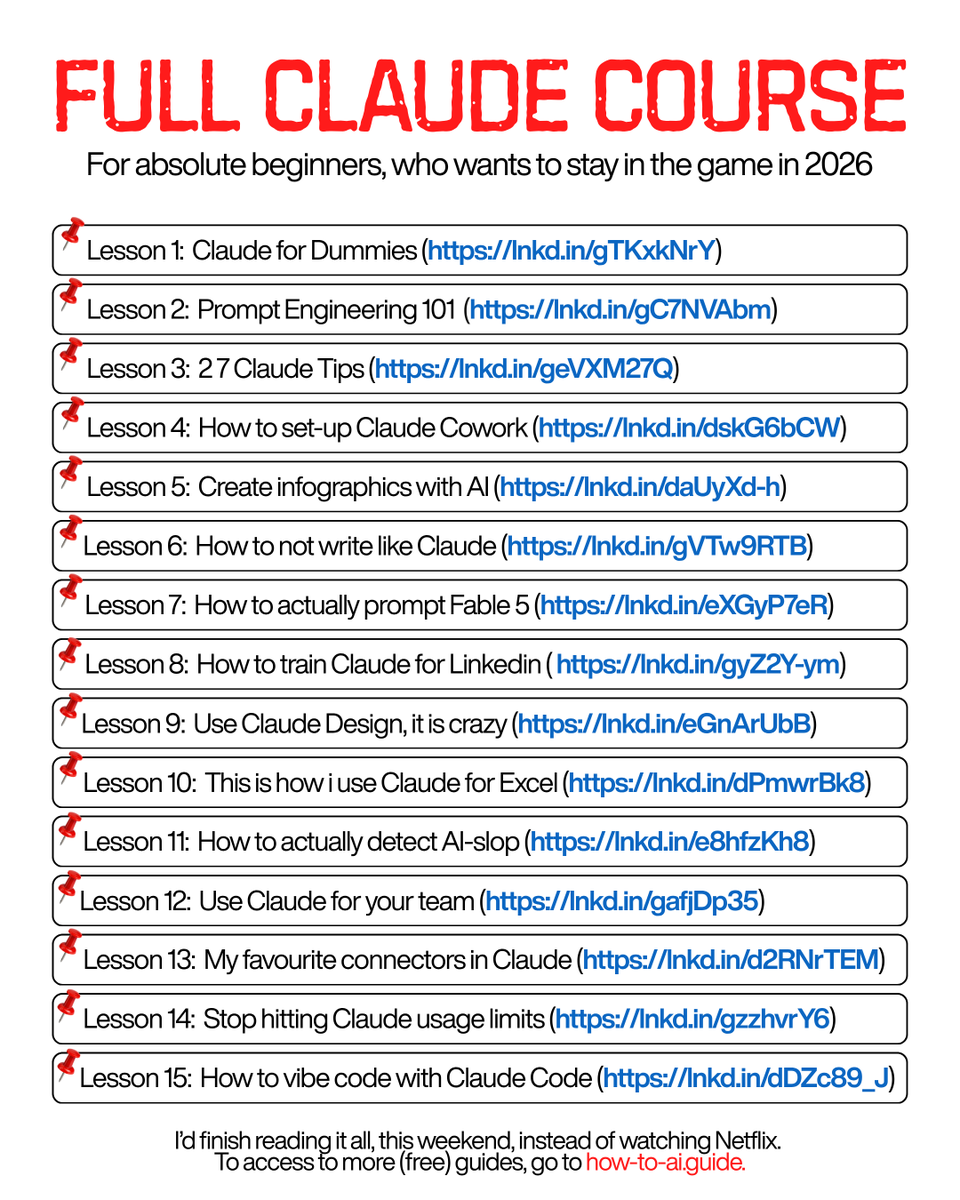
7. How to prompt Fable 5 (https://t.co/682TA10gmu)
8. Claude for Linkedin (https://t.co/9d5stC6grm)
9. Use Claude Design (https://t.co/q1zjMfeAyg)
10. Claude for Excel (https://t.co/7g3CFNcKrs)
11. Detect AI-slop (https://t.co/Tcc7YTTf1D)
12. Claude for your team (https://t.co/U1JsBVCzYH)
13. Connectors in Claude (https://t.co/TSAQqOpDeV)
14. Vibecode with Claude Code (https://t.co/O2kJvFkgan)
15. Stop hitting Claude limits (https://t.co/j5fEzSH5br)
--
1. Save this list for later (three dots, top right).
2. Share it with a friend by ♻️ reposting this image.
3. Subscribe to my free newsletter: https://t.co/psB7XxB2Y4.
You're constantly drowning in (overtechnical) posts about Claude, many of what is written by Claude itself. So, I've made a simpler one-pager that you MUST know (without getting technical):
First, the words. People use them like you're supposed to already know them.
→ A Project is a folder with your uploaded files, rules & categorised chats for one job.
→ A Style is a copy of how you write.
→ An Artifact is a doc that opens on the right of your screen. You can edit it there.
→ A Skill is a long prompt you wrote down once so you never have to explain it again.
→ A Connector is your tools, in Claude (your Gmail, Drive, Slack), so it reads them & gets your context.
→ Claude Cowork works on your files stored on your desktop while you go do something else.
→ A token is (literally) a word. That's all.
It wasn't that scary, right?
Now the part that you have to do, to set up Claude:
1. Open a Project & name it after the repetitive task. Like, "Client emails." Then upload files related to this task. Now, Claude reads everything in the folder before it answers you.
2. Write your about-me file & turn it into a Skill.
It must have your job, whom you sell to, what you sell, how you talk, what you never say.
Then turn it into a Claude Skill by uploading it in a chat with this prompt: "Turn this uploaded .md file into a Claude skill with the name of "about me."
To write your own about me skill, download the interview prompts at https://t.co/nvi0ODsMR5
3. Put your rules in the Project instructions. Copy this, but change the names:
"You help me write [what]. My readers are [who]. Use short sentences. Never use the words [x] or [y]. If you need more information, ask me one question at a time. When I paste a draft, tell me what to cut before you rewrite anything."
But I don't use these Claude functions anymore:
✦ I don't have Memory turned on. It poisons the future chats and restricts Claude to being in a box.
✦ I only connect to 3 connectors. Gamma, Granola, Gmail. Never paste logins, keys, or client contracts.
I wrote 27 such Claude tips after realising Anthropic was going to publish them for us. The guide is free to download: https://t.co/KNO2y4QN8T
Claude Code isn't just an AI coding assistant.
It's an entire agent development stack.
If you're building serious AI agents, you need to understand these 7 pieces:
Claude Code → Your AI developer
Agent SDK → Build your own agent-powered apps
CLAUDE.md → Persistent project context
Skills → Reusable expertise & workflows
Hooks → Event-driven automation
Subagents → Specialized AI workers
Plugins → Package and extend everything
Put them together and Claude can move beyond generating code.
It can understand → plan → use tools → delegate → test → automate → ship.
The real shift is from:
Using AI to write code → Building AI systems that write, test, and ship code.
📌 Save this roadmap if you're learning AI engineering.
♻️ Repost for someone building with Claude Code.
Which Claude Code feature are you using most?
#ClaudeCode #ClaudeAI #AIAgents #AIEngineering #MCP #Coding #Developers #GenerativeAI #Anthropic #TechDeals
Full Claude Course
Master Claude to automate repetitive tasks, build apps without coding, create real portfolio projects, and become more valuable at work.
Don't make (another) .md file for Claude.
Instead, open Claude Settings → Skills → Create.
Then do this, in order:
1. Name the Claude Skill: "/How-I-write"
2. Paste this template inside (edit the brackets):
"My voice: [how you talk. e.g: short sentences, direct, no fluff]
Banned words: delve, unlock, leverage, [add yours]
My writing samples: [paste your writing pieces]
Rule: Use this on everything unless I say otherwise."
3. Save. Don't attach it anywhere. Close Settings.
4. Now open your old .md files.
5. Run each one through this test:
"Does this need editing or changing every week?"
→ No: delete it. It lives in the Skill now.
→ Yes: move it to a folder 'Facts Claude can't guess'
6. Open a new chat.
7. Ask for something you'd normally prompt for.
8. Don't mention the Skill. Don't attach a single file.
9. Read the output. Your voice, rules, 0 reminders.
10. Something off? Fix the Skill once - not the chat.
11. Repeat for your next workflow:
Settings → Skills → Create → "/Client-emails"
Settings → Skills → Create → "/How-I-design"
All of them load in every chat, automatically.
Files for facts. Skills for everything else.
To skip all of the steps above. Directly download my Claude Skill library with over 26+ skills:
1. Go to https://t.co/psB7XxAv8w.
2. Find a welcome email in your inbox named "Don't lose access to your AI library."
3. Click on the Notion library link.
4. Open the "Claude Skills" folder. Download it all.
5. Upload to Claude → Settings → Skills.
You don't need to learn to code anymore.
Here's how to prompt Claude Code (zero coding):
1. Turn on "Allow bypass permissions mode" first.
(Settings → Claude Code)
2. Make a folder. Everything it builds lives here.
3. Settings → Connectors, add Netlify & Supabase.
4. Click the folder icon and select your folder.
5. Pick Opus 5 model (High Effort).
6. Use this setup guide: https://t.co/KcScqiA4Od
Claude now builds anything you describe in English.
But here's where it gets powerful:
1. Stop describing code & typing 'make it look good'
Start from a screenshot. Found a site you love? Screenshot it, & say "build this, but for my thing."
2. Then paste this prompt:
"You're my CTO. I'm the CEO. I don't write code and I don't read it. Bypass is on - don't ask, just build. I want [your goal]. Interview me one question at a time using AskUserQuestion, then build it. Use Netlify to push it live and give me a link. Match this screenshot."
3. Claude reads the screenshot, asks you questions.
You click the answers. It ships.
My Calendly example went live in 24 minutes.
Three things nobody tells you:
→ Build one piece at a time. The home page first. Get it right. Then the next page. Small prompts give Claude less room to break what already works.
→ When something looks off, don't describe it - screenshot it & paste it back: "this overlaps on mobile, fix it." Faster than words every time.
→ Your site will look like every other AI site.
The fix: Go to getdesign .md, download a real brand's file - Stripe, Notion, even Claude. Drop it in your folder & say "use this for all the styling."
The secret is not knowing how to code anymore.
It is knowing how to prompt. But to go even deeper, use my full playbook: https://t.co/KcScqiA4Od
(save this if you can't code - you won't need to)
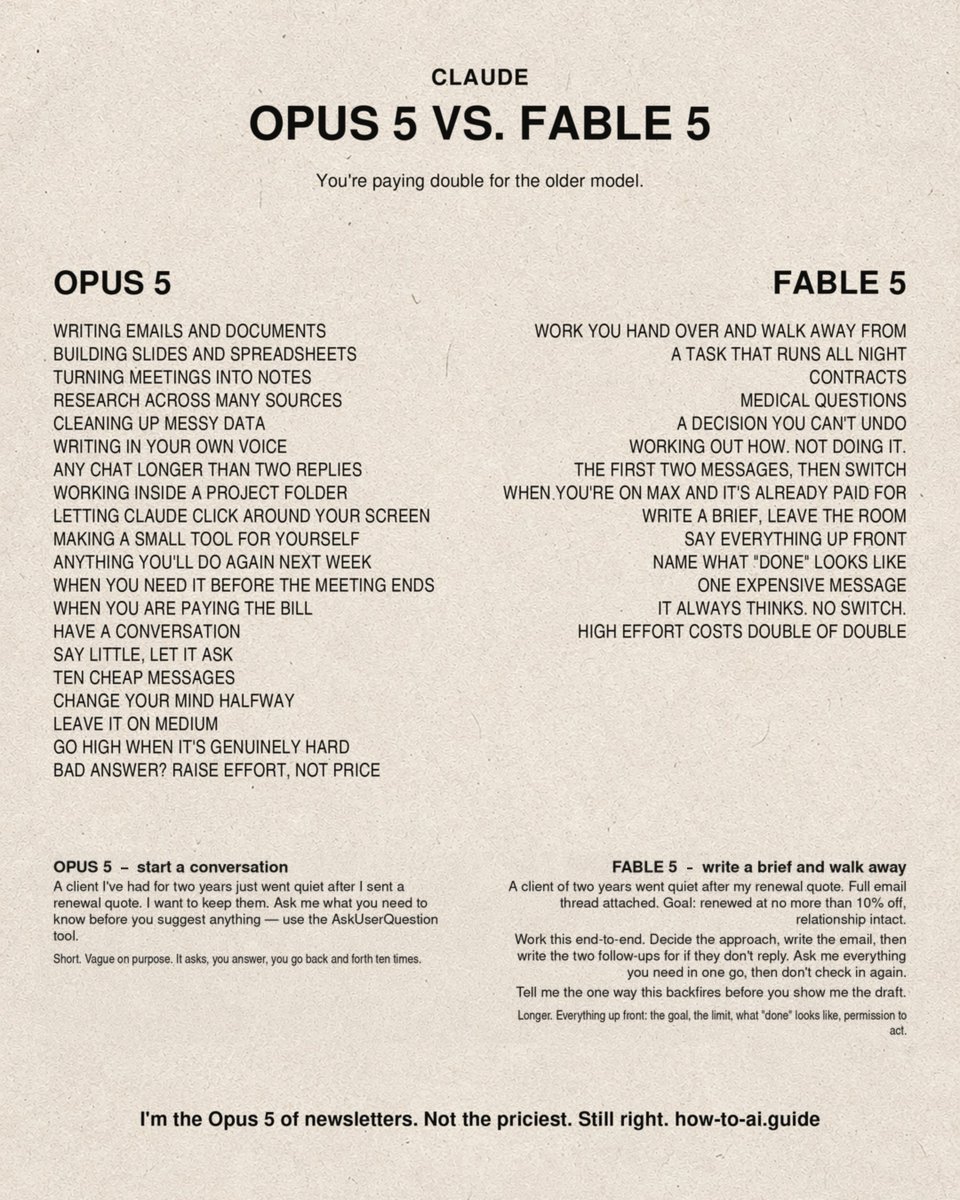
Claude Fable 5 was shipped on June 9. Opus-5 on July 24. And you still pick the wrong one every time.
The 11 mistakes burning credits & 5 rules that fix it:
(both prompts are free here → https://t.co/psB7XxB2Y4)
Stop doing these today:
1. Picking Fable because it's expensive.
The newer model is the cheaper one.
2. Thinking $10 buys more brain.
Opus 5 is $5. Fable 5 is $10. Opus scores higher on knowledge work.
3. Thinking $10 buys more memory.
Same 1M context on both models. You're paying double for identical memory.
4. Using Fable for emails.
Shooting a bird with a bazooka. It's your renewal quote, not the Manhattan Project.
5. Never touching the effort setting.
It's under the model name. It decides how long Claude thinks.
6. Switching models when the answer is bad.
Increase the effort setting. That's free. Switching costs double.
7. Maxing effort on Fable.
Effort multiplies tokens. Fable's tokens already cost 2x. That's double of double.
8. One long chat all day.
Claude re-reads the entire thread on every single turn. Turn 40 costs a fortune.
9. Not knowing your plan.
On Pro, Fable is included but with a limit. Be conservative the way you use Fable 5.
10. Not knowing Fable eats your week.
50% of your weekly limit, drained faster. Every Fable prompt steals an Opus prompt.
11. Prompting them the same way.
This is the real one. They demand different levels of instructions.
Now the 8 rules that fix it-
1. Opus 5 must be your default.
Emails, decks, spreadsheets, research, messy data, meeting notes. All of it.
2. Open Fable 5 three times a year.
Work you hand over for hours. Contracts and medical questions. A decision you get one shot at. That's the use case.
3. With Opus 5, have a conversation.
It's cheap. Ten messages cost nothing. Let it pull the context out of you.
4. Two turns on Fable, then switch.
Use it for the plan. Use Opus for the typing.
5. Give Fable a goal, never a task.
"Write this email" is a task. Opus does that for half the price. "Get me paid without losing the client" is a goal.
Opus 5 prompt:
"A client I've had two years went quiet after my renewal quote. I want to keep them. Ask me what you need to know before you suggest anything - use the AskUserQuestion tool."
Fable 5 prompt:
"Client of two years went quiet after my renewal quote. Thread attached. Goal: renewed at max 10% off, relationship intact. Work it end-to-end. Decide the approach, write the email, write the two follow-ups if they don't reply. Tell me how this backfires before you show me the draft."
Opus 5 gives you a draft. You edit it, you send it.
Fable 5 gives you a decision.
The hard part is writing that Fable brief. So I built a skill that writes it for you.
Type /fable-prompter, give it a lazy half-formed idea, and it hands back the finished brief.
Run it on Opus 5, never on Fable. The cheap model writes the expensive prompt.
It's free here → https://t.co/psB7XxB2Y4
Subscribe, open the welcome email, click the Notion link, upload once to Claude.
L'affiliation Amazon avec des vidéos IA c'est le business le plus sous-coté du moment mdrrr c'est hard
Tu touches une commission sur des produits que t'as jamais achetés, jamais stockés, jamais filmés
La prod coûte 2$ la vidéo, le reste c'est du volume
🚨 Claude d’Anthropic intègre désormais des filigranes (Watermarks) invisibles dans tous les textes ainsi que dans toutes les métadonnées associées aux fichiers créés ou modifiés par l’IA.
Je sais pas avec quelle entité il a refusé de pacté, Baal, Baphomet, Ibliss, va savoir, mais comme par hasard le jour où on a su que son média LEGEND était valoriser à plus de 75 millions d’euros, il y a tout qui ressort. Pourquoi c’était pas sorti avant ?
Nobody has ever explained all of Claude to you.
But everything you've learned (so far) was level one:
Level 1. Install Claude app, even if you never use it.
You will use the browser 90% of the time, and that's fine. But the day you need Claude to touch a real folder, you don't want to be downloading, logging in and re-granting permissions while the work waits. Set it up on a slow Tuesday. Use it on a fast one.
Level 2. Escalate on failure, not on anticipation.
Don't pick the best model "just in case." Start with Sonnet. When it gives you a bad answer, that's your evidence the task is genuinely hard - then move up. You'll discover most of your work never needed the heavy brain, and the 5% that did is now obvious.
And when you switch, switch inside the same conversation. Claude keeps the thread. Starting fresh throws away everything you already explained.
Level 3. One correct answer = low effort.
That's the whole test. "Reformat this table" has one right answer; don't let it think. "Should we price at 40 or 60" has trade-offs - let it think properly.
The mistake: turning thinking up on a task that had one right answer. You get a reasoned paragraph explaining why the wrong answer is correct.
Level 4. Count your messages before you start.
If the task would take you more than three back-and-forth prompts, it was never a chat task. Hand it to Cowork at prompt one.
And if you've explained the same context twice in two different chats, stop. That's a Project. Set it up once and every future chat starts where you left off.
Level 5. Say the output format in your 1st sentence.
Not after. Ask for "a one-page Word doc" or "an Excel model" up front and you skip the wall of text entirely. Don't generate 900 words, then ask for a doc, then get the 900 words again with headings. Two prompts wasted, every single time.
Level 6. Turn your corrections into instructions.
The second time you correct Claude on the same thing, that correction becomes a Skill.
"Stop using em dashes." "Always give me the number before the explanation." "Never open with a summary."
Correct it twice → write it down once → never say it again. Most people spend a year giving the same three corrections daily.
Your first 20 minutes, in order:
1. Install desktop app.
2. No settings is the best.
3. Connect ONE tool - not everything.
4. Make one Project for the work you do weekly.
5. Write 1st Skill from a correction you already gave.
Step 5 is the one you'll never do, so I'll make it easy.
✦ My favourite Claude Skills are free on https://t.co/psB7XxB2Y4 - the exact ones I use every day.
✦ Open the welcome email (don't skip this).
✦ Click the Notion link → "Skills" folder.
✦ Download the whole Skills library.
✦ Upload to Claude → Settings → Skills.
🇮🇪🚫 FLASH | Une première mondiale : l’Irlande rend PUBLIC le fichier national des CONDAMNÉS pour violences conjugales afin d’empêcher de nouvelles victimes. Toute personne peut y accéder et vérifier un nom. La loi a notamment été portée après le meurtre de Jennifer Poole, poignardée par son conjoint déjà condamné pour violences conjugales sur son ex-conjointe. L’inscription des noms, bien que non systématique, sera généralisée dans les prochains mois. Afin de faciliter la réinsertion, un condamné pourra demander la suppression de son nom après 3 ans.
🇺🇸✊ FLASH | La cagnotte de soutien à Arianna, licenciée d’un restaurant Burger King après avoir lancé « Free Palestine » à un client israélien, a atteint 153 418 dollars en seulement 48 heures.
🔗 https://t.co/e6HWIDB3Q5
🚨🇫🇷 ALERTE INFO | Guillaume Pley fréquentait et appréciait la compagnie de jeunes filles, dont certaines étaient mineures, à l’époque de son émission "Guillaume Radio 2.0" sur NRJ. (Les Inrockuptibles)
🚨 ALERTE !
UNE PLAINTE POUR ESCROQUERIE A ÉTÉ DÉPOSÉE À L’ENCONTRE DU CINÉASTE FRANÇAIS WIL AIME 😳
Le directeur artistique de son film de merde « WHO » n’a toujours pas été payé à hauteur de 40 000 € depuis 2022.




![rubenhassid's tweet photo. You're constantly drowning in (overtechnical) posts about Claude, many of what is written by Claude itself. So, I've made a simpler one-pager that you MUST know (without getting technical):
First, the words. People use them like you're supposed to already know them.
→ A Project is a folder with your uploaded files, rules & categorised chats for one job.
→ A Style is a copy of how you write.
→ An Artifact is a doc that opens on the right of your screen. You can edit it there.
→ A Skill is a long prompt you wrote down once so you never have to explain it again.
→ A Connector is your tools, in Claude (your Gmail, Drive, Slack), so it reads them & gets your context.
→ Claude Cowork works on your files stored on your desktop while you go do something else.
→ A token is (literally) a word. That's all.
It wasn't that scary, right?
Now the part that you have to do, to set up Claude:
1. Open a Project & name it after the repetitive task. Like, "Client emails." Then upload files related to this task. Now, Claude reads everything in the folder before it answers you.
2. Write your about-me file & turn it into a Skill.
It must have your job, whom you sell to, what you sell, how you talk, what you never say.
Then turn it into a Claude Skill by uploading it in a chat with this prompt: "Turn this uploaded .md file into a Claude skill with the name of "about me."
To write your own about me skill, download the interview prompts at https://t.co/nvi0ODsMR5
3. Put your rules in the Project instructions. Copy this, but change the names:
"You help me write [what]. My readers are [who]. Use short sentences. Never use the words [x] or [y]. If you need more information, ask me one question at a time. When I paste a draft, tell me what to cut before you rewrite anything."
But I don't use these Claude functions anymore:
✦ I don't have Memory turned on. It poisons the future chats and restricts Claude to being in a box.
✦ I only connect to 3 connectors. Gamma, Granola, Gmail. Never paste logins, keys, or client contracts.
I wrote 27 such Claude tips after realising Anthropic was going to publish them for us. The guide is free to download: https://t.co/KNO2y4QN8T](https://pbs.twimg.com/media/HQN89mTaoAAgbf3.png)


![rubenhassid's tweet photo. Don't make (another) .md file for Claude.
Instead, open Claude Settings → Skills → Create.
Then do this, in order:
1. Name the Claude Skill: "/How-I-write"
2. Paste this template inside (edit the brackets):
"My voice: [how you talk. e.g: short sentences, direct, no fluff]
Banned words: delve, unlock, leverage, [add yours]
My writing samples: [paste your writing pieces]
Rule: Use this on everything unless I say otherwise."
3. Save. Don't attach it anywhere. Close Settings.
4. Now open your old .md files.
5. Run each one through this test:
"Does this need editing or changing every week?"
→ No: delete it. It lives in the Skill now.
→ Yes: move it to a folder 'Facts Claude can't guess'
6. Open a new chat.
7. Ask for something you'd normally prompt for.
8. Don't mention the Skill. Don't attach a single file.
9. Read the output. Your voice, rules, 0 reminders.
10. Something off? Fix the Skill once - not the chat.
11. Repeat for your next workflow:
Settings → Skills → Create → "/Client-emails"
Settings → Skills → Create → "/How-I-design"
All of them load in every chat, automatically.
Files for facts. Skills for everything else.
To skip all of the steps above. Directly download my Claude Skill library with over 26+ skills:
1. Go to https://t.co/psB7XxAv8w.
2. Find a welcome email in your inbox named "Don't lose access to your AI library."
3. Click on the Notion library link.
4. Open the "Claude Skills" folder. Download it all.
5. Upload to Claude → Settings → Skills.](https://pbs.twimg.com/media/HPQNU4-bQAAw_F-.png)
![rubenhassid's tweet photo. You don't need to learn to code anymore.
Here's how to prompt Claude Code (zero coding):
1. Turn on "Allow bypass permissions mode" first.
(Settings → Claude Code)
2. Make a folder. Everything it builds lives here.
3. Settings → Connectors, add Netlify & Supabase.
4. Click the folder icon and select your folder.
5. Pick Opus 5 model (High Effort).
6. Use this setup guide: https://t.co/KcScqiA4Od
Claude now builds anything you describe in English.
But here's where it gets powerful:
1. Stop describing code & typing 'make it look good'
Start from a screenshot. Found a site you love? Screenshot it, & say "build this, but for my thing."
2. Then paste this prompt:
"You're my CTO. I'm the CEO. I don't write code and I don't read it. Bypass is on - don't ask, just build. I want [your goal]. Interview me one question at a time using AskUserQuestion, then build it. Use Netlify to push it live and give me a link. Match this screenshot."
3. Claude reads the screenshot, asks you questions.
You click the answers. It ships.
My Calendly example went live in 24 minutes.
Three things nobody tells you:
→ Build one piece at a time. The home page first. Get it right. Then the next page. Small prompts give Claude less room to break what already works.
→ When something looks off, don't describe it - screenshot it & paste it back: "this overlaps on mobile, fix it." Faster than words every time.
→ Your site will look like every other AI site.
The fix: Go to getdesign .md, download a real brand's file - Stripe, Notion, even Claude. Drop it in your folder & say "use this for all the styling."
The secret is not knowing how to code anymore.
It is knowing how to prompt. But to go even deeper, use my full playbook: https://t.co/KcScqiA4Od
(save this if you can't code - you won't need to)](https://pbs.twimg.com/media/HPWmGXEaUAA7mIz.jpg)