aider is AI pair programming in your terminal. Start a new project or build on an existing codebase: it maps your repo, edits files across 100+ languages and commits every change to git.
$AIDER Live on @ponsdotfamily
CA: 0xc2fad41c99e56ca06db232c6a090e8c62c97ba93
aider --message "make a script that prints hello" hello.js
One instruction, applied to the files, then aider exits. Loop it in a shell script to apply the same instruction to many files.
Multitasking while aider works? Run aider --notifications and it tells you when the LLM has finished and is waiting for your input.
macOS uses terminal-notifier or AppleScript, Linux notify-send or zenity, Windows a PowerShell message box. --notifications-command runs your own.
aider has a slash command for nearly everything. Some you may not have tried:
/copy-context: copy the current chat context as markdown, ready to paste into a web UI
/read-only: add files for reference only, or turn added files read-only
/map: print out the current repository map
/tokens: report on the number of tokens used by the current chat context
/save: save commands to a file that can reconstruct the current chat session's files
/load: load and execute commands from a file
/editor: open an editor to write a prompt
/think-tokens: set the thinking token budget
/reasoning-effort: set the reasoning effort level
/models: search the list of available models
/report: report a problem by opening a GitHub Issue
Not sure what one does? Ask aider itself with /help.
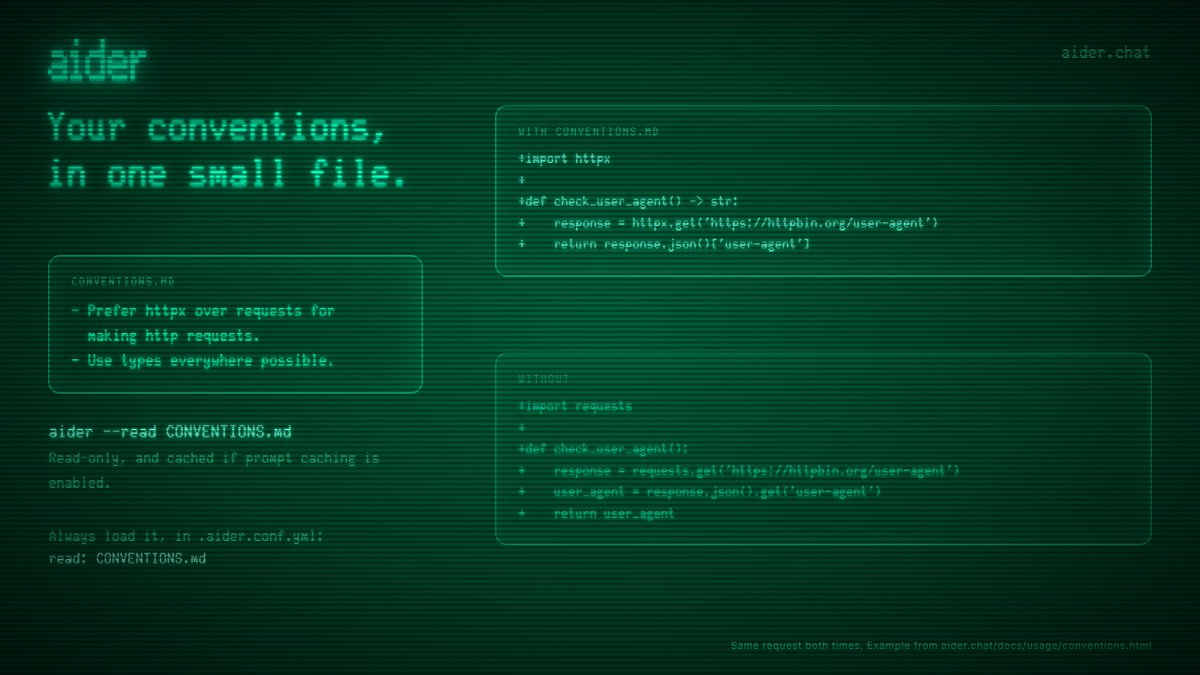
Want aider to follow your coding guidelines? Put them in a small markdown file like CONVENTIONS.md and load it with /read or aider --read.
Same request, with and without it: httpx and type hints, or requests and no types.
Who writes aider? Mostly aider.
Aider writes most of its own code, usually about 70-80% of the new code in each release. Every release note says how much:
v0.81.0 86%
v0.82.0 92%
v0.83.0 55%
v0.84.0 79%
v0.85.0 21%
v0.86.0 88%
main 62%
The numbers come from the git commit history of the aider repo. That works because every edit aider makes is a commit, and "(aider)" marks the ones it authored.
The Singularity stat on the https://t.co/OSeRlMHl62 home page reads 88%.
https://t.co/jcqpMyRUze
Your code is not the only context aider can use.
Images
Show aider a screenshot of a UI to build or modify, a mockup, or an error message that is hard to copy as text.
/add <image-filename>
/paste
Web pages
Give it docs the model never saw: pages for less popular APIs, or libraries newer than its training cutoff. aider scrapes the text and adds it to the chat.
/web <url>
Your voice
Request new features, test cases or bug fixes out loud. Press ENTER when you are done and the request is transcribed as if you had typed it.
/voice
Images work with vision-capable models like GPT-4o and Claude 3.7 Sonnet.
aider has four chat modes.
code changes your code. ask discusses it and never makes changes. architect has an architect model propose the change and an editor model turn it into file edits. help answers questions about aider itself.
Recommended: bounce between /ask and /code.
Run aider with --watch-files, then ask for changes from your own editor:
# Make a snake game. AI!
AI! makes aider change the code. AI? gets you an answer.
Every edit aider makes is a git commit with a descriptive message.
/diff shows what changed since your last message. /undo discards the last change. /commit commits dirty files. /git runs raw git commands.
Or review it all with the git tools you already use.
DeepSeek and o3-mini start the same way:
aider --model deepseek --api-key deepseek=<key>
aider --model o3-mini --api-key openai=<key>
More in the docs at https://t.co/y0q2PWJPRR (4/4)
Change directory into your codebase and start aider with a model and your API key:
cd /to/your/project
aider --model sonnet --api-key anthropic=<key>
(3/4)