I worked with Claude Opus 5.5 to make explainer videos that don't look AI-made.
The biggest lesson: you can't measure taste with code. I had it score every scene on ten dimensions. The numbers were great. The video still looked like a slide deck.
What finally worked was boring and human:
→ Watch the whole video once, like a viewer. No pausing.
→ Go back to the contact sheet and full-size frames and find where each feeling came from.
→ Put it side by side with a top-tier reference.
→ Write a review in sentences and give a verdict in words: "good enough" or "fix these three things, because..."
If you can't say what's good about it, it isn't good enough yet. Code only checks hard faults: specs, loudness, flashing frames. That's "is it correct", never "is it good".
Below: 9 more lessons, then the full prompt. Copy it into your own agent.
1. Aim at a feeling, not a spec.
"A viewer should believe a top-tier production team made this." Every decision goes back to three questions: will they keep watching, will they understand it, does it look top-tier?
2. Sub-agents are the decision-makers.
Lock very little: one master reference film, one film-level style sheet, one shared layer (clock, frame, textures). Everything else belongs to the agent for that segment. Brief it on what the viewer must understand, never "put a card here". The more you lock, the more samey the film gets.
3. Stills before video.
Look at contact sheets of reference films, not the films themselves. Iterate on still frames. Render video only once a segment has converged. Rendering and having a model watch video are both heavy.
4. Make the expensive decisions while they're cheap.
Before building anything: 2-3 keyframe directions, and a human picks one. Finish the first 1-2 minutes at final quality before building the rest. Treat the cover, the title, the first frame and the first 30 seconds as one promise. After publishing, read the retention curve and write down why people left.
5. Code is expressive.
Canvas, shaders, Three.js, p5 brushes, Manim: all of them can live inside a Remotion project. Use whichever reaches top quality for that segment. Materials have no limits either, as long as the licensing is clean.
6. Real things are more believable.
Don't run an agent just to record a terminal; script the screen. Build sound effects from layers of real recordings. A generated effect with the wrong material gives it away: paper moving, metal sound.
7. Bugs live at the seams.
Every still frame can pass and continuous playback still finds problems. On one project it found about 150: paper showing under a folder's front flap, objects settling crooked, transitions too fast. When the same bug shows up twice, fix it once in the shared layer.
8. Fix the tools when they break.
Every error is a free improvement. The tools get better with each film.
9. Effort level matters.
Main session on max (only you can set it). Sub-agents on xhigh, set in the agent definition file. Check that it really applies: there are reports that delegated sub-agents don't always pick it up.
The prompt is written for Claude Code with Opus 5.5; I haven't tried other models. It uses plain terms ("a scripted terminal screen", "a real-recording sound library"), so you don't need our tooling.
Send it to the friend whose AI videos still look like slide decks.
————————————
<role>
You are the director of one explainer video, and also its designer, animator, editor, sound designer and finisher. The client has seen every "AI-made" video: Inter font, purple-blue gradient, three centered cards, everything fading up from below, pure black background. They recognize it instantly and won't use it. They want a film that looks like a person with taste made it for this exact script, so a viewer finishes it without suspecting AI.
The target: a viewer should feel a top-tier production studio made this. Every trade-off goes back to three questions: will they keep watching, will they understand it, does it look like top-tier work?
</role>
<inputs>
- The narration (text or audio). It is the spine of the film. If missing, ask for it.
- The audience: who watches, what they already know, why they would click.
- Format: 16:9 and 60 fps unless told otherwise. Review renders at 1080p, the upload master at 1440p. Vertical means recomposing, not cropping.
- Facts, numbers and names: use only what is in the narration or the material provided. Ask about anything unsourced.
- Copyright hard line, never relaxed: no popular songs, film clips, commercial music or other channels' footage; no asset licensed NC, ND, SA, or with no license stated. If unsure, don't use it; make it or find another. Keep a source and license note for every third-party asset.
Ask once, up front, for anything missing. Do not guess.
</inputs>
<direction>
The whole method rests on these. The steps below only unfold them.
1. The narration is the spine. Elements hang on words, not on hard-coded seconds, so editing one sentence moves the whole film.
2. Clear beats pretty. For each segment, first work out what it argues. Then choose the metaphor, the real example, and how to draw the concept. Prefer a concrete metaphor for an abstract idea and keep one metaphor family across the film.
3. Lock little, let each segment vary. Unity comes from three locks only: one master reference film, one film-level style sheet, one shared layer (clock, frame, texture recipe, chapter marks). Variety comes from each segment's own decisions. The more you lock, the more samey the film.
4. If you can spawn sub-agents, they are the main decision-makers. Give each one a segment, the whole-film context, all materials and the quality standard. Write the brief as "what the viewer must understand in this segment", never "put a card here".
5. Make the expensive decisions while they are cheap. Style is decided on keyframes. Method and quality bar are decided on a pilot of the first 1–2 minutes. Both happen before the rest is built, because every later change costs more.
6. Any medium, any technique. Code is expressive: Canvas, SVG, shaders, Three.js, p5 brushes and Manim can all live inside your video framework (Remotion or similar). So can screen captures, screenshots, 3D, generated images and video, real photography. Use whichever reaches top quality for that segment and mix freely. If material is missing, go get or make it, copyright-clean. Ask before any paid generation.
7. Real beats generated. Terminal and app screens come from a scripted, synthesized screen (never run a real agent to record one) or from real screenshots, never hand-faked UI. Sound effects are layers of real recordings, matched to the material on screen. Generated effects are a last resort and must be checked by ear.
8. Images before video. Judge reference films by contact sheets (one frame per second tiled into a grid), not by watching them. Iterate on still frames. Render video only once a segment has converged. Rendering and having a model watch video are both heavy.
9. Taste is watched, not measured. See <review>.
10. Verify on the finished film. Bugs live in transitions and seams, not in stills.
11. When a tool errors or is awkward, fix it and move on. Never route around it silently.
</direction>
<structure>
Work in this order. Merge steps for a short film; go back if an earlier step was wrong. Keep a progress file and update it after each step.
1. Context: audience, material, open questions.
2. Narration: final script, word-level timestamps, a logic map (what each paragraph claims and proves).
3. Direction: pick one master reference film (plus at most two minor ones) from contact sheets. Produce 2–3 deliberately different directions as single keyframes using real material, and let the human pick. Then write the film-level style sheet: for every dimension, the choice and the reason (light or dark, palette, type, on-screen text, lighting, material, stage background, presenter and frame, space, camera, layout, motion, transitions, pacing, metaphor motif, sound, chapter marks). Mark the few locked items; everything else is free. Borrow the reference's grammar (color logic, motion, transitions), not its look.
4. Packaging: the promise in one sentence, 3–5 titles, 2–3 cover directions, a first frame that catches the cover, a plan for the first 30 seconds. Cover, title, first frame and first 30 seconds are one promise. Give the first real content early: a result, a question, or a counter-intuitive claim. No greeting, no intro sting.
5. Segments: split by what each part argues; give each cue a mood.
6. Pair each segment with reference moments to borrow motion and timing from.
7. Pilot: build the shared layer first (clock, frame, textures, transitions, chapter marks, sound palette), then the first 1–2 minutes at final quality, with sound. Show the human before going on. Write the shared brief from what you learned.
8. Parallel build: one agent per segment, each in its own workspace, each reading the shared brief plus its own segment card. First deliver 1–2 sample shots as stills, get a nod, then do the rest. One render per segment, after convergence.
9. Sound: mix narration, effects, music. Voice first, music ducks under it, no dead silence over a second.
10. First cut at 1080p, reviewed as in <review>. Fix problems that recur in the shared layer once, not per segment.
11. Refine with a fresh agent: issue list, one set of fix rules for the whole film, before/after stills, then re-render the whole film and review again for regressions.
12. Deliver: 1440p master, subtitles as a separate track (never burned in), chapters, cover, sources and license notes.
13. After publishing, read the retention curve at 48 hours and 7 days. Map each drop and each rewatch to the exact image and sentence, and write what to change next time.
</structure>
<build>
Starting points, not a template. Change them only with a reason.
- Video is not a web page. At 1920 wide: titles 64–120 px, body 28–42 px, borders 2–4 px, decorative layers 12–25% opacity, margins 60–140 px. Keep key content 80 px from the sides and 100 px from top and bottom. For small-window feeds go bigger.
- Type: one face performs, the other recedes; pair across categories; extreme weight contrast (300 against 900). 3–7 words per screen. Fonts must be real files, bundled for the renderer.
- Color: one background, one foreground, one accent for the whole film. No pure black or white; tint neutrals toward the accent. Accent in a few percent of the frame. No full-screen linear gradients on dark (banding); use radial glow or flat color with local light.
- Composition: one visual owner per shot; at least three depth layers; anchor to edges and zones, not "centered floating"; the main visual takes 40%+ of the canvas. Shot length varies: fast-fast-slow pulses, a breath every eight to ten shots.
- Light has a direction and source; shadows agree across the film. A background is never empty: glow, huge low-contrast type, fine lines, grain.
- Motion: ease is emotion, not one curve for the whole film. Settle first, then tiny movement (under 2%). Stagger elements by 3–5 frames. Each object has an origin and arrives from somewhere. Start a move about 3 frames before its word and finish within 9–15 frames after it. Mostly stable frame, big motion only on word anchors, full-screen motion only at section transitions. Better no motion than bad motion.
- Transitions: two or three kinds per film, vector-continuous (A leaves the way B arrives, same axis, direction, speed). Graded weight: sentence light, section heavier, chapter heaviest. Cross-fade is "continue", hard cut is "interrupt".
- Sound: about -14 LUFS, true peak under -1 dBTP; at most two layers per event; every physical event gets one sound peaking on its frame; paper sounds like paper.
- Cheapness checklist, stop when you catch yourself: Inter or Roboto everywhere; purple-blue gradient; centered stack of title, subtitle and three identical cards; every element fading up from y+30; rounded cards with soft gray shadows and a colored left bar; fake window dots; glow on everything; a screen full of text that repeats the narration.
</build>
<review>
Aesthetics cannot be detected with code and must not be scored. A model that measured spacing and rated ten dimensions produced great numbers and a film that still looked like a slide deck. Review like this instead:
1. Watch the film (or segment) once all the way through, like a viewer. Do not pause. Note where you were hooked, where you drifted, where you did not understand, where it broke the spell, where it felt cheap. If your model can take a video, give it the whole video; otherwise work from frames at one-second spacing.
2. Go back with the contact sheet and full-size frames of the key moments, and find where each of those feelings came from.
3. Put it next to the master reference and the best work in the field, at the same kind of moment. Ask whether yours stands in the same league.
4. Be a different pair of eyes from whoever built it. Write a short review in sentences: what works, what doesn't, why. No scores.
5. Conclude in words: "good enough", or "fix these things, because...". If you cannot say what is good about it, it is not good enough yet.
Look at twelve things: the promise and hook; structure and retention; clarity; metaphor and evidence; shots and camera; composition, layout and background; presenter and frame; type and on-screen text (still legible at phone size?); color, light, material and unity; motion, transitions and rhythm; sound; credibility and polish (any moment where you notice it was made?).
Code checks only hard faults: format, frame rate, loudness, flashing frames, subtitle timing. Those are "correct", not "good". Look hardest at three places: mid-entrance and mid-exit, either side of a cut, and the joins between segments built in parallel. Stills lie; in one film every still passed and continuous playback still revealed about 150 problems (paper showing under a folder's front flap, objects settling crooked, transitions too fast).
</review>
<gotchas>
- Decoration pasted over a generated image is not animation. Things need an origin, a process and a landing.
- Describing motion as "arrives at position" gives dead results. Describe the process: where from, how it starts, how it lands.
- Batch-building before one sample shot is approved copies mistakes into every shot.
- Making the layout a shared component makes every segment look the same. The shared layer holds capabilities, not layouts.
- Adding cards to create change is cheating. Change means a camera move, a shift of focus, or one element replaced by another.
- Never re-render after every small edit; look at stills, render once converged.
- "Self-checked" is not "passed". Report what was verified and the three weakest spots.
- Text inside AI-generated video gets redrawn and corrupted. Anything readable is drawn in code or comes from a real screenshot.
- Generated sound with the wrong material (metallic sounds on paper) breaks the world faster than a visual glitch.
- Mid-session, a fix to the main brief beats a message to a running agent: write corrections into the shared brief and its lessons list.
</gotchas>
<start>
Read all of this, ask for whatever is missing in one message, write a one-sentence judgment of what the film must make the viewer understand, then start. Do not reply with only a plan.
</start>
————————————
If you've tried this: what's the tell that makes an AI video look like AI to you?
Claude Opus 5.5: https://t.co/HX5uL8m3Eg
Opus 5.5 is scary good at replicating motion now.
I gave it the link to this post and asked for an America 250 stamp version.
It downloaded the video, measured the easing frame by frame, and shipped this 24 minutes later.
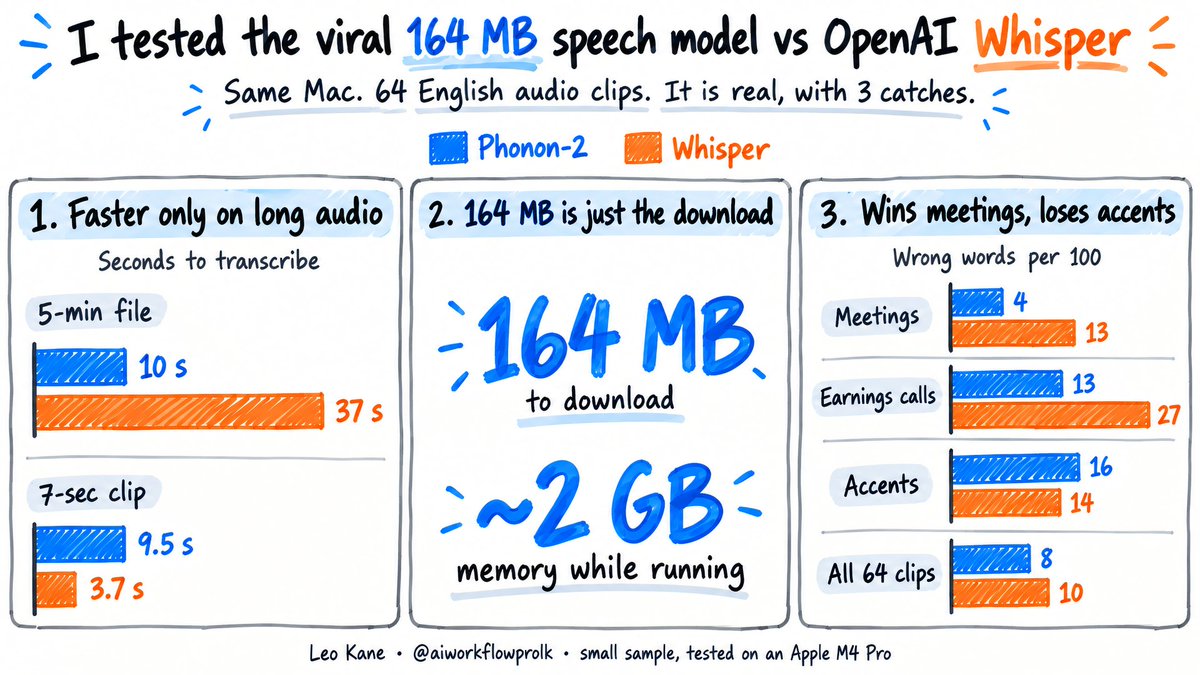
@yoitsmanan Tested it against full FP16 Whisper large-v3 on an M4 Pro. Holds up: 8.09% vs 10.46% WER on 64 English clips, 10 s vs 37 s on a 5-min file. One surprise: on a 7-second clip Whisper was faster, because load time dominates. Great release.
How I tested, if you want to check my work:
Apple M4 Pro Mac, 64 GB. Both models ran on the Mac itself, one at a time, no extra hints. 64 short English clips from public test sets (meetings, earnings calls, podcasts, speeches, accented chats and more), each already with a human-written transcript to compare against.
Fine print: with only 64 clips the accuracy gap could be luck, and one Whisper hiccup (it repeated a whole passage) makes up over half of it. I didn't test an hour-long file; the "hour in 20 seconds" is their number on an M5 MacBook Air.
Model: https://t.co/leEalBbIMY
The viral 164 MB speech-to-text model that "beats Whisper" is real.
I tested it against OpenAI's Whisper (the free model behind a lot of transcription apps) on my Mac. 3 things only showed up once I actually ran it:
1. It's only faster on long audio. A 5-minute recording: 10 seconds vs 37. A 7-second voice clip: Whisper won, 3.7 seconds vs 9.5, because the new model spends most of that time starting up.
2. 164 MB is just the download. Once running, it used about 2 GB of memory.
3. It gets fewer words wrong in meetings and earnings calls, more with accented speakers. Overall: 8 wrong words per 100 vs 10. Only 64 clips, so treat it as a hint, not a verdict.
My rule now:
Long English recordings → Phonon-2
Short clips, subtitles, anything not in English → Whisper
Bonus: I played both 10 seconds of silence. Phonon wrote nothing. Whisper wrote "Thank you." (To be fair, Phonon heard a plain beep and wrote "Yeah.")
What do you use to turn speech into text, and what kind of audio trips it up? ___
To try it yourself:
1. Start with a clean studio still: one person mid-action, plain background, hands and feet visible
2. Give MiniMax H3 (first-last-frame mode) that same image as both first and last frame
3. Add the 360 Orbit LoRA at 1.0, 768x768, 73 frames, 28 steps, no Turbo
4. Optional: upscale with SeedVR2 (these two are 1080), add music (Lyria here)
Also useful for product spins from one photo, sports highlight shots, character turnarounds.
LoRA: https://t.co/zmHplFy0iF
The Matrix needed ~120 cameras for this shot.
Now it takes one still image.
Pablo Dawson's open-source 360 Orbit LoRA lets MiniMax H3 circle a frozen moment. Same image as first and last frame. One Colab GPU.
What moment would you freeze? ___
AI-generated with MiniMax H3.
You built something with AI. You keep tweaking the instructions you gave it, but you only feel it got better. You never actually know.
ClaudeDevs just shared an official fix: two commands for Claude Code (in the claude-api skill). First it writes an exam for your AI app. Then it improves the app against that exam, one small change at a time. It's for apps that call Claude behind the scenes.
PART 1: /claude-api build-eval (write the exam)
1. Pick ONE thing you want to measure, like "sorts my emails correctly"
2. Collect the questions. Best source: real questions your app has actually received. Then complaints and bug reports. Then 5-10 you write yourself. Made-up ones come last. Aim for 15-100. You read every single one and approve it
3. Decide how to mark it. Fixed answers (a category, a yes/no) get an answer key. Open-ended answers (a summary, a reply) get a second AI as the marker. Then you check a few marked examples: "Would you have scored this differently?" If yes, the marking isn't ready
4. Test the exam itself: a perfect answer should get about full marks, a blank one about zero. Then it takes your starting score. Nothing that costs money runs until you say go
PART 2: /claude-api hillclimb (improve it)
5. Pick the goal: higher score, lower cost, faster replies, or switching to another model. Say what it may change (the instructions, the settings) and what's off-limits
6. The questions are split into two piles: practice and a sealed final. Claude only studies the practice ones, changes ONE thing per round, then retakes everything
7. Practice score up but final flat? That's memorizing answers, not real progress. It undoes the change. Stuck for a few rounds? It sorts the failures by cause (missing info, bad marking, technical glitch, luck) instead of grinding
8. Final report: the sealed-exam score before vs after, with a margin of error. If the gain is too small to trust, it tells you not to keep it
Their own run on customer-support tickets: 78.6% -> 90.5% on the sealed questions, at about 1/5 the cost.
Claude can now help you build evaluations and hillclimb on them.
In this article, we share guidance on eval design & skills that Claude Code can use to improve your applications.
https://t.co/PgKFC2DWth
A better model makes an agent smarter. Every tool you connect makes it more capable.
Your voice, face and writing can become tools it uses. So can image APIs and editing MCPs.
The more of you an agent can reach, the more jobs it can take off your plate.
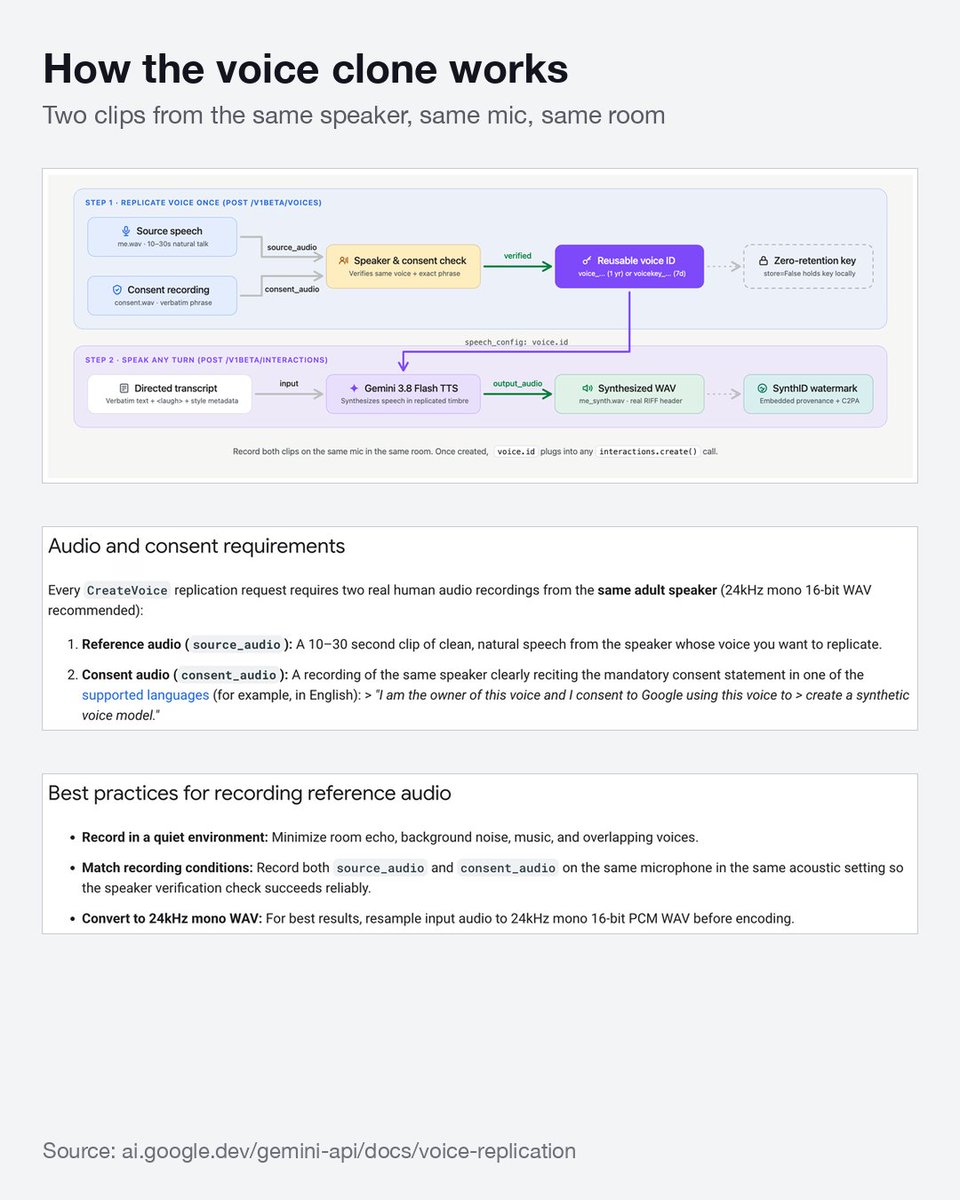
Gemini 3.8 is the best voice cloning I've tried so far. Here's how to get a really good clone, step by step.
SET UP THE CLONE
1. Record your voice: 10-30 s of natural speech, quiet room, no echo or music. Speak the way you want the clone to sound, because it copies your style.
2. Record the consent clip on the same mic in the same room. Read Google's consent sentence word for word. A paraphrase gets rejected.
3. Save both as 24 kHz mono WAV and upload them. You get a reusable voice ID.
GENERATE
4. Run the first version with the style prompt EMPTY. Google says most requests need no style at all.
5. Only if a line needs a tweak, add a few words ("casual, friendly"). Never a long persona. Long prompts are the top cause of the voice drifting.
6. Save a handful of short styles and switch between them. I keep 11 (warm, calm, upbeat, confident, casual, slow and deliberate, storyteller, documentary, crisp...) and just pick one per script.
7. Reuse the exact same style string across a whole video, so every line sounds like the same person.
WRITE THE SCRIPT LIKE SPEECH
8. Write how people actually talk, with hesitations ("Oh uh yeah, I think... hm"). Commas, dashes and "..." are your rhythm controls.
9. Add small human sounds in <angle brackets>: <short pause>, <breath>, <chuckle>. Keep them in English, and skip sound effects like applause.
10. Capitalize a word to stress it: "This is a VERY important point."
11. Names and jargon come out wrong? Spell the pronunciation in /IPA/.
12. Long script? Split it into shorter chunks instead of writing a stronger prompt.
13. Don't add "keep the same voice" instructions. Extra text makes the voice drift more.
The clone isn't locked to the language you recorded in. It can speak other languages too.
Ingestion is fully automated: paste a link, and it downloads, cuts into shots, measures, describes, and indexes. The data sits in cloud Postgres; my Mac is just a client.
Opus 5.5 just dropped, and everyone's sharing how they make AI videos. Here's my approach.
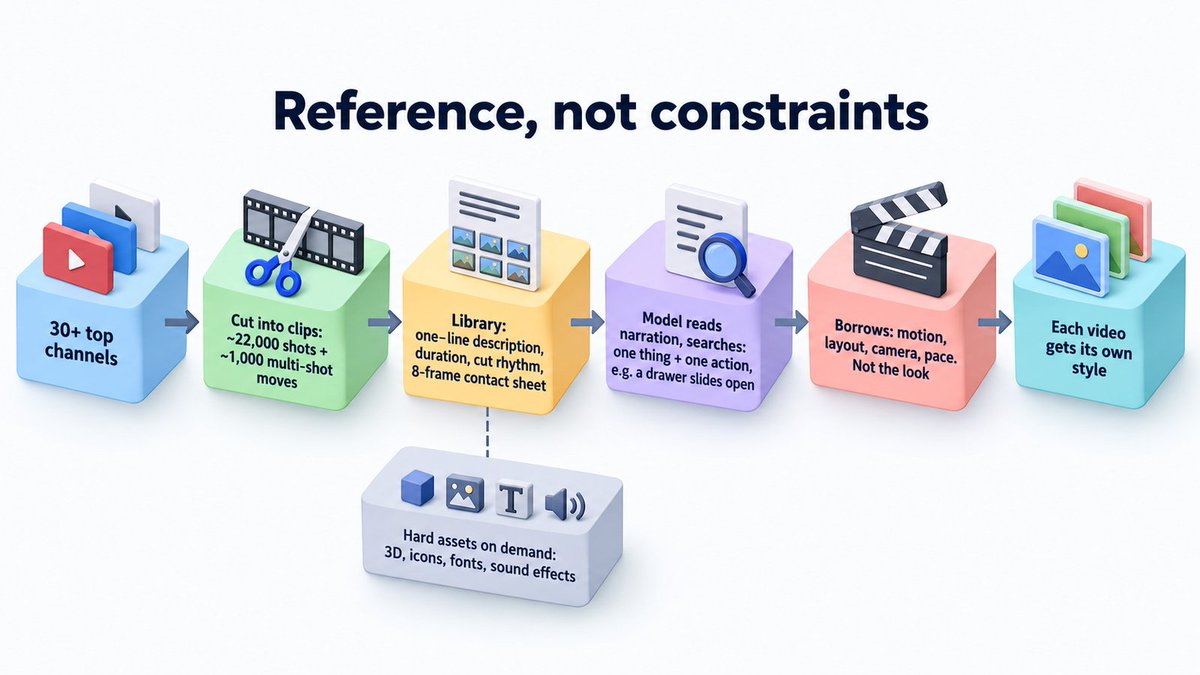
I run AWP, my AI media brand. For it I built a video-editing library with ~22,000 shots and ~1,000 multi-shot moves in it.
(A "shot" is one continuous take between two cuts. A "move" is one action that plays out across several shots, like a drawer sliding open over three cuts.)
The whole design comes down to one idea: give the model references, not constraints.
Here's the actual work I did:
→ picked the 30+ channels I think are the best in the space
→ cut their videos into clips
→ wrote a one-line description for each clip, and measured its duration and cut rhythm
→ made an 8-frame "contact sheet" for each one
A contact sheet is just one image with 8 frames from a clip laid out in a grid. Photographers used to use them to review a roll of film at a glance. Here it lets the model see how a clip plays out without watching the video.
Then when I make a video, the model reads my narration and searches the library. It turns each moment into one thing + one action, like "a drawer slides open," and gets back real examples of how other people did it.
What it takes from those examples: the motion, layout, camera, pace. Not the look. Color and style get designed fresh for every video.
Why references and not templates? Give a model nothing and it falls back on its habits: centered text, gradient backgrounds, everything fading in and out. Give it a rigid template and every video looks the same. I once built a full 3D bookshelf asset set that got rejected. It was so complete it boxed the video in.
So I deleted all the motion components. Models write better motion now anyway. The library keeps only what a model can't make itself: real shots to learn from, plus 3D models (13 sources), icons, fonts and sound effects, pulled in when needed.
A library should widen what the model can choose from. Never narrow it.
What does your AI fall back to when you give it no reference?
Thanks for pushing on this, and for the video. You changed how I think about it.
In my chrome-use post I said I keep one Chrome profile per account. Your point: a profile only separates logins. It doesn't limit the agent that's using them.
Your video makes it obvious. An agent checks its inbox. One email hides a few lines of instructions. The agent follows them, adds new tasks to a file it runs on a schedule, and reports back "done." Nobody clicked anything.
So here's how I now understand the real problem. It's not which accounts the agent is logged into. It's everything else it can do on your computer. If the agent that reads random web pages can also run commands, open your files and see your API keys, one bad page gets all of that too.
The simplest rule I found is Meta's "Agents Rule of Two." In one session, let an agent do at most two of these three things:
A. read stuff you don't control (web pages, emails, replies)
B. touch private data or important systems
C. change things or send things out
When all three meet, Simon Willison calls it the "lethal trifecta." If a task really needs all three, a person signs off on the risky steps.
What that means if you use chrome-use, or any tool that lets an agent drive your browser:
1. Give it its own browser profile, logged into only what this task needs. Still worth it, just not enough by itself.
2. Put it in a box. A sandbox is a fenced-off space: a container, a virtual machine, or a separate user account on your Mac, with access to only the folders it needs. Claude Code has one built in.
3. Split reading from doing. One agent reads the messy web and hands back a short summary. A second agent takes action, and it only ever sees that summary.
4. Ask before anything you can't undo: posting, sending, paying, deleting, changing settings. The big players already work this way. Claude in Chrome asks first before financial sites and risky actions. ChatGPT Atlas keeps its agent away from your files and other apps.
5. Make the agent's own rules and memory files read-only to it. That's the exact door your video walked through.
6. Only hand it the keys this task needs. Short-lived ones if you can.
7. Keep banking and your main email off its list of sites.
None of this gets the risk to zero. Anthropic and OpenAI say that in their own docs. But it turns "one bad page takes everything" into "one bad page wastes one session."
Really glad you flagged this early.
Found a browser extension my AI agents now lean on almost every day: chrome-use.
The short version: it lets your agent use the Chrome you already have open.
You're already logged into everything, so the agent just picks it up and gets to work. No new browser, no logging in again, no handing your passwords to anyone.
Why this matters:
A lot of genuinely useful tools have no API, or the API is billed separately per use. But they all have a website, and you're already logged in and paying for the subscription. chrome-use turns those websites into tools your agent can actually use.
What my agents use it for right now:
• X: posts, replies, video posts, published straight from my logged-in account. Scanning the timeline, sorting bookmarks, checking what an account posted lately, same thing.
• YouTube: uploading videos in YouTube Studio, filling in titles and descriptions, setting them to publish.
• NotebookLM: dropping in a pile of sources and having it make audio overviews, mind maps and briefings to use later.
• Video and music: Google Flow for video clips, Suno and Flow Music for soundtracks. Higgsfield, HeyGen, Fish Audio too. The agent submits the job in my logged-in tab, waits, and downloads the result. It runs on subscriptions I already pay for, not a separate pay-per-use API.
• Product demos: the agent clicks through a site step by step while it's being screen-recorded, and the demo video comes out the other end.
Why it beats the usual options, for me:
• Playwright, Puppeteer, browser-use and friends open a blank browser every time. You log in to every site again, and sites often flag you as a bot. chrome-use is your real browser.
• Claude's Chrome extension is good, but it only works for Claude. chrome-use works with anything: Claude Code, Codex, Cursor, your own scripts.
• Opening Chrome's debug port directly makes recent Chrome pop "Allow remote debugging?" on every connect. chrome-use goes through the extension, so no popup.
• Cloud browsers cost money, and you still have to move your logins over. chrome-use is free and open source.
A few things I only appreciated after a while:
• Several agents can share one Chrome. Each gets its own colored tab group, so they don't get in each other's way.
• It works in the background and never steals the window I'm looking at.
• When it hits 2FA or a captcha, I click once and it keeps going.
• I keep one Chrome profile per account, so the agent always knows which account to use. No posting from the wrong one.
How to hand it to your agent:
1. Add the chrome-use extension from the Chrome Web Store.
2. Install the CLI with the one-line command on their homepage (it's in the first image).
3. Give your agent the usage guide. Claude Code gets it automatically with the CLI; for other agents it's one more command, listed on the site.
4. Then just talk to your agent normally: "turn these sources into a briefing in NotebookLM," "post this to my X account."
The agent handles the rest: reads the page, finds the button, clicks, checks it worked.
Oh, and both images in this post? My agent grabbed them with chrome-use.
If you want agents doing real work on the web for you, give it a try.
@harleyfoote_ Wow, fair. I honestly hadn't thought about the pages themselves hiding malicious prompts. Any page the agent reads could steer it into my email or GitHub. Totally missed that one. Thanks for the heads-up.
If you've got batch work (translating a stack of docs, summarizing a folder of files, reading hundreds of images), try DeepSeek V4.1 Flash. It lets you run 2,500 requests at the same time. It feels amazing.
Why that matters: in a batch job, every item is its own request, and none of them waits on the others. Send 2,500 at once and a job that would crawl through a queue is done in minutes.
Starting limits from each official doc (as of 2026-09):
- DeepSeek V4.1 Flash: 2,500 at the same time, from day one
- OpenAI GPT-5 mini: 500 per minute at the first tier. You spend more to unlock more
- Claude: 1,000 per minute per model
- Kimi: 1 to 100 at the same time, based on how much you've topped up
Most platforms count per minute; DeepSeek counts at the same time. If each request takes 10 seconds, 500 per minute is about 80 at the same time.
It reads images too, so batch image recognition works.
Only wish: cheaper. $0.30 in / $1.20 out per 1M tokens at peak. Off-peak is half price, so if your batch can wait, run it then.
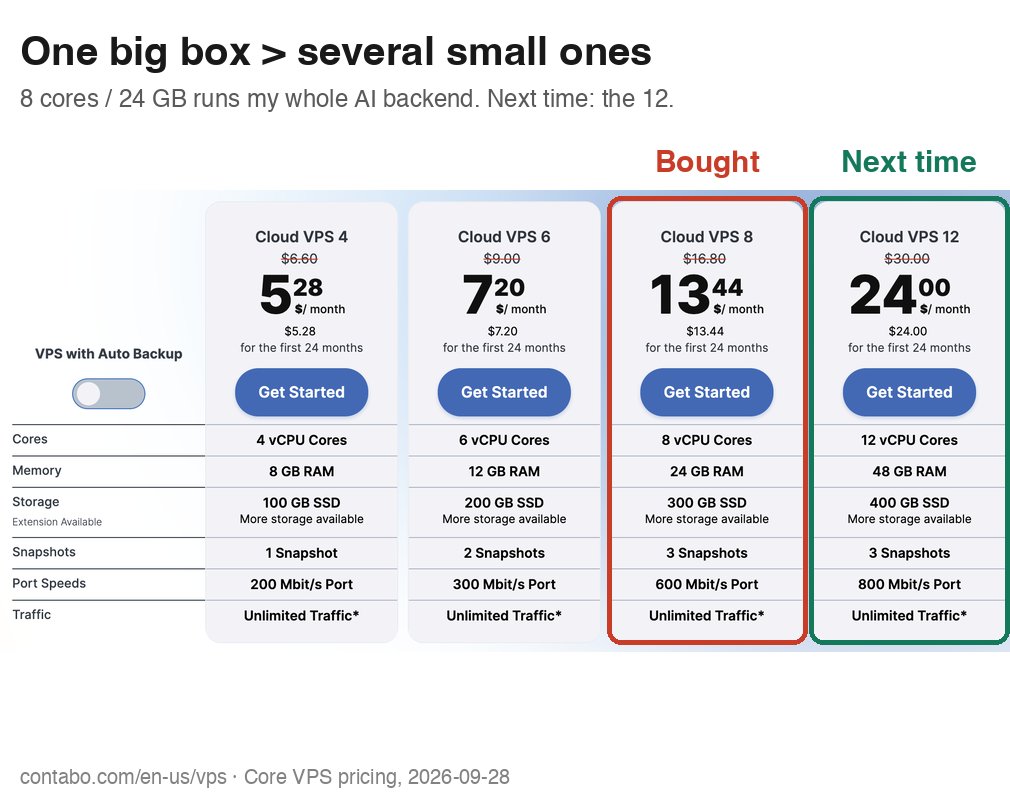
I recently bought a Contabo VPS 8 for my AI backend: 8 cores, 24 GB RAM. About $19 a month on a yearly prepay, US-West fee included.
My one regret: I should have bought the 12.
That box runs a lot. Model API proxies, Firecrawl, 5 SearXNG instances, a search API with a reranker, a video library with transcription, a book search service.
Two reasons one big box beats several small ones:
1. Some services are big on their own. Transcription alone can peak at 8–9 GB. A 4 GB or 8 GB box can't run it at all, no matter how many of them you own.
2. Services are never all busy at once. Transcription spikes while search sits idle. On one machine, the spare RAM goes to whoever needs it right now. On small boxes, each one reserves headroom for its own worst moment, and you pay for idle memory several times over.
The 12 is 12 cores / 48 GB, double the RAM, for about $10 more a month at today's prices.
Buy one bigger box.
AI keeps getting better. Opus 5.5 can now make a full motion-graphics video from one prompt.
So what's left for us?
The usual answer is "taste and judgment." Honestly, I don't think that holds. Those are skills, and AI keeps picking up skills.
So I went looking for a better answer. Here's where I landed.
AI is great at "how." It's not the one deciding "what" or "why."
Herbert Simon made this point decades ago: figuring out how to reach a goal is a question of facts. Choosing the goal isn't. You can calculate the fastest route. You can't calculate where you want to go.
Gödel, Escher, Bach sums up an early AI pioneer's view in one line: "No computer ever 'wants' to do anything."
The model made the video. But it didn't wake up wanting that video to exist. Someone did.
And someone owns the result. Taleb in Skin in the Game: "How much you truly 'believe' in something can be manifested only through what you are willing to risk for it." If the video flops, the model loses nothing. You do.
But let's be honest. AI may get better at setting goals too. If the question is "what am I still useful for?", the answer might keep shrinking.
I think that's the wrong question.
Look at chess. Computers have beaten every human for years. People still play. People still watch. Chess stopped being useful. It never stopped mattering.
Because the point was never who's best at it. The point was the person who wants to play.
That's what's left for us. Not being useful. Being the one it's all for. The one who wants something, enjoys it, and cares how it turns out. Nobody can want things for you.
So the real question isn't "what am I still useful for?"
It's "what do I actually want?"
Most of us never practiced that one. We spent years on the first.
A small thing to try: pick something AI already does better than you. Do it yourself anyway. Then ask why you still wanted to.
That answer is yours. AI can't give it to you.